
Send a Slack Message From a Cron Job: 4 Failures We Hit and the Fix
A Slack webhook call that works in your terminal often fails from cron. We ran six crontab entries and a launchd agent on a Mac for 10 minutes, logged each failure (empty env var, % in crontab, JSON quoting, macOS privacy block) and the script that posted every minute.
To send a Slack message from a cron job, have the job run a script that POSTs JSON to a Slack incoming webhook with curl. The catch is that cron is not your terminal: it runs /bin/sh with PATH=/usr/bin:/bin, none of your exported variables, and its own rules for %. On November 2, 2026 we ran six crontab entries and one launchd agent on a Mac every minute for 10 minutes, all posting to the same test channel. Four of them failed in ways that a terminal test never shows, and two of those failures returned exit code 0. Below are the scripts, the exact errors, and the version that posted every minute.
The script that worked
#!/bin/sh
# slack-notify.sh: post one line to Slack from cron, launchd or a shell
PATH=/usr/bin:/bin
MSG="backup didn't finish: disk \"/data\" is 97% full ($(date -u +%H:%M:%S), from $1)"
jq -n --arg text "$MSG" '{text: $text}' |
  curl -sS --fail-with-body -K "$HOME/.config/slack/webhook.curl" \
    -H 'Content-type: application/json' --data @-
echo " exit=$?"
The webhook URL lives in a file that only you can read, so it never sits in the crontab, the script or ps output:
mkdir -p ~/.config/slack
printf 'url = "%s"\n' 'https://hooks.slack.com/services/T000/B000/XXXX' > ~/.config/slack/webhook.curl
chmod 600 ~/.config/slack/webhook.curl
curl -K reads options from that file. If you do not have a webhook URL yet, create one in 4 steps first. The crontab line is then:
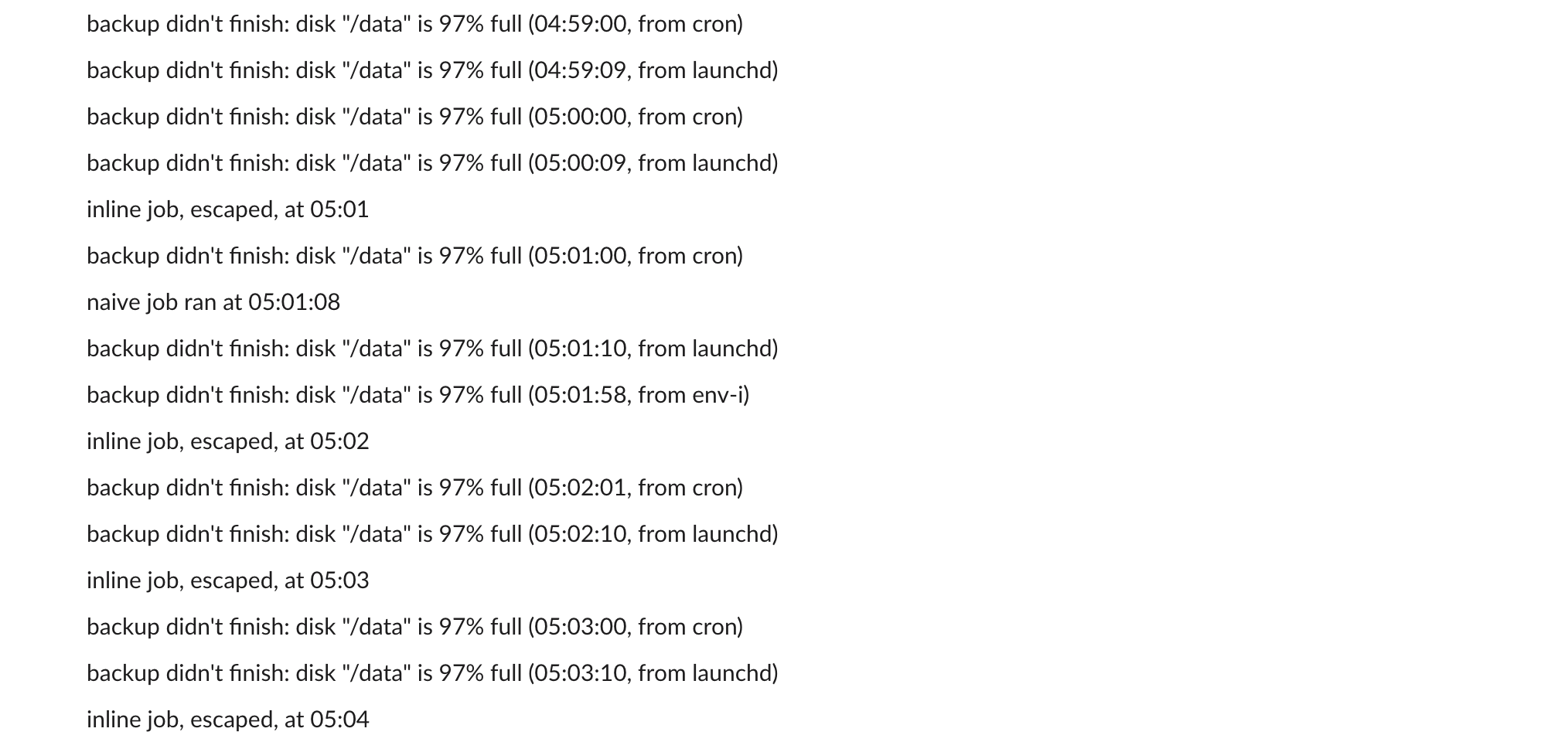
* * * * * /path/to/slack-notify.sh cron >> /tmp/slack-notify.log 2>&1From cron it posted 10 messages in 10 minutes, and from launchd 10, each one with the apostrophe and the quotes intact. The lines between them are the escaped inline job from failure 2 and two manual runs:
Failure 1: the variable you exported does not exist
The common first try is a script that uses $SLACK_WEBHOOK_URL from your shell profile:
curl -s -X POST -H 'Content-type: application/json' \
  --data "{\"text\":\"naive job ran at $(date -u +%H:%M:%S)\"}" \
  "$SLACK_WEBHOOK_URL"
Run by hand with the variable set, it printed ok and exit 0. From cron, all 10 runs logged:
curl: option : blank argument where content is expected
curl: try 'curl --help' or 'curl --manual' for more information
exit=2
A one-line job that printed its environment showed why. Cron gave the script only this:
PATH=/usr/bin:/bin
SHELL=/bin/sh
HOME=/Users/<you>
USER=<you>
SLACK_WEBHOOK_URL is unset
Cron does not read ~/.zshrc or ~/.bash_profile. Put the URL in a file the script reads, as above, or set it at the top of the crontab. The same PATH explains the other classic error: on our Mac jq is in /usr/bin, but Homebrew tools in /opt/homebrew/bin are not on cron's path, and command -v brew printed nothing. Use full paths or set PATH in the script.
Failure 2: a % in the crontab line
We also tried the whole call inline in the crontab, with the time in the message:
* * * * * /usr/bin/curl -s -K ~/.config/slack/webhook.curl -H 'Content-type: application/json' --data '{"text":"inline job at '$(date -u +%H:%M)'"}'It never posted. Cron mailed the error to the local mailbox, /var/mail/<user>, once a minute:
/bin/sh: -c: line 0: unexpected EOF while looking for matching `)'
/bin/sh: -c: line 1: syntax error: unexpected end of file
In a crontab, % ends the command and the rest goes to its standard input, so the shell saw ... $(date -u + and stopped. Escaping each one as \% fixed it: the same line with +\%H:\%M posted 7 times in the 7 minutes after we changed it. A script file avoids the problem, because % inside a script is normal. The local mail is also how you find cron errors at all: a job whose output is not redirected sends it there, and nothing tells you it arrived.
Never appear "away" on Slack again
Cloud-based. No downloads. Works 24/7 even when your laptop is off.
Failure 3: quotes in the message, and exit 0 on a failure
Building the JSON by hand breaks as soon as the message has a double quote:
MSG="backup didn't finish: disk \"/data\" is 97% full"
curl -s -K "$HOME/.config/slack/webhook.curl" -H 'Content-type: application/json' \
  --data "{\"text\":\"$MSG\"}"
Slack answered HTTP 400 with the body invalid_payload, and curl still exited 0, so the cron log showed only invalid_payload exit=0 and any check of $? would call it a success. --fail-with-body turns a 4xx or 5xx into exit code 22 and still prints Slack's error:
curl: (22) The requested URL returned error: 400
invalid_payload curl exit=22
jq -n --arg text "$MSG" '{text: $text}' builds valid JSON from any string, apostrophes and quotes included. Without jq, Python's json.dumps does the same; our Python Slack message guide shows that route. The other replies a webhook can return are listed in Slack webhook not working.
Failure 4: macOS blocks a script in Documents
The fixed script, copied into ~/Documents/cronlab-tcc-test/, failed 10 times out of 10 from cron with:
/bin/sh: /Users/<you>/Documents/cronlab-tcc-test/fixed.sh: Operation not permittedThe same file ran from a terminal. macOS privacy protection keeps cron out of Documents, Desktop and Downloads unless you give /usr/sbin/cron Full Disk Access in System Settings. We kept the script outside those folders instead, which needs no setting.
cron or launchd on a Mac
The launchd agent ran the same script every 60 seconds with StartInterval, from ~/Library/LaunchAgents/:
<?xml version="1.0" encoding="UTF-8"?>
<!DOCTYPE plist PUBLIC "-//Apple//DTD PLIST 1.0//EN" "http://www.apple.com/DTDs/PropertyList-1.0.dtd">
<plist version="1.0">
<dict>
  <key>Label</key><string>green.slack.cronlab</string>
  <key>ProgramArguments</key>
  <array><string>/path/to/slack-notify.sh</string><string>launchd</string></array>
  <key>StartInterval</key><integer>60</integer>
  <key>StandardOutPath</key><string>/tmp/slack-notify.log</string>
  <key>StandardErrorPath</key><string>/tmp/slack-notify.log</string>
</dict>
</plist>
Load it with launchctl bootstrap gui/$(id -u) ~/Library/LaunchAgents/green.slack.cronlab.plist, and stop it with launchctl bootout and the same arguments. In our run cron fired on the minute and launchd 8 to 12 seconds after it, drifting later each run, and both posted 10 times out of 10. Neither one runs while the Mac is asleep, and we did not test what each does on wake. If you would rather not run a scheduler at all, Slack itself can post on a schedule: /remind and scheduled messages cover the no-code routes, and for a CI job see sending a Slack message from GitHub Actions.
A quick checklist
- • Test with the cron environment, not your shell:
env -i PATH=/usr/bin:/bin HOME=$HOME /bin/sh /path/to/slack-notify.sh. - • Redirect the job's output to a log file, or read
/var/mail/<user>. - • Use
--fail-with-bodyso a 400 from Slack is a failed run. - • Escape
%as\%in any crontab line, or move the command into a script. - • On a Mac, keep scripts out of Documents, Desktop and Downloads.
To check how a message will look in Slack before a job sends it, paste the text into our Slack message formatter. The plain curl call this all builds on is in our Slack webhook curl example.
Stop Jiggling Your Mouse.
Join hundreds of remote workers who never worry about their Slack status. Set it up once, stay green forever.
Related Articles
Slack Outgoing Webhooks: Payload, Trigger Words and Timeout, Tested
Slack's legacy Outgoing WebHooks still install on a Free workspace in November 2026. We set one up, sent 15 trigger messages through a tunnel, and logged the exact payload, how trigger words match, which replies Slack posts and when it gives up.
Slack API link_names: What It Still Links, Tested on 20 Messages
Slack's docs say link_names now links only user groups. On November 2, 2026 a bot token with link_names=true still turned @name, #channel and @here into real mentions, in plain text, section blocks and incoming webhooks.
Slack DND API: dnd.setSnooze, dnd.info and endSnooze, Tested
Slack's Do Not Disturb API is five methods: dnd.setSnooze, dnd.endSnooze, dnd.endDnd, dnd.info and dnd.teamInfo. Setting DND needs a user token. We ran each one on October 31 and found that dnd.endSnooze inside a scheduled DND window also ends the schedule.