
Are Slack Incoming Webhooks Deprecated? We Tested Legacy and App Webhooks
App incoming webhooks are current. The old 'Incoming WebHooks' custom integration carries a deprecation notice but could still be added on 2 October 2026. We added both, sent channel and username overrides, and posted 60 messages at once to look for a 429.
No. Incoming webhooks that belong to a Slack app are the current way to post into a channel from outside Slack, and nothing marks them as deprecated. What Slack does call deprecated is the old "Incoming WebHooks" custom integration, the one you add from the Marketplace page instead of creating an app. On 2 October 2026 we could still add it to our Free-plan test workspace, and it still honored the channel, username and icon_emoji fields that app webhooks ignore. If you use the legacy kind, plan to move to an app webhook, and expect those three fields to stop working when you do.
What Slack shows for the legacy integration
The Marketplace page for Incoming WebHooks opens with this notice:
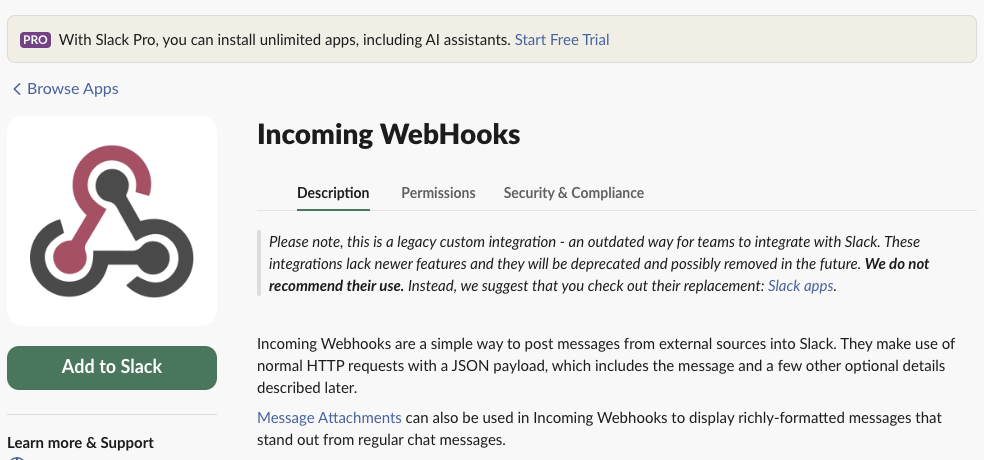
"Will be deprecated and possibly removed in the future" has no date. The Add to Slack button still worked: we picked a channel, clicked "Add Incoming WebHooks integration", and got a hooks.slack.com/services/... URL. An app webhook URL has the same shape, so the URL alone does not tell you which kind you have. The settings page does: a legacy one lives under Custom Integrations at <workspace>.slack.com/services/B..., and an app webhook lives in the app's settings at api.slack.com/apps.
A new legacy webhook posted nowhere until we saved its channel
Our first plain post to the new legacy URL failed:
HTTP 404
channel_not_found
We had picked #w1pm-hooks on the add page, but the integration's settings showed "Post to Channel" empty:
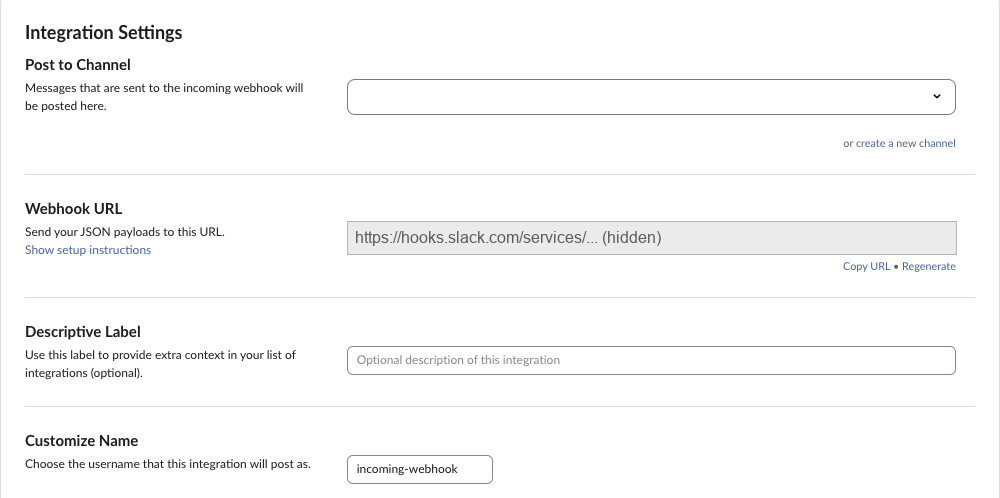
The fix: pick the channel in "Post to Channel" on that settings page and press "Save Settings". The same post then returned 200 ok. A writer on our team saw the same channel_not_found on a fresh legacy webhook on 1 October, so check this field before you blame your payload. Posts that named a channel in the JSON worked even before the fix, because they did not need the default.
Never appear "away" on Slack again
Cloud-based. No downloads. Works 24/7 even when your laptop is off.
Overrides: honored by legacy, ignored by app webhooks
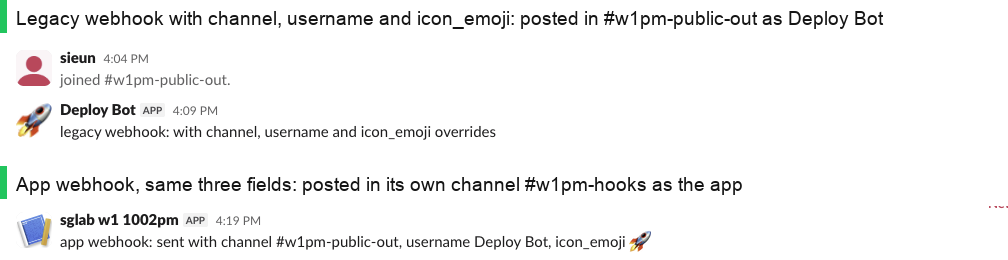
We sent the same JSON to both URLs:
{"text": "...", "channel": "#w1pm-public-out", "username": "Deploy Bot", "icon_emoji": ":rocket:"}Both answered 200 ok. Only the legacy one did what the JSON asked:
| Field in the JSON | Legacy Incoming WebHooks | App incoming webhook |
|---|---|---|
channel: "#other-channel" | posted in #other-channel | ignored, posted in the channel picked at install |
channel: "<user ID>" | posted in that user's Slackbot DM, as "incoming-webhook" | ignored, posted in the install channel |
username | used | ignored, the app's name |
icon_emoji | used | ignored, the app's icon |
| HTTP answer | 200 ok | 200 ok, with no warning that fields were dropped |
This is what breaks most migrations. A script that posts to several channels through one legacy URL will send everything to one channel after the switch, and Slack will not return an error. The replacement is chat.postMessage with a bot token: it takes any channel the bot is in, and username plus icon_emoji with the chat:write.customize scope. Our bot name and icon test has the details. If you only need one channel, an app webhook is enough; how to create a Slack webhook has the four steps, and our webhook curl example has the request.
Rate limit: 120 posts, no 429
Slack documents about one message per second for incoming webhooks. We sent faster than that to see what happens:
| Test | Result |
|---|---|
| App webhook, 30 posts in 10.9 s, one after another | 30 x 200 ok, no 429 |
| App webhook, 60 posts from 20 parallel workers | 60 x 200 ok, no 429, last answer after 11.3 s |
| Legacy webhook, 60 posts from 20 parallel workers | 60 x 200 ok, no 429, last answer after 20.3 s |
Our 1 October run sent 290 posts to an app webhook in about 15 seconds, also with no 429. Two things showed up instead:
- • The answers came back in pairs about 0.3 s apart, so some requests waited 10 to 20 seconds for their
200. Set a client timeout well above that, or a slowoklooks like a failure and you post the message twice. - • Parallel posts arrived out of order. The channel showed "parallel 56, 57, 58, 59, 60, 8, 15, 48, 13". If order matters, send one at a time.
This is the loop we ran for the 30-in-10-seconds test (url comes from an environment variable):
import os, time, requests

url = os.environ["SLACK_WEBHOOK_URL"]
t0 = time.time()
for i in range(30):
    while time.time() < t0 + i / 3:
        time.sleep(0.01)
    r = requests.post(url, json={"text": f"burst {i + 1}/30"}, timeout=15)
    print(i + 1, round(time.time() - t0, 2), r.status_code, r.text, r.headers.get("retry-after"))
The last line it printed was 30 10.88 200 ok None. When a webhook does get limited, our rate limit tests found the body says rate_limited and Retry-After is 1 second, so retry after that.
FAQ
Can I still add the legacy Incoming WebHooks integration?
On 2 October 2026, yes, on our Free-plan workspace. The page also showed a "With Slack Pro, you can install unlimited apps" banner above the notice.
Does an app webhook let me mention people?
Yes, with the user ID in the text, such as <@U0123ABCD>; names alone do not ping anyone. See how to mention a user in a Slack webhook.
Stop Jiggling Your Mouse.
Join hundreds of remote workers who never worry about their Slack status. Set it up once, stay green forever.
Related Articles
assistant.threads.setStatus vs agents.sessions.setStatus: Both Tested in Slack
We called assistant.threads.setStatus and agents.sessions.setStatus on a test app before and after turning on the agent feature, clicked the stop button, and timed how long the status line stays. Every response, the stop event, and what Slack showed.
Slack Slash Command Payload: Every Field, Responses, and response_url Limits
We caught the payload a slash command sends, answered it as ephemeral, in_channel, plain text and empty, posted to its response_url until it failed, and typed the command inside a thread. Every result is from a test app on 2 October 2026.
Slackbot MCP Client: We Connected a 17-Line MCP Server and Slackbot Called It
We wrote a one-tool MCP server, added it to a Slack app with the mcp_servers manifest field, switched it on in Slackbot and asked for the time. Every request Slackbot sent to the server, the permission prompt, and what Slackbot said when the server was down.