
Slack Socket Mode in Python: A Bolt App and the Token Errors
A 13-line Bolt for Python app that answers in Slack over Socket Mode, run against a real workspace, plus the exact errors from the wrong token, a missing connections:write scope, and two copies running at once.
Socket Mode lets a Slack app receive events over a WebSocket that your code opens, so you do not need a public HTTPS URL. In Python it takes two tokens: an app-level token that starts with xapp- and has the connections:write scope, which opens the socket, and the usual xoxb- bot token, which calls the Web API. We built a test app in our own Slack workspace on 1 October 2026, ran the script below, and then broke it on purpose to collect the errors.
Get the xapp- token
- At
api.slack.com/apps, open your app and go to Socket Mode. Turn on Enable Socket Mode. - Go to Basic Information, scroll to App-Level Tokens and click Generate Token and Scopes.
- Name the token, click Add Scope, pick
connections:write, and click Generate. - Under Event Subscriptions, subscribe to the bot events you need. For the script below that is
message.channels, plus thechannels:historyscope. - Install the app and copy the Bot User OAuth Token (
xoxb-) from OAuth & Permissions.
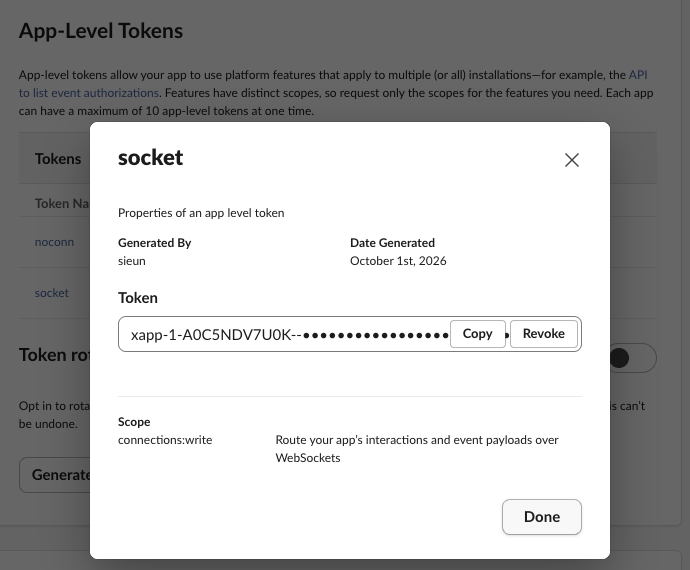
The app-level token belongs to the app, not to a workspace install. It is not on the OAuth page with the other tokens, which is why people search for where it is. Each app can hold up to 10 of them. The other prefixes are explained in Slack bot token.
A Bolt for Python app that answers over Socket Mode
import os, logging
from slack_bolt import App
from slack_bolt.adapter.socket_mode import SocketModeHandler

logging.basicConfig(level=logging.INFO)
app = App(token=os.environ["SLACK_BOT_TOKEN"])

@app.message("hello")
def say_hello(message, say):
    say(f"Hi <@{message['user']}>, this reply came over Socket Mode.")

if __name__ == "__main__":
    SocketModeHandler(app, os.environ["SLACK_APP_TOKEN"]).start()
pip install slack_bolt
export SLACK_BOT_TOKEN=xoxb-...
export SLACK_APP_TOKEN=xapp-...
python app.pyThe console log from our run (Python 3.14, slack_bolt from PyPI that day):
INFO:slack_bolt.App:A new session has been established (session id: 0ba27433-249d-4468-b25d-cacfa5a55aac)
INFO:slack_bolt.App:⚡️ Bolt app is running!
INFO:slack_bolt.App:Starting to receive messages from a new connection (session id: 0ba27433-249d-4468-b25d-cacfa5a55aac)
We typed hello in a test channel the bot was in. The reply came 0.54 seconds later, measured from the two message timestamps:

The bot also logged a 404 unhandled request warning for the channel_join message when it joined the channel. That warning is harmless. It means no listener matched that event.
Errors from the wrong token
We changed one thing at a time and ran the same script.
| What we changed | Where it failed | Error |
|---|---|---|
xoxb- bot token as SLACK_APP_TOKEN | At start, in apps.connections.open | not_allowed_token_type |
xoxp- user token as SLACK_APP_TOKEN | At start | not_allowed_token_type |
xapp- token with only authorizations:read | At start | missing_scope, needed connections:write |
xapp- token as SLACK_BOT_TOKEN | Only when it tried to reply | not_allowed_token_type from chat.postMessage |
The scope error, as Bolt printed it before the traceback:
ERROR:slack_bolt.App:Failed to retrieve WSS URL: The request to the Slack API failed. (url: https://slack.com/api/apps.connections.open)
The server responded with: {'ok': False, 'error': 'missing_scope', 'needed': 'connections:write', 'provided': 'authorizations:read'}
The last row is the one that wastes time. With the two tokens swapped into each other's place, the app still logged "Bolt app is running!" and received our message. auth.test accepts an xapp- token and answers {"ok": true, "app_name": "w1 test 1001", "app_id": "A0C5NDV7U0K"}, so nothing fails at startup. The error came only when say() called chat.postMessage. If the app connects but never answers, check which token is in which variable first. A missing scope on the bot token gives a different error, covered in missing_scope.
Never appear "away" on Slack again
Cloud-based. No downloads. Works 24/7 even when your laptop is off.
Why Socket Mode seems not to work
Two more things we measured:
hello while offline with no connection open, then started the app 5 seconds later. No reply came in the first 40 seconds. The reply arrived 61 seconds after the message, when Slack retried the delivery. Do not assume an event is lost after a restart, and make handlers safe to run twice.Also check the usual causes: the bot must be in the channel to get message.channels events, and each event type must be ticked under Event Subscriptions. Socket Mode only replaces the request URL.
Socket Mode vs HTTP request URLs
| Socket Mode | HTTP request URL | |
|---|---|---|
| What we set up | An xapp- token with connections:write, then one switch | A public HTTPS URL that answers Slack's challenge request |
| Request URL field | Not needed. The settings page says so: "Socket Mode is enabled. You won't need to specify a Request URL." | Required for events, interactivity and each slash command |
| Runs behind a firewall or on a laptop | Yes, it only opens outbound connections | Needs a tunnel or a server |
| Slack Marketplace | Not allowed, per Slack's docs | Required |
Socket Mode fits internal tools and local development. The same app can also send buttons and slash command replies that only one person sees; we tested those in Slack ephemeral messages.
FAQ
Do I still need a signing secret with Socket Mode? No. Slack sends events over the socket your app opened with its own token, so there is no incoming HTTP request to verify. Our script never used the signing secret.
Does the xapp- token stop working when the app is uninstalled?
Not while the app exists. After we uninstalled our test app, apps.connections.open with the same xapp- token still returned a WebSocket URL. After we deleted the app, auth.test with it returned invalid_auth.
Stop Jiggling Your Mouse.
Join hundreds of remote workers who never worry about their Slack status. Set it up once, stay green forever.
Related Articles
Slack OAuth Redirect URL on localhost: What Slack Accepts, Tested
We added localhost, 127.0.0.1, https, custom-scheme and tunnel redirect URLs to a Slack app on 1 October 2026, then ran the OAuth flow against a local server. What was accepted, how Slack matches the URL, and the PKCE rules.
Slack App Manifest Example: YAML and JSON That Worked, Tested
A Slack app manifest we used to create a working app on 1 October 2026, in YAML and JSON, plus the validation errors from broken versions and real output from apps.manifest.validate, export, create and update.
Slack chat.delete API: Who Can Delete What, Tested
chat.delete removes a message by channel and ts. We deleted bot messages, a person's messages, a thread parent and an already deleted message with bot and user tokens, and list every response, including cant_delete_message and the tombstone a thread parent leaves.