
Webex Status Stuck in a Meeting? Causes and Fixes
Webex shows In a meeting while a Webex meeting is still open on any of your devices, and In a calendar meeting while an event is on your calendar. Leave the meeting everywhere, check your calendar, or turn off Show when in a calendar meeting. Plus the fixes when Webex status does not show in Outlook.
If your Webex status is stuck on In a meeting, a Webex meeting is almost always still open somewhere: on your phone, in a browser tab, or on a meeting room device you joined from. Leave or end it everywhere and the status clears. If it says In a calendar meeting, Webex is reading an event on your Outlook or Google calendar that has not ended. End or decline the event, or turn off Show when in a calendar meeting under Settings, Privacy, Availability and Status, where your account offers it. If nothing changes, sign out of Webex and back in.
A Cisco Community answer notes one detail that confuses people: joining a webinar does not set In a meeting, but if the webinar is on your Outlook calendar, you show In a calendar meeting.
We build Slack Green, which keeps a Slack status green during your work hours, and we cover how work apps show presence. What each Webex icon means is in Webex status icons meaning.
Why Webex still says you are in a meeting
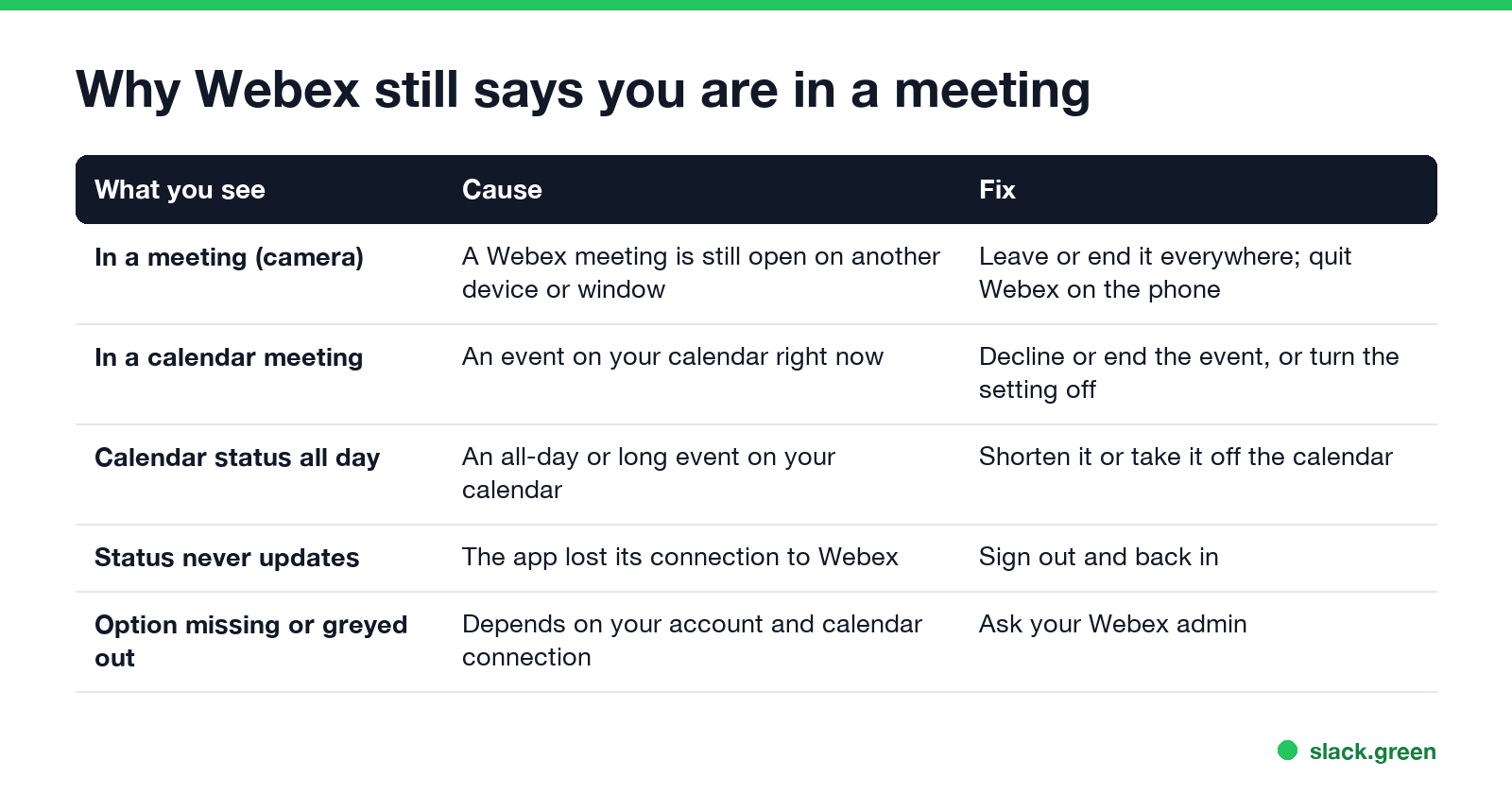
| What you see | Cause | Fix |
|---|---|---|
| In a meeting, camera icon | A Webex meeting is open on another device or window | Leave or end it everywhere |
| In a calendar meeting | A calendar event is running now | End or decline it, or turn the setting off |
| Calendar status all day | An all-day or long event | Shorten it or take it off the calendar |
| Status never changes | The app lost its connection | Sign out and back in |
| The calendar option is missing or greyed out | Depends on your account and calendar connection | Ask your Webex admin |
Webex shows one status at a time and ranks them. Do not disturb outranks a meeting, and a meeting outranks Available, so a stuck meeting hides your green status even while you work. The order is in Webex status icons meaning.
Clear a stuck meeting status
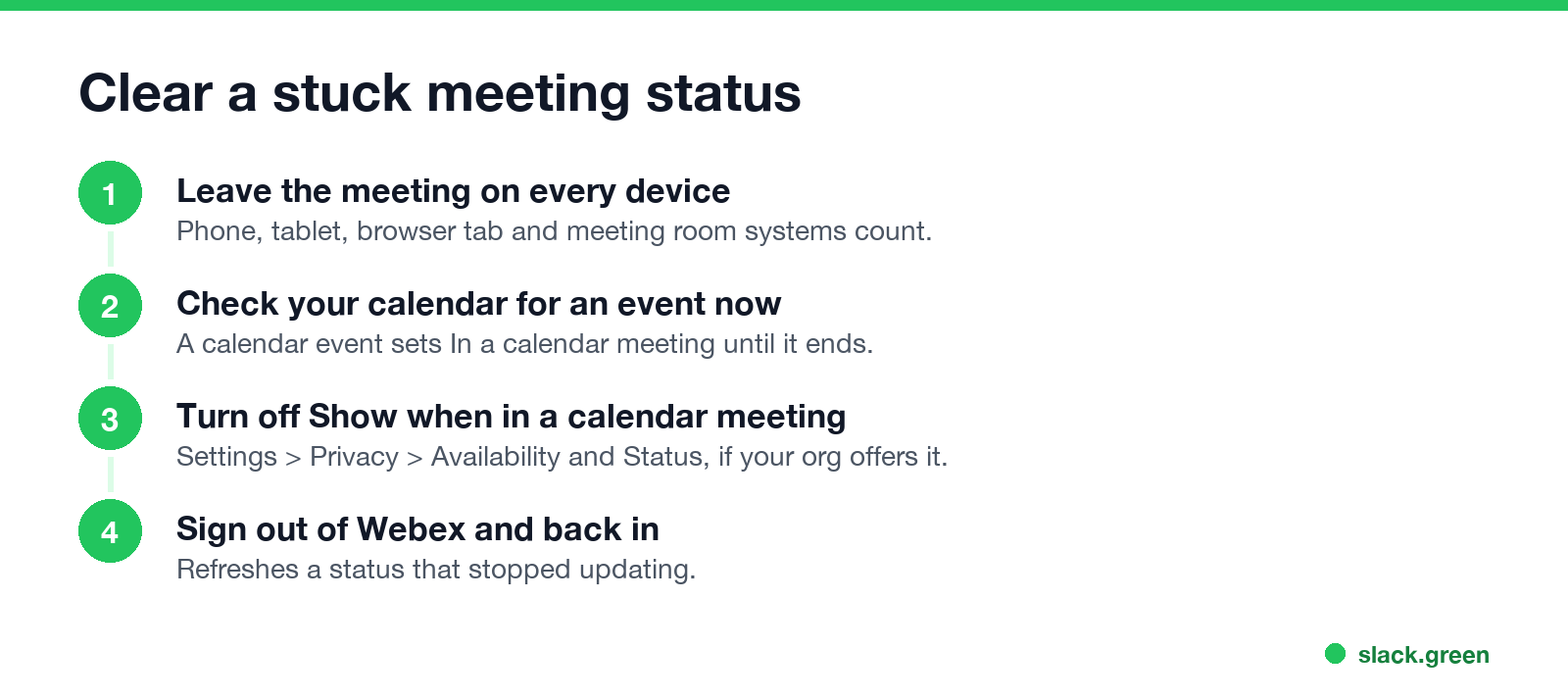
- Leave the meeting on every device. Open Webex on your phone and tablet and leave any meeting still running. Close browser tabs with a Webex meeting. If you joined a room device, end the call there too.
- Look at your calendar. An event happening now, including a tentative one or a long focus block, can keep In a calendar meeting on until it ends.
- Turn off calendar status. In the Webex App, open Settings, then Privacy, then Availability and Status, and turn off Show when in a calendar meeting. Several Cisco Community threads report the option missing or greyed out for some accounts; in that case only your Webex admin can help.
- Sign out and back in. Click your profile picture, Sign Out, then sign in again. This refreshes a status that stopped updating.
- Set a status by hand if you need to. Choose Available, or set a custom status such as "Free now, calendar is wrong".
Webex status not showing in Outlook
Never appear "away" on Slack again
Cloud-based. No downloads. Works 24/7 even when your laptop is off.
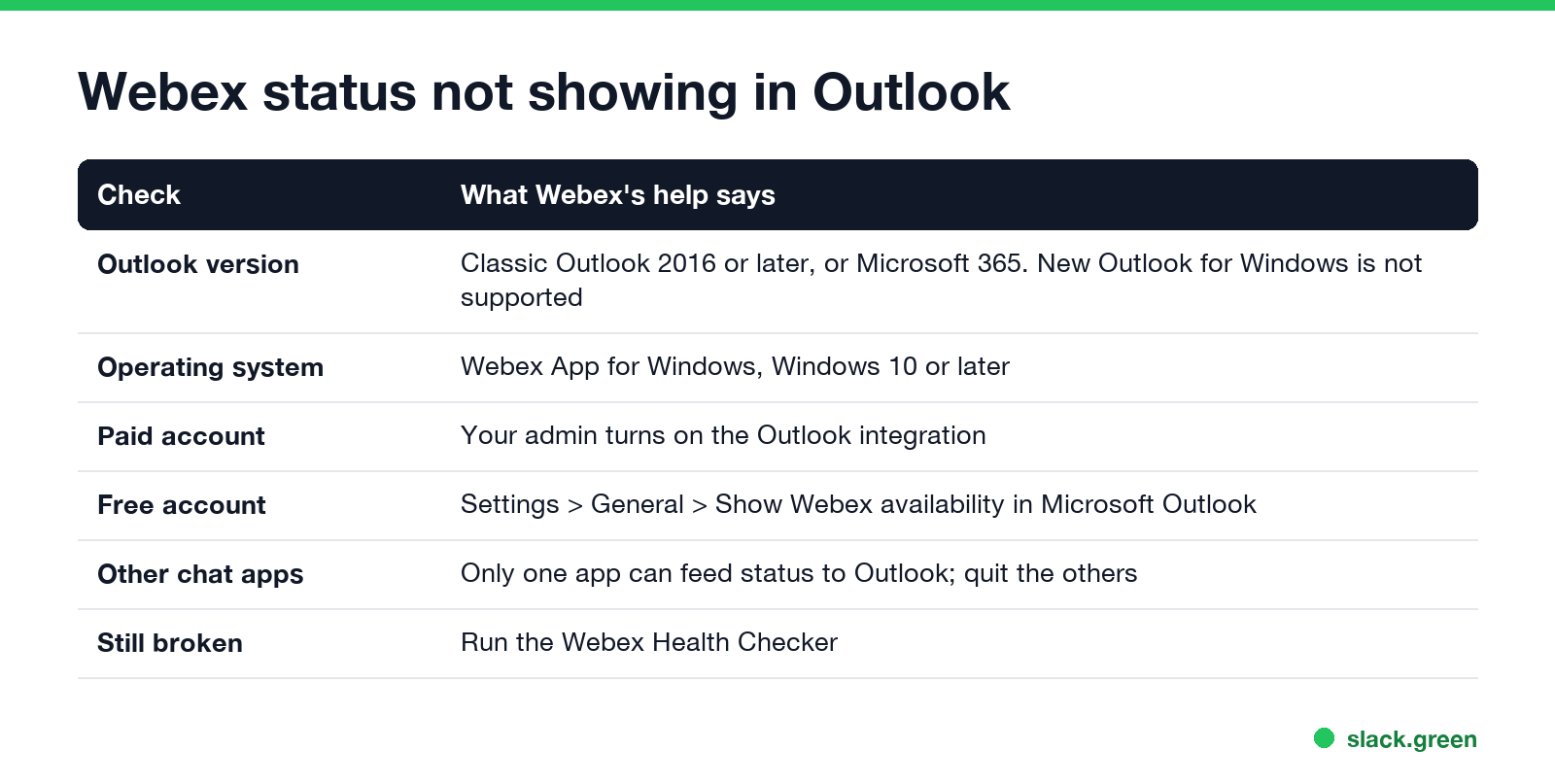
Webex can feed your status to Outlook, so people see it on contact cards. Webex's help article lists these conditions:
Webex, Teams and Slack in meetings
Teams sets In a meeting from Teams meetings and from Outlook events marked Busy, and clears it when they end; stuck cases are in Teams status stuck on busy. Slack has no automatic meeting status unless you add a calendar app, and it sets you away after 10 minutes without input in the Slack window. To keep Webex active while you work in other apps, see how to keep Webex status active. Slack Green keeps Slack green during your work hours.
FAQ
Why does Webex say I am in a meeting when I am not? A Webex meeting is still open on another device or tab, or a calendar event is running.
What does In a calendar meeting mean in Webex? Webex sees an event on your connected Outlook or Google calendar for this time.
How do I stop Webex from showing In a calendar meeting? Turn off Show when in a calendar meeting under Settings, Privacy, Availability and Status, or end the event.
Why is my Webex status not showing in Outlook? New Outlook is not supported, the integration is off, or another chat app is feeding status to Outlook.
How do I reset my Webex status? Sign out and back in, then pick Available.
Stop Jiggling Your Mouse.
Join hundreds of remote workers who never worry about their Slack status. Set it up once, stay green forever.
Related Articles
RingCentral Status Stuck on In a Meeting? Turn Off Calendar Presence
RingCentral usually shows In a meeting when you are not in one because Calendar presence is on: it shows In a meeting for every event on a connected calendar, whether you join or not. How to turn it off, the other four causes (Teams presence sync, a meeting that never ended, another RingCentral app, old events), and what each presence icon means.
Slack Huddle API: What Apps Can Read and Do
Slack has no API to start, join or record a huddle. Apps can read whether a user is in one from huddle_state on the user profile, see which channel from huddle_state_channel_id, and get the user_huddle_changed event when it changes. Code for both, plus audit log events on Enterprise.
Zoho Cliq Idle Status: What It Means and When It Shows
Idle in Zoho Cliq means you set yourself to Available but have not used Cliq for 10 minutes. Cliq switches it on by itself, on web, desktop and mobile, and you still get notifications and calls. What idle tells your coworkers, how it differs from Away and Invisible, and what you can change.