
Slack Huddle API: What Apps Can Read and Do
Slack has no API to start, join or record a huddle. Apps can read whether a user is in one from huddle_state on the user profile, see which channel from huddle_state_channel_id, and get the user_huddle_changed event when it changes. Code for both, plus audit log events on Enterprise.
Slack has no API to start, join, record or end a huddle. What apps can do is read huddle status. Every user profile has a huddle_state field with the values default_unset, in_a_huddle or available_for_huddle, plus huddle_state_channel_id for the channel the huddle is in. When someone joins or leaves a huddle, Slack sends the user_huddle_changed event, which needs only the users:read scope. So an app can show who is in a huddle right now, but it cannot take part in one.
We build Slack Green, which keeps your Slack presence green during your working hours, so we work with Slack's presence and profile APIs every day. The related presence calls are in Slack presence API.
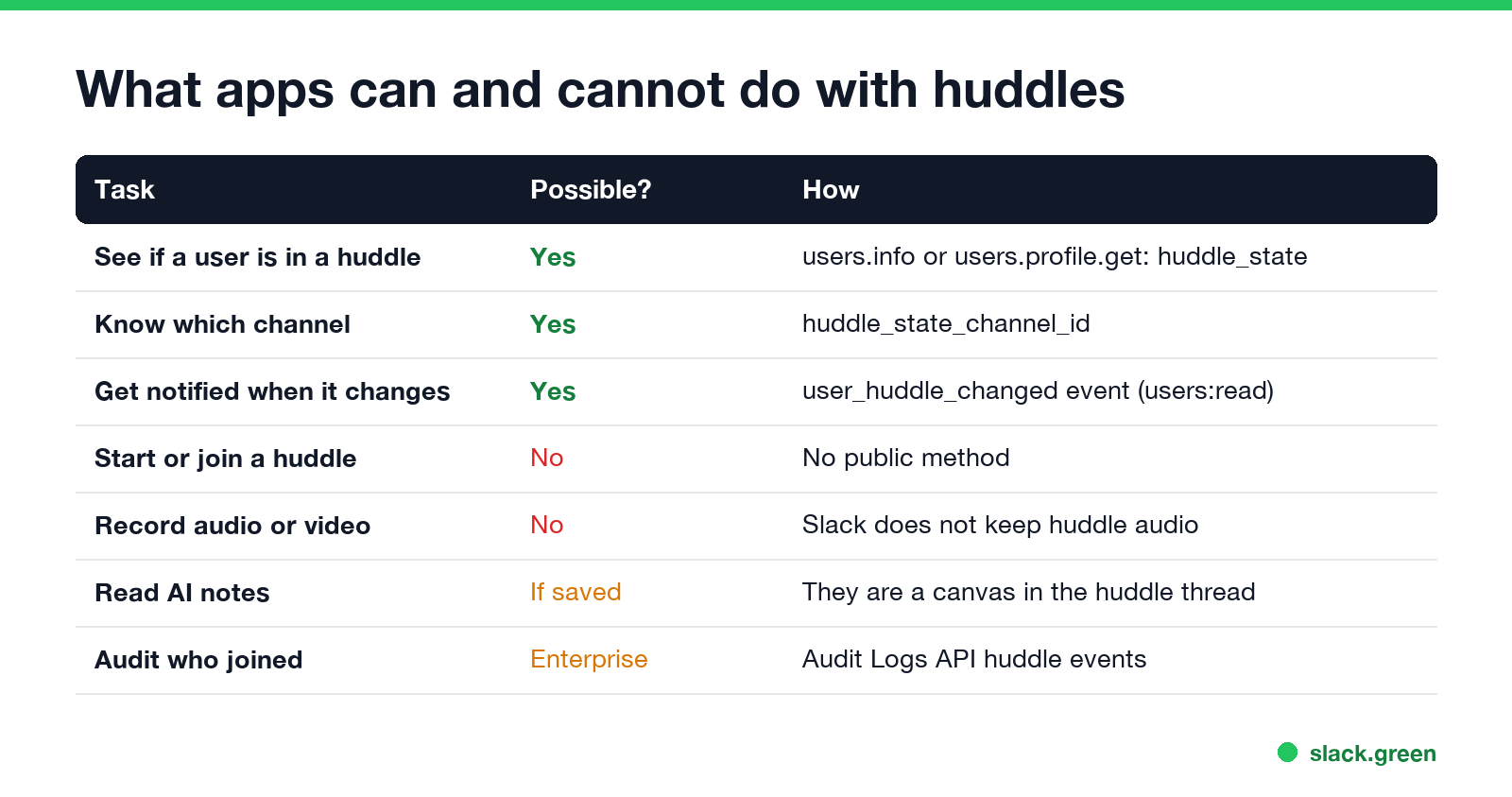
What apps can and cannot do with huddles
| Task | Possible? | How |
|---|---|---|
| See if a user is in a huddle | Yes | huddle_state from users.info or users.profile.get |
| Know which channel | Yes | huddle_state_channel_id |
| Get notified when it changes | Yes | user_huddle_changed event |
| Start, join or end a huddle | No | No public method |
| Record audio or video | No | Slack does not keep huddle audio |
| Read AI huddle notes | If someone turned them on | They are a canvas in the huddle thread |
| See who joined, for compliance | Enterprise only | Audit Logs API huddle events |
Huddle fields on the user profile
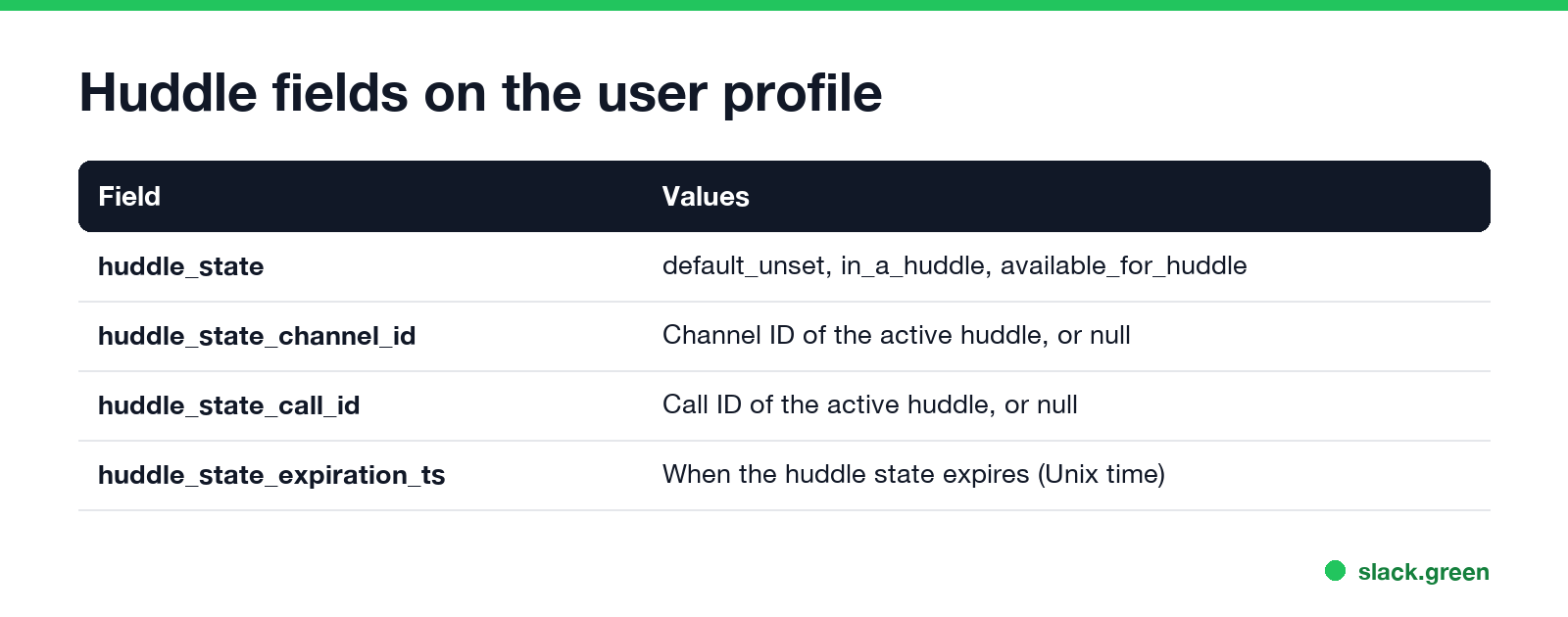
Slack's user object reference lists four fields:
| Field | Meaning |
|---|---|
huddle_state | default_unset, in_a_huddle or available_for_huddle |
huddle_state_channel_id | Channel ID of the active huddle, or null |
huddle_state_call_id | Call ID of the active huddle, or null |
huddle_state_expiration_ts | When the huddle state expires, as Unix time |
Read them with users.info, in the profile object, which needs users:read, or with users.profile.get, which needs users.profile:read.
# pip install slack_sdk
import os
from slack_sdk import WebClient

client = WebClient(token=os.environ["SLACK_BOT_TOKEN"])  # needs users:read


def huddle_of(user_id: str) -> str | None:
    profile = client.users_info(user=user_id)["user"]["profile"]
    if profile.get("huddle_state") == "in_a_huddle":
        return profile.get("huddle_state_channel_id")
    return None


print(huddle_of("U012AB3CD"))
To check a whole team, call users.list once and read each profile, instead of one users.info call per person. users.list is rate limited to Tier 2, about 20 calls a minute.
Detect huddles in real time with user_huddle_changed
Never appear "away" on Slack again
Cloud-based. No downloads. Works 24/7 even when your laptop is off.
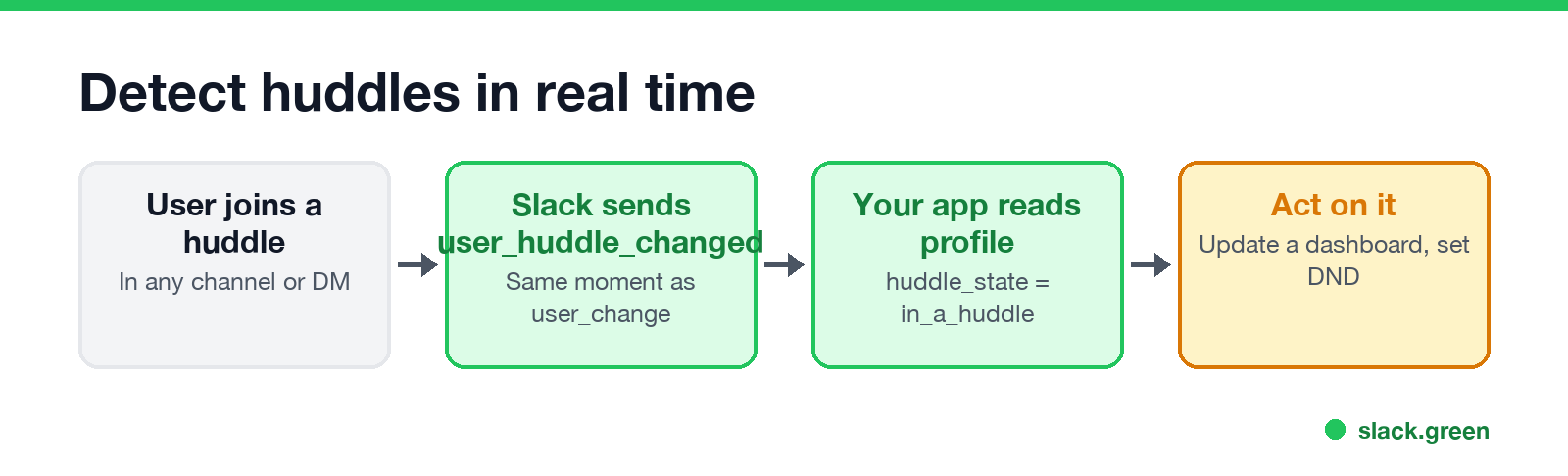
Subscribe to user_huddle_changed under Event Subscriptions, Subscribe to bot events. Slack's docs say the event carries the same full user object as user_change and is sent at the same moment, so the new huddle_state is in the payload. It works over the Events API and Socket Mode.
# pip install slack_bolt
import os
from slack_bolt import App
from slack_bolt.adapter.socket_mode import SocketModeHandler

app = App(token=os.environ["SLACK_BOT_TOKEN"])


@app.event("user_huddle_changed")
def on_huddle(event, logger):
    user = event["user"]
    state = user["profile"].get("huddle_state")
    channel = user["profile"].get("huddle_state_channel_id")
    logger.info(f"{user['id']} is now {state} (channel {channel})")


SocketModeHandler(app, os.environ["SLACK_APP_TOKEN"]).start()
Slack sends the event for every user in the workspace, so on a big workspace keep the handler fast and filter early. Typical uses: a "who is in a huddle" board, pausing alerts to someone while they talk, or logging meeting time for yourself.
Huddle events in the Audit Logs API
On Enterprise plans, the Audit Logs API records huddle actions such as huddle_started, huddle_participant_left and huddle_screenshare_on. They say who was in a huddle and when, with no audio and no words. Reading them needs an org-level token with the auditlogs:read scope. What admins can see in general is in Slack audit logs.
Huddle status vs presence vs custom status
Three separate things show next to a name:
- • Presence, the green or grey dot: active, or away after 10 minutes without input in the Slack window. Read it with
users.getPresence. - • Custom status, the emoji and text. Set it with
users.profile.set; see Slack API set user status. - • Huddle state, the headphones people see while you are in a huddle. Read-only for apps.
Joining a huddle does not change your presence. Slack can also set an automatic "In a huddle" status, which users turn on or off under Preferences, Automatic statuses. What other people see when you join is in can people see when you join a Slack huddle, and what Slack keeps afterwards is in are Slack huddles recorded.
FAQ
Never appear "away" on Slack again
Cloud-based. No downloads. Works 24/7 even when your laptop is off.
Is there a Slack huddle API?
Only for reading status. Apps read huddle_state and receive user_huddle_changed. No method starts, joins or records a huddle.
How do I check if a user is in a Slack huddle?
Call users.info and read profile.huddle_state. in_a_huddle means yes; huddle_state_channel_id gives the channel.
What scope does user_huddle_changed need?
users:read.
Can a bot join a Slack huddle? Not through Slack's API. Meeting-recorder services that join huddles use their own clients, not a public huddle API.
Can I get a huddle recording or transcript from the API? No recording exists. If someone turned on AI notes, the notes and transcript are in a canvas in the huddle thread.
Stop Jiggling Your Mouse.
Join hundreds of remote workers who never worry about their Slack status. Set it up once, stay green forever.
Related Articles
Webex Status Stuck in a Meeting? Causes and Fixes
Webex shows In a meeting while a Webex meeting is still open on any of your devices, and In a calendar meeting while an event is on your calendar. Leave the meeting everywhere, check your calendar, or turn off Show when in a calendar meeting. Plus the fixes when Webex status does not show in Outlook.
RingCentral Status Stuck on In a Meeting? Turn Off Calendar Presence
RingCentral usually shows In a meeting when you are not in one because Calendar presence is on: it shows In a meeting for every event on a connected calendar, whether you join or not. How to turn it off, the other four causes (Teams presence sync, a meeting that never ended, another RingCentral app, old events), and what each presence icon means.
How to Create a Slack Webhook URL in 4 Steps
Create a Slack app at api.slack.com/apps, turn on Incoming Webhooks, click Add New Webhook to Workspace and pick a channel. Slack gives you a hooks.slack.com URL that posts to that channel. Private channels, DMs, several channels, the Workflow Builder alternative, and the errors you may see.