
Slack API: Get Users in a Channel With conversations.members, Tested
conversations.members returns the user IDs in a channel, bots included. We ran it on public and private channels with the bot inside and outside each, joined the IDs to names and emails, and hit a cursor that pointed at an empty page.
To get the users in a Slack channel, call conversations.members with the channel ID. It returns user IDs only, bots included, so you join them to users.info for names and emails. We tested it on 2 October 2026 in our own workspace with a test app (bot scopes channels:read, groups:read, users:read, users:read.email) on four channels: public and private, with the bot inside and outside each. The bot could read every public channel, and every private channel it was in. The one it was not in returned channel_not_found.
What conversations.members returns
A call on our public channel #w1pm-public-in, where the bot is a member:
{"ok": true, "members": ["U0B7L4YK420", "U0C673JH6RY"], "response_metadata": {"next_cursor": ""}}The second ID is the bot itself. Slack's own channel dialog shows the same channel differently. It counted 1 member and put the bot under a separate "Agents & apps" tab:
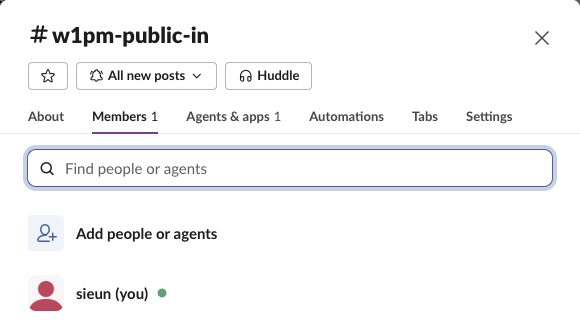
So the API count and the number in the channel header differ by the number of apps in the channel. Filter bots out with the is_bot field from users.info, shown below.
Which channels the bot can read
We ran the same call with the bot token and with a user token (the owner, who is in all four channels):
| Channel | Bot token | User token |
|---|---|---|
| Public, bot is a member | 2 IDs | 2 IDs |
| Public, bot is not a member | 1 ID (works without joining) | 1 ID |
| Private, bot is a member | 2 IDs | 2 IDs |
| Private, bot is not a member | channel_not_found | 1 ID |
| Channel ID that does not exist | channel_not_found | not tested |
No channel parameter | invalid_arguments, [ERROR] missing required field: channel | not tested |
For a private channel, channel_not_found means the bot is not in it, not that the ID is wrong. Invite the bot first (/invite @yourbot in the channel, or conversations.invite with a user token); our add a user to a channel test covers the invite errors. More on that error is in channel_not_found.
Never appear "away" on Slack again
Cloud-based. No downloads. Works 24/7 even when your laptop is off.
Names and emails for every member
conversations.members gives IDs. This script, run with the bot token in SLACK_BOT_TOKEN, looks each one up with users.info:
import os, sys
from slack_sdk import WebClient

client = WebClient(token=os.environ["SLACK_BOT_TOKEN"])
channel = sys.argv[1]

ids = []
for page in client.conversations_members(channel=channel, limit=200):
    ids += page["members"]                      # slack_sdk follows next_cursor for you

for uid in ids:
    u = client.users_info(user=uid)["user"]
    email = u["profile"].get("email", "-")      # needs users:read.email
    kind = "bot" if u["is_bot"] else "person"
    print(f"{uid}  {kind:6}  {u['real_name'] or u['name']:<20}  {email}")
print(f"{len(ids)} members")
Output for #w1pm-public-in (we masked the email):
U0B7L4YK420  person  sieun                 s****@virev.ai
U0C673JH6RY  bot     sglabw1pm             -
2 members
Bots have no email, so the script prints -. The email needs the users:read.email scope, and adding a scope to an installed app means reinstalling it. For a large channel, one users.list page returns many profiles at once and costs fewer calls than one users.info per member; see our users.list test.
On the private channel without the bot, the same script stopped with:
slack_sdk.errors.SlackApiError: The request to the Slack API failed. (url: https://slack.com/api/conversations.members)
The server responded with: {'ok': False, 'error': 'channel_not_found'}
Paging: a cursor can point at an empty page
conversations.members pages with limit and cursor. On #all-slack, after the bot joined, it had exactly 2 members. With limit=2:
{"ok": true, "members": ["U0B7L4YK420", "U0C673JH6RY"], "response_metadata": {"next_cursor": "dXNlcl9pZDoxMjIxMTEyMDU4NDg4Mg=="}}Following that cursor returned:
{"ok": true, "members": [], "response_metadata": {"next_cursor": ""}}A full page comes with a cursor even when nothing is left. Loop until next_cursor is empty, and do not treat an empty members list as an error. The cursor is base64 for user_id:12211120584882. Our pagination test covers the same pattern on other methods.
The other direction: users.conversations
To list the channels a user is in, call users.conversations. The types default caught us: without it, only public channels come back.
| Call | Channels returned |
|---|---|
| User token, no parameters | 6 public channels |
User token, types=public_channel,private_channel | 9: the 6 public plus 3 private |
| Bot token, no parameters | 2: the channels the bot is in |
Bot token, user=<owner ID> | the owner's 6 public channels |
Bot token, user=<owner ID>, types=public_channel,private_channel | 7: the 6 public plus the 1 private channel the bot is also in |
A bot asking about a user sees that user's private channels only where the bot is a member too.
Stop Jiggling Your Mouse.
Join hundreds of remote workers who never worry about their Slack status. Set it up once, stay green forever.
Related Articles
assistant.threads.setStatus vs agents.sessions.setStatus: Both Tested in Slack
We called assistant.threads.setStatus and agents.sessions.setStatus on a test app before and after turning on the agent feature, clicked the stop button, and timed how long the status line stays. Every response, the stop event, and what Slack showed.
Slack Slash Command Payload: Every Field, Responses, and response_url Limits
We caught the payload a slash command sends, answered it as ephemeral, in_channel, plain text and empty, posted to its response_url until it failed, and typed the command inside a thread. Every result is from a test app on 2 October 2026.
Slackbot MCP Client: We Connected a 17-Line MCP Server and Slackbot Called It
We wrote a one-tool MCP server, added it to a Slack app with the mcp_servers manifest field, switched it on in Slackbot and asked for the time. Every request Slackbot sent to the server, the permission prompt, and what Slackbot said when the server was down.