
Slack users.list API: What It Returns, Tested on a Real Workspace
We called users.list with a bot token in a one-person workspace and got 14 members back: Slackbot, 1 person, 4 live bots and 8 deleted ones. The script, the curl call, cursor paging to the end, and what users:read.email changes.
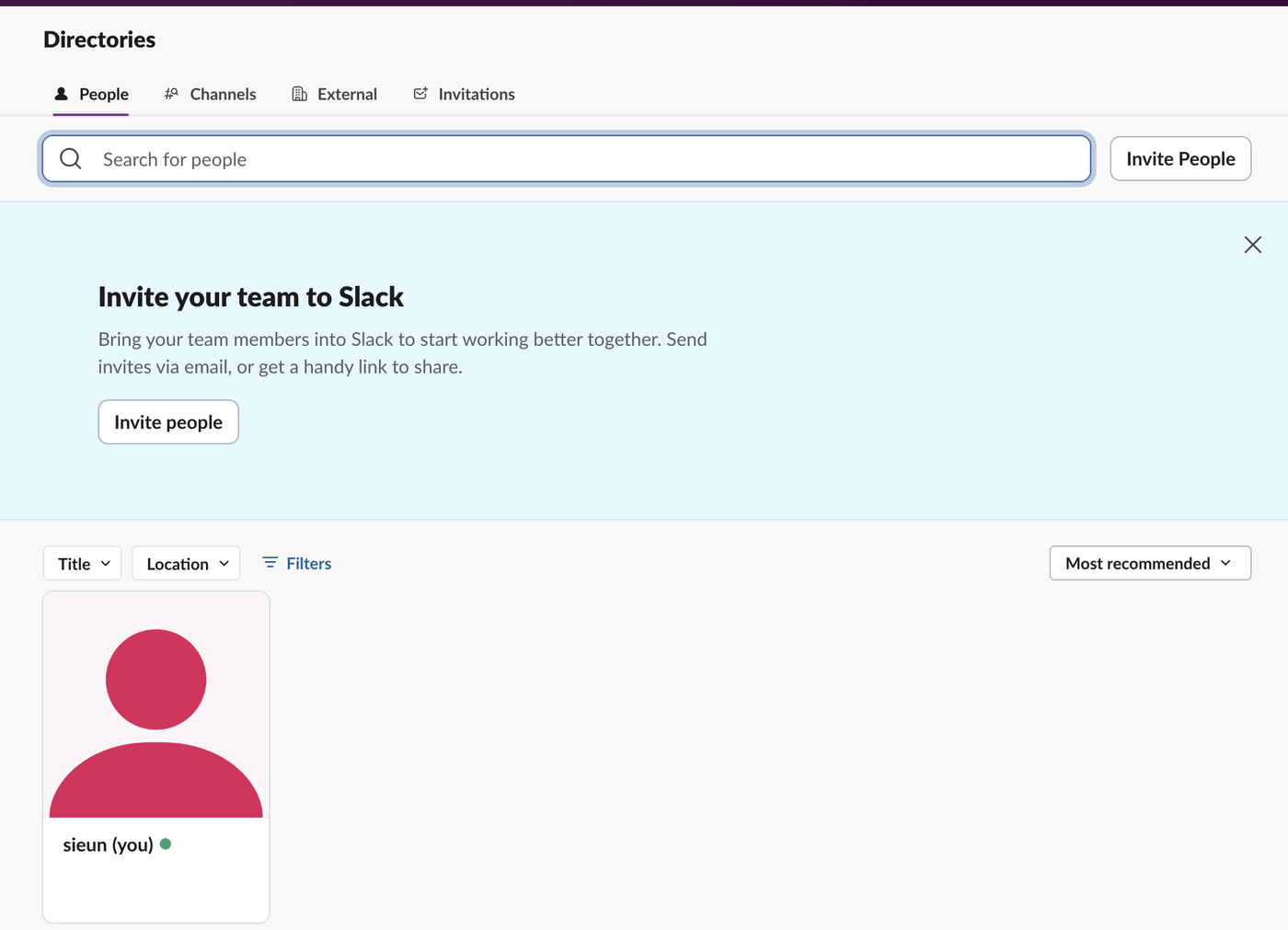
To list every user in a Slack workspace with the API, call users.list with a token that has the users:read scope, and follow response_metadata.next_cursor until it comes back empty. The list is longer than the people you see in Slack. On 2 October 2026 we ran it with a bot token in our own test workspace, which has one person in its directory. users.list returned 14 members: Slackbot, that one person, 4 bots, and 8 bots from apps we had deleted.
List all users in Python
This is the script we ran with slack_sdk 3.45.0. Iterating over users_list() follows the cursor for you:
import os
from slack_sdk import WebClient

client = WebClient(token=os.environ["SLACK_BOT_TOKEN"])
members = []
for page in client.users_list(limit=200):          # slack_sdk follows next_cursor for you
    members.extend(page["members"])

def kind(m):
    if m["id"] == "USLACKBOT":
        return "slackbot"
    if m.get("deleted"):
        return "deleted bot" if m.get("is_bot") else "deactivated person"
    if m.get("is_bot"):
        return "bot"
    return "person"

for m in members:
    print(f'{m["id"]:12} {kind(m):18} {m["name"]:22} email={m.get("profile", {}).get("email", "-")}')
print(len(members), "members returned")
Output, after we added users:read.email (the one email is redacted here):
USLACKBOT    slackbot           slackbot               email=-
U0B7L4YK420  person             sieun                  email=<redacted>
U0C5DA22W79  deleted bot        w1test                 email=-
U0C5FA6FSJ3  deleted bot        bklab                  email=-
U0C5FEA81N3  deleted bot        sglabw2http            email=-
U0C5L6Q2EAJ  deleted bot        w10930test             email=-
U0C5QDUGPV1  deleted bot        sglabw2                email=-
U0C5UH0S0E6  deleted bot        apilab                 email=-
U0C5WG3PXHQ  deleted bot        sglabw1-x              email=-
U0C61H3JW5N  deleted bot        api_error_lab          email=-
U0C63GB2THU  bot                w2rotatebot            email=-
U0C65AARWAW  bot                w2labbot               email=-
U0C695L6YVA  bot                sglabw1                email=-
U0C6ZSGEKRN  bot                w2optinbot             email=-
14 members returned
What the output shows:
- • Slackbot is in the list as
USLACKBOT, and itsis_botisfalse. A filter onis_botalone counts Slackbot as a person. Check the ID too. - • Deleted apps leave their bot users behind with
"deleted": trueand"is_bot": true. Each one still carriesprofile.bot_idandprofile.api_app_id, so you can tell which app it belonged to. - • Deactivated people come back the same way, with
"deleted": trueand"is_bot": false. Our workspace had none, which is why thedeactivated personbranch never printed. To list only deactivated accounts, keep the members wheredeletedis true andis_botis false. - • Our own app's bot (
sglabw1) is a member like any other.
To count only active people, keep members where deleted and is_bot are false and the ID is not USLACKBOT. In our workspace that left 1, which matches the directory above.
The same call with curl
Send the token in the Authorization header. limit=2 and jq keep the output short:
curl -s -H "Authorization: Bearer $SLACK_BOT_TOKEN" \
  "https://slack.com/api/users.list?limit=2" \
  | jq '{ok, members: [.members[] | {id, name, is_bot, deleted}], response_metadata}'
{
"ok": true,
"members": [
{
"id": "USLACKBOT",
"name": "slackbot",
"is_bot": false,
"deleted": false
},
{
"id": "U0B7L4YK420",
"name": "sieun",
"is_bot": false,
"deleted": false
}
],
"response_metadata": {
"next_cursor": "dXNlcjpVMEM1REEyMlc3OQ=="
}
}The cursor is base64. dXNlcjpVMEM1REEyMlc3OQ== decodes to user:U0C5DA22W79, the ID of the next member in the list. Treat it as opaque anyway: a cursor we built ourselves from a real-looking ID returned invalid_cursor.
Never appear "away" on Slack again
Cloud-based. No downloads. Works 24/7 even when your laptop is off.
Paging with next_cursor
We paged through the list one member at a time with limit=1, passing each next_cursor back as cursor:
| Request | Members returned | next_cursor |
|---|---|---|
| 1 | 1 | dXNlcjpVMEI3TDRZSzQyMA== |
| 2 to 13 | 1 each | a new cursor each time |
| 14 | 1 | "" (empty string) |
The last page still had a member in it. The loop ends when next_cursor is an empty string, not when a page comes back empty, so check the cursor before you decide you are done.
Other values we sent:
| Request | Result |
|---|---|
limit=0 | ok, all 14 members, empty cursor |
limit=1000, 1001 and 5000 | ok, all 14 members, no error and no warning |
cursor=bogus | {"ok": false, "error": "invalid_cursor"} |
| A base64 cursor we built for a user ID that does not exist | {"ok": false, "error": "invalid_cursor"} |
Our workspace is small, so every limit fit in one page. Slack's docs say a page can hold fewer members than the limit you asked for, and recommend a limit of 200 or less, so write the loop around the cursor, not around the page size. users.list is rate limited per method; our rate limit tests show what a ratelimited reply looks like and how long Retry-After was.
Getting emails: users:read.email
With only users:read, no member had an email key in profile. The key was missing, not empty. We added users:read.email to the app's bot scopes and called users.list again before reinstalling: still no emails. After we reinstalled the app, the same bot token string returned the person's email. Bots never have one.
A user token with only users:read also returned all 14 members and no emails. To look up one person by address instead of listing everyone, use users.lookupByEmail. If you skip the scope, the missing_scope error names the one you need in its needed field.
FAQ
How do I get a user's ID from their name with the API?
List the members and match on name, real_name or profile.display_name. Names are not unique, so check that you got exactly one match. For finding one ID in the Slack app, see how to find a Slack member ID.
Does users.list return guests and members from other workspaces?
Every active member object we got had is_restricted and is_ultra_restricted fields (the deleted bots had neither); Slack's docs use them to mark multi-channel and single-channel guests. Our test workspace had no guests and no Slack Connect channels, so we could not see either case in the output.
Stop Jiggling Your Mouse.
Join hundreds of remote workers who never worry about their Slack status. Set it up once, stay green forever.
Related Articles
Slack API Pagination: next_cursor, the Last Page and invalid_cursor, Tested
Slack paginates list methods with a cursor: pass response_metadata.next_cursor back as cursor until it is empty. We paged 27 real messages on 2 October 2026 and broke the cursor five ways to see which ones fail.
Slack RTM API Deprecated: What rtm.connect Returns for a New App, and the Socket Mode Fix
A Slack app created today cannot use the RTM API. We called rtm.connect and rtm.start with every token a new app gets on 2 October 2026, tried to request the rtm:stream scope, and ran the same bot over Socket Mode.
Slack Bot Icon and Name Per Message: icon_emoji, icon_url and username, Tested
icon_emoji, icon_url and username only work with the chat:write.customize scope, and Slack ignores them silently without it. We tested every case on 2 October 2026, plus webhooks and the app icon upload limits.