
Slack API Get User Info: users.info and Which Name Field to Use
We called users.info and users.profile.get for a person, a bot and Slackbot, changed the person's display name in between, and logged which fields moved. Code, output, the email scope test and every user_not_found case we hit.
To get a user's info with the Slack API, call users.info with the user ID in user and a token that has the users:read scope. The response holds the account fields (name, real_name, tz, is_bot, is_admin, deleted) and a profile object with display_name, real_name, title, the avatar URLs and the status. On 2 October 2026 we called it with a bot token in our own test workspace for a person, our bot and Slackbot, then changed the person's display name and called it again. The name a person sees in Slack is profile.display_name when it is set and profile.real_name when it is empty.
The script we ran
This uses slack_sdk 3.x. PERSON_ID and BOT_USER_ID came from the environment. The fourth ID does not exist:
import os
from slack_sdk import WebClient
from slack_sdk.errors import SlackApiError

client = WebClient(token=os.environ["SLACK_BOT_TOKEN"])

def best_name(user):
    p = user["profile"]
    return p.get("display_name") or p.get("real_name") or user["name"]

for user_id in [os.environ["PERSON_ID"], os.environ["BOT_USER_ID"], "USLACKBOT", "U00000000"]:
    try:
        u = client.users_info(user=user_id)["user"]
    except SlackApiError as e:
        print(f"{user_id:12} error={e.response['error']}")
        continue
    p = u["profile"]
    print(f"{u['id']:12} name={u['name']!r:11} real_name={u.get('real_name')!r:11} "
          f"display_name={p.get('display_name')!r:20} email={'email' in p!s:5} "
          f"is_bot={u['is_bot']!s:5} -> show {best_name(u)!r}")
Output on our workspace:
U0B7L4YK420  name='sieun'     real_name='sieun'     display_name=''                   email=True  is_bot=False -> show 'sieun'
U0C5RSHVBQF  name='sglabw2'   real_name='sglabw2'   display_name=''                   email=False is_bot=True  -> show 'sglabw2'
USLACKBOT    name='slackbot'  real_name='Slackbot'  display_name='Slackbot'           email=False is_bot=False -> show 'Slackbot'
U00000000    error=user_not_found
name is the old username handle. It did not change when we edited the profile below, which makes it stable but not what people see. The person in our test never set a display name, so display_name came back as an empty string, not as a missing key. Code that prints display_name alone shows a blank name for every user like this one.
What changed when the display name changed
We set the person's display name to Sieun (test name) in Slack and ran the same script a few seconds later:
U0B7L4YK420  name='sieun'     real_name='sieun'     display_name='Sieun (test name)'  email=True  is_bot=False -> show 'Sieun (test name)'
U0C5RSHVBQF  name='sglabw2'   real_name='sglabw2'   display_name=''                   email=False is_bot=True  -> show 'sglabw2'
USLACKBOT    name='slackbot'  real_name='Slackbot'  display_name='Slackbot'           email=False is_bot=False -> show 'Slackbot'
U00000000    error=user_not_found
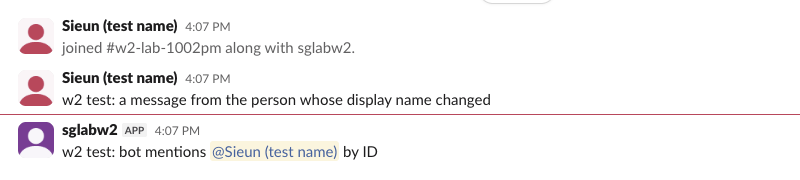
Only profile.display_name and profile.display_name_normalized changed, plus the updated timestamp (1790905024 to 1790924821). name, real_name and profile.real_name stayed sieun. Slack web showed the new name on the person's messages and on the bot's <@U0B7L4YK420> mention:
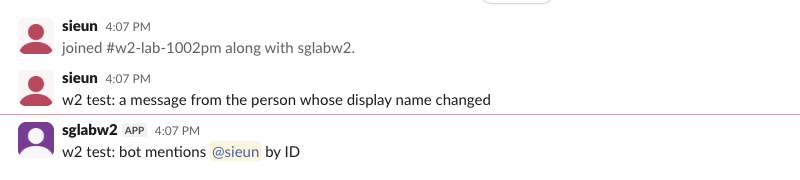
When we cleared the display name, the same three messages switched back to sieun. Slack had not stored the name in the messages; it drew the current name for the user ID each time:
Messages from the API work the same way. conversations.history returns a user ID, not a name, so look the name up with users.info when you display it, and cache it for a while rather than forever. Our member ID guide shows where to find an ID by hand.
Name fields side by side
| Field | Person, no display name | Person, display name set | Our bot | Slackbot |
|---|---|---|---|---|
name | sieun | sieun | sglabw2 | slackbot |
real_name | sieun | sieun | sglabw2 | Slackbot |
profile.real_name | sieun | sieun | sglabw2 | Slackbot |
profile.display_name | (empty) | Sieun (test name) | (empty) | Slackbot |
is_bot | false | false | true | false |
| Name Slack showed | sieun | Sieun (test name) | sglabw2 | Slackbot |
Slackbot has is_bot: false, so a filter on is_bot alone lets it through. Check id == "USLACKBOT" as well. Bots also have profile.bot_id and profile.api_app_id, which people do not have.
Never appear "away" on Slack again
Cloud-based. No downloads. Works 24/7 even when your laptop is off.
The full users.info response
This is the raw response for the person, after we added the email scope. Avatar URLs are cut and the address is redacted:
{
  "ok": true,
  "user": {
    "id": "U0B7L4YK420",
    "name": "sieun",
    "is_bot": false,
    "updated": 1790924853,
    "team_id": "T0B7JBCDKC1",
    "deleted": false,
    "real_name": "sieun",
    "tz": "Asia/Seoul",
    "tz_label": "Korea Standard Time",
    "tz_offset": 32400,
    "is_admin": true,
    "is_owner": true,
    "is_restricted": false,
    "is_ultra_restricted": false,
    "profile": {
      "real_name": "sieun",
      "display_name": "",
      "first_name": "sieun",
      "last_name": "",
      "title": "",
      "email": "sieun@<redacted>",
      "status_text": "",
      "status_emoji": "",
      "status_expiration": 0,
      "image_72": "https://secure.gravatar.com/avatar/...",
      "huddle_state": "default_unset"
    }
  }
}
Add include_locale=true to the call and the user also gets a locale field. Ours came back as en-US. The time zone fields are there by default, which is what you need to show a time in the user's zone.
users.info or users.profile.get
users.profile.get returns only the profile object. Compared with the profile inside users.info, it added fields (custom profile fields, {} in our workspace) and status_clear_on_focus_end, and dropped team. It needs the users.profile:read scope instead of users:read. Call it with no user argument and it returns the caller's own profile. With our bot token it returned the bot's profile. Use users.info when you need tz, is_bot, deleted or the admin flags, and users.profile.get when you need custom profile fields.
Email, and the user_not_found cases
users.info left email out of the profile until we added the users:read.email scope and reinstalled the app. Reinstalling kept the same bot token string; the next call returned email for the person. Bots and Slackbot never had an email field. One result surprised us: before the reinstall, users.profile.get with the bot token already returned the person's email, while users.profile.get with a user token holding the same users.profile:read scope did not. We ran it twice with the same result. Do not build on that; ask for users:read.email if you need addresses. To go the other way, from an address to an ID, use users.lookupByEmail.
Every bad input we tried gave the same error from both methods:
user value | users.info | users.profile.get |
|---|---|---|
U00000000 (no such user) | user_not_found | user_not_found |
UBADID | user_not_found | user_not_found |
u0b7l4yk420 (a real ID in lower case) | user_not_found | user_not_found |
C0B7GGE8Q1Y (a channel ID) | user_not_found | user_not_found |
| empty string | user_not_found | user_not_found |
IDs are case-sensitive, so a lower-cased ID from a database or a URL fails. If you have a mention string like <@U0B7L4YK420>, strip the <@ and > first. To get every user at once instead of one call per ID, users.list returns them in pages, and the bot's own ID comes from auth.test.
FAQ
Which scope does users.info need? users:read, as a bot or user scope. The x-accepted-oauth-scopes header on our responses read users:read for users.info and users.profile:read for users.profile.get.
Why is display_name empty? The person never set one. Slack shows the full name in that case, so fall back to profile.real_name.
Does users.info show whether someone is online? No. Presence is a separate method, users.getPresence. Our Slack status API page covers the status fields that do come back in the profile.
Stop Jiggling Your Mouse.
Join hundreds of remote workers who never worry about their Slack status. Set it up once, stay green forever.
Related Articles
assistant.threads.setStatus vs agents.sessions.setStatus: Both Tested in Slack
We called assistant.threads.setStatus and agents.sessions.setStatus on a test app before and after turning on the agent feature, clicked the stop button, and timed how long the status line stays. Every response, the stop event, and what Slack showed.
Slack Slash Command Payload: Every Field, Responses, and response_url Limits
We caught the payload a slash command sends, answered it as ephemeral, in_channel, plain text and empty, posted to its response_url until it failed, and typed the command inside a thread. Every result is from a test app on 2 October 2026.
Slackbot MCP Client: We Connected a 17-Line MCP Server and Slackbot Called It
We wrote a one-tool MCP server, added it to a Slack app with the mcp_servers manifest field, switched it on in Slackbot and asked for the time. Every request Slackbot sent to the server, the permission prompt, and what Slackbot said when the server was down.