
Slack Bot User ID: Get It With auth.test, and the U, B and A IDs Compared
A Slack bot has three IDs: a user ID (U...), a bot ID (B...) and an app ID (A...). We called auth.test with a bot, user and app-level token on 2 October 2026 and show where each ID turns up.
To get your bot's user ID, call auth.test with the bot token (xoxb-). The user_id field is the bot user ID, starting with U; that is the ID you use in mentions (<@U...>) and the one you compare against event.user. The same response has bot_id, starting with B, which is a different ID. The app ID, starting with A, comes from auth.test with an app-level token or from bots.info. auth.test needed no extra scope: it worked with an app-level token whose only scope was connections:write.
We ran all of this on 2 October 2026 against a throwaway test app in a test workspace. The IDs below are real; the app was deleted after the test.
auth.test with three kinds of token
curl -s -X POST https://slack.com/api/auth.test -H "Authorization: Bearer $SLACK_BOT_TOKEN"Bot token (xoxb-):
{
  "ok": true,
  "url": "https://slack-0yr1948.slack.com/",
  "team": "Slack",
  "user": "w2labbot",
  "team_id": "T0B7JBCDKC1",
  "user_id": "U0C65AARWAW",
  "bot_id": "B0C63G345V4",
  "is_enterprise_install": false
}
User token (xoxp-) from the same install. user_id is now the person who installed the app, and there is no bot_id:
{
  "ok": true,
  "url": "https://slack-0yr1948.slack.com/",
  "team": "Slack",
  "user": "sieun",
  "team_id": "T0B7JBCDKC1",
  "user_id": "U0B7L4YK420",
  "is_enterprise_install": false
}
App-level token (xapp-, scope connections:write). We expected an error here; it worked and returned the app, not a user:
{
  "ok": true,
  "app_name": "w2-lab-1002",
  "app_id": "A0C5Z82NNGK"
}
U, B and A IDs side by side
| ID | Our value | What it is | Where we found it |
|---|---|---|---|
| Bot user ID | U0C65AARWAW | The bot as a member of the workspace | auth.test user_id; bot_user_id in the OAuth response; authorizations[].user_id in events; profile menu, Copy member ID |
| Bot ID | B0C63G345V4 | The bot integration | auth.test bot_id; bot_id on messages the bot posts; profile.bot_id in users.info; the bot's profile email |
| App ID | A0C5Z82NNGK | The app definition | auth.test with the xapp- token; app_id in bots.info; api_app_id in every event; Basic Information page |
| Team ID | T0B7JBCDKC1 | The workspace | team_id in every response above |
bots.info and users.info
bots.info turns a B ID into the other two. Our bot had users:read, the scope Slack lists for it:
{
  "ok": true,
  "bot": {
    "id": "B0C63G345V4",
    "deleted": false,
    "name": "w2-lab-1002",
    "updated": 1790903767,
    "app_id": "A0C5Z82NNGK",
    "user_id": "U0C65AARWAW",
    "icons": {
      "image_36": "https://a.slack-edge.com/80588/img/plugins/app/bot_36.png",
      "image_48": "https://a.slack-edge.com/80588/img/plugins/app/bot_48.png",
      "image_72": "https://a.slack-edge.com/80588/img/plugins/app/service_72.png"
    }
  }
}
It only takes a B ID. Passing the bot's U ID or the A ID returned {"ok": false, "error": "bot_not_found"}. Calling it with no bot argument returned {"ok": true} and nothing else, which is easy to mistake for success.
Going the other way, users.info on the U ID marks the user as a bot and carries the other two IDs in its profile:
id U0C65AARWAW | name w2labbot | is_bot True | is_app_user False
profile.bot_id B0C63G345V4 | profile.api_app_id A0C5Z82NNGK
Never appear "away" on Slack again
Cloud-based. No downloads. Works 24/7 even when your laptop is off.
Where to see them in Slack and in app settings
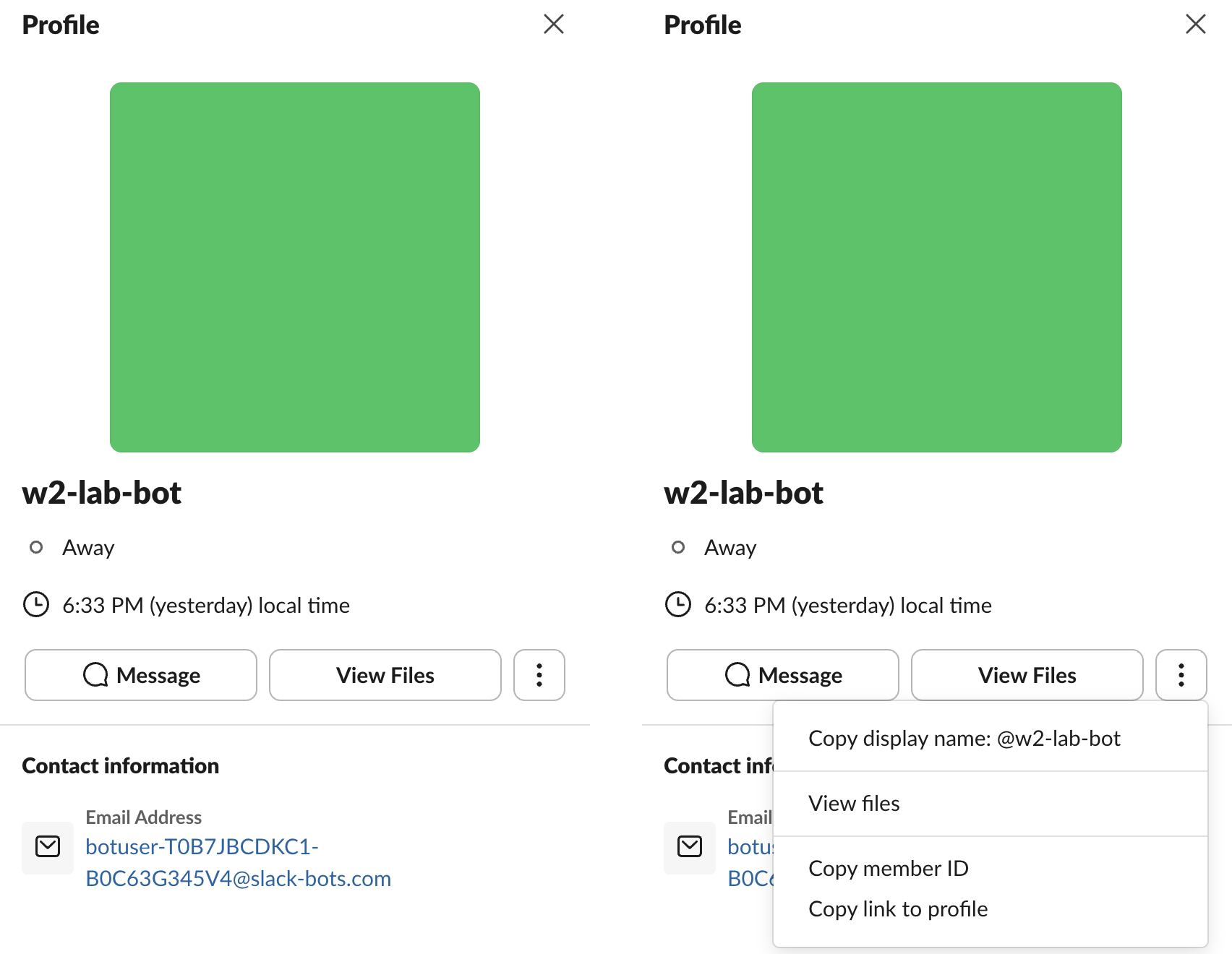
In Slack, click the bot's name and open the three-dot menu. Copy member ID copied U0C65AARWAW, the bot user ID. The profile also shows an email address built from the team ID and the bot ID: botuser-T0B7JBCDKC1-B0C63G345V4@slack-bots.com.
The app ID is the first field under App Credentials on the app's Basic Information page:

For people rather than bots, Slack member ID shows where Slack puts the copy button for each client.
Which IDs an event carries
We ran the app over Socket Mode and posted hello <@U0C65AARWAW> to a channel with the app's user token. The app_mention envelope, trimmed:
{
  "team_id": "T0B7JBCDKC1",
  "api_app_id": "A0C5Z82NNGK",
  "event": {
    "type": "app_mention",
    "user": "U0B7L4YK420",
    "bot_id": "B0C695E0JHJ",
    "app_id": "A0C5Z82NNGK",
    "text": "hello <@U0C65AARWAW>",
    "channel": "C0C6ZRH1Z8Q",
    "ts": "1790904224.775959"
  },
  "type": "event_callback",
  "authorizations": [
    {"team_id": "T0B7JBCDKC1", "user_id": "U0C65AARWAW", "is_bot": true, "is_enterprise_install": false}
  ]
}
So an event tells you your own bot user ID in authorizations[0].user_id without any API call, and the mention in text uses the U ID.
The bot_id in that event is not the bot's B0C63G345V4, because the message went out through the user token. The bot ID depends on how a message was posted. We read the channel back with conversations.history:
| How the message was posted | user | bot_id |
|---|---|---|
chat.postMessage with the bot token | U0C65AARWAW | B0C63G345V4 |
chat.postMessage with the app's user token | U0B7L4YK420 (the person) | B0C695E0JHJ |
| The app's incoming webhook | none | B0C5Q3QUKP1 |
| The webhook made by a second install | none | B0C5Q5HFB6K |
bots.info on B0C695E0JHJ returned the same app ID and name as the bot. One app, four different B IDs. To ignore your own app's messages, compare app_id or api_app_id with your app ID; comparing bot_id with the value from auth.test misses the user-token and webhook posts.
FAQ
Can I get the bot user ID without a token? Yes, from Slack: Copy member ID in the bot's profile menu, as shown above. Every API way needs a token.
Stop Jiggling Your Mouse.
Join hundreds of remote workers who never worry about their Slack status. Set it up once, stay green forever.
Related Articles
Slack API Pagination: next_cursor, the Last Page and invalid_cursor, Tested
Slack paginates list methods with a cursor: pass response_metadata.next_cursor back as cursor until it is empty. We paged 27 real messages on 2 October 2026 and broke the cursor five ways to see which ones fail.
Slack RTM API Deprecated: What rtm.connect Returns for a New App, and the Socket Mode Fix
A Slack app created today cannot use the RTM API. We called rtm.connect and rtm.start with every token a new app gets on 2 October 2026, tried to request the rtm:stream scope, and ran the same bot over Socket Mode.
Slack Bot Icon and Name Per Message: icon_emoji, icon_url and username, Tested
icon_emoji, icon_url and username only work with the chat:write.customize scope, and Slack ignores them silently without it. We tested every case on 2 October 2026, plus webhooks and the app icon upload limits.