
Slack Image Block: Formats, Size Limits and Errors We Measured
We posted image blocks pointing at our own server with PNG, JPG, GIF, WebP and SVG files, a 404, a redirect, slow responses and files from 2 MB to 42 MB, then used slack_file uploads. What rendered, what failed with downloading image failed, and where the 20 MB line sits.
A Slack image block is {"type": "image", "image_url": "https://...", "alt_text": "..."}, or the same with slack_file in place of image_url for a file uploaded to Slack. alt_text is required. Slack downloads the URL while it handles your chat.postMessage call, and if that download fails the whole message is refused with invalid_blocks and downloading image failed. On 2 October 2026 we served test images from our own server and posted them with a bot token in our test workspace. PNG, JPG, GIF and WebP rendered. SVG, a 404 and an HTML page failed. Every file we tried posted, but Slack web did not expand images over 20 MiB.
The test
Our server logged every request Slack made. This script posted one image block per case:
import os
from slack_sdk import WebClient
from slack_sdk.errors import SlackApiError

client = WebClient(token=os.environ["SLACK_BOT_TOKEN"])
BASE = os.environ["IMG_BASE"]          # our test server, behind a tunnel

cases = {
    "PNG": "/i/test.png", "JPG": "/i/test.jpg", "GIF": "/i/test.gif",
    "WebP": "/i/test.webp", "SVG": "/i/test.svg",
    "404": "/missing.png", "302 redirect": "/redirect.png",
    "PNG as text/plain": "/png-as-text", "no extension": "/noext",
    "HTML page": "/html", "2 MB PNG": "/i/big2.png",
    "10 MB PNG": "/i/big10.png", "20 MB PNG": "/i/big20.png", "40 MB PNG": "/i/big40.png",
}
for label, path in cases.items():
    block = {"type": "image", "image_url": BASE + path, "alt_text": label}
    try:
        r = client.chat_postMessage(channel=os.environ["CHANNEL_ID"], text=label, blocks=[block])
        print(f"{label:18} ok    ts={r['ts']}")
    except SlackApiError as e:
        d = e.response.data
        print(f"{label:18} {d['error']}  {d.get('response_metadata', {}).get('messages', '')}")
Output:
PNG                ok    ts=...
JPG                ok    ts=...
GIF                ok    ts=...
WebP               ok    ts=...
SVG                invalid_blocks  ['[ERROR] downloading image failed [json-pointer:/blocks/0/image_url]']
404                invalid_blocks  ['[ERROR] downloading image failed [json-pointer:/blocks/0/image_url]']
302 redirect       ok    ts=...
PNG as text/plain  ok    ts=...
no extension       ok    ts=...
HTML page          invalid_blocks  ['[ERROR] downloading image failed [json-pointer:/blocks/0/image_url]']
2 MB PNG           ok    ts=...
10 MB PNG          ok    ts=...
20 MB PNG          ok    ts=...
40 MB PNG          ok    ts=...
The "MB" labels are rounded: the four noise PNGs were 2.15, 10.6, 21.1 and 42.2 million bytes.
What rendered and what failed
image_url points at | chat.postMessage | In Slack web |
|---|---|---|
| PNG, JPG, GIF, WebP | ok | Rendered |
SVG (served as image/svg+xml, HTTP 200) | invalid_blocks: downloading image failed | Not posted |
| A 404 | invalid_blocks: downloading image failed | Not posted |
| An HTML page (HTTP 200) | invalid_blocks: downloading image failed | Not posted |
| A 302 redirect to a PNG | ok | Rendered |
A PNG sent as text/plain | ok | Rendered |
| A URL with no file extension | ok | Rendered |
| A server that waited 3 s or 6 s | ok, the call took 3.8 s and 6.7 s | Rendered |
| A server that waited 12 s | invalid_blocks after 8.3 s | Not posted |
| PNGs of 2.15 to 20.56 million bytes | ok | Rendered |
| PNGs of 21.07 and 42.2 million bytes | ok | "Not automatically expanded" |
Slack looks at the bytes, not the extension or the Content-Type header: a PNG served as text/plain and a URL without .png both worked, and an SVG with the right header did not. Convert SVGs to PNG before you post them.
Who fetches the image
Our server log showed two different fetchers for each image. Slackbot 1.0 (+https://api.slack.com/robots) requested the URL during the chat.postMessage call; for most cases it requested it twice within a second. Then Slack-ImgProxy (+https://api.slack.com/robots) requested it, which is the copy Slack shows to people. For the two files over 20 MiB, Slack-ImgProxy never made a request. For the 302 case Slackbot requested /redirect.png and then followed it to /i/test.png.
So the URL has to be public when you post, not only when someone opens the message. A URL behind a login, a signed URL that has not been issued yet, or a server that blocks unknown user agents gives downloading image failed. For the 404 and HTML cases, Slackbot made one request and Slack refused the message.
Never appear "away" on Slack again
Cloud-based. No downloads. Works 24/7 even when your laptop is off.
The size limit
No file we tried was refused: the 42.2-million-byte PNG posted with ok. The limit we found is in the client. Slack web drew every image up to 20.56 million bytes. At 21.07 million bytes it showed a line of text instead of the picture:
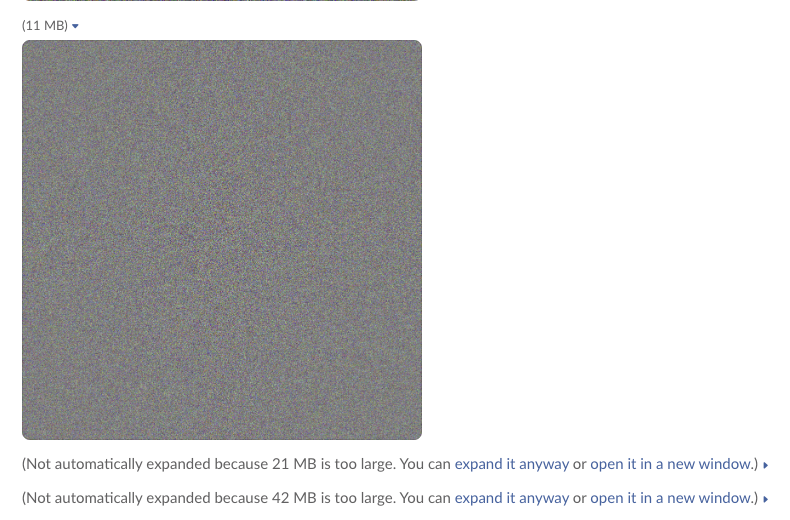
20 MiB is 20,971,520 bytes, which falls between the largest file that rendered and the smallest one that did not. Slack prints the size in decimal megabytes, so a file it labels "21 MB" can still be under the line. Keep images well below it; a chart or screenshot is usually under 1 MB.
Field limits we hit
| Payload | Result |
|---|---|
No alt_text | invalid_blocks: missing required field: alt_text |
alt_text of 2,000 characters | ok |
alt_text of 2,001 characters | invalid_blocks: must be less than 2001 characters |
image_url of 3,001 characters | invalid_blocks: must be less than 3001 characters |
An http:// URL | ok |
A title (plain_text) | ok, shown above the image |
Both image_url and slack_file | ok |
Every refusal names the field in a json-pointer, so read response_metadata.messages in the error, not only error. More block errors are in our invalid_blocks guide, and the Block Kit checker tests a payload before you send it.
Use an uploaded file: slack_file
If the image is private, upload it to Slack and point the block at the file. We uploaded with files.getUploadURLExternal and files.completeUploadExternal without sharing it anywhere, then posted it two ways:
import os, requests
from slack_sdk import WebClient
from slack_sdk.errors import SlackApiError

client = WebClient(token=os.environ["SLACK_BOT_TOKEN"])
CHANNEL = os.environ["CHANNEL_ID"]
path = os.environ.get("IMG_PATH", "img/test.png")

# 1. Ask Slack for an upload URL, 2. send the bytes, 3. finish the upload without sharing it
up = client.files_getUploadURLExternal(filename=os.path.basename(path), length=os.path.getsize(path))
requests.post(up["upload_url"], files={"file": open(path, "rb")}, timeout=30).raise_for_status()
done = client.files_completeUploadExternal(files=[{"id": up["file_id"], "title": "chart"}])
print("uploaded", up["file_id"], "shared to", done["files"][0].get("channels"))

for label, ref in {"slack_file.id": {"id": up["file_id"]},
                   "slack_file.url": {"url": done["files"][0]["url_private"]},
                   "bad id": {"id": "F00000000"}}.items():
    block = {"type": "image", "slack_file": ref, "alt_text": "chart"}
    try:
        r = client.chat_postMessage(channel=CHANNEL, text=label, blocks=[block])
        print(f"{label:15} ok    ts={r['ts']}")
    except SlackApiError as e:
        print(f"{label:15} {e.response['error']}  {e.response.get('response_metadata', {}).get('messages', '')}")
Output for a PNG:
uploaded F0C5S0MEY4X shared to []
slack_file.id   invalid_blocks  ['[ERROR] invalid slack file [json-pointer:/blocks/0/slack_file.id/slack_file]']
slack_file.url  ok    ts=1790925841.544449
bad id          invalid_blocks  ['[ERROR] file not found [json-pointer:/blocks/0/slack_file.id]']
slack_file.id failed on the first try, about a second after the upload, then worked when we posted again a few seconds later. In three later uploads, of a PNG, a JPG and a GIF, the id worked on the first try at 0.4 to 0.6 s. If you post straight after uploading, retry once on invalid slack file. slack_file.url with the file's url_private worked at once. A made-up ID returned file not found.
The upload flow itself, with the errors it gives, is on our files.upload replacement page.
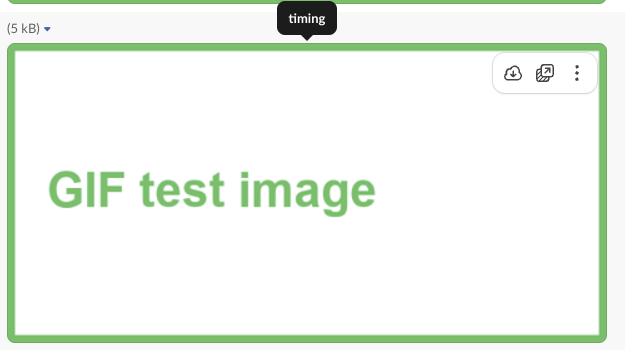
Two things differ from image_url. WebP and SVG files failed with invalid slack file every time, by id and by url, retried for 26 seconds, although a WebP worked as an image_url. And posting the block shared the file: before, files.info showed no channels; after, it listed our channel under shares.public with "source": "BK_IMAGE", and is_public was true. Everyone in the channel can open the file afterwards, as with any shared file. In Slack web the image got a download button that image_url images do not have:
FAQ
Why does my image block show nothing? If the post succeeded, wait a few seconds: in our tests the image boxes stayed blank until Slack's proxy fetched them. If it still shows a line of text, the file is over 20 MiB.
Can an image block show an animated GIF? Our GIF test file was a still image, so we did not check animation. GIF files posted and rendered both as image_url and as slack_file.
Stop Jiggling Your Mouse.
Join hundreds of remote workers who never worry about their Slack status. Set it up once, stay green forever.
Related Articles
assistant.threads.setStatus vs agents.sessions.setStatus: Both Tested in Slack
We called assistant.threads.setStatus and agents.sessions.setStatus on a test app before and after turning on the agent feature, clicked the stop button, and timed how long the status line stays. Every response, the stop event, and what Slack showed.
Slack Slash Command Payload: Every Field, Responses, and response_url Limits
We caught the payload a slash command sends, answered it as ephemeral, in_channel, plain text and empty, posted to its response_url until it failed, and typed the command inside a thread. Every result is from a test app on 2 October 2026.
Slackbot MCP Client: We Connected a 17-Line MCP Server and Slackbot Called It
We wrote a one-tool MCP server, added it to a Slack app with the mcp_servers manifest field, switched it on in Slackbot and asked for the time. Every request Slackbot sent to the server, the permission prompt, and what Slackbot said when the server was down.