
Slack Slash Command Payload: Every Field, Responses, and response_url Limits
We caught the payload a slash command sends, answered it as ephemeral, in_channel, plain text and empty, posted to its response_url until it failed, and typed the command inside a thread. Every result is from a test app on 2 October 2026.
When someone runs your slash command, Slack sends an HTTP POST to your Request URL with a form-encoded body, not JSON. Ours had 13 fields: who ran it, where, the text after the command, and a response_url for replies later. Your HTTP reply decides what the user sees. ephemeral (the default) shows the reply only to them. in_channel posts it for everyone and also shows the command they typed. We built a test app on 2 October 2026, pointed its command /w1pm at a small Flask server through a cloudflared tunnel, and recorded everything below.
The payload Slack sends
We typed /w1pm check the deploy in a public channel. Our server received Content-Type: application/x-www-form-urlencoded with these fields, decoded:
token=(redacted, the old verification token)
team_id=T0B7JBCDKC1
team_domain=slack-0yr1948
channel_id=C0C71JSE7KJ
channel_name=w1pm-public-in
user_id=U0B7L4YK420
user_name=sieun
command=/w1pm
text=check the deploy
api_app_id=A0C71JQPB4G
is_enterprise_install=false
response_url=https://hooks.slack.com/commands/T0B7JBCDKC1/12239651434400/(redacted)
trigger_id=12195906924119.11256386461409.fba24e31258d3791a7f78aff9972e876
Plus two headers, X-Slack-Request-Timestamp and X-Slack-Signature, which you check with the signing secret; our signing secret test has the code. Things to know about the fields:
- •
textis everything after the command name, with no leading space. - •
tokenis the old verification token. Verify the signature header instead. - •
user_nameis the account's username, not the display name. For display names, look upuser_idwithusers.info. - • There is no
thread_ts, and no field that says whether the channel is a DM or private. The command can never come from a thread, as shown below. - •
trigger_idis what you pass toviews.opento show a modal in reply.
What "Escape channels, users, and links" changes
That checkbox on the command's settings page is should_escape in the manifest. We sent the same text both ways through chat.command, the call the Slack client makes when you press Enter:
should_escape false: @sieun <#C0C71JSE7KJ> <https://example.com> & <!here>
should_escape true: <@U0B7L4YK420|sieun> <#C0C71JSE7KJ> <https://example.com> & <!here>With escaping on, a user mention arrives as an ID you can use, and &, < and > arrive as HTML entities, so decode them before you show the text back. With it off, the mention arrives as @sieun, a name you would have to look up.
Replying: ephemeral, in_channel, plain text, empty
Your server has 3 seconds to answer the POST. What it returns becomes the reply:
| HTTP 200 body | What Slack showed |
|---|---|
{"response_type": "ephemeral", "text": "..."} | "Only visible to you" reply; the typed command is not shown to anyone |
{"response_type": "in_channel", "text": "..."} | the command /w1pm show everyone as a message from the user, then the app's reply, both visible to everyone |
plain text plain text body, no JSON (text/plain) | an "Only visible to you" reply with that text |
| empty body | nothing at all; the command just leaves the message box |
{"response_type": "in_channel"} with no text | the user's command posted in the channel, and no reply |
in_channel with 3,001 characters of text | posted in full |
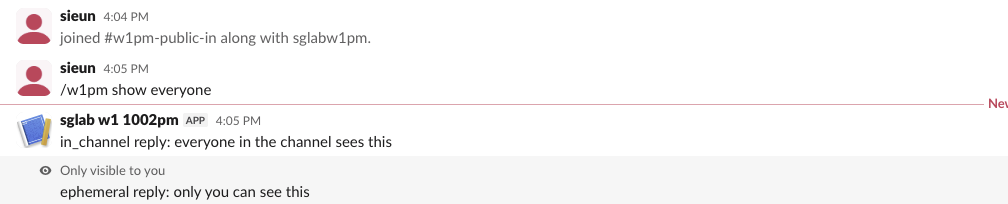
The in_channel reply with no text is the trap in that table. Slack still posts the user's /command text to the channel, so everyone sees a command with no answer. If a command fails, reply ephemeral with the error.
If your server answers late or with an error status, the user gets dispatch_failed or operation_timeout; our dispatch_failed test reproduced each case.
Never appear "away" on Slack again
Cloud-based. No downloads. Works 24/7 even when your laptop is off.
response_url: 5 posts and 30 minutes
For anything slower than 3 seconds, answer the POST with an empty 200 and send the result to response_url later, as JSON with the same response_type and text fields. We tested both of its limits.
Posts per URL. We posted to one response_url 7 times, about 1 second apart:
post 1-5   200 ok
post 6     404 used_url
post 7     404 used_url
Time. We ran a second command and posted to its response_url 6 times over 31 minutes:
| Post | Time after the command | Answer |
|---|---|---|
| 1 | 0:05 | 200 ok |
| 2 | 10:01 | 200 ok |
| 3 | 20:00 | 200 ok |
| 4 | 29:30 | 200 ok |
| 5 | 30:31 | 404 expired_url |
| 6 | 31:01 | 404 expired_url |
Posts up to 29:30 worked and the post at 30:30 got expired_url, so the limit is 30 minutes from the command. A button's response_url in our 1 October test narrowed it further: 29:50 worked and 30:10 failed. Each command gets its own response_url, so a user running the command again resets both limits. For a job that may run longer, save channel_id and post with chat.postMessage and a bot token instead; the bot must be in the channel (not_in_channel covers that error). Button clicks get a response_url with the same 5-post limit; see our interactivity payload test.
Slash commands do not work in threads
We posted a message, opened its thread, and typed /w1pm from inside a thread in the thread reply box. Slack did not call our server. It answered instead:
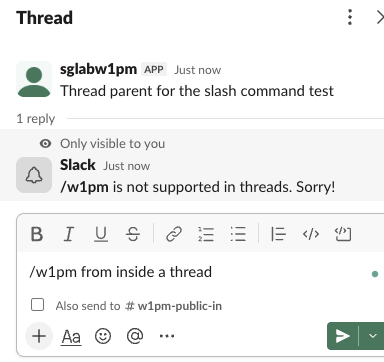
The same call through the API, chat.command with thread_ts, failed with:
restricted_in_threadsSo there is no payload with a thread_ts to look for. If your app needs to act inside a thread, it has to start from something other than a slash command, such as an @mention of the bot.
FAQ
Is the slash command payload JSON?
No. It is application/x-www-form-urlencoded, so parse it as a form. In Flask that is request.form; in Bolt the framework parses it for you. Your reply, and anything you post to response_url, is JSON.
Does the user see their own command when the reply is ephemeral?
No. In our test the ephemeral reply showed alone, and the typed command was not posted. With in_channel the command is posted for everyone.
Stop Jiggling Your Mouse.
Join hundreds of remote workers who never worry about their Slack status. Set it up once, stay green forever.
Related Articles
assistant.threads.setStatus vs agents.sessions.setStatus: Both Tested in Slack
We called assistant.threads.setStatus and agents.sessions.setStatus on a test app before and after turning on the agent feature, clicked the stop button, and timed how long the status line stays. Every response, the stop event, and what Slack showed.
Slackbot MCP Client: We Connected a 17-Line MCP Server and Slackbot Called It
We wrote a one-tool MCP server, added it to a Slack app with the mcp_servers manifest field, switched it on in Slackbot and asked for the time. Every request Slackbot sent to the server, the permission prompt, and what Slackbot said when the server was down.
Slack Image Block: Formats, Size Limits and Errors We Measured
We posted image blocks pointing at our own server with PNG, JPG, GIF, WebP and SVG files, a 404, a redirect, slow responses and files from 2 MB to 42 MB, then used slack_file uploads. What rendered, what failed with downloading image failed, and where the 20 MB line sits.