
Slack views.update and views.push: Stack Limit, hash_conflict and response_action, Tested
We opened a Slack modal, pushed views until Slack refused, updated the top view with a current and a stale hash, and answered view_submission with every response_action. Every response and what the user saw.
views.update replaces a modal that is already open, and views.push adds a new view on top of it. Both need the view_id or a trigger_id from the user's last click, and both can fail in ways the user never sees. On 3 October 2026 we opened a modal from a slash command in our own test workspace, pushed views until Slack refused, sent views.update with a current and a stale hash, and answered view_submission with each response_action. The test app ran on Bolt for Python in Socket Mode.
The test modal
Every view had three buttons and a menu that chose how the app answers Submit:
def modal_view(depth, note=""):
    return {"type": "modal", "callback_id": "stack", "private_metadata": str(depth),
            "title": {"type": "plain_text", "text": f"View {depth}"},
            "submit": {"type": "plain_text", "text": "Submit"},
            "close": {"type": "plain_text", "text": "Back" if depth > 1 else "Cancel"},
            "blocks": [
              {"type": "section", "text": {"type": "mrkdwn", "text": f"This is view *{depth}* in the stack. {note}"}},
              {"type": "actions", "block_id": "acts", "elements": [
                 {"type": "button", "action_id": "push", "text": {"type": "plain_text", "text": "Push a view"}},
                 {"type": "button", "action_id": "update_good", "text": {"type": "plain_text", "text": "Update (current hash)"}},
                 {"type": "button", "action_id": "update_stale", "text": {"type": "plain_text", "text": "Update (stale hash)"}}]},
              {"type": "input", "block_id": "mode", "optional": True,
               "label": {"type": "plain_text", "text": "On submit, answer with"},
               "element": {"type": "static_select", "action_id": "m", "options": [
                  opt("update", "update"), opt("push", "push"), opt("clear", "clear"),
                  opt("errors", "errors"), opt("nothing (ack only)", "none"), opt("slow ack (4 s)", "slow")]}},
              {"type": "input", "block_id": "note", "optional": True,
               "label": {"type": "plain_text", "text": "Note"},
               "element": {"type": "plain_text_input", "action_id": "n"}}]}

@app.command("/sglab1003")
def cmd(ack, body, client):
    ack()
    # trimmed: our handler also had a branch for another test
    client.views_open(trigger_id=body["trigger_id"], view=modal_view(1))
Typing /sglab1003 modal in the message box opened View 1. When we sent the same command through the API instead of typing it, views.open failed with internal_error, because no Slack window was waiting for the modal. Our expired trigger_id guide covers the 3 second window for views.open.
views.push stops at three views
The Push button called views.push with the click's trigger_id. Here log() is our helper that writes one JSON line per call:
@app.action("push")
def push(ack, body, client):
    ack()
    depth = int(body["view"]["private_metadata"]) + 1
    try:
        r = client.views_push(trigger_id=body["trigger_id"], view=modal_view(depth))
        log("views.push", depth=depth, ok=True, view_id=r["view"]["id"])
    except Exception as e:
        log("views.push", depth=depth, ok=False, error=e.response.data if hasattr(e, "response") else str(e))
We clicked it three times:
{"depth": 2, "ok": true, "view_id": "V0C5ZEUTLQP", "kind": "views.push"}
{"depth": 3, "ok": true, "view_id": "V0C6EMEUFRQ", "kind": "views.push"}
{"depth": 4, "ok": false, "error": {"ok": false, "error": "push_limit_reached"}, "kind": "views.push"}
So the stack holds three views: the one from views.open plus two pushes. The user saw nothing when the fourth push failed. View 3 simply stayed open:
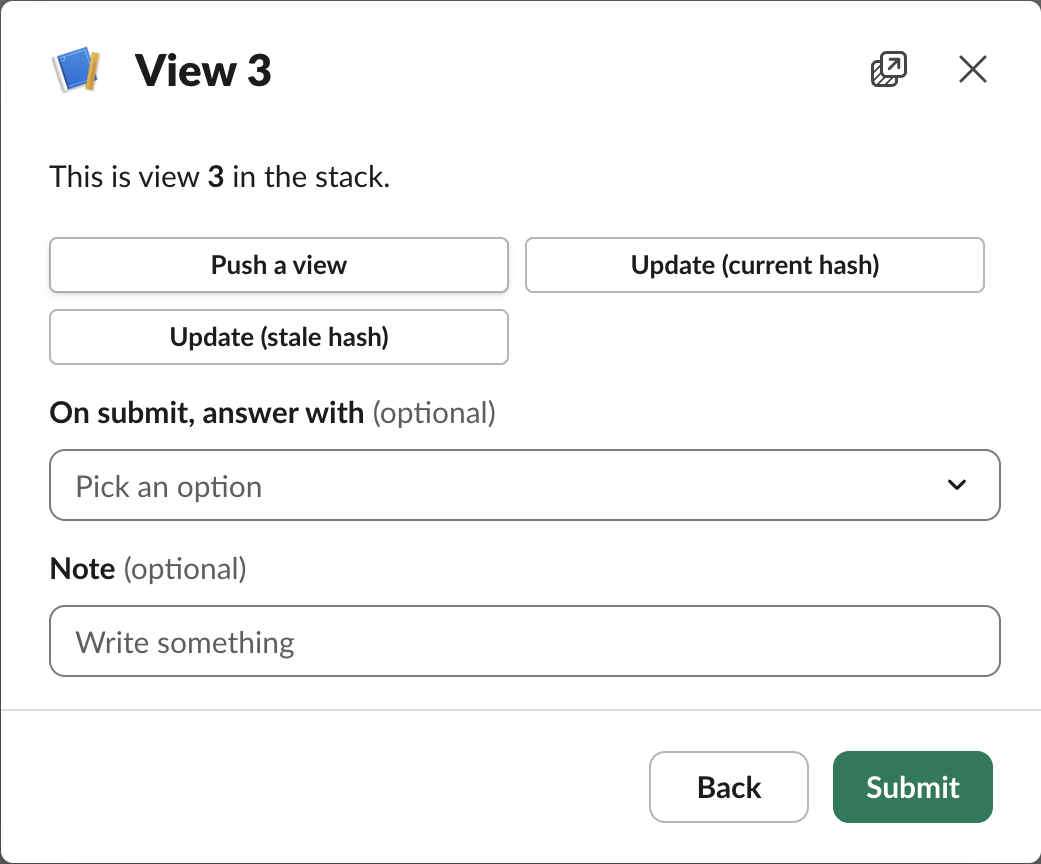
If your flow needs a fourth step, replace the top view with views.update or response_action: "update" instead of pushing.
Never appear "away" on Slack again
Cloud-based. No downloads. Works 24/7 even when your laptop is off.
views.update with a current and a stale hash
Every view carries a hash that changes each time the view changes. The first button sent the hash from the click payload, then kept it. The second button sent that saved, now old, hash:
STALE = {}

@app.action("update_good")
def upd_good(ack, body, client):
    ack()
    v = body["view"]; depth = int(v["private_metadata"])
    STALE[v["id"]] = v["hash"]
    try:
        r = client.views_update(view_id=v["id"], hash=v["hash"], view=modal_view(depth, note=f"Updated at {time.strftime('%H:%M:%S')}."))
        log("views.update good", ok=True, old_hash=v["hash"], new_hash=r["view"]["hash"])
    except Exception as e:
        log("views.update good", ok=False, error=e.response.data)
@app.action("update_stale")
def upd_stale(ack, body, client):
    ack()
    v = body["view"]; depth = int(v["private_metadata"])
    stale = STALE.get(v["id"], "1790000000.abcdEFGH")
    try:
        r = client.views_update(view_id=v["id"], hash=stale, view=modal_view(depth, note="stale update"))
        log("views.update stale", ok=True, sent_hash=stale, current_hash=v["hash"])
    except Exception as e:
        log("views.update stale", ok=False, sent_hash=stale, current_hash=v["hash"], error=e.response.data)
The current hash worked and changed it from 1790990384.kFx7pFyv to 1790990399.ONOelWns. The stale one failed. The error response also carried the whole current view, trimmed here:
{
  "ok": false,
  "error": "hash_conflict",
  "view": {
    "id": "V0C6EMEUFRQ",
    "hash": "1790990399.ONOelWns",
    "previous_view_id": "V0C5ZEUTLQP",
    "root_view_id": "V0C6EMD8D0S",
    "...": "..."
  }
}
That is useful: on hash_conflict, read view.hash and view.state from the error, decide whether your change still makes sense, and retry once with the new hash.
Other views.update errors we got:
| Call | Response |
|---|---|
view_id of a modal the user already closed | not_found |
Neither view_id nor external_id | invalid_arguments, with the message "[ERROR] Must provide either view_id or external_id" (Slack wraps both names in backticks) |
| Title of 25 characters | invalid_arguments, [ERROR] must be less than 25 characters [json-pointer:/view/title/text] |
response_action answers to Submit
views.update and views.push need an API call. On Submit you can do the same in the acknowledgement itself:
@app.view("stack")
def submit(ack, body, view):
    vals = view["state"]["values"]
    mode = ((vals.get("mode", {}).get("m") or {}).get("selected_option") or {}).get("value", "none")
    depth = int(view["private_metadata"])
    log("view_submission", mode=mode, depth=depth, view_id=view["id"])
    if mode == "update":
        ack(response_action="update", view=modal_view(depth, note="Replaced by response_action update."))
    elif mode == "push":
        ack(response_action="push", view=modal_view(depth + 1, note="Pushed by response_action push."))
    elif mode == "clear":
        ack(response_action="clear")
    elif mode == "errors":
        ack(response_action="errors", errors={"note": "Write a note before you submit"})
    elif mode == "slow":
        time.sleep(4); ack()
    else:
        ack()
What each answer did, starting on View 3 (View 2 for clear):
| Answer | What the user saw |
|---|---|
errors | The view stayed, with "Write a note before you submit" in red under the Note field |
update | The same view with the new text "Replaced by response_action update." |
push on View 3 | "We had some trouble connecting. Try again?" at the top of the view |
ack() with no action, on View 3 | View 3 closed and View 2 came back |
clear on View 2 | Every view closed |
ack() after 4 seconds | Spinner, then "We had some trouble connecting. Try again?"; Bolt logged submit didn't call ack() |
The errors key is the block_id of an input block. This is what it looked like:
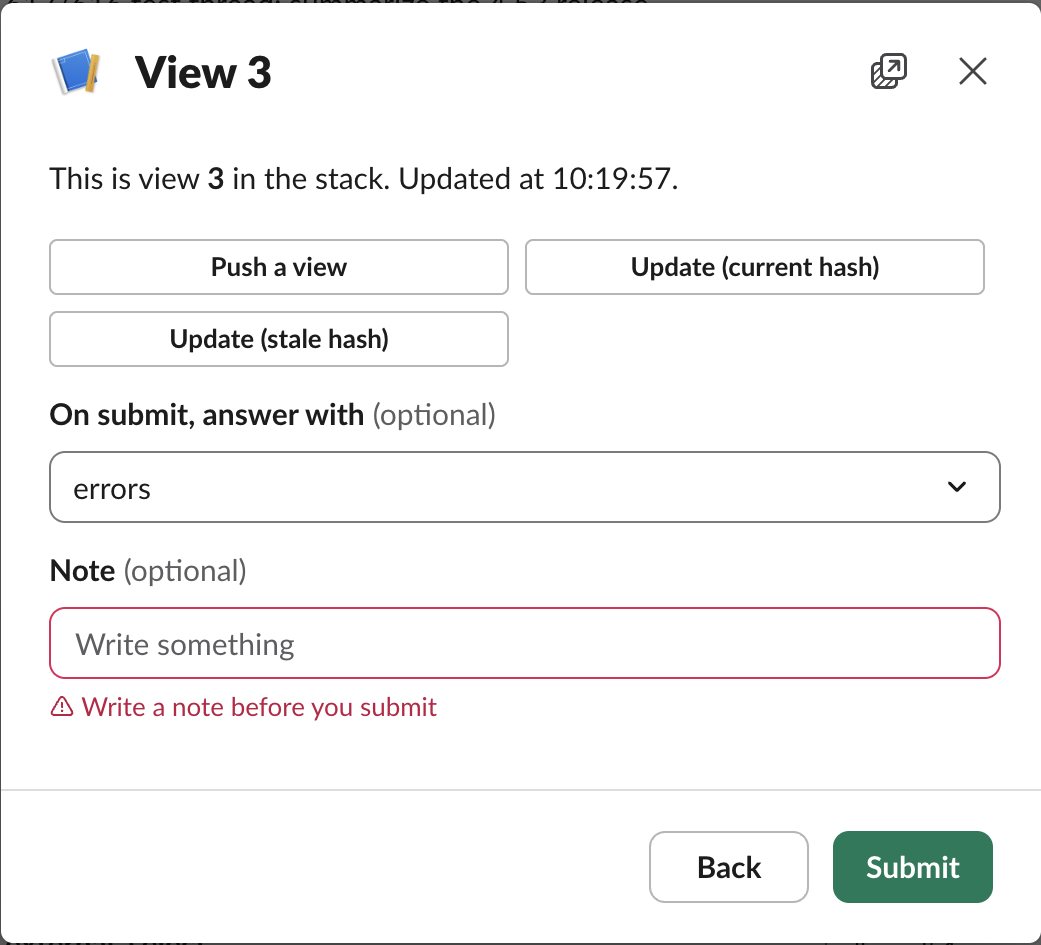
The push answer at the stack limit fails with no hint about the limit. The user gets a connection error, and your app gets nothing back:
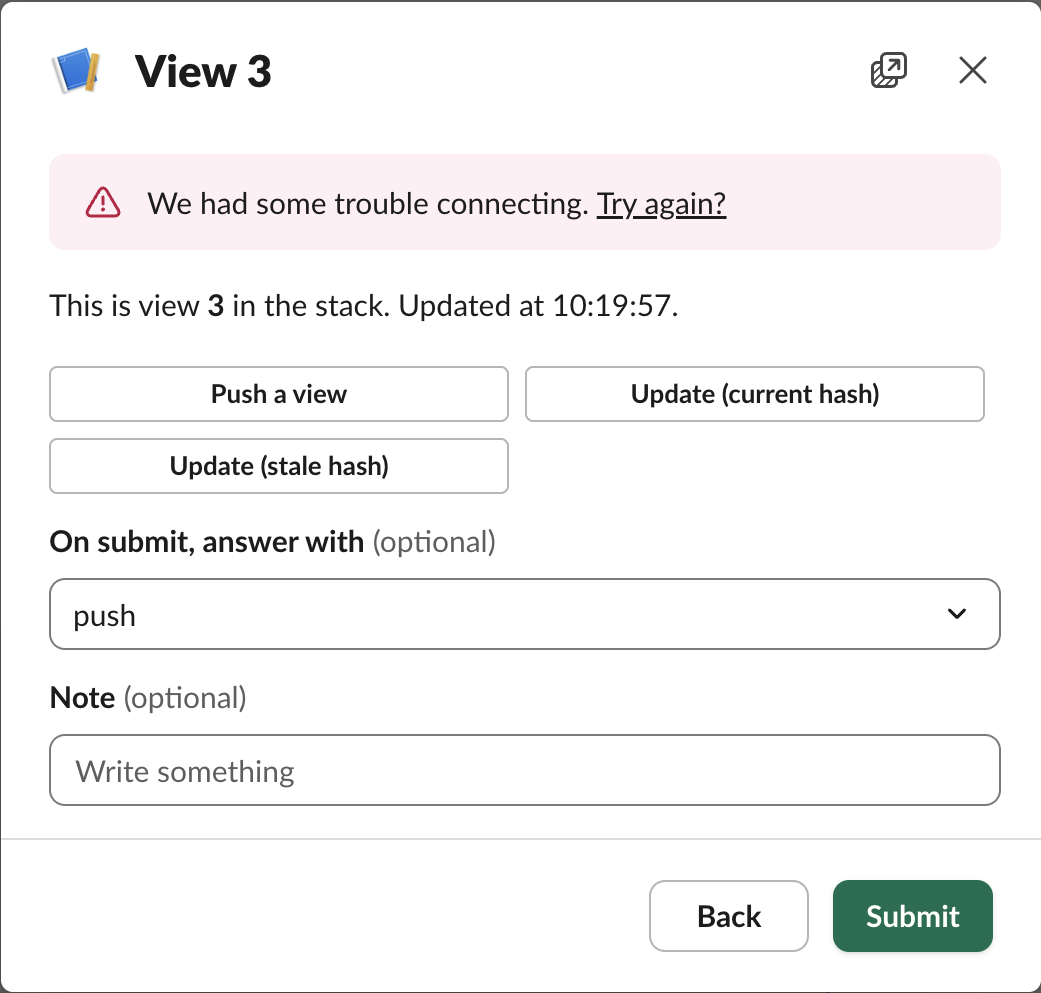
A late ack shows the same banner, so when you see "trouble connecting" on a modal, check both the 3 second deadline and the stack depth. For what else arrives in these payloads, see our interactivity payload guide; App Home tabs use the same hash rule with views.publish, covered in the App Home tab guide.
Stop Jiggling Your Mouse.
Join hundreds of remote workers who never worry about their Slack status. Set it up once, stay green forever.
Related Articles
Slack chat.startStream: Streaming a Message, Timed and Tested
We streamed a bot reply into a Slack DM thread with chat.startStream, chat.appendStream and chat.stopStream, timed every call, screenshotted the thread mid-stream, and found how long an idle stream stays open.
Slack Plan and Task Card Blocks: Every Status, Update and Limit Tested
We posted a plan block with tasks in all four statuses and standalone task cards from a bot, updated them with chat.update, and probed the limits. pending works only inside a plan, and titles have no length limit we could find.
Slack Block Kit Select Menus: Static, Multi, Users and External, Tested
We posted all four common select menus from a Socket Mode app, picked a value in each, logged the block_actions payloads, and timed an external_select options handler from 0 to 5 seconds. Past 3 seconds Slack silently shows the old results.