
Slack Block Kit Select Menus: Static, Multi, Users and External, Tested
We posted all four common select menus from a Socket Mode app, picked a value in each, logged the block_actions payloads, and timed an external_select options handler from 0 to 5 seconds. Past 3 seconds Slack silently shows the old results.
A Block Kit select menu is an element you put in a section's accessory or an actions block. static_select takes up to 100 options you send with the message, multi_static_select lets people pick several, users_select lists the workspace's members, and external_select asks your app for options as the user types. On 3 October 2026 we posted all four from a Bolt for Python Socket Mode app in our own test workspace, picked a value in each, and timed the external options handler. The external menu has a hard 3 second limit, and missing it does not show an error.
The message we posted
def opt(t, v): return {"text": {"type": "plain_text", "text": t}, "value": v}
FRUIT = [opt("Apple", "apple"), opt("Banana", "banana"), opt("Cherry", "cherry")]

blocks = [
  {"type": "section", "block_id": "s_static", "text": {"type": "mrkdwn", "text": "*static_select*"},
   "accessory": {"type": "static_select", "action_id": "pick_static",
                 "placeholder": {"type": "plain_text", "text": "Pick a fruit"}, "options": FRUIT}},
  {"type": "section", "block_id": "s_multi", "text": {"type": "mrkdwn", "text": "*multi_static_select*"},
   "accessory": {"type": "multi_static_select", "action_id": "pick_multi",
                 "placeholder": {"type": "plain_text", "text": "Pick fruits"}, "options": FRUIT, "max_selected_items": 2}},
  {"type": "section", "block_id": "s_users", "text": {"type": "mrkdwn", "text": "*users_select*"},
   "accessory": {"type": "users_select", "action_id": "pick_user",
                 "placeholder": {"type": "plain_text", "text": "Pick a person"}}},
  {"type": "section", "block_id": "s_ext", "text": {"type": "mrkdwn", "text": "*external_select*"},
   "accessory": {"type": "external_select", "action_id": "pick_ext",
                 "placeholder": {"type": "plain_text", "text": "Search tickets"}, "min_query_length": 0}},
]
client.chat_postMessage(channel=channel_id, text="612 select menus", blocks=blocks)
One listener caught every pick:
@app.action(re.compile("pick_.*"))
def picked(ack, body):
    ack()
    print(json.dumps(body["actions"][0]))
The block_actions value for each menu
These are the actions[0] objects Slack sent when we picked a value:
{"type": "static_select", "action_id": "pick_static", "block_id": "s_static", "selected_option": {"text": {"type": "plain_text", "text": "Banana", "emoji": true}, "value": "banana"}, "placeholder": {"type": "plain_text", "text": "Pick a fruit", "emoji": true}, "action_ts": "1790989996.318666"}
{"type": "multi_static_select", "action_id": "pick_multi", "block_id": "s_multi", "selected_options": [{"text": {"type": "plain_text", "text": "Apple", "emoji": true}, "value": "apple"}, {"text": {"type": "plain_text", "text": "Banana", "emoji": true}, "value": "banana"}], "placeholder": {"type": "plain_text", "text": "Pick fruits", "emoji": true}, "action_ts": "1790990058.398004"}
{"type": "users_select", "action_id": "pick_user", "block_id": "s_users", "selected_user": "U0B7L4YK420", "action_ts": "1790990079.293592"}
{"type": "external_select", "action_id": "pick_ext", "block_id": "s_ext", "selected_option": {"text": {"type": "plain_text", "text": "all result 1", "emoji": true}, "value": "all-1"}, "placeholder": {"type": "plain_text", "text": "Search tickets", "emoji": true}, "action_ts": "1790990342.110390"}
Read selected_option.value for single selects, selected_options[].value for multi selects, and selected_user for users_select. The full envelope around these objects is on our interactivity payload page.
Things we saw that the reference does not mention:
- •
users_selectlisted bots and deactivated apps too: our test app, Slackbot, Slack Security, and four deleted test apps marked "(deactivated) APP". Checkselected_userwithusers.infoif you only want people. - • In a message,
multi_static_selectdoes not open a dropdown. It opens a "Pick fruits" dialog with the line "You can select up to 2 items." and Cancel and Confirm buttons. The pick is sent only on Confirm. - • Picking a third item turned the hint into a warning and disabled Confirm:
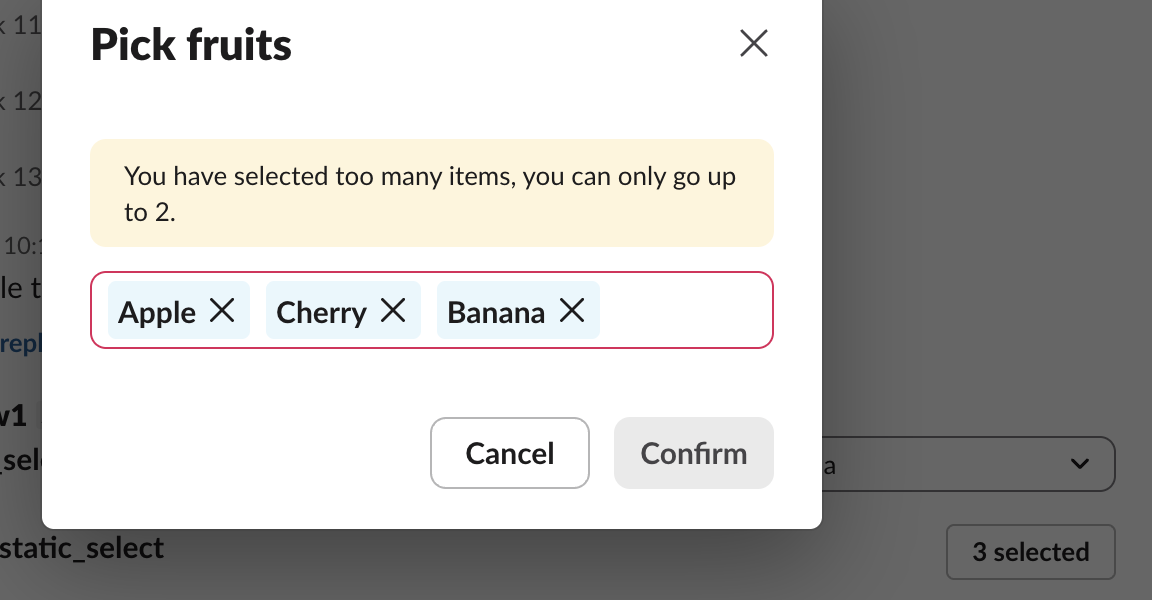
When we closed that dialog with Escape, no event reached the app, yet the button in the message read "3 selected" until we reopened it. Do not trust what the button says; trust the last block_actions you received.
Never appear "away" on Slack again
Cloud-based. No downloads. Works 24/7 even when your laptop is off.
How long the external options handler can take
The handler slept for a set time, then answered with options named after the query, so we could tell old results from new ones:
@app.options("pick_ext")
def ext_options(ack, body):
    time.sleep(DELAY)
    q = body.get("value") or "all"
    ack(options=[opt(f"{q} result {i}", f"{q}-{i}") for i in range(1, 6)])
We typed a new query each time and recorded the menu's text every 50 ms in the browser. Slack showed "Loading results…" under the old list at once. Times are from the last keystroke:
| Handler delay | What the user saw | Bolt for Python log |
|---|---|---|
| 0 s | New results at 995 ms | (nothing) |
| 1 s | New results at 2,118 ms | (nothing) |
| 2.5 s | New results at 3,613 ms | (nothing) |
| 2.9 s | New results at 4,015 ms | (nothing) |
| 3.1 s | Spinner gone at 4,002 ms, old results kept | ext_options didn't call ack() |
| 3.5 s | Spinner gone at 4,100 ms, old results kept | ext_options didn't call ack() |
Even a 0-second handler took about a second to show, because Slack waits for typing to pause before it asks your app. Past 3 seconds there was no error, no "No results", nothing. The menu dropped the spinner and kept the previous query's results under the new query:
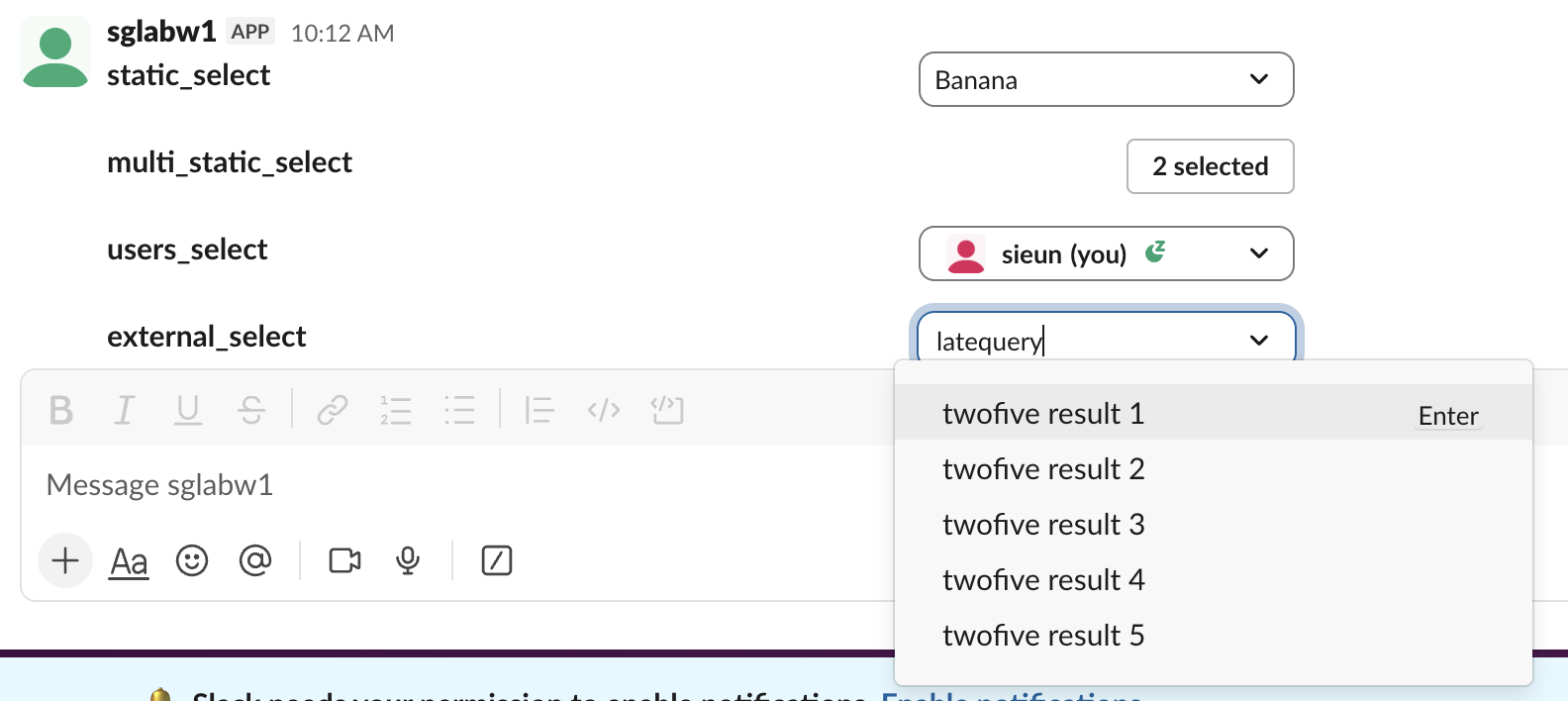
That is worse than an error, because a user can pick a result that does not match what they typed. Bolt for Python also gives up at 3 seconds and logs Unhandled request ({'type': 'block_suggestion', ...}). To rule out Bolt, we answered the same requests from a bare slack_sdk SocketModeClient with no timeout of its own. Answers at 2.9 s showed up; answers at 3.5 s and 5 s were ignored the same way. The 3 second limit is Slack's.
So keep the options handler under about 2.5 seconds: query an index or a cache, never a slow API, and return fewer, better matches.
Limits Slack enforced
| What we sent | Response |
|---|---|
static_select with 100 options | ok |
static_select with 101 options | invalid_blocks, [ERROR] no more than 100 items allowed [json-pointer:/blocks/0/accessory/options] |
| Option text of 76 characters | invalid_blocks, [ERROR] must be less than 76 characters [json-pointer:/blocks/0/accessory/options/0/text/text] |
| Option value of 151 characters | invalid_blocks, [ERROR] must be less than 151 characters [json-pointer:/blocks/0/accessory/options/0/value] |
external_select with an options array | invalid_blocks, [ERROR] invalid additional property: options [json-pointer:/blocks/0/accessory] |
| External handler returning 101 options | No error anywhere. The menu kept the previous query's results. |
| External handler returning 100 options | Shown |
So option text tops out at 75 characters and values at 150. The silent failure for 101 external options matches the timeout case: if your search can return more, cut the list to 100 before you ack.
To build these blocks by hand first, our Block Kit Builder guide shows the preview workflow, and the invalid_blocks guide explains how to read the json-pointer in each error.
Stop Jiggling Your Mouse.
Join hundreds of remote workers who never worry about their Slack status. Set it up once, stay green forever.
Related Articles
Slack chat.startStream: Streaming a Message, Timed and Tested
We streamed a bot reply into a Slack DM thread with chat.startStream, chat.appendStream and chat.stopStream, timed every call, screenshotted the thread mid-stream, and found how long an idle stream stays open.
Slack Plan and Task Card Blocks: Every Status, Update and Limit Tested
We posted a plan block with tasks in all four statuses and standalone task cards from a bot, updated them with chat.update, and probed the limits. pending works only inside a plan, and titles have no length limit we could find.
Slack views.update and views.push: Stack Limit, hash_conflict and response_action, Tested
We opened a Slack modal, pushed views until Slack refused, updated the top view with a current and a stale hash, and answered view_submission with every response_action. Every response and what the user saw.