
Slack Bot Token: How to Get One, and xoxb vs xoxp Explained
A Slack bot token starts with xoxb- and acts as your app's bot user. Get one by creating an app at api.slack.com/apps, adding bot scopes under OAuth & Permissions, installing the app, and copying the Bot User OAuth Token. How it differs from xoxp user tokens, xapp app-level tokens, xoxe rotation and xoxc session tokens.
A Slack bot token starts with xoxb- and lets your app act as its own bot user. To get one, create an app at api.slack.com/apps, open OAuth & Permissions, add Bot Token Scopes such as chat:write, click Install to Workspace, approve it, and copy the Bot User OAuth Token. A user token starts with xoxp- and acts as the person who approved it. Slack's docs recommend bot tokens for most apps, because they stay working even if the installing user is deactivated.
Some things only a user can do: a bot has its own presence and cannot set yours, for example. That is why tools that keep your own Slack dot green, like Slack Green, use your signed-in session rather than a bot token; the difference is covered in Slack xoxc and xoxd tokens.
How to get a Slack bot token
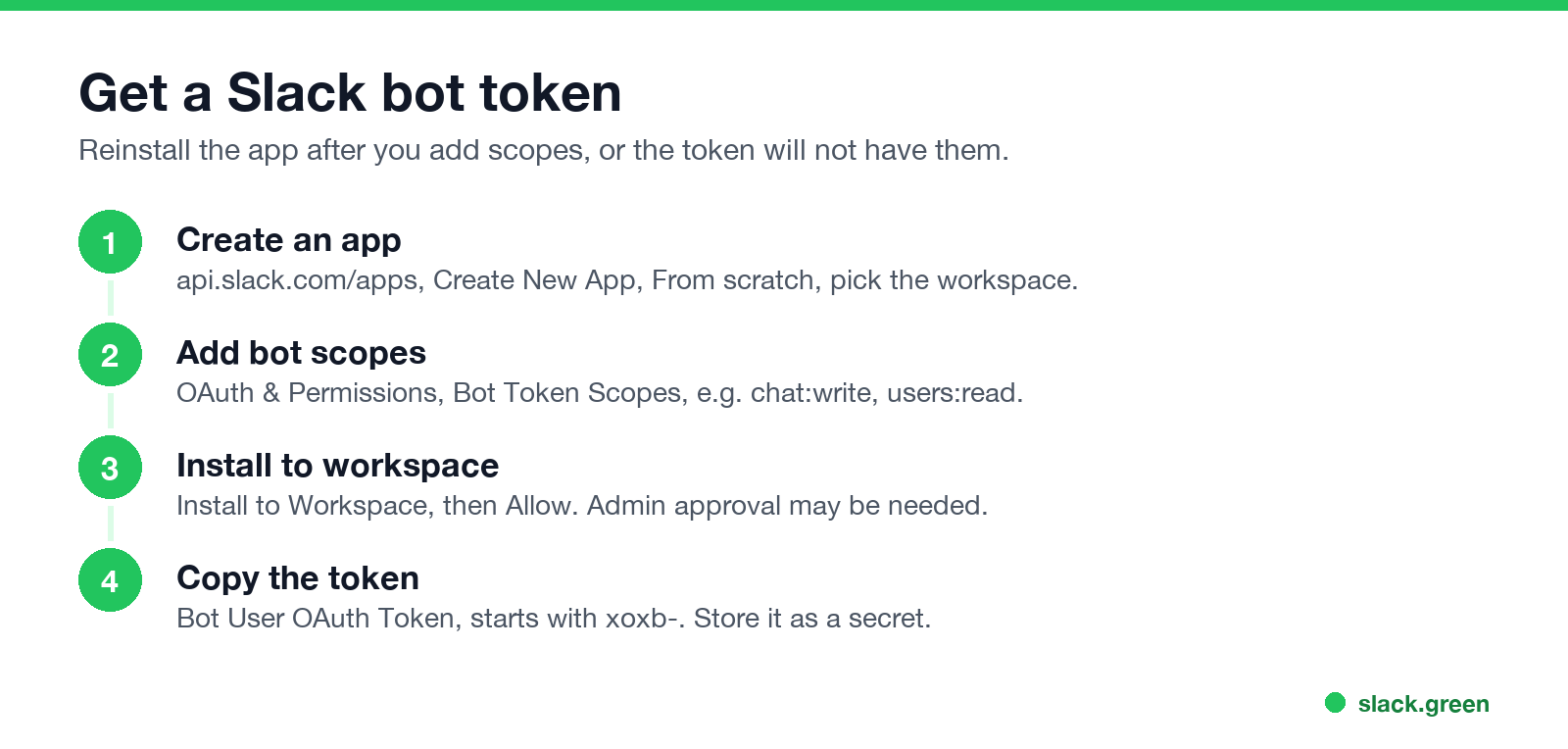
- Go to
api.slack.com/apps, click Create New App, choose From scratch, name it and pick the workspace. - Open OAuth & Permissions and add Bot Token Scopes, for example
chat:writeto post andusers:readto read people and presence. - Click Install to Workspace and Allow. Some workspaces require an admin to approve new apps.
- Copy the Bot User OAuth Token (
xoxb-...) and store it as a secret, never in code or a public repository. - Invite the bot to any channel it needs to post in:
/invite @your-bot.
When you add scopes later, reinstall the app so the token gets them.
Test it:
curl -s -H "Authorization: Bearer $SLACK_BOT_TOKEN" https://slack.com/api/auth.testSlack token types and prefixes
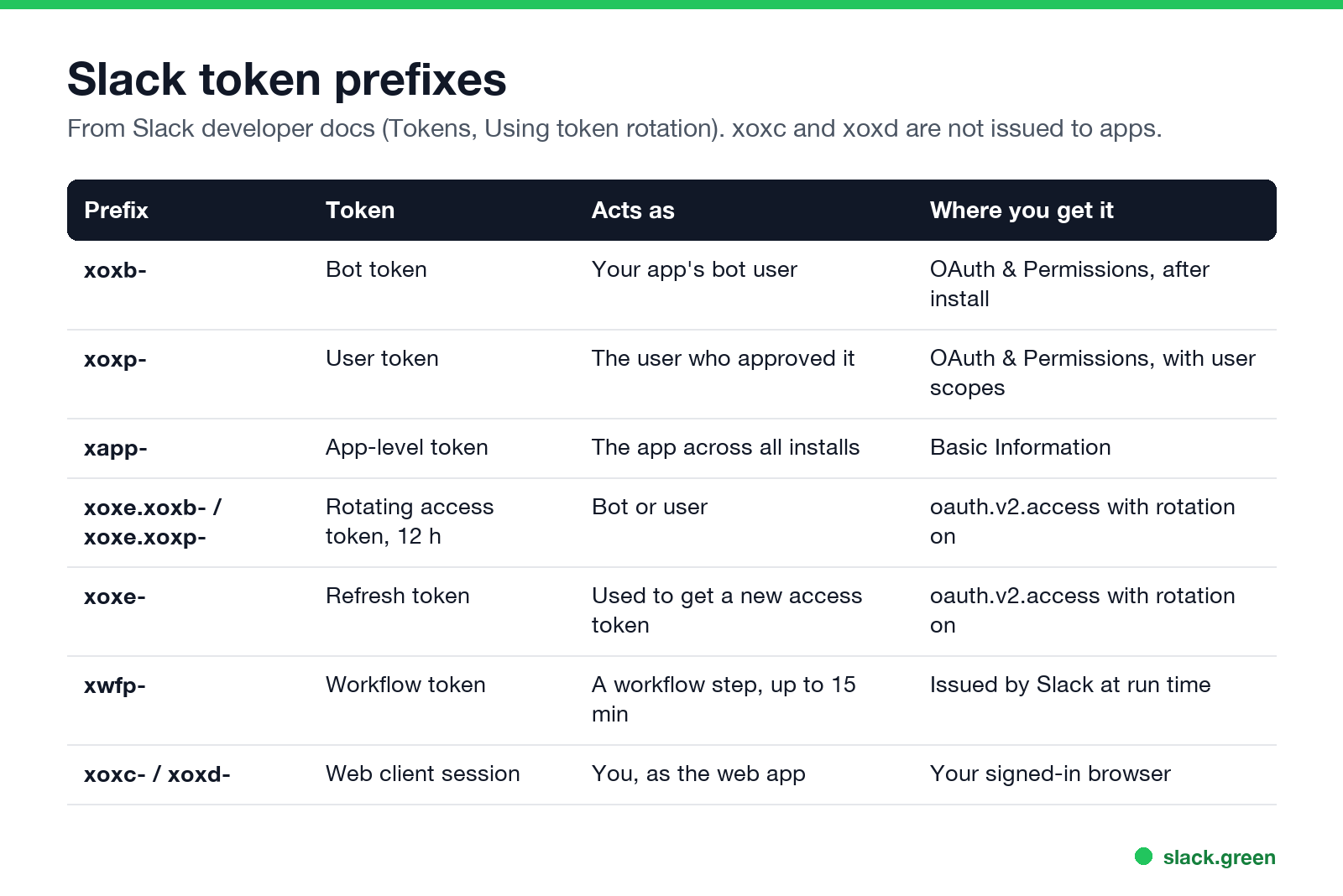
| Prefix | Token | Acts as |
|---|---|---|
xoxb- | Bot token | Your app's bot user |
xoxp- | User token | The user who approved the app |
xapp- | App-level token | The app across all its installs |
xoxe.xoxb-, xoxe.xoxp- | Rotating access token | Bot or user, expires after 12 hours |
xoxe- | Refresh token | Used to get a new access token |
xwfp- | Workflow token | A workflow step, for at most 15 minutes |
xoxc-, xoxd- | Web client session | You, as the Slack web app |
Slack's docs also describe configuration tokens for the App Manifest APIs and service tokens for apps built with the Deno Slack SDK.
xoxb vs xoxp
Slack पर फिर कभी "away" न दिखें
क्लाउड-आधारित। कोई डाउनलोड नहीं। लैपटॉप बंद होने पर भी 24/7 काम करता है।
users.profile.set for their own status.A user token also carries user scopes that the user approved. Slack's docs note that user token actions are performed as if by the user themselves.
xoxe tokens and token rotation
If you turn on token rotation in your app settings, oauth.v2.access returns an access token with an xoxe. prefix that expires after 43,200 seconds (12 hours), plus a refresh token starting with xoxe-. Call oauth.v2.access with grant_type=refresh_token before it expires to get a new pair.
xapp app-level tokens
App-level tokens start with xapp- and come from Basic Information in your app settings. They are for app-wide APIs, most often Socket Mode connections, not for posting messages.
Which token can set presence?
Slack पर फिर कभी "away" न दिखें
क्लाउड-आधारित। कोई डाउनलोड नहीं। लैपटॉप बंद होने पर भी 24/7 काम करता है।
users.setPresence sets the calling user's presence to away or auto, so with a user token it changes the user's own dot; a bot token changes the bot's. No token can force a user to active. Code and fields are in our Slack presence API guide.
FAQ
How do I get a Slack bot token?
Create an app at api.slack.com/apps, add bot scopes, install it to your workspace, and copy the Bot User OAuth Token from OAuth & Permissions.
What is the difference between xoxb and xoxp?
xoxb acts as your app's bot. xoxp acts as the user who approved the app.
Do Slack bot tokens expire?
Not unless you turn on token rotation; then access tokens expire after 12 hours and you refresh them.
What is an xoxe token?
With rotation on, xoxe. prefixes a short-lived access token and xoxe- starts the refresh token.
What are xoxc and xoxd tokens?
The web client's session token and cookie; see Slack xoxc and xoxd tokens.
माउस हिलाना बंद करें।
सैकड़ों रिमोट वर्कर्स अब Slack स्टेटस की चिंता नहीं करते। एक बार सेटअप करें, हमेशा के लिए हरे रहें।
Related Articles
Slack User Groups: How to Create, Mention and Manage Them
A Slack user group is a named list of people with one @handle, like @designers, that notifies all of them and can add them to up to 100 default channels. How to create one, who can, how to mention it, and how it differs from a channel.
How to Contact Slack Support: Form, Chat, Email and /feedback
To contact Slack support, open slack.com/help/requests/new and click Contact support, or use Help > Contact us inside Slack, or type /feedback in any message box. Email feedback@slack.com if you cannot sign in. Slack lists no support phone line. Response times by plan and what to include.
How to Make a Private Slack Channel Public, and Who Can
Open the channel, click its name, go to Settings, and choose Change to a public channel. By default only Workspace Owners, Org Owners and Org Admins can do it. The whole history and every file become visible to the workspace.