
How to Contact Slack Support: Form, Chat, Email and /feedback
To contact Slack support, open slack.com/help/requests/new and click Contact support, or use Help > Contact us inside Slack, or type /feedback in any message box. Email feedback@slack.com if you cannot sign in. Slack lists no support phone line. Response times by plan and what to include.
To contact Slack support, go to slack.com/help/requests/new and click Contact support, then pick a topic and describe the problem. Inside Slack, the same form opens from the Help menu under Contact us, and typing /feedback in any message box sends a note to Slack. If you cannot sign in at all, email feedback@slack.com. Slack's contact page offers no phone line for support; the phone and "Talk to sales" options on slack.com are for sales. Paid plans get 24/7 support, and Business+ and Enterprise+ get a 4-hour first response time.
Before you write in, check slack-status.com for an outage, and try the fix guides linked below. Many "Slack is broken" tickets are about the away status: Slack marks you away 10 minutes after your last input in its window, which is how it is designed. Slack Green keeps your dot green during the working hours you set, from the cloud.
Ways to reach Slack support
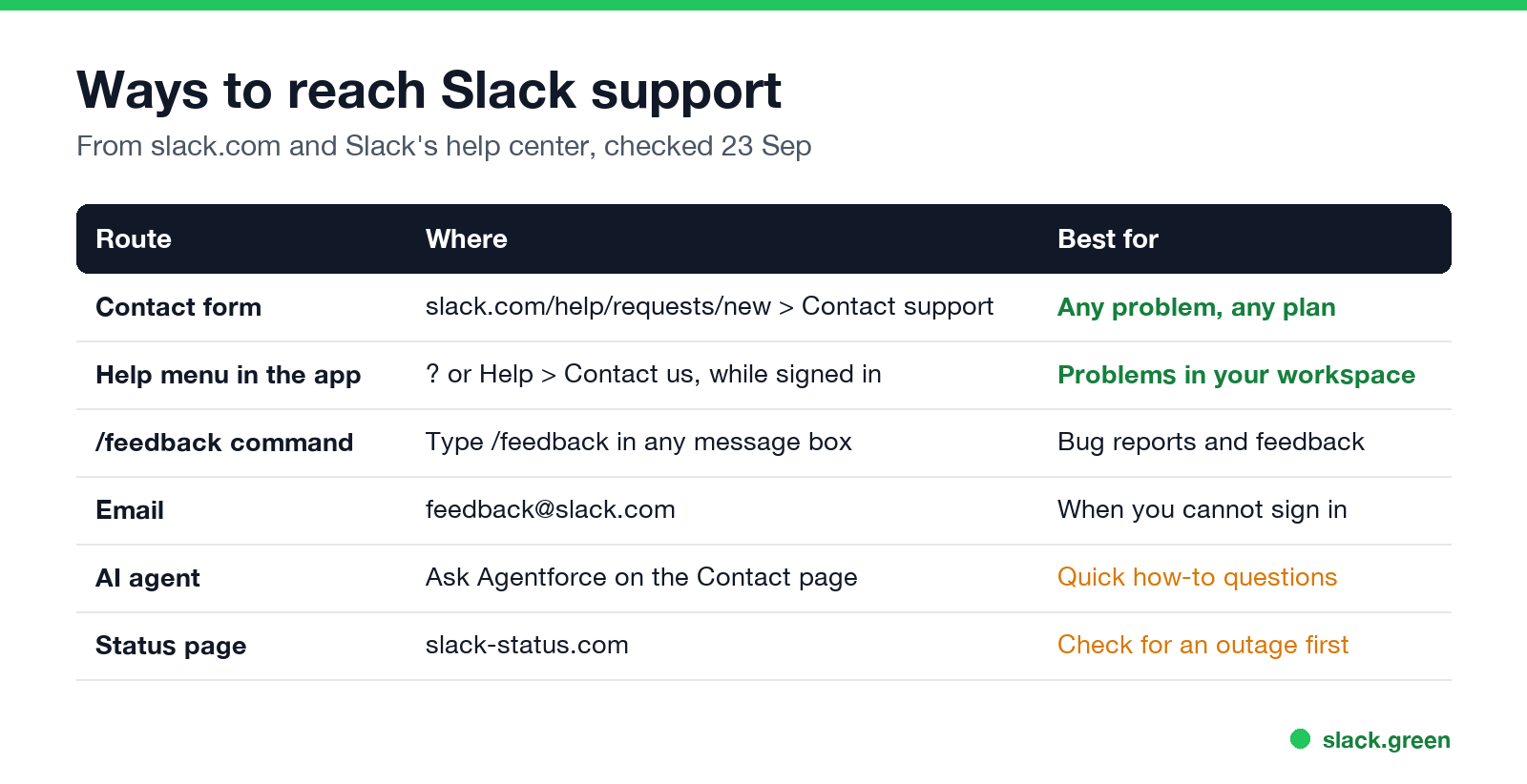
| Route | Where | Best for |
|---|---|---|
| Contact form | slack.com/help/requests/new, then Contact support | Any problem, on any plan |
| Help menu in Slack | Help (question mark), then Contact us | Problems in a workspace you are signed in to |
/feedback | Type it in any message box | Bug reports and feedback |
| feedback@slack.com | When you cannot sign in | |
| AI agent | Ask Agentforce on the Contact page | Quick how-to questions |
| Status page | slack-status.com | Checking for an outage first |
Slack's Contact page, checked on 23 September, offers two buttons: Ask Agentforce, an AI agent for support questions, and Contact support, the form that reaches a person. Every help center article also ends with the feedback@slack.com address for people who want a reply from the support team.
Slack support phone number
Slack does not list a phone number for customer support. The phone numbers people find online are for sales or legal matters, and Slack's own pages route support requests through the contact form and chat.
Slack live chat support
Slack पर फिर कभी "away" न दिखें
क्लाउड-आधारित। कोई डाउनलोड नहीं। लैपटॉप बंद होने पर भी 24/7 काम करता है।
When you are signed in to a paid workspace and open Contact support, the form can offer a chat with an agent as well as a message, depending on your plan and the topic. Free workspaces get the contact form and email. The plan limits are on slack.com/pricing:
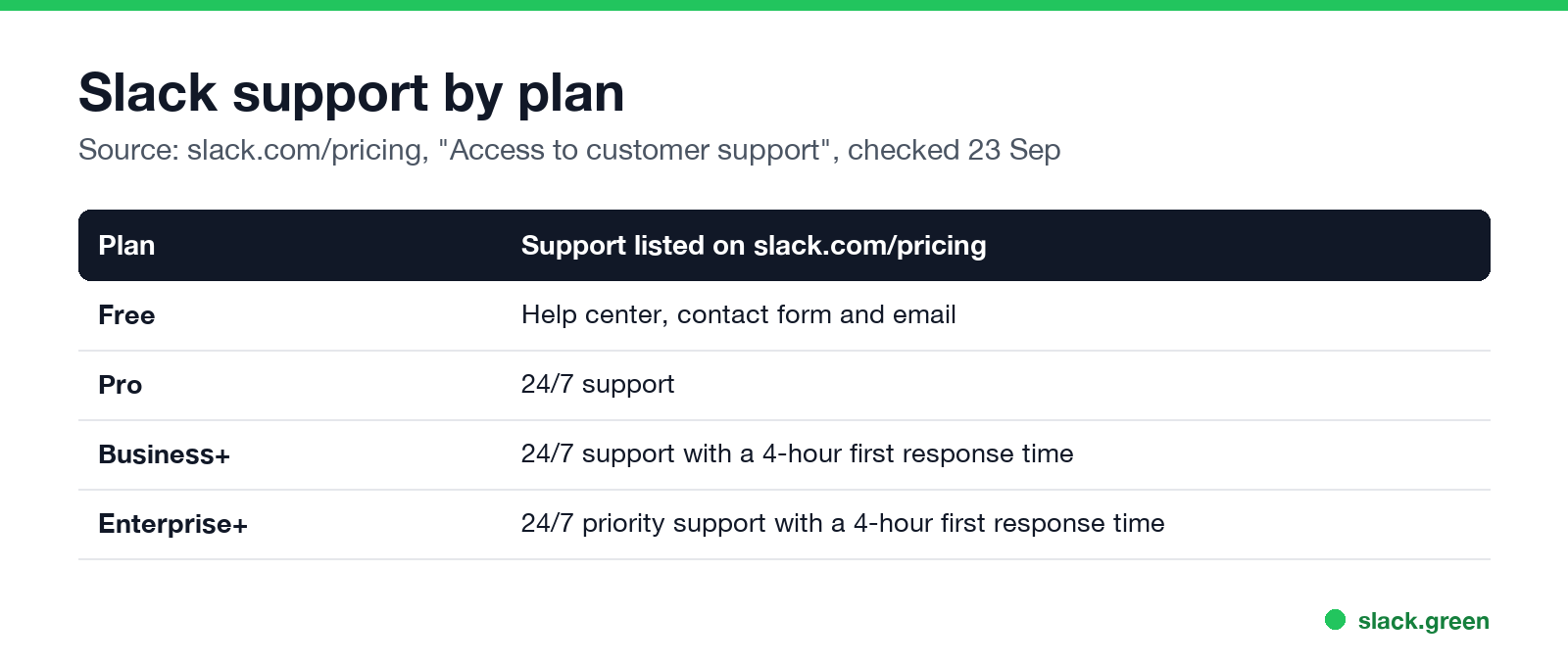
| Plan | Support listed on slack.com/pricing |
|---|---|
| Free | Help center, contact form and email |
| Pro | 24/7 support |
| Business+ | 24/7 support with a 4-hour first response time |
| Enterprise+ | 24/7 priority support with a 4-hour first response time |
If fast answers matter to your team, that is one reason to pay; see is Slack Pro worth it.
What to include in a Slack support request
- • Your workspace URL, such as
yourteam.slack.com. - • What you expected and what happened, in one or two sentences.
- • Device and app: desktop app, browser, iPhone or Android, and the version from Help > About Slack.
- • Steps to reproduce and the time it happened, with your time zone.
- • A screenshot or screen recording, with private messages cropped out.
- • Notifications not arriving: Slack notifications not working.
- • Slack keeps signing you out: Slack keeps logging me out.
- • Blank or white window: Slack desktop app blank screen, and how to clear Slack cache.
- • Huddles fail to connect: Slack huddle not working.
- • You show as away while working: Slack keeps showing away while working.
- • A deactivated account: can a deactivated Slack account be reactivated.
For account issues, write from the email address on the account. If the problem is a permission or a workspace setting, ask your workspace Owner or Admin first, because only they can change it.
Fix it before you write in
Most support requests have a known fix:
FAQ
Slack पर फिर कभी "away" न दिखें
क्लाउड-आधारित। कोई डाउनलोड नहीं। लैपटॉप बंद होने पर भी 24/7 काम करता है।
How do I contact Slack support directly?
Open slack.com/help/requests/new and click Contact support, or use Help > Contact us in the Slack app.
Does Slack have a customer service phone number?
Not for support. Slack handles support through its contact form, chat on paid plans, and email.
What is Slack's support email?
feedback@slack.com. Slack's help center articles list it for anyone who wants a reply from the support team.
Can free Slack users contact support?
Yes, through the contact form and email. 24/7 support is listed for paid plans.
How long does Slack support take to reply?
Business+ and Enterprise+ list a 4-hour first response time. Pro lists 24/7 support without a stated time.
माउस हिलाना बंद करें।
सैकड़ों रिमोट वर्कर्स अब Slack स्टेटस की चिंता नहीं करते। एक बार सेटअप करें, हमेशा के लिए हरे रहें।
Related Articles
Slack Lists Tutorial: Create, Organize and Share a List
Slack lists are tables of tasks inside Slack, with fields, assignees, due dates, a board view and a comment thread on every item. How to create a list from scratch or a template, set up fields, turn it into a kanban board, add messages to it, share it, and what the plan limits are.
Slack Jira Integration: Setup, /jira Commands and Notifications
Install the Jira Cloud for Slack app, type /jira connect in a channel to send a Jira space's updates there, /jira notify for personal notifications as DMs, and create work items from any message with More actions. Every /jira command, Jira automation to Slack, and fixes when previews or notifications stop.
How to Create a Slack Workspace, on Desktop or Phone
Go to slack.com/get-started, enter your email, type the confirmation code, and click Create a Workspace. It is free to start, you become the Primary Owner, and it takes about five minutes. Steps for desktop, iPhone and Android, and what to set up next.