
Slack Keeps Crashing? How to Fix It on Mac, Windows and Phone
Slack crashes or closes by itself for a handful of reasons: an old version, a corrupt cache, the graphics driver, broken app data, or on Android the System WebView. The fixes in order for Mac, Windows, iPhone and Android, with the commands to reset Slack without losing messages.
If Slack keeps crashing, update it first, then open Help > Troubleshooting > Clear Cache and Restart in the desktop app. Those two fix most crashes, because they replace the files that break: an old app build after an OS update, and cached data from a channel or file Slack cannot render. If Slack still closes by itself, turn off hardware acceleration, then reset the app data folder. None of these steps delete messages, which live on Slack's servers. On a phone, update Slack and restart the phone; on Android, also update Android System WebView.
A crash also drops your status. Slack shows you away when the app closes, and after 10 minutes with no input in the Slack window. Slack Green keeps your status green from a server during the hours you set, whether the app is open or not.
Why does Slack keep crashing?
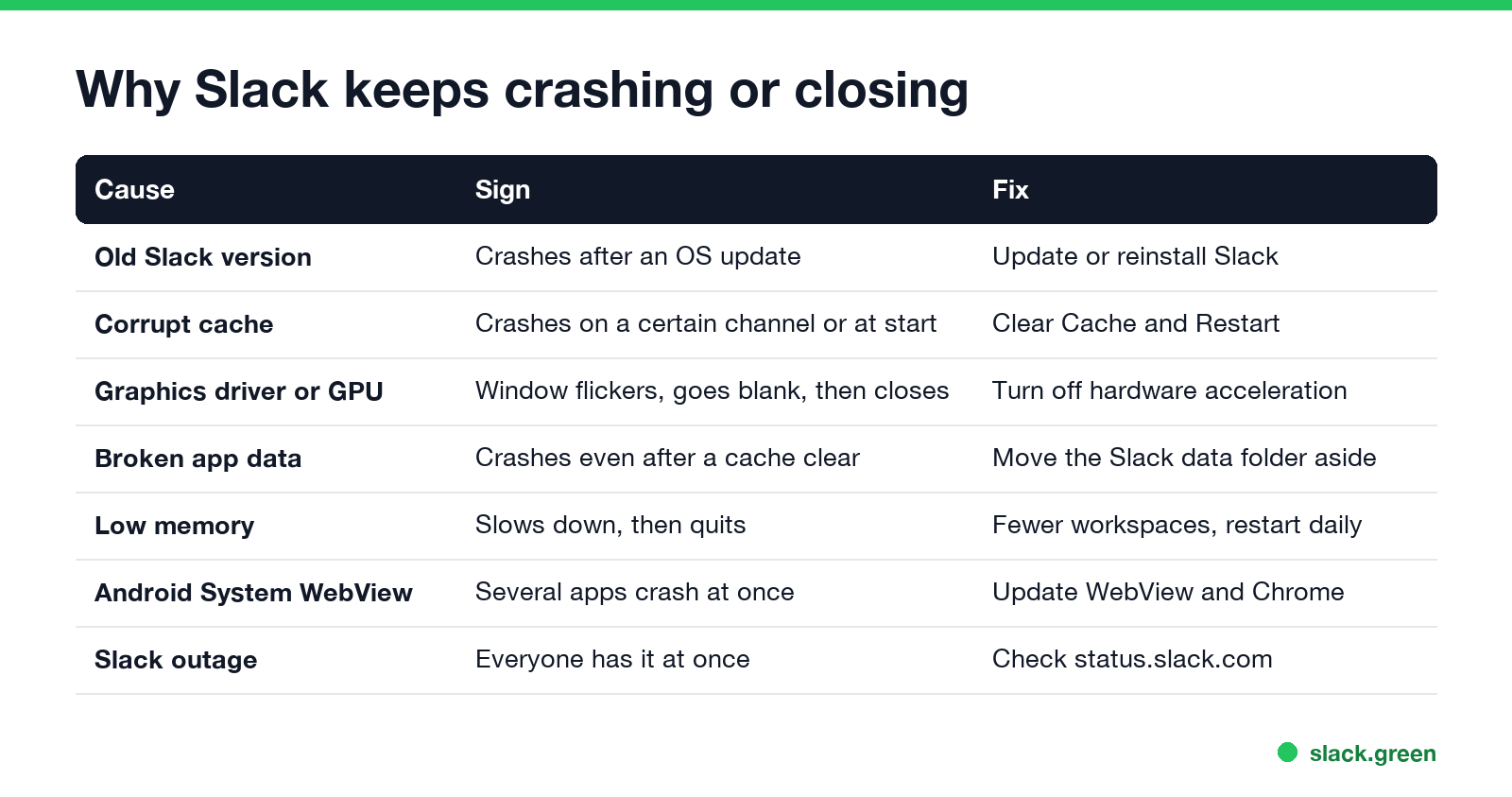
| Cause | Sign | Fix |
|---|---|---|
| Old Slack version | Crashes start after a macOS or Windows update | Update or reinstall |
| Corrupt cache | Crashes when you open one channel, file or at start | Clear Cache and Restart |
| Graphics driver or GPU | The window flickers or goes blank, then closes | Hardware acceleration off |
| Broken app data | Crashes even after clearing the cache | Reset the data folder |
| Low memory | Slack slows, stops responding, then quits | Fewer workspaces, restart it daily |
| Android System WebView | Several apps crash at the same time | Update WebView and Chrome |
| A Slack outage | Everyone on the team has it at once | Check status.slack.com |
The Slack desktop app is built on Electron, a copy of the Chrome engine. That is why graphics drivers and cached web data cause most desktop crashes, the same as in a browser. If Slack opens to a white or grey window instead of closing, see Slack desktop app blank screen.
Fix Slack crashing on Mac and Windows
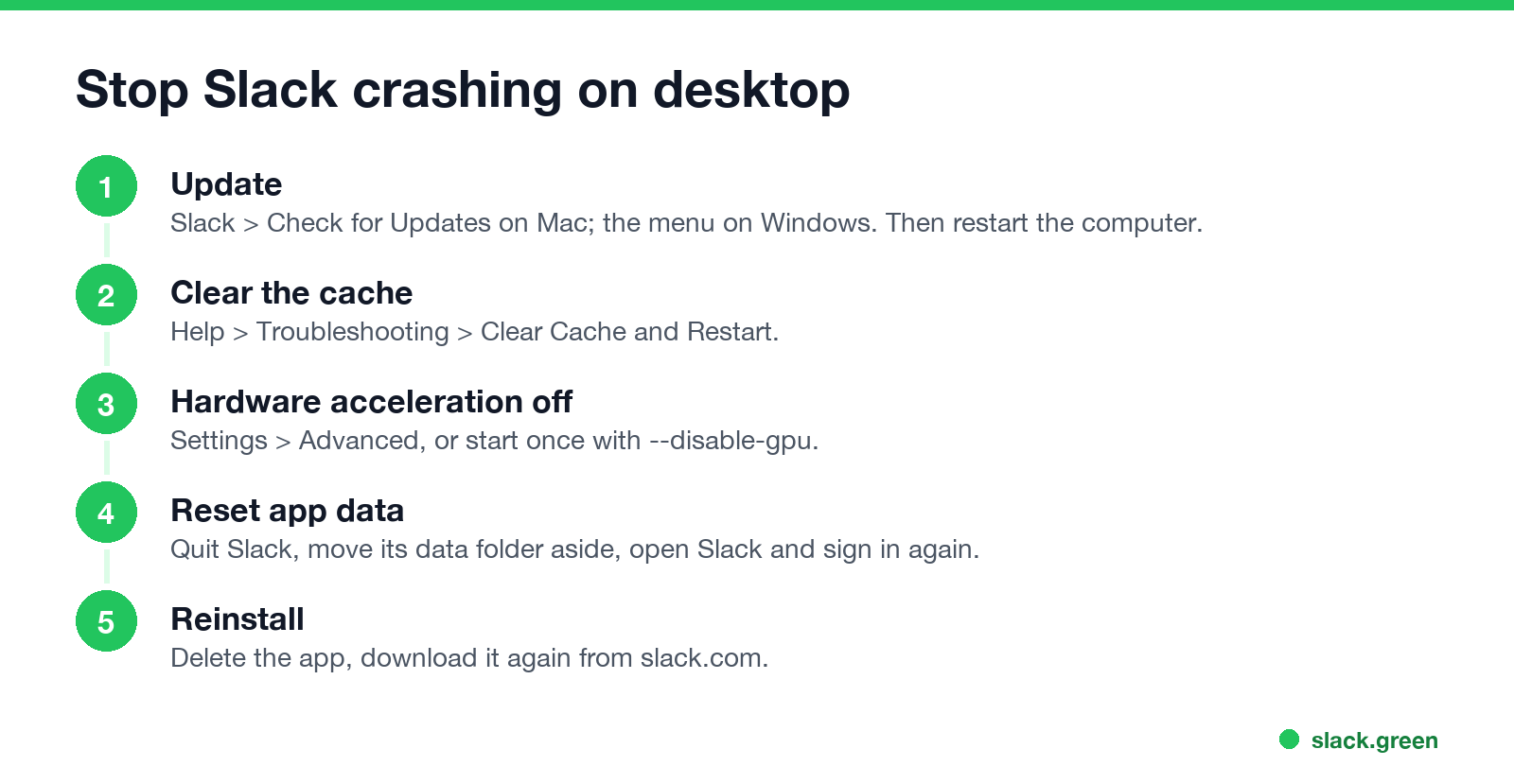
1. Update Slack and restart
On a Mac, click Slack > Check for Updates, or use the App Store if you installed it from there. On Windows, click the menu (three lines) in the top-left, then Help > Check for Updates. Then restart the computer, which clears a stuck Slack process that can crash the new window.
2. Clear Cache and Restart
In the menu bar, open Help > Troubleshooting > Clear Cache and Restart. Slack deletes its cached images and web data and reloads. If Slack crashes before you can reach the menu, use step 4.
3. Turn off hardware acceleration
Slack draws its window with the graphics card. With some drivers, external monitors or virtual machines this crashes or blanks the window. Look under Settings > Advanced for the hardware acceleration option and turn it off, then restart Slack. Slack stores the choice as useHwAcceleration in its local-settings.json file. To try it once without changing anything, start Slack with the GPU off:
# Mac: quit Slack, then start it once with the GPU off
osascript -e 'quit app "Slack"'
open -a Slack --args --disable-gpu
On Windows, run "%LOCALAPPDATA%\slack\slack.exe" --disable-gpu from the Run box (Win+R). If Slack stops crashing, the graphics driver is the cause; update it from your PC maker or GPU vendor.
4. Reset the Slack app data
When Slack crashes at start, before any menu opens, move its data folder aside. Slack builds a new one and asks you to sign in again. Your workspaces and messages come back from the server.
# Mac, Slack downloaded from slack.com
osascript -e 'quit app "Slack"'
mv ~/Library/Application\ Support/Slack ~/Desktop/Slack-data-backup
open -a Slack
If you installed Slack from the Mac App Store, the folder is ~/Library/Containers/com.tinyspeck.slackmacgap/Data/Library/Application Support/Slack.
# Windows, Slack installed from slack.com
Stop-Process -Name slack -ErrorAction SilentlyContinue
Rename-Item "$env:APPDATA\Slack" "Slack-data-backup"
Start-Process "$env:LOCALAPPDATA\slack\slack.exe"
The Microsoft Store version keeps its data under %LOCALAPPDATA%\Packages instead; reinstalling it resets it. Once Slack runs well for a day, delete the backup folder.
5. Reinstall Slack
Quit Slack, delete it (drag it to the Trash on a Mac, or Settings > Apps > Installed apps > Slack > Uninstall on Windows), and download it again from slack.com. A fresh install fixes a damaged app bundle, which an update cannot always do.
Slack not responding on Mac
Never appear "away" on Slack again
Cloud-based. No downloads. Works 24/7 even when your laptop is off.
A spinning wheel and "Slack (Not Responding)" in Force Quit usually means Slack is short of memory, not crashed. Each workspace you are signed in to runs its own set of web pages. Sign out of workspaces you rarely use, close large file previews, and quit Slack once a day. Why Slack uses so much memory, with numbers, is in why does Slack use so much memory.
To see whether macOS recorded a crash, open Console and look under Crash Reports, or list them in Terminal:
# newest Slack crash reports first; no output means macOS logged no crash
ls -t ~/Library/Logs/DiagnosticReports | grep -i slack | head
Slack's own logs are in ~/Library/Application Support/Slack/logs. Slack support asks for them if you open a ticket.
If Slack lags but does not close, the Mac-specific causes, including the Intel build running on Apple silicon, are in why is Slack so slow on Mac.
Slack app crashing on iPhone
- Update Slack in the App Store, and update iOS in Settings > General > Software Update.
- Restart the iPhone.
- If it crashes on one conversation, open Slack on a computer and check for a large file or a message with an unusual preview in it.
- Offload and reinstall: Settings > General > iPhone Storage > Slack > Offload App, then tap Reinstall App. Offloading keeps your sign-in data; deleting does not.
- Update Slack in the Play Store.
- Update Android System WebView and Chrome in the Play Store. Slack shows parts of its screens through WebView, and in March 2021 a bad WebView update crashed Gmail and many other apps at once until Google shipped a fix.
- Clear Slack's cache: Settings > Apps > Slack > Storage > Clear cache. Use Clear storage only if the cache does not help; it signs you out.
- Restart the phone.
Slack keeps crashing on Android
When it is not your device
Never appear "away" on Slack again
Cloud-based. No downloads. Works 24/7 even when your laptop is off.
If everyone on your team sees Slack crash or fail to load at the same time, check status.slack.com before you reset anything. Slack posts incidents there by feature (messaging, huddles, connections) and by region.
If Slack does not open at all rather than crashing after it opens, see Slack app not opening.
FAQ
Why does Slack keep crashing? Most often an old version or a corrupt cache. Update Slack, then use Help > Troubleshooting > Clear Cache and Restart.
Why does my Slack keep closing by itself? A graphics driver problem or low memory. Turn off hardware acceleration and quit Slack once a day.
Will resetting Slack delete my messages? No. Messages are on Slack's servers. Resetting the app data only signs you out on that device.
Why does Slack keep crashing on my iPhone? An old app or iOS version. Update both, restart, then offload and reinstall Slack.
Why does Slack keep crashing on Android? Often Android System WebView. Update WebView and Chrome, then clear Slack's cache.
Stop Jiggling Your Mouse.
Join hundreds of remote workers who never worry about their Slack status. Set it up once, stay green forever.
Related Articles
Slack Screen Sharing Not Working on Mac? Fix the Permission
On a Mac, Slack can share your screen in a huddle only with the Screen & System Audio Recording permission, and macOS applies it only after Slack restarts. The steps, what a wallpaper-only share means, how to reset the permission, and the browser case.
Why Is Slack So Slow on Mac? Causes and Fixes in Order
Slack slows down on a Mac when memory runs short, when you run the Intel build on Apple silicon, with many workspaces or animated emoji, or when the app has been open for days. How to check each one in Activity Monitor and Terminal, and the fix for each.
Slack App Not Opening? How to Fix It on Windows and Mac
When the Slack app will not open, it is usually already running with no window, or its window sits on a monitor you unplugged. End every Slack process and open it again. If that fails: reset the app data, reinstall, and check what the sign-in link does. Steps for Windows 11 and Mac.