
What Video Formats Does Slack Support? We Uploaded 8 Files
Slack played MP4, MOV, WebM and MKV videos in the message, including HEVC, VP9 and AV1 inside them, because it converts each one to H.264. An AVI file came out as a Binary download with no player. We also made a transcript of an uploaded video on the Free plan.
Slack plays MP4, MOV, WebM and MKV videos right in the message, and the video codec inside them barely matters: in our test it also played HEVC (H.265), VP9 and AV1, because Slack converts every video it accepts into H.264 for playback. AVI was the one format that failed. Slack labelled the AVI file Binary and showed a download card with no player. We uploaded 8 test videos to a Free plan workspace on 4 November 2026 and played each one in the Slack web app in Chrome.
Test results: which video files play in Slack
We made the same 10-second test video with sound in 7 container and codec pairs, plus a 24-second clip of speech, and uploaded them to one channel. For each file we read what Slack stored with the files.info API, and played it in the message.
| File | Video codec | What Slack called it | Thumbnail | Played in the message |
|---|---|---|---|---|
| clip.mp4 | H.264 | MPEG 4 Video | Yes | Yes, all 10 s |
| clip.mov | H.264 | QuickTime Movie | Yes | Yes, all 10 s |
| clip.mov | HEVC (H.265) | QuickTime Movie | Yes | Yes, all 10 s |
| clip.webm | VP9 | WebM | Yes | Yes, all 10 s |
| clip.mkv | H.264 | Matroska Video | Yes | Yes, all 10 s |
| clip.mp4 | AV1 | MPEG 4 Video | Yes | Yes, all 10 s |
| clip.avi | MPEG-4 Part 2 (Xvid) | Binary | No player | No, download only |
| speech.mp4 | H.264 | MPEG 4 Video | Yes | Yes, plus a transcript |
All 7 playable files reached the end with no error in the player. The AVI did not get a player at all.
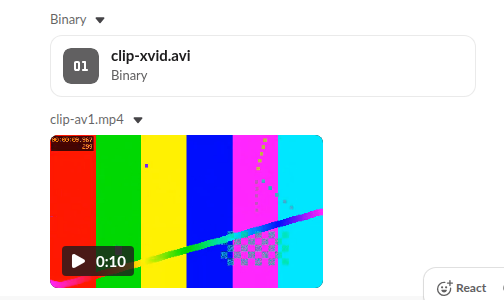
Why HEVC, VP9 and AV1 play: Slack converts them
Slack does not play your original file. For every video it recognised, files.info listed an HLS stream, which is the version the player loads. We decoded each stream's playlist, and every one of them, from the HEVC MOV, the VP9 WebM and the AV1 MP4 alike, said CODECS="avc1...", which is H.264 video with AAC audio. So the browser never has to decode HEVC or AV1 itself, and a format your browser cannot play can still play in Slack. The original file stays available under Download.
This also means a new video can show a thumbnail before it plays. Slack needs a moment to convert it, and in our test the stream of all 7 recognised videos was ready when we checked a minute after uploading.
Why a Slack video is not playing
If a video shows as a file card with a type like Binary and no play button, Slack did not recognise it as a video. That is what happened to our AVI, an older format that Slack treated as a plain file. Convert the file to MP4 with H.264 video and AAC audio, which every phone and editor can export, and upload it again.
If the player shows but the video will not start, the file itself is usually fine, because Slack plays its own H.264 copy. Reload Slack or try the web app in another browser. Our guide to Slack in the browser versus the desktop app covers the differences between the two. For animated GIFs, which follow other rules, see GIF not playing in Slack.
Never appear "away" on Slack again
Cloud-based. No downloads. Works 24/7 even when your laptop is off.
Slack can't upload a video
If the upload itself fails, the size is the most likely cause. Our 8 files were between 0.3 and 8.4 MB, far below the limit. The current limits for each plan are in our guide to the Slack file size limit. A video longer or larger than you need is easier to share as a link to the file in cloud storage.
Video transcripts and captions
Slack did not make a transcript by itself. Right after the upload, files.info said "transcription": {"status": "none"} for every video. On the speech clip, the player offered two buttons: Turn on captions for this video and Generate transcript. We clicked Generate transcript. A Transcript panel said "This usually takes up to a minute", and less than a minute later it showed the full text with a time for each sentence. The API then said "status": "complete" with "locale": "en-US". This worked on the Free plan.
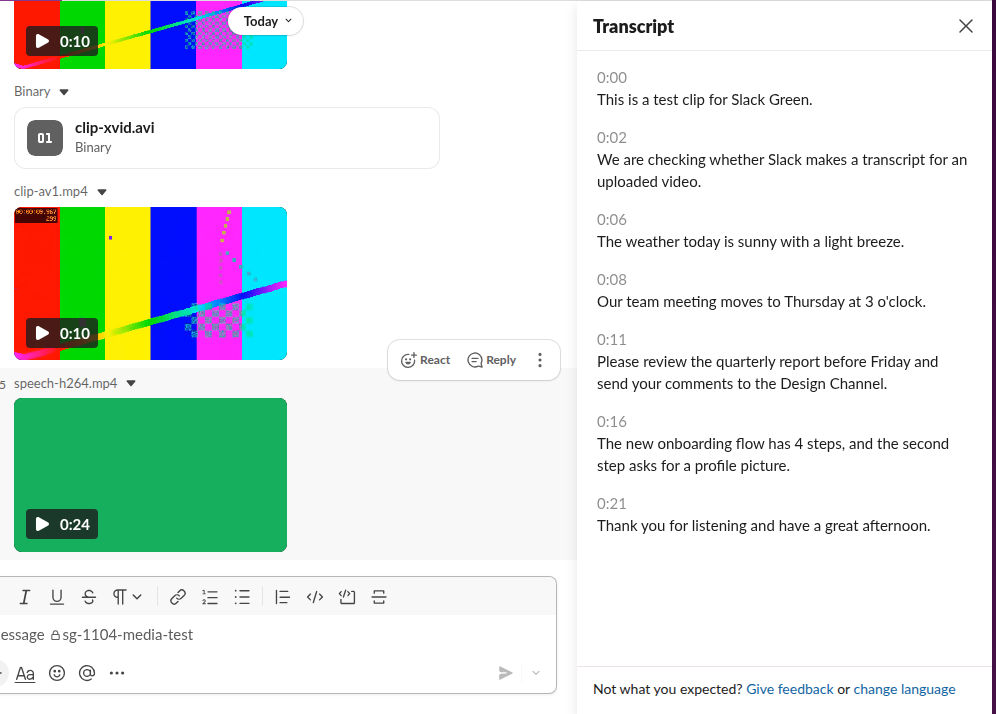
The transcript was close to word for word. It wrote "three o'clock" as "3 o'clock" and capitalised "Design Channel", but every sentence was there. To turn a transcript off, close the Transcript panel or the captions. The More actions menu on the video had Download, Share file, Copy link, Open in, Edit thumbnail, View details, Add to folder, Add to section and Delete file, and no item to delete only the transcript.
FAQ
What is the best video format for Slack?
MP4 with H.264 video and AAC audio. It played in our test, it is the format Slack converts everything else into, and it is the default export of almost every phone and video editor.
Can I upload a video from my iPhone?
iPhone videos are MOV files with HEVC video by default, and our HEVC MOV played normally in Slack. It got a thumbnail and played to the end.
Can I turn a video into a custom emoji?
Yes, if it is short. Our guide shows how to make a Slack emoji from a video as an animated GIF.
Stop Jiggling Your Mouse.
Join hundreds of remote workers who never worry about their Slack status. Set it up once, stay green forever.
Related Articles
How to Search for Images in Slack, Including Text Inside Them
To find an image in Slack, search, switch the results from Messages to Files and set File type to Images, or type type:images. We tested 6 images: Slack also found words written inside PNGs, but not inside JPGs.
Slack SDK for Rust: slack-morphism Tested (Post, History, Socket Mode)
Slack has no official Rust SDK. The community crate that works today is slack-morphism: on 5 November 2026 we used version 2.31.1 to post a message, page through history with a cursor and answer a mention over Socket Mode. Code and output below.
Slack Deep Links: Every slack:// Command in the Current App
A Slack deep link is a slack:// URL such as slack://channel?team=T123&id=C123 that opens the desktop or mobile app on a channel, person, file or setting. We read the handler in Slack's current code, listed the commands it accepts, and tested the https fallbacks.