
Slack channel_not_found: 7 Causes We Reproduced, With Fixes
channel_not_found means Slack cannot see the channel with the token you used: a wrong ID, a name that does not exist, a private channel the bot is not in, or a channel in another workspace. Each case tested on a real bot.
Slack returns channel_not_found when the channel you passed does not exist for the token you used. The usual causes are a mistyped or copied-wrong channel ID, a private channel the bot has not been invited to, a channel name that does not exist, and a channel ID from a different workspace. Private channels are the most common case: to a bot that is not a member, a private channel looks like it does not exist. We ran each cause on 29 September 2026 with a bot that had chat:write and chat:write.public, and recorded Slack's answer.
What each call returned
All calls were chat.postMessage with the same bot token. Every one returned HTTP 200 with "ok": false or "ok": true.
channel value we passed | What it was | Response |
|---|---|---|
C0C4RQXFPAX | A real ID with the last letter changed | channel_not_found |
C0C572NKD7U | A private channel, bot not invited | channel_not_found |
#w1-lab-private | That private channel by name | channel_not_found |
#general | A name no channel in this workspace has | channel_not_found |
#w1-lab-public after a rename | The old name of a renamed channel | channel_not_found |
C0AQB3JTWMQ | A channel ID from another workspace | channel_not_found |
D0B7D4VDCUD | A person's own DM with themselves | channel_not_found |
C0C4RQXFPAT | A public channel, bot not a member, before chat:write.public | not_in_channel |
#w1-lab-public | That public channel by name | not_in_channel |
C0C5106NNJX | An archived channel the bot was in | is_archived |
U0B7L4YK420 | A user ID | ok: true, sent to the app's DM with that user |
The body is the same for every channel_not_found:
{"ok": false, "error": "channel_not_found"}Two rows are worth knowing before you debug. Every workspace has a default channel, but it is not always #general; in our test workspace it is #all-slack, so #general failed. And a DM ID only works for the people in that DM. A bot cannot post into a DM between people; pass the person's user ID instead and Slack delivers it to the app's own DM with them.
Fix: use the channel ID from channel details
Names change and can be ambiguous. IDs do not. Open the channel, click its name at the top, and the ID is at the bottom of the About tab, with a copy button:
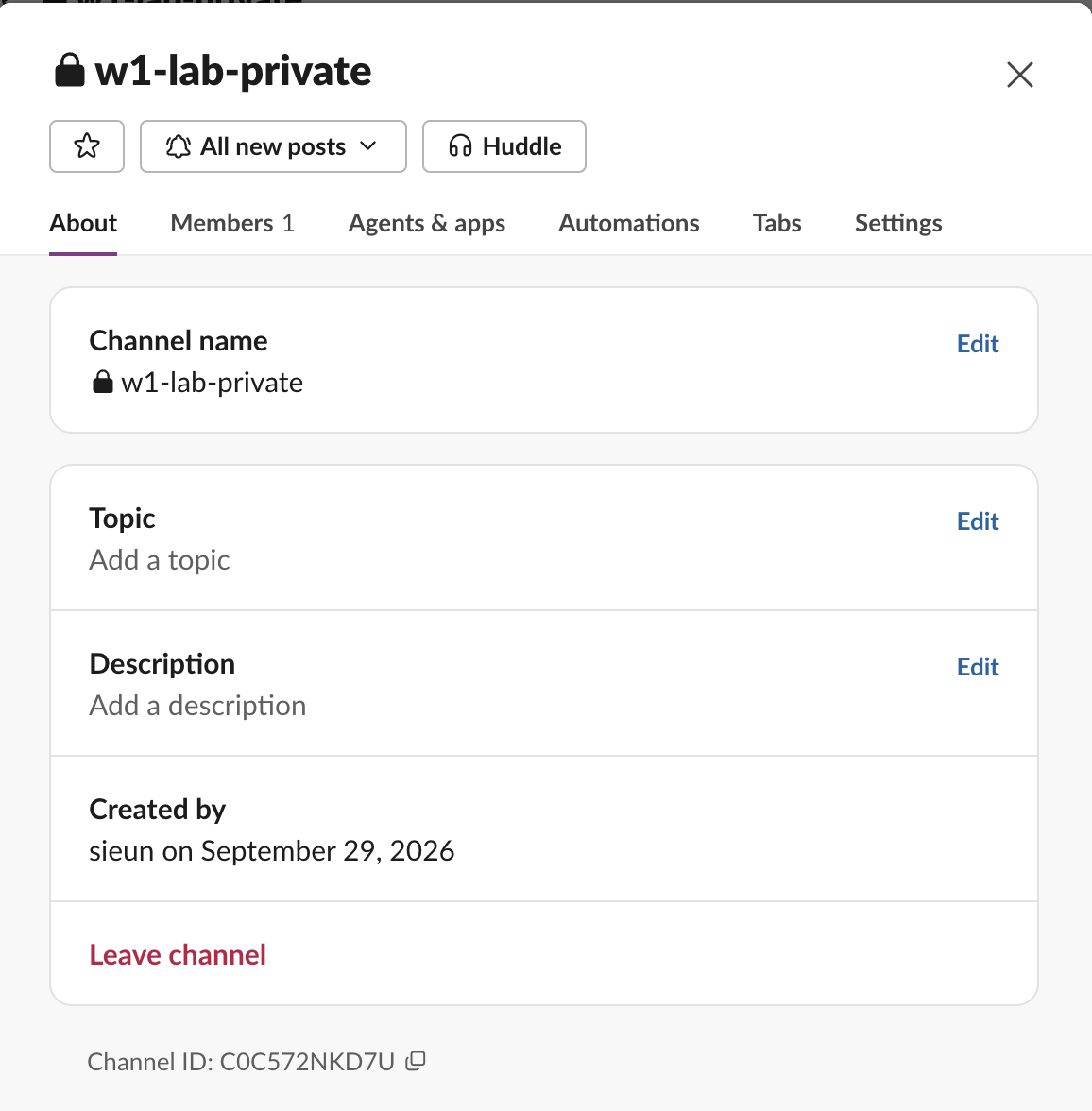
Public channel IDs start with C. Private channels created today also start with C; the lock icon, not the ID, tells you it is private. Paste the ID into the channel field and keep the name out of your config.
Fix: invite the bot to the private channel
Type /invite @YourApp in the private channel. After we did, the same call that returned channel_not_found returned ok: true. When we removed the bot again, the error came back. Adding scopes does not help: our bot had chat:write.public and groups:history, and the private channel still did not exist for it until the invite. The invite step, with screenshots, is in Slack not_in_channel.
Never appear "away" on Slack again
Cloud-based. No downloads. Works 24/7 even when your laptop is off.
Fix: match the token to the workspace
A bot token belongs to one workspace install. The ID C0AQB3JTWMQ is a real channel in another workspace, and our token got channel_not_found. If your app is installed in several workspaces, store the token and the channel ID as a pair, and check auth.test: its team_id must be the workspace that owns the channel.
When the SDK says channel not found
The Python and Node SDKs raise the same error string. In Python, slack_sdk raises SlackApiError and the code is in e.response["error"]:
from slack_sdk.errors import SlackApiError
try:
    client.chat_postMessage(channel=channel_id, text="hi")
except SlackApiError as e:
    print(e.response["error"])
Run against our private channel with slack_sdk 3.44.1, it printed channel_not_found.
Other services that post to Slack, such as Zapier or CI plugins, pass the same response through. The fix is the same: use the ID, and invite their bot to private channels. For the error you get when the token lacks a permission instead, see missing_scope.
FAQ
Why does the channel exist in Slack but the API says channel_not_found? Because the token cannot see it. A private channel is invisible to a bot that is not a member, and a channel in another workspace is invisible to this workspace's token.
Does conversations.join fix channel_not_found?
Not for private channels. Our bot called conversations.join on the private channel and got channel_not_found back. Only an invite from a member works.
Can I post to a channel by name?
For public channels, yes: #w1-lab-public reached the channel and gave the same result as the ID. Store the ID anyway. We renamed the channel, and a post to the old name #w1-lab-public returned channel_not_found, while the ID kept working.
Stop Jiggling Your Mouse.
Join hundreds of remote workers who never worry about their Slack status. Set it up once, stay green forever.
Related Articles
Slack Member ID: Where to Copy It, and What the U Means
A Slack member ID is the U... code that identifies a person. Copy it from their profile under the three-dot menu, or look it up with users.info and users.list. Tested in two workspaces, with the ID formats we found.
Slack API Rate Limits: What We Hit, and the 429 You Get Back
Slack answers too many calls with HTTP 429 and a Retry-After header. We burst chat.postMessage, conversations.history and an incoming webhook from an internal app and logged every response: where the 429s started, the bodies, and a retry loop that never hit one.
Slack files.upload Deprecated: The 3-Step Upload That Replaces It
files.upload now returns method_deprecated. Use files.getUploadURLExternal, POST the bytes, then files.completeUploadExternal, or files_upload_v2 in the SDK. Tested with curl and Python, including two silent failures.