
Slack Fallback Text: What Notifications Show When You Send Blocks
We sent 11 bot messages with different text and blocks combinations to a Slack DM and recorded the notification Slack asked the browser to show for each. Blocks win, text is the fallback, and Slack fills in text when you leave it out.
Slack's fallback text is the top-level text field you send with chat.postMessage next to your blocks. Since 13 July 2026, Slack's changelog says desktop notifications take their text from the blocks first and use text only when the blocks hold no text they can read. Mobile push notifications still use message.text only. On 3 October 2026 we sent 11 messages from a test bot to a DM in our own workspace and recorded the exact notification body Slack produced for each one.
How we captured the notification text
We tested in Slack's web client at app.slack.com, opened on a different channel so a new DM would notify. The Mac app on our test machine is not signed in to the test workspace, so we have no macOS banner to show. The browser had not granted notification permission either, so we replaced the browser's Notification class with a recorder before the messages arrived. Slack's own code then called it with the title and body it wanted to show:
window.__notifs = [];
class RecNotification extends EventTarget {
  constructor(title, opts) {
    super();
    window.__notifs.push({ title, body: opts && opts.body, tag: opts && opts.tag });
  }
  close() {}
  static get permission() { return 'granted'; }
  static requestPermission(cb) { if (cb) cb('granted'); return Promise.resolve('granted'); }
}
window.Notification = RecNotification;
Clicking Slack's "Enable notifications" banner after that produced Slackbot's test notification, "Nice, notifications are enabled!", so the hook was live. Our workspace pauses notifications on weekends, so we ended the pause with dnd.endDnd for the test and typed /dnd off afterwards, which answered "I've turned scheduled Do Not Disturb back on for you."
What each message shape produced
Every message went to the same DM from a bot token. The title was "New message from sglabw1" every time. The body:
| Case | What we sent | Notification body |
|---|---|---|
| A | text only | A text only: deploy finished in 42 s |
| B | text: "TEXT field: build 812 failed" and a section block that says it passed | BLOCKS: build 812 passed on retry |
| C | section block, no text | C blocks only: deploy 813 is live |
| D | image block and text | D TEXT field: chart attached |
| E | header block and section block, plus text | E header: Incident 77 (new line) E section: API latency back to normal |
| F | rich_text block with a bold part, plus text | F rich text: bold part |
| G | actions block with one button, plus text | G TEXT field: approve PTO? |
| H | section with two fields, plus text | H field 1 (new line) H field 2 |
| I | section with <@U...>, a labelled link and :tada: | I: @sieun review the release notes 🎉 |
| J | image block with alt_text, no text | J alt only |
| K | text: "" and a section block | K empty text string, blocks say hello |
Case B is the one that bites. The notification said the build passed while text said it failed. If your text and blocks disagree, desktop users now read the blocks version in the banner, and mobile users read the text version.
Slack strips the markup on the way. *passed* lost its asterisks, the user ID became @sieun, the link became its label, and :tada: became the emoji. Header and section text were joined with a line break, and so were section fields.
When no block has readable text, Slack used text. That happened for the image block in D (its alt text was not used) and for the button in G (the button label was not used).
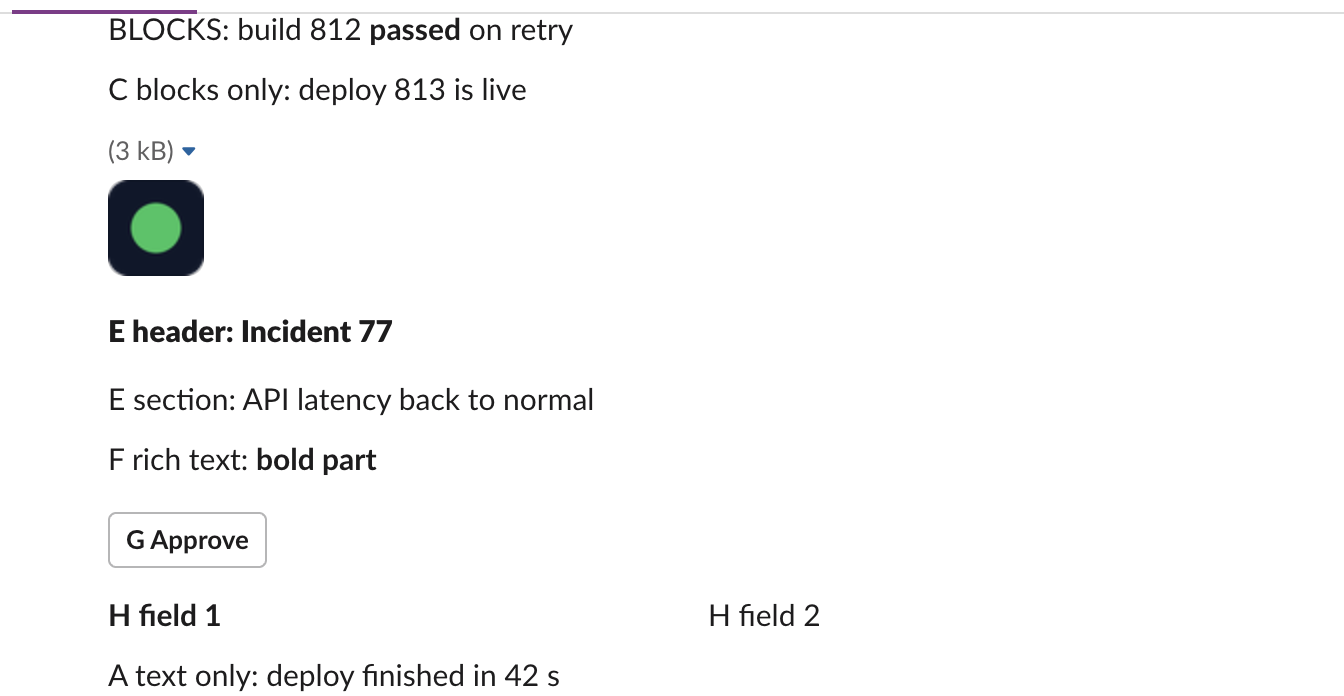
This is how the messages looked in the DM. The message from case B shows only the blocks; its text value "build 812 failed" appears nowhere:
Never appear "away" on Slack again
Cloud-based. No downloads. Works 24/7 even when your laptop is off.
Slack fills in text when you leave it out
The API response shows what Slack stored as message.text. For C, J and K we sent no text or an empty string, and Slack stored text built from the blocks:
| Case | text we sent | message.text Slack stored |
|---|---|---|
| C | (none) | C blocks only: deploy 813 is live |
| J | (none) | J alt only (the image's alt text) |
| K | "" | K empty text string, blocks say hello |
| I | I TEXT field | I TEXT field |
So a blocks-only message still gives mobile push a text to show, and J explains why its desktop banner read "J alt only": the image block had no text, so Slack used the text it had generated from the alt text. We did not test a phone, so the mobile column of this rule comes from the changelog only.
The missing text warning
The Web API itself returned no warning for the blocks-only messages. Every response for C, J and K was a plain {"ok": true, ...}. The warning comes from Slack's Python SDK, on your side, before the request leaves. This is what slack_sdk 3.45.0 printed for a blocks-only chat_postMessage:
UserWarning: The top-level `text` argument is missing in the request payload for a chat.postMessage call - It's a best practice to always provide a `text` argument when posting a message. The `text` argument is used in places where content cannot be rendered such as: system push notifications, assistive technology such as screen readers, etc.
  warnings.warn(missing_text_message, UserWarning)
ok True stored text: 'L slack_sdk call with blocks and no text'
The message still posted. To silence the warning, pass text, and make it say the same thing as the blocks in one sentence:
client.chat_postMessage(
    channel=channel_id,
    text="Build 812 passed on retry",
    blocks=[{"type": "section", "text": {"type": "mrkdwn", "text": "Build 812 *passed* on retry"}}],
)
If you need the full block JSON rules, our Slack invalid_blocks error guide lists the errors Slack returns, and the message length limits page covers how long text can be.
Stop Jiggling Your Mouse.
Join hundreds of remote workers who never worry about their Slack status. Set it up once, stay green forever.
Related Articles
Slack chat.startStream: Streaming a Message, Timed and Tested
We streamed a bot reply into a Slack DM thread with chat.startStream, chat.appendStream and chat.stopStream, timed every call, screenshotted the thread mid-stream, and found how long an idle stream stays open.
Slack Plan and Task Card Blocks: Every Status, Update and Limit Tested
We posted a plan block with tasks in all four statuses and standalone task cards from a bot, updated them with chat.update, and probed the limits. pending works only inside a plan, and titles have no length limit we could find.
Slack views.update and views.push: Stack Limit, hash_conflict and response_action, Tested
We opened a Slack modal, pushed views until Slack refused, updated the top view with a current and a stale hash, and answered view_submission with every response_action. Every response and what the user saw.