
Slack Progress Bar: Block Kit, Emoji and chat.update, Tested
Block Kit has no progress bar element, so a Slack progress bar is text you redraw with chat.update. We drew one three ways on 9 November 2026, timed every update, and pushed chat.update until Slack answered ratelimited.
Slack's Block Kit has no progress bar element, so a progress bar in a Slack message is text that your bot redraws with chat.update as the work moves on. Post the message once, keep its ts, and edit it after each step. On 9 November 2026 we drew a bar three ways (block characters, block characters inside a code span, and square emoji), updated each one 10 times, and timed the calls. A 20-character bar of █ and ░ read best. Each update took 0.17 to 0.36 s, and chat.update first answered ratelimited after about 170 edits in 6 seconds.
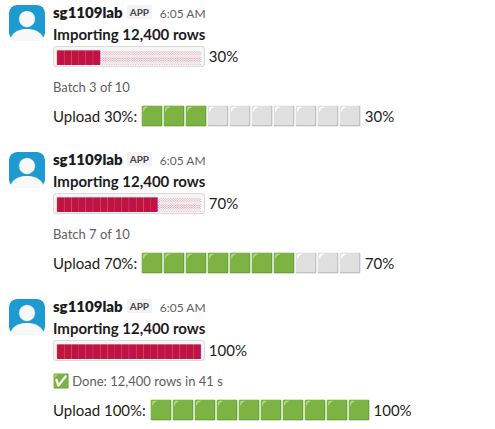
The snapshots above are one message at 30%, 70% and done. The top bar sits in a section block with a context block under it for the batch counter. The emoji bar below it is a second message.
The three styles
| Style | Text we sent at 70% | How it looked | Note |
|---|---|---|---|
| Block characters | ██████████████░░░░░░ 70% | A solid bar in the normal text color | Our pick. Works in text, in mrkdwn and in notifications |
| Block characters in a code span | the same, wrapped in backticks | A red bar on a light box | Slack colors inline code red, so the bar looks like an error |
| Square emoji | :large_green_square: x7 and :white_large_square: x3 | Big green squares | Wider than the text bar at 10 steps, and every step costs about 20 characters of shortcode |

We first wrapped the bar in backticks to keep the characters even in width. The bar turned red, the color Slack uses for inline code. Without backticks the bar keeps the text color and the block characters are already even.
The script
This is the whole script we ran on our Linux server with slack_sdk. It needs a bot token with chat:write and the bot in the channel:
import os, time
from slack_sdk import WebClient

client = WebClient(token=os.environ["SLACK_BOT_TOKEN"])
channel = os.environ["CHANNEL_ID"]

def bar(pct, width=20):
    filled = round(width * pct / 100)
    return "█" * filled + "░" * (width - filled) + f" {pct}%"

msg = client.chat_postMessage(channel=channel, text="Export: " + bar(0))
for pct in range(10, 101, 10):
    time.sleep(1)  # stands in for one batch of real work
    t0 = time.time()
    client.chat_update(channel=channel, ts=msg["ts"], text="Export: " + bar(pct))
    print(f"{pct:3d}%  chat.update {time.time() - t0:.2f} s")
Its output:
 10%  chat.update 0.17 s
 20%  chat.update 0.17 s
 30%  chat.update 0.17 s
 40%  chat.update 0.17 s
 50%  chat.update 0.17 s
 60%  chat.update 0.17 s
 70%  chat.update 0.17 s
 80%  chat.update 0.17 s
 90%  chat.update 0.17 s
100%  chat.update 0.17 s
From our Mac in Seoul the same calls took 0.32 to 0.36 s. Either way, the update is fast next to any real batch of work. Put the chat.update call after each batch, not on a timer, so the bar never moves ahead of the job. Our chat.update guide covers the other fields you can change in an edit.
The Block Kit version
For a bar with a title and a status line, send blocks and still set text, which Slack uses for notifications and screen readers:
[
  { "type": "section", "text": { "type": "mrkdwn", "text": "*Importing 12,400 rows*\n██████████████░░░░░░ 70%" } },
  { "type": "context", "elements": [ { "type": "mrkdwn", "text": "Batch 7 of 10" } ] }
]
Pass the new blocks to chat.update each time. Slack replaces the whole message, so send every block again, not only the changed one. The Block Kit Builder guide is the quickest way to try a layout before you code it.
Never appear "away" on Slack again
Cloud-based. No downloads. Works 24/7 even when your laptop is off.
When chat.update gets rate limited
We sent 60 updates to one message one after another: all 60 returned ok in 20.7 s, about 3 a second. Then we sent 200 updates from 10 threads at once. 199 returned ok; update number 170, 5.8 s in, got "error": "ratelimited" with a Retry-After: 10 header.
So a bar that updates once a second, or once per batch, is far below the limit. If you update from many workers at once, catch ratelimited, wait the Retry-After seconds, and send only the newest value. A skipped step does not matter for a progress bar.
Make the end state clear
When the job finishes, replace the bar with the result (row count, time, a link to the output), or add a context line with a check mark as in our 100% snapshot. If the job fails, edit the message to say so. A bar stuck at 60% reads as "still running". An edit does not notify anyone, so if people should know the job ended, post a short reply in the thread as well.
FAQ
Can a webhook update its progress bar?
No. An incoming webhook returns only ok and no ts, and chat.update cannot edit a webhook's message, as our webhook vs bot token test shows. Use a bot token.
Does editing the message show "(edited)"?
Slack shows "(edited)" on messages a person edits. Our bot's updated messages showed no label.
Can I show a bar in a modal?
Yes, the same text works in a modal's section block, and you redraw it with views.update instead of chat.update. We did not time that path.
Stop Jiggling Your Mouse.
Join hundreds of remote workers who never worry about their Slack status. Set it up once, stay green forever.
Related Articles
Slack File Block: Post Remote and Uploaded Files in Block Kit
A Slack file block shows a file card inside a message. It takes source "remote" plus an external_id or file_id, and the file must exist first. We added remote files with files.remote.add, posted them in file blocks, and tried the mistakes, on 7 November 2026.
Slack Video Block: Which URLs Work, Tested With Real Errors
A Block Kit video block needs video_url, thumbnail_url, title and alt_text, and its video_url must be an embeddable player URL on a domain your app claims. We made 26 posts with a bot token on 7 November 2026; a YouTube /embed/ URL worked with no setup, and every other host needed claimed unfurl domains plus a reinstall.
Slack Channel Welcome Message: A Tested Bot and the Free-Plan Catch
Slack has no built-in welcome message per channel, and Workflow Builder is closed to Free workspaces. A 30-line Bolt app that listens for member_joined_channel does the job on any plan. We ran it on 9 November 2026 and timed the welcome.