
Winston to Slack: winston-slack-webhook-transport Tested (Plus Pino)
winston-slack-webhook-transport sends winston logs to a Slack incoming webhook: add it as a transport with webhookUrl and level error. We ran version 2.3.7 with winston 3.19 on Node 22 on 7 November 2026, sent 50 errors at once, and found two things the README does not say: the burst arrived out of order, and Error stacks need format.errors.
winston-slack-webhook-transport is a winston transport that posts log entries to a Slack incoming webhook. Install it, add it to your logger with webhookUrl and level: "error", and every error you log becomes a Slack message, while lower levels stay in your other transports. On 7 November 2026 we ran version 2.3.7 (released 27 October 2026) with winston 3.19.0 on Node.js 22.23.4 in Docker, against a webhook in a test workspace. It worked, with two catches: a burst of errors arrived in Slack out of order, and an Error object lost its stack until we added format.errors. We also tried a pino transport.
Install
npm i winston winston-slack-webhook-transportYou need an incoming webhook URL; our guide to creating a Slack webhook shows where to get one. Keep it in an environment variable.
The logger we ran
const winston = require("winston");
const SlackHook = require("winston-slack-webhook-transport");

const logger = winston.createLogger({
  level: "info",
  transports: [
    new winston.transports.Console(),
    new SlackHook({
      webhookUrl: process.env.SLACK_WEBHOOK_URL,
      level: "error",
      formatter: (info) => ({
        text: `:rotating_light: *${info.level.toUpperCase()}* ${info.message}`,
      }),
    }),
  ],
});

const mode = process.argv[2];
if (mode === "one") {
  logger.info("this INFO line stays in the console");
  logger.error("Payment webhook failed for order 1042");
  logger.error(new Error("Nightly job crashed"));
} else if (mode === "burst") {
  for (let i = 1; i <= 50; i++) logger.error(`burst ${i} of 50 (winston)`);
}
formatter returns the webhook body, so anything Slack accepts in a webhook payload works here, including blocks. We kept text with Slack's own mrkdwn (*bold*, :emoji:).
Result 1: errors go to Slack, info does not
node app.js one printed all three lines to the console and sent only the error-level ones to Slack. The info line never left the machine. That is the level: "error" on the transport doing its job.
Never appear "away" on Slack again
Cloud-based. No downloads. Works 24/7 even when your laptop is off.
Result 2: an Error object loses its stack
logger.error(new Error("Nightly job crashed")) printed {"level":"error"} to the console with no message at all, and Slack got only the words "Nightly job crashed" with no stack. Winston's default JSON format does not copy an Error's fields. Adding format.errors({ stack: true }) fixed both, and a formatter that adds the stack in a code block gave a readable alert:
const logger = winston.createLogger({
  level: "info",
  format: winston.format.combine(winston.format.errors({ stack: true }), winston.format.json()),
  transports: [
    new winston.transports.Console(),
    new SlackHook({
      webhookUrl: process.env.SLACK_WEBHOOK_URL,
      level: "error",
      formatter: (info) => ({
        text: `:rotating_light: *${info.level.toUpperCase()}* ${info.message}` +
              (info.stack ? "\n```" + info.stack.slice(0, 3000) + "```" : ""),
      }),
    }),
  ],
});
With this, the console line carried message and stack, and Slack showed the message followed by the stack trace starting Error: Nightly job crashed at Object.<anonymous> (/w/app2.js:20:14).
Result 3: 50 errors at once arrive out of order
node app.js burst logged 50 errors in a loop. All 50 reached Slack, but in this order:
1, 2, 7, 6, 17, 11, 3, 5, 9, 10, 8, 16, 13, 12, 15, 14, 4, 21, 22, 20,
18, 30, 29, 24, 33, 28, 25, 23, 31, 32, 26, 42, 36, 37, 41, 47, 35, 38,
39, 40, 49, 43, 45, 48, 44, 46, 50, 19, 34, 27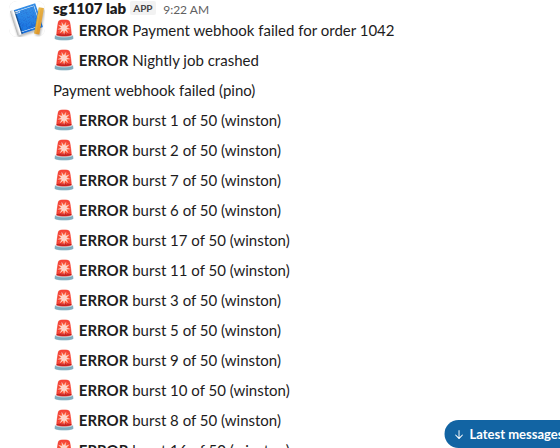
Each log call sends its own HTTP request at once, and the 50 requests race, so Slack stores whichever lands first. When order matters, for example a sequence of steps before a crash, put a counter or timestamp in each message, or collect the lines and send one message.
Slack did not rate-limit any of it. To check, we sent 50 posts to the same webhook in parallel with fetch and Promise.all: all 50 got HTTP 200 ok within 264 ms. So a burst of this size does not need a retry; Slack's limit is higher than our test reached.
Pino instead of winston
For pino, we used @youngkiu/pino-slack-webhook 0.1.2 with pino 10.4.0:
const pino = require("pino");
const transport = pino.transport({
  targets: [
    { target: "pino/file", level: "info", options: { destination: 1 } },
    { target: "@youngkiu/pino-slack-webhook", level: "error",
      options: { webhookUrl: process.env.SLACK_WEBHOOK_URL, channel: "#sg-1107-lab", username: "pino", icon_emoji: ":evergreen_tree:" } },
  ],
});
const logger = pino(transport);
logger.info("pino info stays in stdout");
logger.error({ orderId: 1042 }, "Payment webhook failed (pino)");
setTimeout(() => process.exit(0), 4000);
The error arrived in Slack as plain text, "Payment webhook failed (pino)". The orderId field we logged was not in the message, and the username and icon_emoji options did nothing: the post showed under our Slack app's name. Webhooks made by a Slack app ignore those overrides. This package also had its last release in June 2023, against October 2026 for the winston transport, so for Node we would pick winston.
For logs from Python, the same webhook works with a small logging handler; for more than one-way alerts, use the Slack Web API from Node with a bot token.
FAQ
Can I send logs to more than one channel?
One webhook posts to one channel. Add one SlackHook transport per webhook, each with its own level, for example errors to #alerts and warnings to #ops.
Why did nothing arrive in Slack?
Check the level first: with level: "error" on the transport, logger.warn sends nothing. Then check the URL. A wrong webhook URL got HTTP 403 invalid_token in our Python test, and a body with no text got HTTP 400 no_text.
Stop Jiggling Your Mouse.
Join hundreds of remote workers who never worry about their Slack status. Set it up once, stay green forever.
Related Articles
Node-RED to Slack: Webhook, Bot Token and Socket Mode Flows, Tested
Node-RED can post to Slack with a plain http request node and an incoming webhook, call any Slack API method with node-red-contrib-slack, and receive mentions over Socket Mode with node-red-contrib-slack-modern. We ran all three on Node-RED 5.0.9 on 8 November 2026.
Python Logging to Slack: A Tested Handler (and Which Packages Still Work)
A 36-line logging module posts ERROR records to a Slack incoming webhook with only the standard library. We ran it on Python 3.12 on 7 November 2026, sent 50 errors in a burst with and without a queue, and tried four PyPI Slack logger packages; one of them failed with invalid_auth.
Airflow Slack Alerts: Webhook and Bot Token Setups, Tested on Airflow 3
Airflow sends Slack alerts through the Slack provider: send_slack_webhook_notification or send_slack_notification as an on_failure_callback, or SlackWebhookOperator and SlackAPIPostOperator as tasks. We ran all four on Airflow 3.4.0 with provider 9.11.1 on 7 November 2026, plus the two mistakes that silently cost you alerts.