
How to Remove an App From Slack, and What Stays Behind
Remove an app from one channel with /remove or channel details, or uninstall it from the workspace in Manage apps. We did both with a test app and checked its tokens, messages and files afterwards.
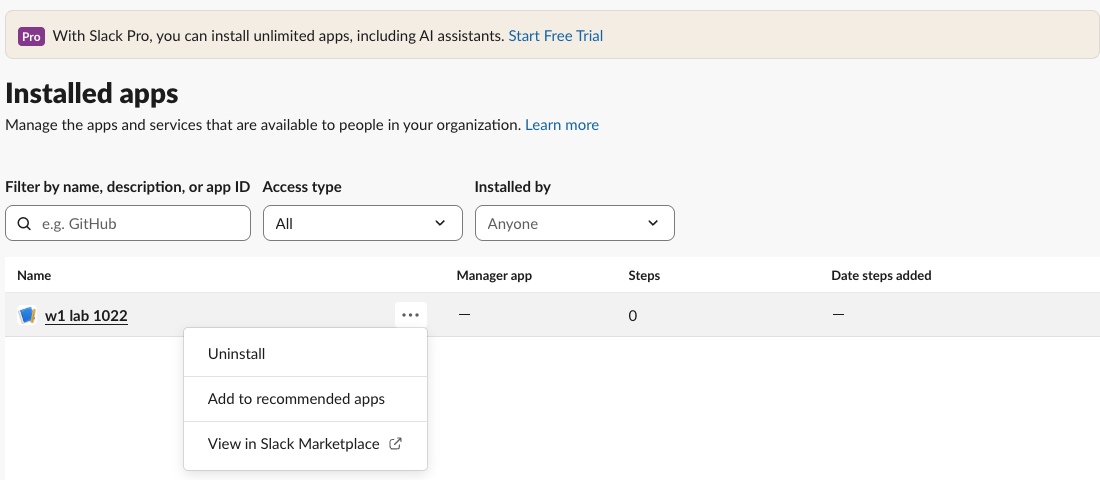
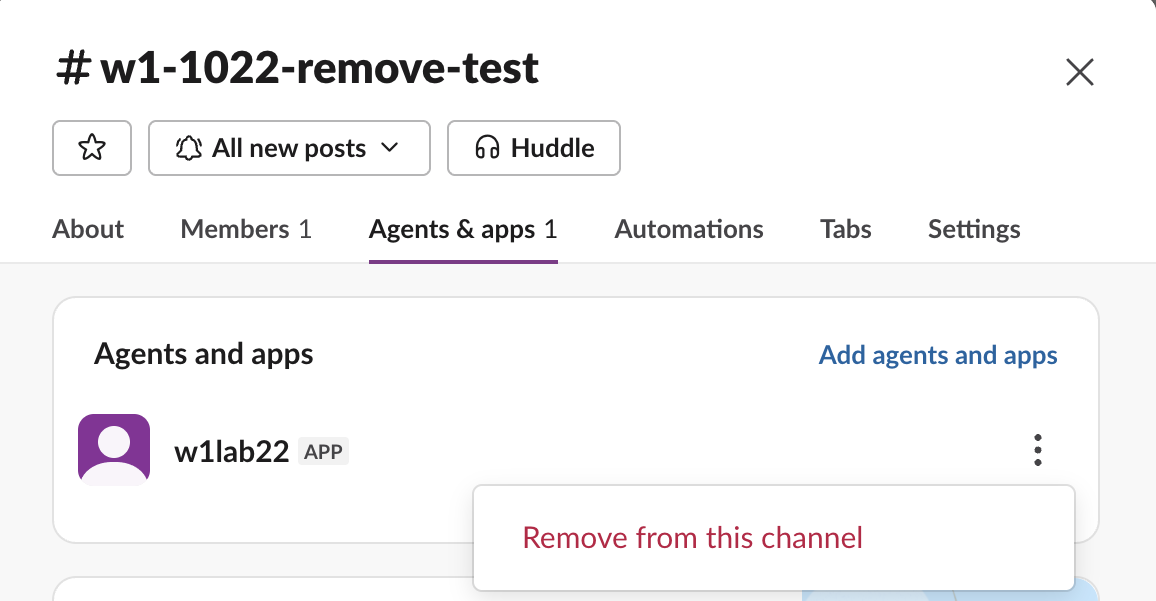
There are two ways to remove an app from Slack. To take it out of one channel, type /remove @AppName in that channel, or open the channel details, go to Agents & apps and pick Remove from this channel. To uninstall it from the whole workspace, open Manage apps > Installed apps, click the three dots next to the app and choose Uninstall. On 22 October 2026 we did both with a test app in our Free-plan workspace. After the uninstall, both of the app's tokens stopped working at once, but every message it had posted stayed in the channels.
Remove an app from one channel
Removing an app from a channel stops it reading that channel. It does not uninstall it.
- Open the channel and click its name at the top.
- Go to the Agents & apps tab. Apps are listed here, not under Members.
- Click the three dots next to the app and pick Remove from this channel.
- Confirm with Remove.
- Open
https://<your-workspace>.slack.com/apps/managein a browser. It opens Manage > Installed apps. - Find the app in the list and click the three dots next to its name.
- Pick Uninstall.
- Tick I want to uninstall … from my team and click Uninstall.
Typing /remove @w1lab22 in the channel opened the same confirm box: "They'll still be able to rejoin, or be added to the conversation." Both ways worked, and so did the API method conversations.kick.
After each removal we tried the app's bot token:
| Call from the removed app | Result |
|---|---|
conversations.history on the channel | not_in_channel |
chat.postMessage to the channel | ok, the message was posted |
conversations.join on the public channel | ok, it was back in |
So a removed app can still post into a public channel when it has the chat:write.public scope, and it can join again by itself. Removal from a channel is not a way to silence an app. If you want it gone, uninstall it. The /remove guide has the same test for people.
Uninstall an app from the workspace
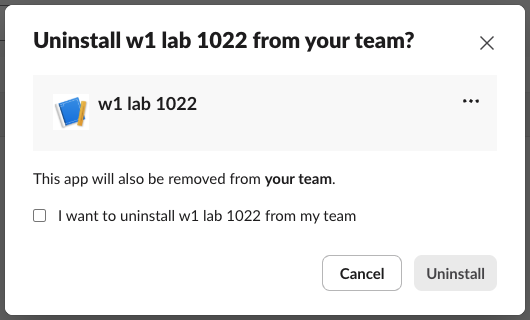
The Uninstall button stays grey until you tick the box. Within the same minute, Installed apps read "No apps have been installed yet."
We uninstalled as the workspace Owner. If you do not see Uninstall next to an app, ask a workspace admin or Owner.
Never appear "away" on Slack again
Cloud-based. No downloads. Works 24/7 even when your laptop is off.
What happened after the uninstall
We checked straight after removing it:
| Thing we checked | Result |
|---|---|
Bot token, auth.test | account_inactive |
User token, auth.test | token_revoked |
Bot token, chat.postMessage | account_inactive |
App's bot user, users.info | deleted: true |
| Channel membership | The bot left every channel; only we were left |
| Messages the app had posted | Still there, still labelled with the app's name |
| A file the app had uploaded | Still there (files.info ok) until we deleted it |
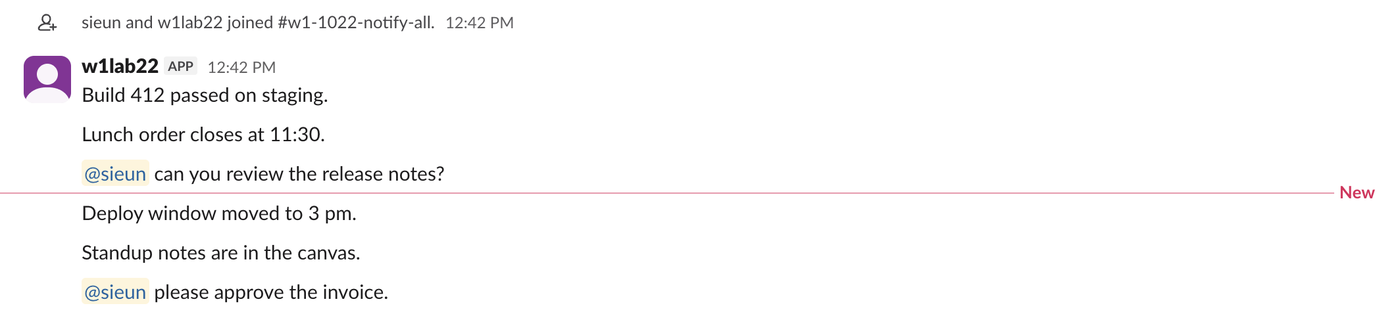
So uninstalling stops the app and its tokens at once, but it does not clean up after it. Delete its old messages or files yourself if you need them gone; delete someone else's message covers who can. If you run the app, the two error codes above are what your code will see; Slack invalid_auth and revoke a Slack token explain them.
Remove an app you built
Uninstalling is not deleting. Our app's settings page still existed after the uninstall. For an app you created, delete it from its settings page at api.slack.com/apps, or with apps.manifest.delete, which returned ok for ours. Our Slack app manifest page shows the manifest calls.
FAQ
Does uninstalling an app delete its messages?
No. All six messages our test app had posted were still in the channel after the uninstall.
How many apps can a Free workspace have?
The Installed apps page on our Free workspace showed the banner "With Slack Pro, you can install unlimited apps." Slack free plan limits lists the current cap. Uninstalling an app you no longer use frees a slot.
Stop Jiggling Your Mouse.
Join hundreds of remote workers who never worry about their Slack status. Set it up once, stay green forever.
Related Articles
Slack: Download All Files From a Channel (Script and Test)
Slack has no download-all button for a channel. We uploaded 8 files, checked what the Files tab and search show, and ran a files.list script that saved all 8, after it first found only 4.
How to Remove Someone From a Slack Channel (3 Ways, Tested)
Use /remove @name in the channel, the channel details window, or conversations.kick. We tried all three, checked what the removed member could still do, and what the channel saw.
How to Copy a Slack Thread: What Survives a Paste, and a Script
Slack has no Copy thread button. We selected a 6-reply thread, pasted it, and compared that with Copy message, Copy link and a short conversations.replies script that writes Markdown.