
How to Remove Someone From a Slack Channel (3 Ways, Tested)
Use /remove @name in the channel, the channel details window, or conversations.kick. We tried all three, checked what the removed member could still do, and what the channel saw.
To remove someone from a Slack channel, open the channel, type /remove @name in the message box, press Enter, and click Remove in the confirm box. You can also do it from the channel details window or with the API method conversations.kick. On 22 October 2026 we used all three on a test member in our Free-plan workspace. Each one took the member out at once, and none of them left a "removed" line in the channel history.
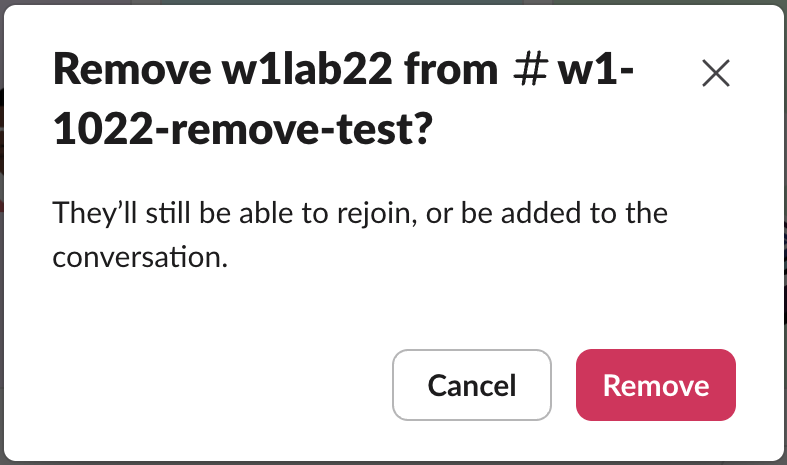
Our test workspace has one human account, so the member we removed was a test app's bot user. Slack showed the same confirm box for it that it uses for people.
1. Type /remove in the channel
- Open the channel.
- Type
/remove @and pick the person from the list. Slack fills in the name. - Press Enter, then click Remove.
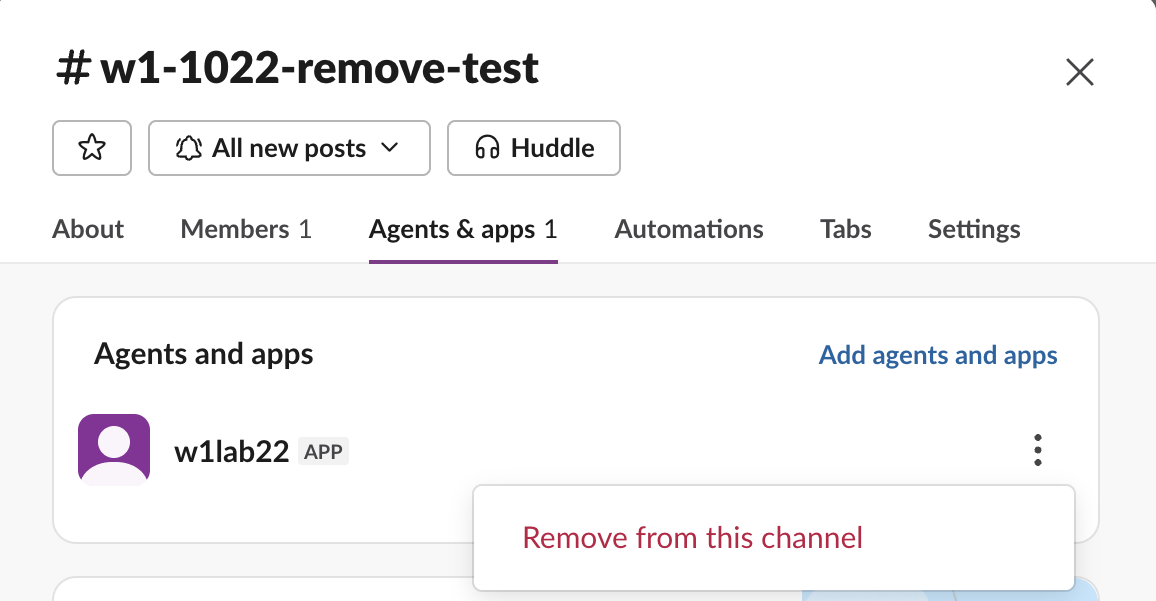
- Click the channel name at the top.
- People are on the Members tab and apps on the Agents & apps tab. In our window the tabs read Members 1 and Agents & apps 1.
- Click the three dots next to the name and pick Remove from this channel.
- Confirm with Remove.

The confirm text, "They'll still be able to rejoin, or be added to the conversation", is the important part: in a public channel, removal is not a ban.
2. Use the channel details window
We ran this on the app, because the only person in our workspace was ourselves.
3. Use the API: conversations.kick
POST https://slack.com/api/conversations.kick
channel=C0CB1A7Q5E1
user=U0CB8FSE9R7
The calls we made, and Slack's answers:
| Call | Answer |
|---|---|
| Kick the member | ok |
| Kick the same member again | not_in_channel |
| Kick yourself | cant_kick_self |
| Leave #all-slack, the workspace's default channel | cant_leave_general |
Slack's API docs list the channels:manage scope for public channels and groups:write for private ones. To add someone back from code, see add a user to a channel with the API.
Never appear "away" on Slack again
Cloud-based. No downloads. Works 24/7 even when your laptop is off.
What the removed member can still do
We checked the removed member's access right after each removal:
| Action by the removed member | Result |
|---|---|
| Read the channel's history | not_in_channel error |
| Rejoin the public channel | Worked, with no invite |
Post into the channel (app with chat:write.public) | Worked |
For a public channel, then, removing someone takes the channel out of their sidebar and stops them reading along, but they can open it from the channel directory and join again. Slack's help article Remove someone from a channel says a person removed from a private channel needs a member to add them back, so a private channel is the way to keep someone out. The not_in_channel error page covers the API side.
What the channel sees
Nothing in the history. After three removals, conversations.history held the join lines for each time the member came back, and no line for any removal. People in the channel only notice through the member count. For leaving, see does Slack notify when you leave a channel.
Who can remove people
In our Free workspace we removed members as the Owner, and the admin Permissions page had no setting for who may remove members from channels. Slack's help describes channel management permissions on paid plans. You cannot remove yourself (cant_kick_self); use Leave channel in the details window. And nobody can leave the workspace's default channel, #general (here #all-slack), which returned cant_leave_general.
To remove someone from the whole workspace, deactivate their account instead; inactive vs deactivated explains the difference.
FAQ
Does Slack tell the person they were removed?
Slack's help page Remove someone from a channel says Slack notifies the removed person. The channel history in our test held no removal line, so the rest of the channel is not told. We could not see the removed member's own screen, because our member was a bot.
Can I remove someone from a DM?
No. A direct message has fixed members. Start a new group DM or a private channel without them.
Stop Jiggling Your Mouse.
Join hundreds of remote workers who never worry about their Slack status. Set it up once, stay green forever.
Related Articles
Slack: Download All Files From a Channel (Script and Test)
Slack has no download-all button for a channel. We uploaded 8 files, checked what the Files tab and search show, and ran a files.list script that saved all 8, after it first found only 4.
How to Remove an App From Slack, and What Stays Behind
Remove an app from one channel with /remove or channel details, or uninstall it from the workspace in Manage apps. We did both with a test app and checked its tokens, messages and files afterwards.
How to Copy a Slack Thread: What Survives a Paste, and a Script
Slack has no Copy thread button. We selected a 6-reply thread, pasted it, and compared that with Copy message, Copy link and a short conversations.replies script that writes Markdown.