
Slack Emoji API: emoji.list Output, Aliases, and Why You Cannot Add Emoji by API
We added two custom emoji and an alias to a test workspace, then called emoji.list, admin.emoji.add and emoji.add with bot and user tokens on 2 October 2026. emoji.list returned 18 entries while the admin page said 3, and every add call was refused.
Slack's emoji API has one method most apps can use, emoji.list, which returns the workspace's custom emoji as a map of name to image URL, with aliases written as alias:<name>. Adding emoji is a different story. admin.emoji.add works only on Enterprise organizations, and emoji.add refuses app tokens. We tested all three on 2 October 2026 in our own Free-plan workspace with a test app that had the emoji:read scope, a bot token and a user token.
The test setup
We made two emoji with our emoji maker: a still PNG and an animated GIF with the Party effect.


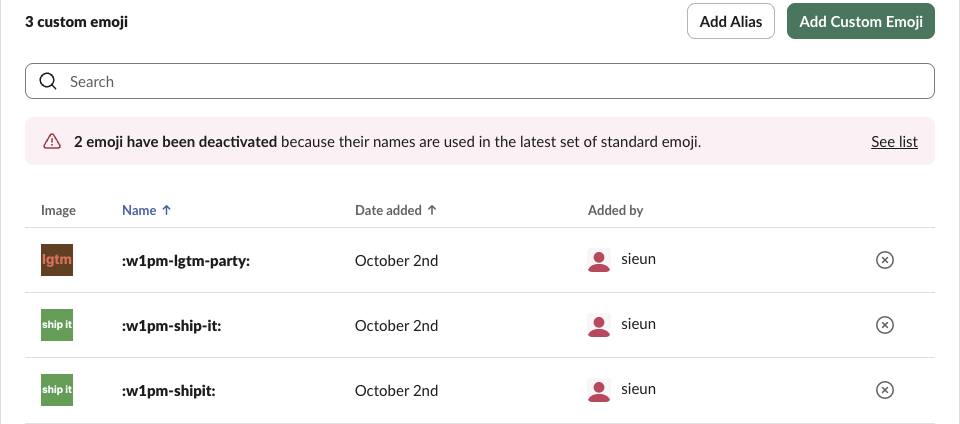
We added them to the workspace as :w1pm-ship-it: and :w1pm-lgtm-party:, plus an alias :w1pm-shipit: that points to the first one. Slack's admin page then counted 3 custom emoji:
What emoji.list returns
GET https://slack.com/api/emoji.list with the bot token returned ok: true and 18 entries. These are our three, cut from that response:
{"ok": true,
 "emoji": {"w1pm-ship-it": "https://emoji.slack-edge.com/T0B7JBCDKC1/w1pm-ship-it/7a7d85470416c686.png",
           "w1pm-lgtm-party": "https://emoji.slack-edge.com/T0B7JBCDKC1/w1pm-lgtm-party/e362677b82a5ccc8.gif",
           "w1pm-shipit": "alias:w1pm-ship-it"},
 "cache_ts": "1790925247.059100"}
What the full response showed:
- • An image is a URL on
emoji.slack-edge.com, and the file type stays: the animated emoji came back as.gif. - • An alias has no URL. Its value is
alias:plus the target name, so you resolve it with a second lookup in the same map. - • The user token returned the same 18 entries as the bot token. Both only need
emoji:read. - • The 2 deactivated emoji from the banner (
bust_in_silhouetteandbilled_cap, added by an earlier test) were not in the list.
The other 15 entries are ones nobody in the workspace added. Slack ships them with every workspace: bowtie, squirrel, glitch_crab, piggy, slack, slackbot and so on, plus aliases such as shipit to squirrel and white_square to the standard white_large_square. The admin page does not count them, which is why it said 3 and the API said 18. If you export "our" emoji, filter these out by name.
Export every custom emoji to a CSV
This is the script we ran, with the token in an environment variable:
import csv, os, sys
from slack_sdk import WebClient

emoji = WebClient(token=os.environ["SLACK_TOKEN"]).emoji_list()["emoji"]
out = csv.writer(sys.stdout)
out.writerow(["name", "type", "target"])
for name, value in sorted(emoji.items()):
    if value.startswith("alias:"):
        out.writerow([name, "alias", value[len("alias:"):]])
    else:
        out.writerow([name, "image", value])
python emoji_csv.py > emoji.csv wrote this file:
name,type,target
black_square,alias,black_large_square
bowtie,image,https://emoji.slack-edge.com/T0B7JBCDKC1/bowtie/f3ec6f2bb0.png
cubimal_chick,image,https://emoji.slack-edge.com/T0B7JBCDKC1/cubimal_chick/85961c43d7.png
dusty_stick,image,https://emoji.slack-edge.com/T0B7JBCDKC1/dusty_stick/6177a62312.png
glitch_crab,image,https://emoji.slack-edge.com/T0B7JBCDKC1/glitch_crab/db049f1f9c.png
piggy,image,https://emoji.slack-edge.com/T0B7JBCDKC1/piggy/b7762ee8cd.png
pride,image,https://emoji.slack-edge.com/T0B7JBCDKC1/pride/56b1bd3388.png
shipit,alias,squirrel
simple_smile,image,https://a.slack-edge.com/80588/img/emoji_2017_12_06/apple/simple_smile.png
slack,image,https://emoji.slack-edge.com/T0B7JBCDKC1/slack/7d462d2443.png
slack_call,image,https://emoji.slack-edge.com/T0B7JBCDKC1/slack_call/b81fffd6dd.png
slackbot,image,https://emoji.slack-edge.com/T0B7JBCDKC1/slackbot/61c7997146.png
squirrel,image,https://emoji.slack-edge.com/T0B7JBCDKC1/squirrel/465f40c0e0.png
thumbsup_all,image,https://emoji.slack-edge.com/T0B7JBCDKC1/thumbsup_all/50096a1020.png
w1pm-lgtm-party,image,https://emoji.slack-edge.com/T0B7JBCDKC1/w1pm-lgtm-party/e362677b82a5ccc8.gif
w1pm-ship-it,image,https://emoji.slack-edge.com/T0B7JBCDKC1/w1pm-ship-it/7a7d85470416c686.png
w1pm-shipit,alias,w1pm-ship-it
white_square,alias,white_large_square
To download the images too, fetch each image URL. They are public CDN links: our PNG came back with HTTP 200 and no token.
Never appear "away" on Slack again
Cloud-based. No downloads. Works 24/7 even when your laptop is off.
Standard emoji: include_categories=true
emoji.list with include_categories=true adds the built-in emoji, grouped the way the emoji picker groups them. Our response had "categories_version": "16" and 9 categories:
| Category | Names |
|---|---|
| Smileys & People | 503 |
| Component | 5 |
| Animals & Nature | 159 |
| Food & Drink | 131 |
| Travel & Places | 218 |
| Activities | 85 |
| Objects | 264 |
| Symbols | 224 |
| Flags | 270 |
That is 1,859 standard names, each a short code such as grinning or skin-tone-2. They come without image URLs; the custom emoji map in the same response stayed at 18. For the codes people use most in status and reactions, see our Slack emoji codes list.
Adding emoji by API: the errors we got
We tried every add method with each token. The image was the URL of our own uploaded emoji.
| Call | Bot token (xoxb) | User token (xoxp) |
|---|---|---|
admin.emoji.add | not_allowed_token_type | not_an_enterprise |
admin.emoji.list | not_allowed_token_type | missing_scope, needed admin.teams:read |
emoji.add | not_allowed_token_type | not_allowed_token_type |
The user token had no admin scope at all, yet admin.emoji.add answered not_an_enterprise, so Slack checks the plan first:
{"ok": false, "error": "not_an_enterprise"}So on Free, Pro and Business+ there is no API for an app to add emoji. emoji.add is the call the Slack client itself makes when you use Add Emoji, and it accepts only the browser session token. That leaves two ways to add emoji in bulk outside Enterprise:
emoji.add as the dialog, as you, about 20 a minute.FAQ
Does emoji.list paginate?
Not in our test. All 18 entries came back in one response, with no response_metadata and no next_cursor.
What happens to an alias when the original emoji is deleted?
It goes too. We removed :w1pm-ship-it: and called emoji.list again: the list dropped from 18 to 16 entries, and both w1pm-ship-it and its alias w1pm-shipit were gone. The old image URL still returned the PNG (HTTP 200) right after the delete, so a cached export keeps working links for a while.
Can a bot delete or rename custom emoji?
No. admin.emoji.remove and admin.emoji.rename gave the same errors as admin.emoji.add: not_allowed_token_type for the bot token and not_an_enterprise for the user token. Outside Enterprise, delete or rename emoji on the admin page; how to delete a Slack emoji has the steps.
Stop Jiggling Your Mouse.
Join hundreds of remote workers who never worry about their Slack status. Set it up once, stay green forever.
Related Articles
assistant.threads.setStatus vs agents.sessions.setStatus: Both Tested in Slack
We called assistant.threads.setStatus and agents.sessions.setStatus on a test app before and after turning on the agent feature, clicked the stop button, and timed how long the status line stays. Every response, the stop event, and what Slack showed.
Slack Slash Command Payload: Every Field, Responses, and response_url Limits
We caught the payload a slash command sends, answered it as ephemeral, in_channel, plain text and empty, posted to its response_url until it failed, and typed the command inside a thread. Every result is from a test app on 2 October 2026.
Slackbot MCP Client: We Connected a 17-Line MCP Server and Slackbot Called It
We wrote a one-tool MCP server, added it to a Slack app with the mcp_servers manifest field, switched it on in Slackbot and asked for the time. Every request Slackbot sent to the server, the permission prompt, and what Slackbot said when the server was down.