
Can a Slack Webhook Send a File? What We Tested, and What Works
An incoming webhook cannot upload a file. It can show an image from a public URL in an image block, or a link Slack unfurls. For a real file you need a bot token and the upload API. Every payload we tried on 9 November 2026, with Slack's answer.
A Slack incoming webhook cannot send a file. It accepts only a JSON message, so there is no field for file bytes, and it ignores one if you add it. What a webhook can do is show an image that is already on a public URL, through an image block or a link that Slack unfurls. To attach a real file (a PDF, a CSV, a log) you need the app's bot token and Slack's upload API. On 9 November 2026 we sent 14 payloads through one webhook in a test workspace and uploaded the same files with a bot token.
Every payload we sent
| What we sent through the webhook | Slack's answer | What showed in the channel |
|---|---|---|
| Image block with a public PNG URL | 200 ok (1.6 to 1.9 s) | The image, full width |
| Image block with a URL that returns 404 | 400 invalid_blocks | Nothing |
Image block with a data:image/png;base64,... URL | 400 invalid_blocks | Nothing |
Image block with slack_file pointing at a file the bot uploaded | 400 invalid_blocks, for a private file and for one shared in a public channel | Nothing |
PNG URL in plain text | 200 ok | The link plus an image preview |
The same PNG URL again a few seconds later, unfurl_media: true | 200 ok | The link only, no preview |
PDF URL in text with unfurl_links: true | 200 ok | The link only |
Legacy attachment with image_url | 200 ok | The image inside the attachment |
A file field with base64 bytes | 200 ok | The text only. The field was ignored |
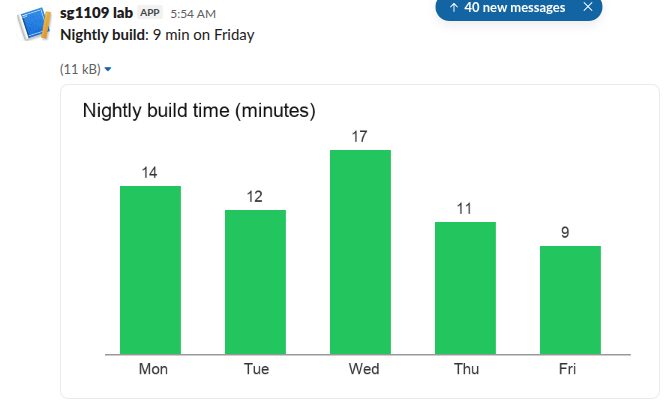
The image block is the closest a webhook gets to an attachment. Slack downloads the image when you post, which is why those requests took about 1.6 s instead of the usual 0.3 s, and why a dead URL fails at once with invalid_blocks instead of posting a broken image.
Show an image with a webhook
Host the image anywhere public (an S3 or Supabase bucket, your CI's artifact URL if it needs no login) and post an image block:
{
  "text": "Nightly build chart",
  "blocks": [
    { "type": "section", "text": { "type": "mrkdwn", "text": "*Nightly build*: 9 min on Friday" } },
    { "type": "image", "image_url": "https://example.com/build-chart.png", "alt_text": "Nightly build time chart" }
  ]
}
Keep text as the fallback for notifications. The Slack image block guide covers sizes, titles and the formats Slack accepts.
A plain link also works for images, because Slack unfurls it into a preview:
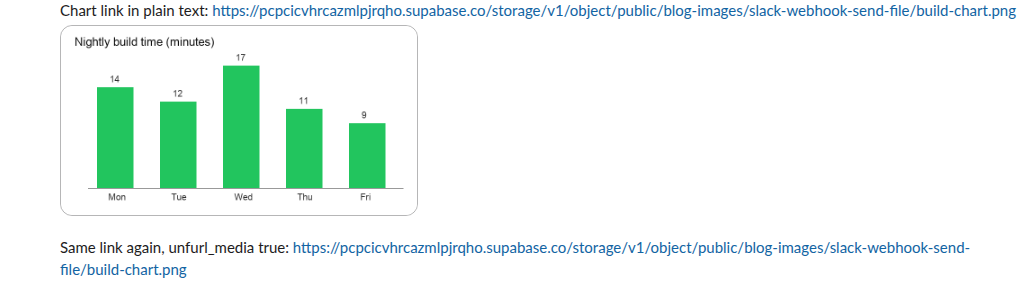
The second message in that screenshot posted the same link 0.3 s later with unfurl_media: true and got no preview. Slack did not unfurl the repeated link, so do not rely on a link preview for every message. The image block showed every time.
Why base64 and slack_file fail
People try two tricks to get a file through a webhook. A data: URL in image_url fails with invalid_blocks, because Slack fetches the image over HTTP. A slack_file reference (the image block field that points at a file already in Slack) also failed from the webhook, even for a file the same app's bot had shared in that public channel. The same block sent with the bot token posted fine. The webhook posts as a separate sender from the bot user, so it cannot see the bot's files, as our webhook vs bot token test shows.
Never appear "away" on Slack again
Cloud-based. No downloads. Works 24/7 even when your laptop is off.
Send a real file with the bot token
The app that owns your webhook can also have a bot token (xoxb-) with the files:write scope. With the Python SDK (slack_sdk 3.46.0 in our test), files_upload_v2 does the whole upload:
import os, time, json
from slack_sdk import WebClient
client = WebClient(token=os.environ["SLACK_BOT_TOKEN"])
t0 = time.time()
resp = client.files_upload_v2(
    channel=os.environ["CHANNEL_ID"],
    file="build-report.pdf",
    title="Build report",
    initial_comment="Nightly build report attached",
)
f = resp["file"]
print(round(time.time() - t0, 2), "s")
print(json.dumps({k: f.get(k) for k in ["id", "name", "mimetype", "size", "permalink"]}, indent=2))
Our run printed:
1.14 s
{
  "id": "F0CG46GGSA0",
  "name": "build-report.pdf",
  "mimetype": "",
  "size": 13264,
  "permalink": "https://slack-0yr1948.slack.com/files/U0CG27WHFC1/F0CG46GGSA0/build-report.pdf"
}
The PDF showed in the channel with a preview of its first page. Note the empty mimetype: Slack was still processing the file when the call returned. files.info a few seconds later gave application/pdf and listed the share in the channel.
Without the SDK, the same upload is three requests: files.getUploadURLExternal with the file name and byte length, a POST of the bytes to the URL it returns, then files.completeUploadExternal with the file ID and channel_id. A 96 KB PNG took 1.34 s that way. The old one-call files.upload method no longer exists; see files.upload deprecation and its replacement.
Which way to go
- • A chart or screenshot that is already on a public URL: an image block through the webhook.
- • A file people should download, or anything private: the bot token and
files_upload_v2. Our webhook guide shows where both live in the app settings. - • A link to a file in your own storage: plain text through the webhook, but expect no preview for PDFs or for a link Slack just unfurled.
FAQ
Can a webhook send a CSV or log file?
No. Upload it with the bot token, or post the first lines in a code block. Long text gets split or cut, as our Slack message character limit test shows, so a file is the better home for a long log.
Does the image URL have to stay up?
We did not test how long Slack keeps its copy. The safe choice is a URL that stays up as long as the message matters.
Can I reply in a thread with a file?
Yes, with the bot token: files_upload_v2 takes a thread_ts argument. A webhook can reply in a thread with text or an image block, but only if you already know the parent message's ts.
Stop Jiggling Your Mouse.
Join hundreds of remote workers who never worry about their Slack status. Set it up once, stay green forever.
Related Articles
Slack Webhook vs Bot Token: 10 Things We Tested Both Ways
An incoming webhook can post, reply in a thread and do little else. A bot token can also edit, delete, upload files, pick the channel and post as a custom name. We sent the same Block Kit message both ways on 9 November 2026 and recorded each answer.
Slack Progress Bar: Block Kit, Emoji and chat.update, Tested
Block Kit has no progress bar element, so a Slack progress bar is text you redraw with chat.update. We drew one three ways on 9 November 2026, timed every update, and pushed chat.update until Slack answered ratelimited.
Slack Channel Welcome Message: A Tested Bot and the Free-Plan Catch
Slack has no built-in welcome message per channel, and Workflow Builder is closed to Free workspaces. A 30-line Bolt app that listens for member_joined_channel does the job on any plan. We ran it on 9 November 2026 and timed the welcome.