
Does Keeping Your Laptop Awake Drain the Battery? The Numbers
Yes, keeping a laptop awake drains the battery, and the screen is most of the cost. An idle laptop with the screen on draws about 5 to 10 W, with the screen off about 2 to 5 W, and asleep under 1 W. A mouse jiggler or Caffeine adds almost nothing by itself; the cost is the awake screen it keeps on. How to measure your own laptop and keep the drain low.
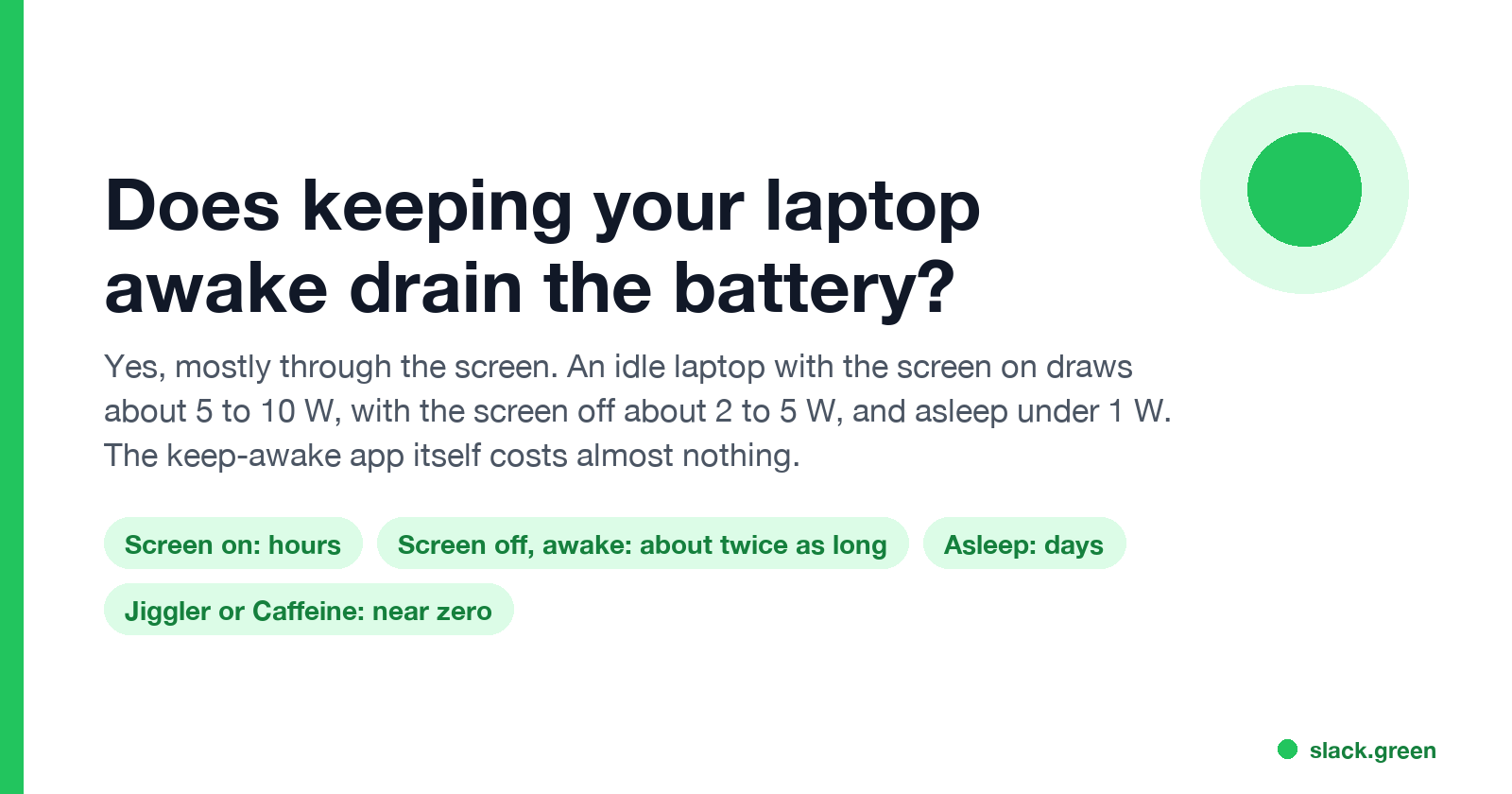
Yes. A laptop kept awake uses far more battery than one that sleeps, and the screen is most of the difference. A recent thin laptop sitting idle with the screen on draws about 5 to 10 W, so a 60 Wh battery lasts roughly 6 to 12 hours. With the screen off but the system awake, it draws about 2 to 5 W. Asleep, it draws under 1 W and lasts days. The keep-awake app itself, whether Caffeine, Amphetamine, PowerToys Awake or a mouse jiggler, uses almost no power. What costs battery is the awake screen and system it keeps running.
Most people keep a laptop awake so that Teams or Slack does not show them as away. We build Slack Green, which keeps your Slack status active from a server during the hours you set, so your laptop can sleep and use no battery for it. For Teams you need the laptop awake and in use, which is where the numbers below come in.
Laptop battery: sleep vs awake
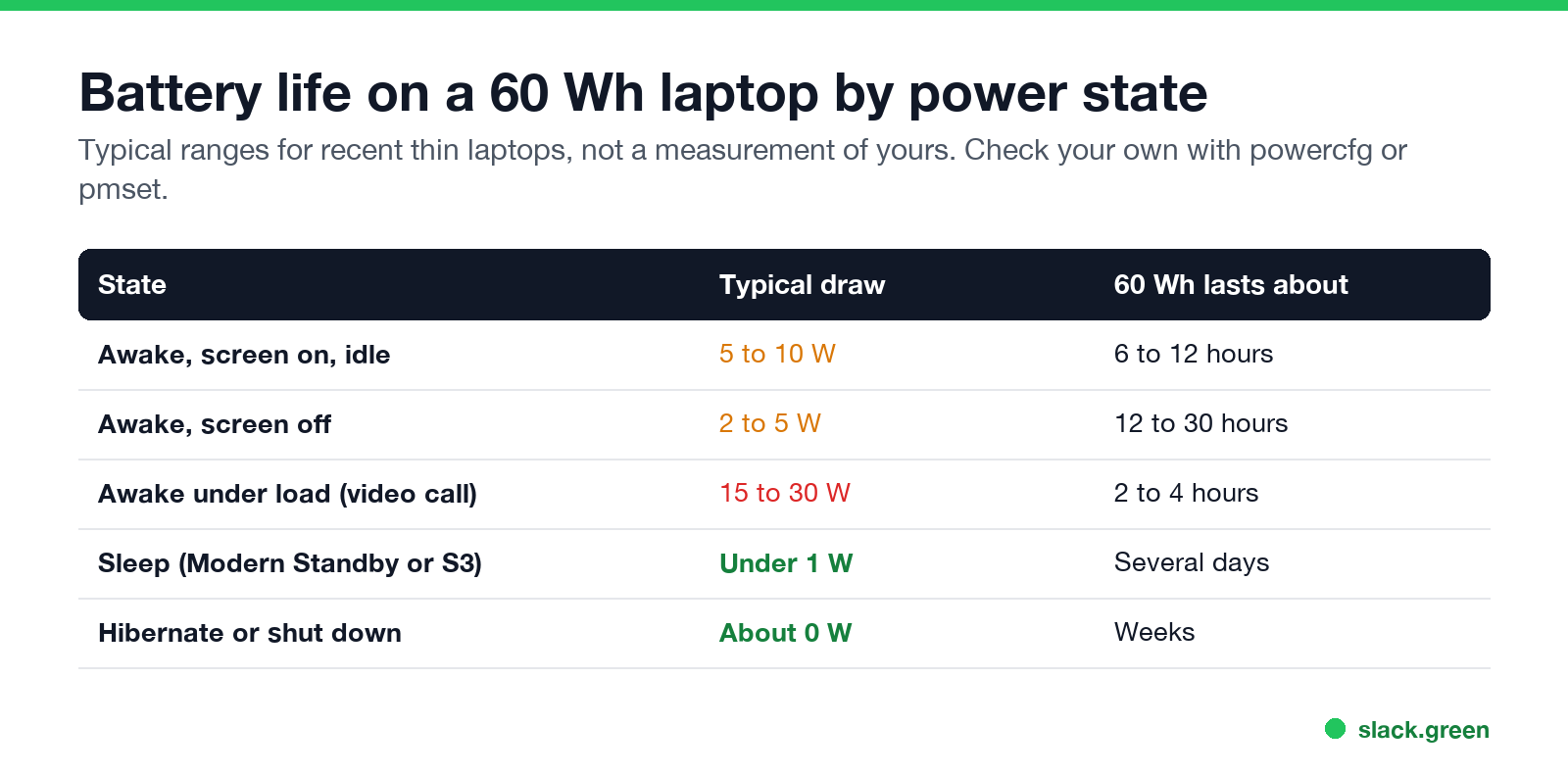
| State | Typical draw | A 60 Wh battery lasts about |
|---|---|---|
| Awake, screen on, idle | 5 to 10 W | 6 to 12 hours |
| Awake, screen off | 2 to 5 W | 12 to 30 hours |
| Awake under load, such as a video call | 15 to 30 W | 2 to 4 hours |
| Sleep (Modern Standby or S3) | Under 1 W | Several days |
| Hibernate or shut down | About 0 W | Weeks |
These are typical ranges for recent thin laptops, not a measurement of yours. Screen brightness, display size, background apps and the chip all move them. Apple silicon Macs sit at the low end of each range; a gaming laptop with a large screen sits well above it.
The math is short. Battery life in hours is battery capacity in watt-hours divided by the draw in watts. A 60 Wh battery at 6 W lasts 10 hours; the same battery at 0.5 W lasts 120 hours.
For a short break, the difference does not matter much. Ten minutes awake at 7 W uses about 1.2 Wh, or 2% of a 60 Wh battery. Leaving the laptop awake over a lunch hour costs about 10% more than letting it sleep. Leaving it awake overnight on battery can empty it.
Does Caffeine or a mouse jiggler drain the battery?
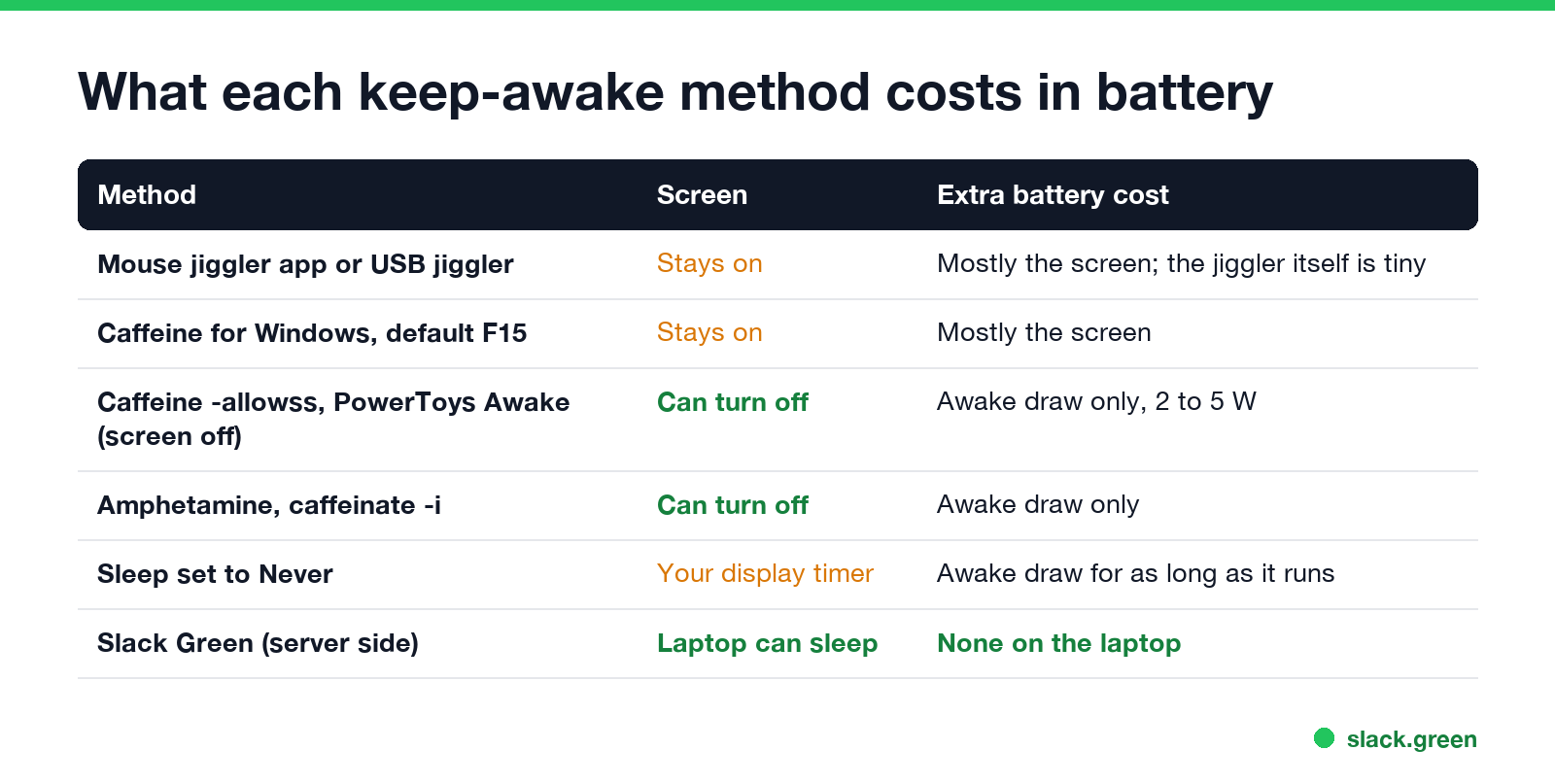
Not by itself. A keep-awake app wakes up once every 30 to 60 seconds, sends one key press or pointer move, or holds a power request, and goes back to waiting. That is a tiny fraction of a watt. The cost comes from what it prevents:
- • Apps that send input keep the screen on. A mouse jiggler, Move Mouse and Caffeine for Windows in its default F15 mode all reset the display timer too, so the screen stays lit. You pay the full 5 to 10 W.
- • Apps that only hold a power request can let the screen turn off. PowerToys Awake with Keep screen on off, Caffeine for Windows with
-allowss, Amphetamine with display sleep allowed, andcaffeinate -ion a Mac keep the system awake but let the display sleep. That is the 2 to 5 W row. - • A USB jiggler draws a few milliamps from the USB port. The laptop screen it keeps awake draws far more.
The catch is that screen-off modes send no input. Teams sets you Away after about 5 minutes without input and Slack sets you away after 10 minutes without input in the Slack window, whether the screen is on or off. Which tools create input and which do not is in does Caffeine keep Teams active and does PowerToys Awake keep Slack active.
How to measure the drain on your laptop
Never appear "away" on Slack again
Cloud-based. No downloads. Works 24/7 even when your laptop is off.
On Windows, the battery report lists capacity and usage per day, and the sleep study shows what drained the battery in Modern Standby:
powercfg /batteryreport /output "$env:USERPROFILE\battery-report.html"
powercfg /sleepstudy /output "$env:USERPROFILE\sleepstudy.html"
Open the two HTML files in your user folder. The battery report shows design and full-charge capacity and recent usage. The sleep study shows each standby session and the percentage it used.
On a Mac, check the battery and see which apps are holding the Mac awake:
# current charge and whether you are on battery
pmset -g batt
# apps preventing sleep right now, such as caffeinate or Amphetamine
pmset -g assertions
To compare, note the percentage, leave the laptop awake and idle for 30 minutes, and note it again. Then do the same with the lid closed or the laptop asleep.
How to keep a laptop awake with less battery drain
-activeperiods, Move Mouse has schedules, and Amphetamine has timed sessions. See how to stop your computer from sleeping for the built-in timers.Is keeping a laptop awake bad for the battery's health?
Staying awake does not harm the battery by itself. What wears a lithium-ion battery is heat, time spent at 100% charge, and the number of charge cycles. A laptop kept awake and plugged in all day sits at 100% and runs warm, which ages the battery faster than normal use.
Most laptops have a setting for this. macOS has Optimized Battery Charging, and some Macs have a charge limit, under Battery settings. Many Windows laptops from Dell, Lenovo, HP and ASUS let you cap charging at about 80% in the maker's app. Turn it on if the laptop stays plugged in most of the day. Keeping a laptop awake with the lid closed adds heat; the setup is in keep a laptop awake with the lid closed.
A way to stay green without keeping the laptop awake
Never appear "away" on Slack again
Cloud-based. No downloads. Works 24/7 even when your laptop is off.
If the reason you keep the laptop awake is Slack, the laptop does not need to be on at all. Slack Green keeps your Slack status active from a server during the hours you set, so the laptop can sleep, with the lid closed, and use no battery for it. How that compares with a jiggler is in Slack Green vs a mouse jiggler. Teams has no server-side option like this; the Teams methods are in how to keep your Teams status Available.
FAQ
Does keeping a laptop awake drain the battery?
Yes. Awake with the screen on it draws about 5 to 10 W, against under 1 W asleep. A 60 Wh battery lasts hours awake and days asleep.
Does Caffeine drain the battery?
The app itself uses almost nothing. Its default mode keeps the screen on, and the screen drains the battery.
Does a mouse jiggler drain the battery?
A software or USB jiggler uses very little power. The awake screen it keeps on is the cost.
Is it better to let a laptop sleep or keep it awake?
For battery life, sleep. For short breaks of a few minutes, the difference is about 1 to 2% of the battery.
Does keeping a laptop awake while plugged in hurt the battery?
Heat and sitting at 100% charge age the battery. Turn on your laptop's charge limit or optimized charging if it stays plugged in.
Stop Jiggling Your Mouse.
Join hundreds of remote workers who never worry about their Slack status. Set it up once, stay green forever.
Related Articles
Can My Employer See My Browsing If I Use a VPN? It Depends Whose
A personal VPN hides the sites you visit from the office network, but not from monitoring software, a managed browser or IT on a work laptop. The company VPN shows your employer every site it carries. What each setup hides.
Teams Status on Multiple Devices: The Last Device You Used Wins
Signed in to Teams on a computer and a phone? Your status comes from the device you used most recently. That is why a quick look at your phone can turn you Away, and why a phone in your pocket shows Away instead of Offline at night.
Zoom Do Not Disturb: How to Turn It On, Schedule It, and What It Blocks
To turn on Do not disturb in Zoom, click your profile picture, point at your status and choose Do not disturb, then a time from 20 minutes to 24 hours, or Custom for a daily schedule. It blocks pop-up notifications for Zoom Team Chat and Zoom Phone calls. Busy, by contrast, mutes nothing. How the two differ, and how to keep a Zoom meeting free of pop-ups.