
Can My Employer See My Browsing If I Use a VPN? It Depends Whose
A personal VPN hides the sites you visit from the office network, but not from monitoring software, a managed browser or IT on a work laptop. The company VPN shows your employer every site it carries. What each setup hides.
It depends whose VPN it is and whose computer you use. A personal VPN, such as NordVPN or Proton VPN, on your own phone or laptop hides the sites you visit from the office Wi-Fi: the network sees only that you connected to a VPN server. On a work laptop, a personal VPN hides almost nothing, because monitoring software, a managed browser and device management read your activity on the laptop itself, before the VPN encrypts it. The company VPN works the other way round: it sends your traffic through your employer's servers, so your employer can log the name of every site it carries.
In every case your employer can usually tell that a VPN is in use. The table below shows what each setup hides. If all you want is to stop looking idle in Slack while you read or think, that has nothing to do with browsing; Slack Green keeps your Slack status active from a server during the hours you set.
What a VPN hides from your employer, by setup
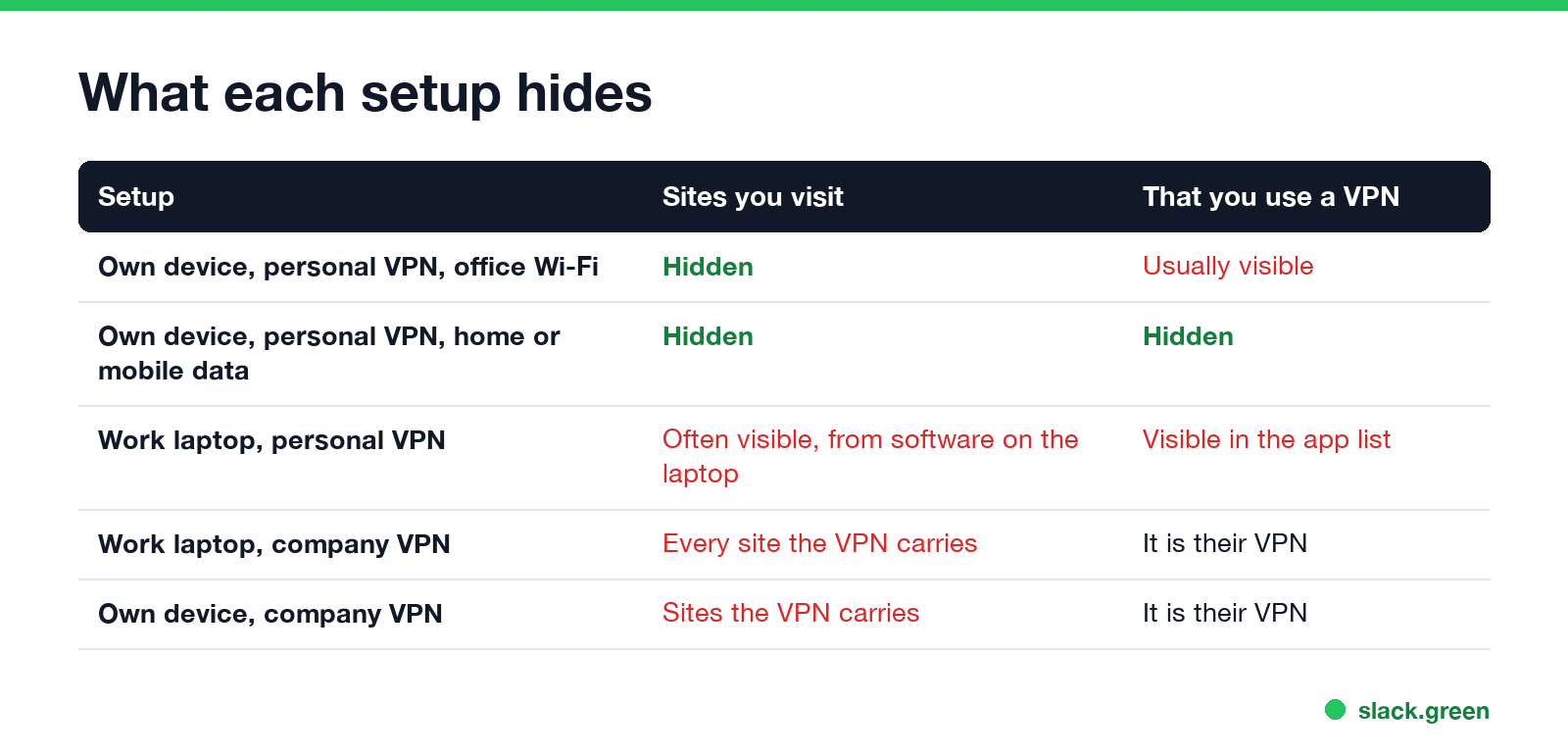
| Setup | Can your employer see the sites you visit? | Can they see you use a VPN? |
|---|---|---|
| Your own device, personal VPN, office Wi-Fi | No. The network sees one connection to a VPN server | Yes, usually, from the server address and traffic pattern |
| Your own device, personal VPN, home or mobile data | No | No |
| Work laptop, personal VPN | Often yes, through software on the laptop | Yes, the VPN app shows in the app list |
| Work laptop, company VPN connected | Yes, the name of every site the VPN carries | It is their VPN |
| Your own device, company VPN connected | Yes, for the traffic the VPN carries | It is their VPN |
A personal VPN on your own device
A VPN encrypts your traffic between your device and the VPN company's server. On the office Wi-Fi, your employer's network then sees a single encrypted connection to that server: its address, when it started and how much data passed. The DNS lookups and site names that the network would normally log, such as reddit.com at 11:02, travel inside the tunnel.
So on a personal phone or laptop with no work software on it, a personal VPN hides your browsing from the office network. Two things still show:
- • That you use a VPN. VPN servers use known addresses and protocols, and firewalls label them. Many company networks block VPN protocols on guest and staff Wi-Fi, which is often the first sign that IT noticed.
- • What you do inside work apps. Slack, Teams and Microsoft 365 log activity on their own servers, VPN or not.
Using a personal VPN on company Wi-Fi may also break the network's acceptable use policy. Read it before you rely on one.
A personal VPN on a work laptop
Never appear "away" on Slack again
Cloud-based. No downloads. Works 24/7 even when your laptop is off.
This is where people expect privacy and get none. A VPN only protects traffic after it leaves the laptop. Everything that reads activity on the laptop sees it first.
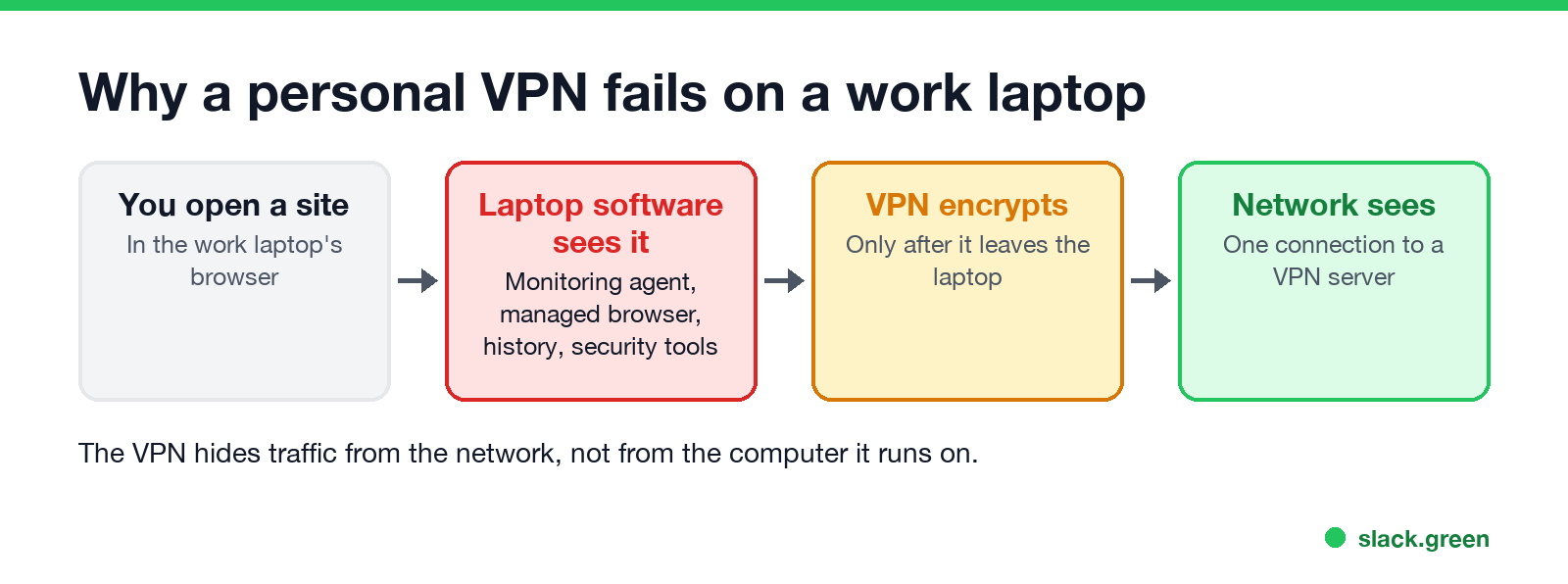
A personal VPN on a company laptop also tends to get noticed for another reason: it can break access to company systems, and IT sees the support ticket. What each work tool can see on a laptop is in can my employer see my screen.
The company VPN
The company VPN exists so your employer's rules apply wherever you work. While it is connected, traffic it carries passes through company servers, and the company can log:
Some company VPNs send all traffic through the tunnel. Others use split tunneling, where only traffic to company systems goes through the VPN and the rest goes straight to the internet. On a split tunnel, your personal browsing never reaches company servers, though software on a work laptop still sees it. More on the network side is in can my employer see my browsing history.
Can my company track me on the VPN?
It can see where you connect from, not follow you. The VPN log records the public IP address of each connection, and IP addresses map to a city and an internet provider. That is how a company notices a login from another country. Exact location needs something else, such as location services on a managed phone.
How to check what your traffic goes through
Never appear "away" on Slack again
Cloud-based. No downloads. Works 24/7 even when your laptop is off.
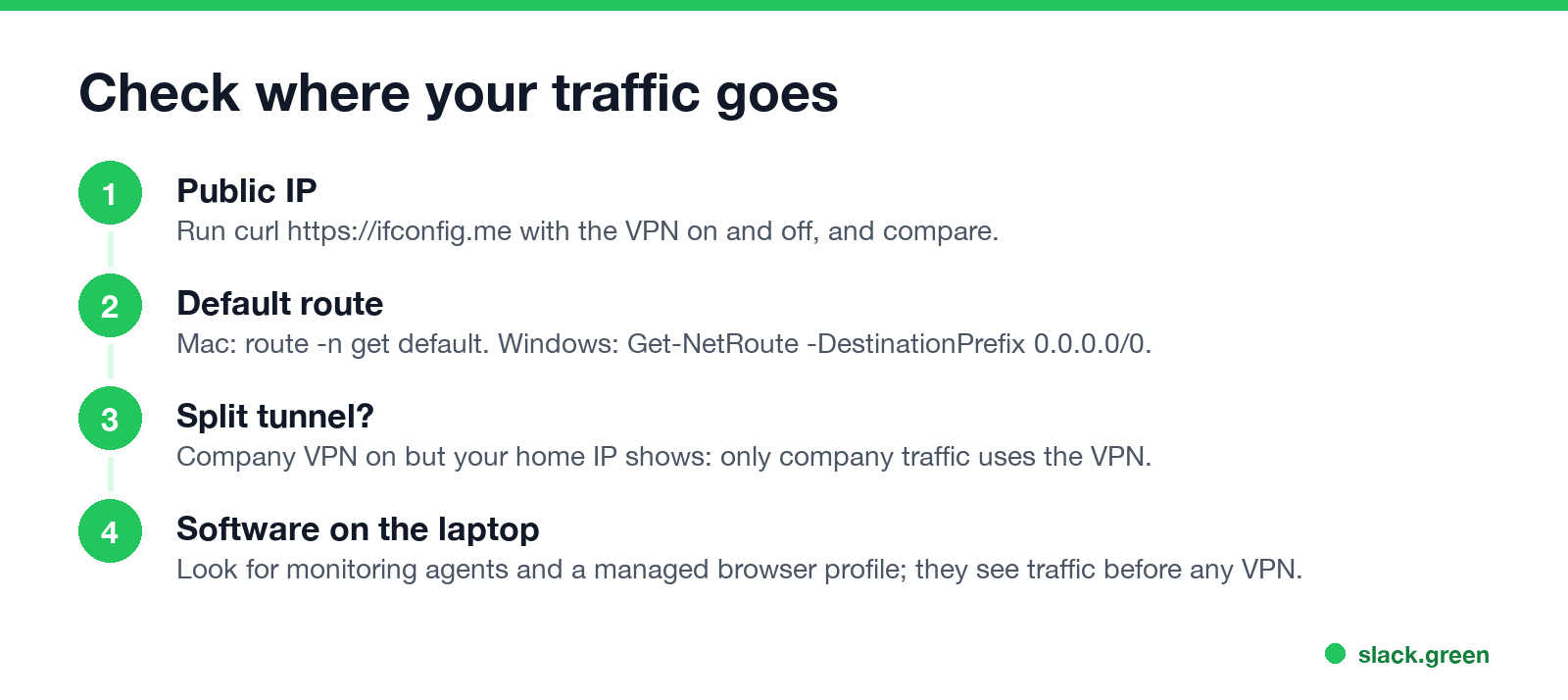
Run these with the VPN on, then off, and compare.
# the public IP address websites see (and your employer's network sees)
curl https://ifconfig.me

# Mac: which network interface carries your traffic; utun usually means a VPN tunnel
route -n get default | grep interface
On Windows, in PowerShell:
# the public IP address websites see
Invoke-RestMethod https://ifconfig.me/ip

# default routes; a VPN adapter at the top usually carries your traffic
Get-NetRoute -DestinationPrefix 0.0.0.0/0 | Sort-Object RouteMetric | Select-Object InterfaceAlias, RouteMetric
If the public IP is your company's with the company VPN on, and your home internet provider's with it off, the VPN carries all traffic. If it stays your home IP with the company VPN on, the VPN is split tunneled. To find monitoring software on a laptop, see how to tell if you are being monitored at work.
The safe setup for private browsing
FAQ
Can my employer see my browsing if I use a VPN? Not on your own device with your own VPN. On a work laptop, often yes, because software on the laptop sees activity before the VPN encrypts it.
Can my employer see that I am using a VPN? Usually, on the office network, from the VPN server's address and traffic. On a work laptop, the VPN app shows in the installed app list.
Does the company VPN let my employer see my browsing? Yes, the names of the sites it carries. With HTTPS inspection, more. On a split tunnel, personal traffic skips the VPN.
Can my employer see my browsing on work Wi-Fi with a personal VPN on my phone? No. The network sees one encrypted connection to the VPN server.
Can my company track my location through the VPN? Only approximately. The VPN logs your public IP address, which maps to a city and provider.
Does incognito mode hide browsing on the company VPN? No. Incognito keeps history off the device only. The VPN still carries the traffic.
Stop Jiggling Your Mouse.
Join hundreds of remote workers who never worry about their Slack status. Set it up once, stay green forever.
Related Articles
Teams Status on Multiple Devices: The Last Device You Used Wins
Signed in to Teams on a computer and a phone? Your status comes from the device you used most recently. That is why a quick look at your phone can turn you Away, and why a phone in your pocket shows Away instead of Offline at night.
Zoom Do Not Disturb: How to Turn It On, Schedule It, and What It Blocks
To turn on Do not disturb in Zoom, click your profile picture, point at your status and choose Do not disturb, then a time from 20 minutes to 24 hours, or Custom for a daily schedule. It blocks pop-up notifications for Zoom Team Chat and Zoom Phone calls. Busy, by contrast, mutes nothing. How the two differ, and how to keep a Zoom meeting free of pop-ups.
Auto Clicker vs Mouse Jiggler: Which Keeps You Active, and the Risks
A mouse jiggler moves the pointer; an auto clicker clicks wherever the pointer sits. Both keep Teams and the screen awake, but an auto clicker can click the wrong thing, and fixed-interval clicks are exactly what monitoring tools flag.