
Can My Employer See My Incognito History? What It Hides at Work
Incognito saves no history on the laptop, so there is nothing for IT to open later. It does not hide your browsing from the office Wi-Fi, the company VPN, an HTTPS inspection proxy or monitoring software, and IT can turn it off.
Your employer cannot open an Incognito history, because Incognito does not save one. But on a work laptop, the company VPN or the office Wi-Fi, your employer can still see what you visit in Incognito. The network logs the site names. An HTTPS inspection proxy can log full pages and search terms. Monitoring software records Incognito windows like any other window. Chrome says the same thing on every new Incognito tab: your activity "might still be visible to" your employer or school.
Incognito protects you from the next person who uses the same browser, and nothing more. On your own phone or computer, on mobile data or your home Wi-Fi with no company VPN, your employer cannot see your browsing, Incognito or not.
We build Slack Green, which keeps your Slack status green from our servers with nothing installed on the work laptop, so we track what employers can see on work devices. This page covers Incognito. All browsing, private or not, is in can my employer see my browsing history.
What Incognito hides, and from whom
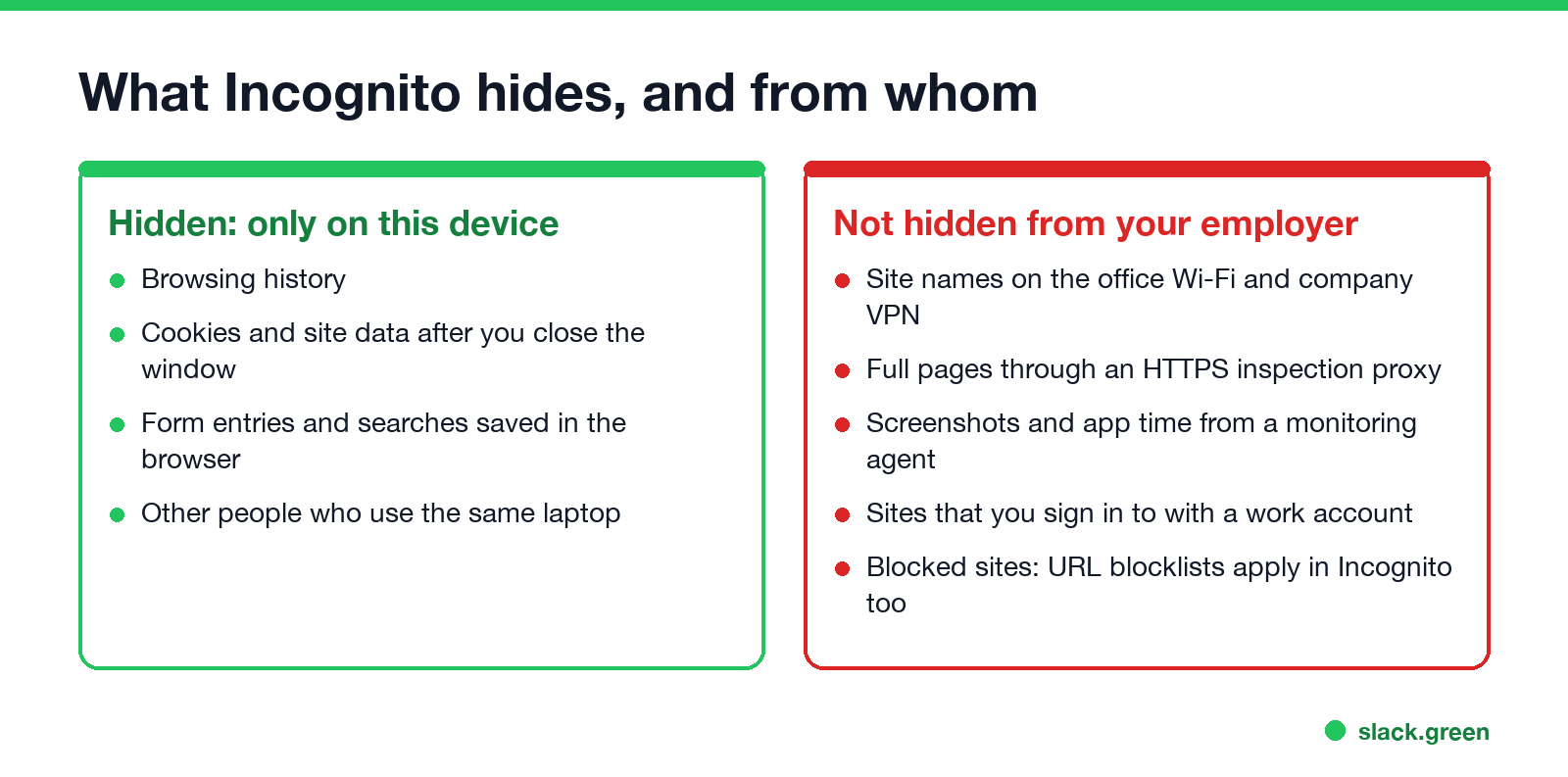
Incognito in Chrome, InPrivate in Edge and Private Browsing in Firefox and Safari all do the same job. When you close the window, the browser deletes:
- • the pages you opened, so they never reach the history list;
- • cookies and site data from that session;
- • searches and form entries that the browser would otherwise remember.
- An inspection proxy. If IT installed a company certificate, the proxy decrypts the traffic and can log the full search address, words included.
- A monitoring agent. Screenshots and keystroke logs capture the search box directly.
Downloads and bookmarks you make in Incognito stay. Everything else about the visit leaves the laptop the normal way, over the network, and the network does not know or care which kind of window you used.
| Who is looking | Can they see your Incognito browsing? | What they see |
|---|---|---|
| Someone who opens your browser later | No | Nothing in history |
| Office Wi-Fi, DNS and firewall | Yes | Site names and times, even from your own phone |
| Company VPN | Yes | Site names while the VPN is on |
| HTTPS inspection proxy (Zscaler, Netskope, Palo Alto) | Yes | Full addresses, search terms, page content |
| Monitoring agent on the laptop | Yes | Screenshots, app and site time, sometimes keystrokes |
| Sites where you sign in with a work account | Yes | Your activity, logged by that site under your work identity |
Can my employer see my Incognito searches?
On a work laptop or the work network, often yes. The search goes to google.com or bing.com, so the network sees that you searched. It does not see the words, because the search travels inside HTTPS. Two things change that:
If you are signed in to a work Google account in the Incognito window, the searches are also tied to that account. Workspace admins can see audit logs for the account, and Google can keep activity on it.
Can IT see my Incognito history after I close the window?
Never appear "away" on Slack again
Cloud-based. No downloads. Works 24/7 even when your laptop is off.
Not from the browser. Once you close the last Incognito window there is no list of sites left in Chrome or Edge for IT to read, and no command that brings it back.
The records that matter live elsewhere. The firewall, the DNS server, the VPN gateway and the inspection proxy each keep their own logs on company systems, and a monitoring agent uploads its data as it goes. Clearing anything on the laptop does not touch those logs. So "can they see my Incognito history" and "can they see what I did in Incognito" have different answers: no, and often yes.
Can my employer turn off Incognito?
Yes, on a managed browser. Chrome has a policy called IncognitoModeAvailability. Edge has the same one, InPrivateModeAvailability. Both take three values:
| Value | Meaning |
|---|---|
| 0 | Incognito or InPrivate is available (the default) |
| 1 | Turned off: the menu item is grey or missing |
| 2 | Forced: every window opens in Incognito or InPrivate |
Firefox has DisablePrivateBrowsing. If "New Incognito window" is missing from Chrome's menu on your work laptop, this policy is why.
Managed browsers also apply URL blocklists inside Incognito, so a site that is blocked in a normal window is blocked there too.
You can read the policy yourself. In Chrome, open chrome://policy and search for Incognito. From a terminal:
# Windows (Command Prompt): Chrome and Edge policies set by IT
reg query "HKLM\SOFTWARE\Policies\Google\Chrome" /v IncognitoModeAvailability
reg query "HKLM\SOFTWARE\Policies\Microsoft\Edge" /v InPrivateModeAvailability

# Mac (Terminal): managed Chrome preferences, if any
defaults read "/Library/Managed Preferences/com.google.Chrome" IncognitoModeAvailability
"The system was unable to find the specified registry key or value" on Windows, or "does not exist" on a Mac, means no policy is set for that browser.
Check what your work laptop can report
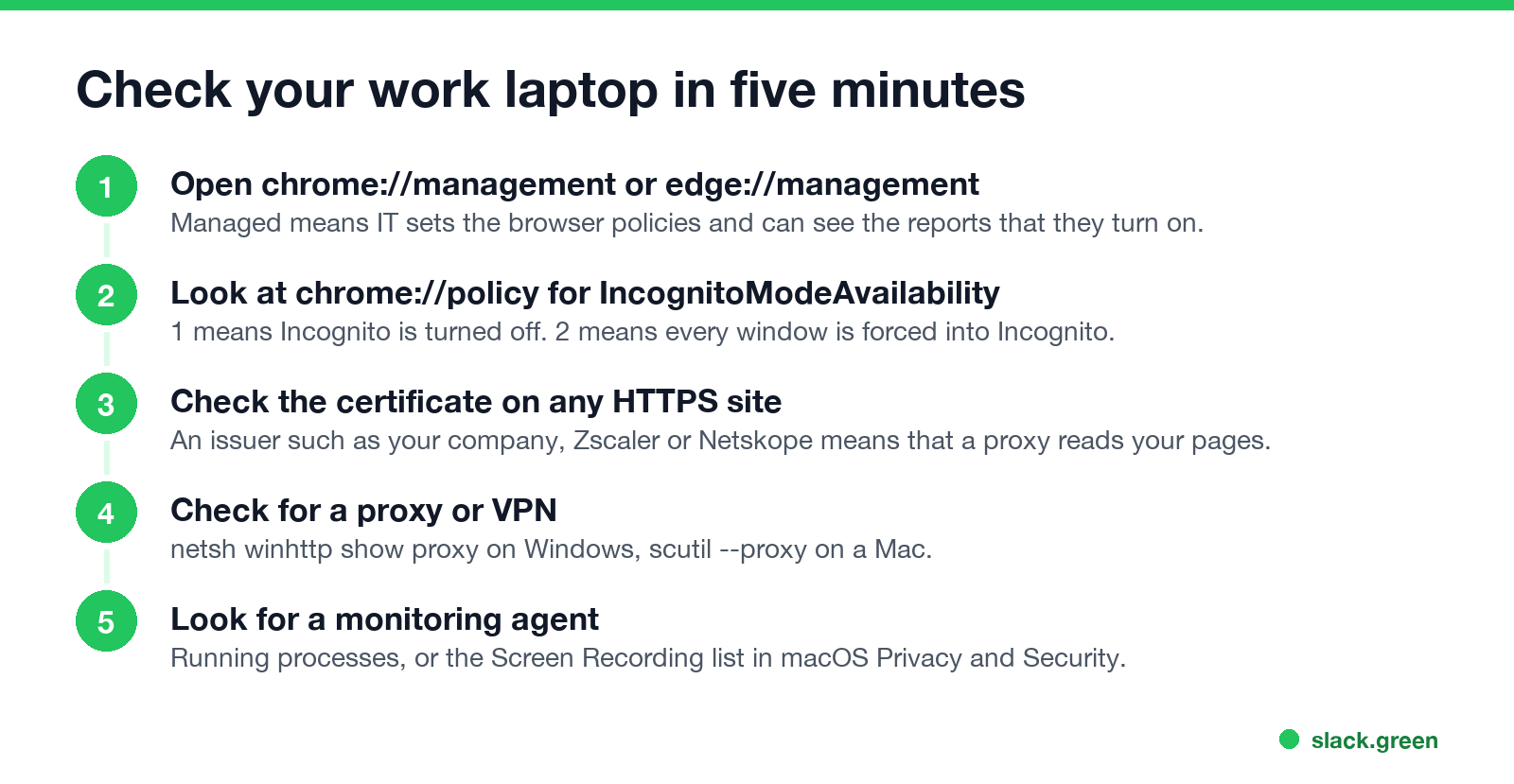
1. Is the browser managed? Open chrome://management or edge://management. A managed browser says so and lists what the administrator can see.
2. Is Incognito allowed? Check chrome://policy as above.
3. Is HTTPS inspected? On any HTTPS site, click the icon left of the address, open the connection details and view the certificate. A public site shows a public issuer such as DigiCert, Google Trust Services or Let's Encrypt. Your company's name, Zscaler or Netskope means a proxy reads your pages, Incognito or not.
4. Is there a proxy or VPN? Run netsh winhttp show proxy in Command Prompt on Windows, or scutil --proxy in Terminal on a Mac. A proxy address or a .pac file means your web traffic goes through a company server.
5. Is there a monitoring agent? Look for it in running processes, or on a Mac in System Settings, Privacy & Security, Screen & System Audio Recording. Signs of the common tools are in how to tell if you are being monitored at work.
Keep private browsing private
Never appear "away" on Slack again
Cloud-based. No downloads. Works 24/7 even when your laptop is off.
FAQ
Does Incognito hide browsing from my employer? No. It hides browsing from the next person who uses the browser. The network, the VPN, an inspection proxy and monitoring software still see it.
Can my employer see my Incognito history on the work Wi-Fi from my own phone? They can see the site names your phone connects to, with times. They cannot see the pages or searches, because your phone does not trust a company certificate. Switch to mobile data and they see nothing.
Can my employer see Incognito history if I work from home? On a work laptop, yes: the VPN, a cloud proxy such as Zscaler and a monitoring agent all work from home. Your home router is the only part your employer does not control.
Is InPrivate in Edge different?
No. InPrivate, Firefox Private Browsing and Safari Private Browsing work the same way, and IT can turn InPrivate off with InPrivateModeAvailability.
Can my employer see my Incognito history on a work phone? On a company phone, treat it like a work laptop. On your own phone with a work profile, IT manages the work apps only. The details are in can my employer see what I do on my phone.
Stop Jiggling Your Mouse.
Join hundreds of remote workers who never worry about their Slack status. Set it up once, stay green forever.
Related Articles
Does Slack Notify When You View Someone's Profile? No
No. Opening someone's Slack profile, hovering over their name or checking their status sends them nothing, and Slack has no list of who viewed your profile. Admins cannot see profile views either. What does get noticed: typing in a DM, messages, reactions, mentions and huddles. What a profile shows, and what Slack admins can see instead.
Quiet Vacationing: What It Means and Why Workers Do It
Quiet vacationing, also called a hushed vacation, means taking time off without telling your manager while you keep looking online. In a Harris Poll of 1,170 US workers, 37% of millennials said they had done it and 38% had moved their mouse to look active. What it looks like, why people do it, how it gets noticed, and the working-vacation alternative.
Can Time Doctor Detect a Mouse Jiggler? Yes, With One Report
Yes, if your company has Time Doctor's Unusual Activity Report. It checks keyboard and mouse activity in 30-minute blocks and flags mouse movement without clicks and input that is unusually regular, which is what app and USB jigglers produce. It does not look at app names. What the report flags, who sees it, and what else Time Doctor records.