
How to Keep a Citrix Session Active: Find Which Timeout Logs You Out
A Citrix session can end from four different timers: Windows locking inside the virtual desktop, the Citrix session idle timer, the Citrix Gateway session time-out, and the StoreFront web page timeout. Only input from your own device into the Citrix window resets them. How to tell which one hit you and what keeps each one quiet.
To keep a Citrix session active, send input into the Citrix window from your own keyboard or mouse before the shortest idle timer runs out. The hard part is knowing which timer that is. A Citrix session can be cut by four separate timeouts: Windows locking the screen inside the virtual desktop, the Citrix Session idle timer on the virtual desktop, the Citrix Gateway session time-out, and the StoreFront web page timeout when you launch from a browser. Each shows a different message, and only an admin can change them. A local mouse jiggler helps only while the Citrix window is in front, and the ICA keep-alive setting does not stop idle timeouts at all.
We build Slack Green, which keeps your Slack status active from our servers during the hours you set. Many people who work in a Citrix desktop run Slack there too, and Slack counts only input inside its own window.
Which Citrix timeout logged you out?
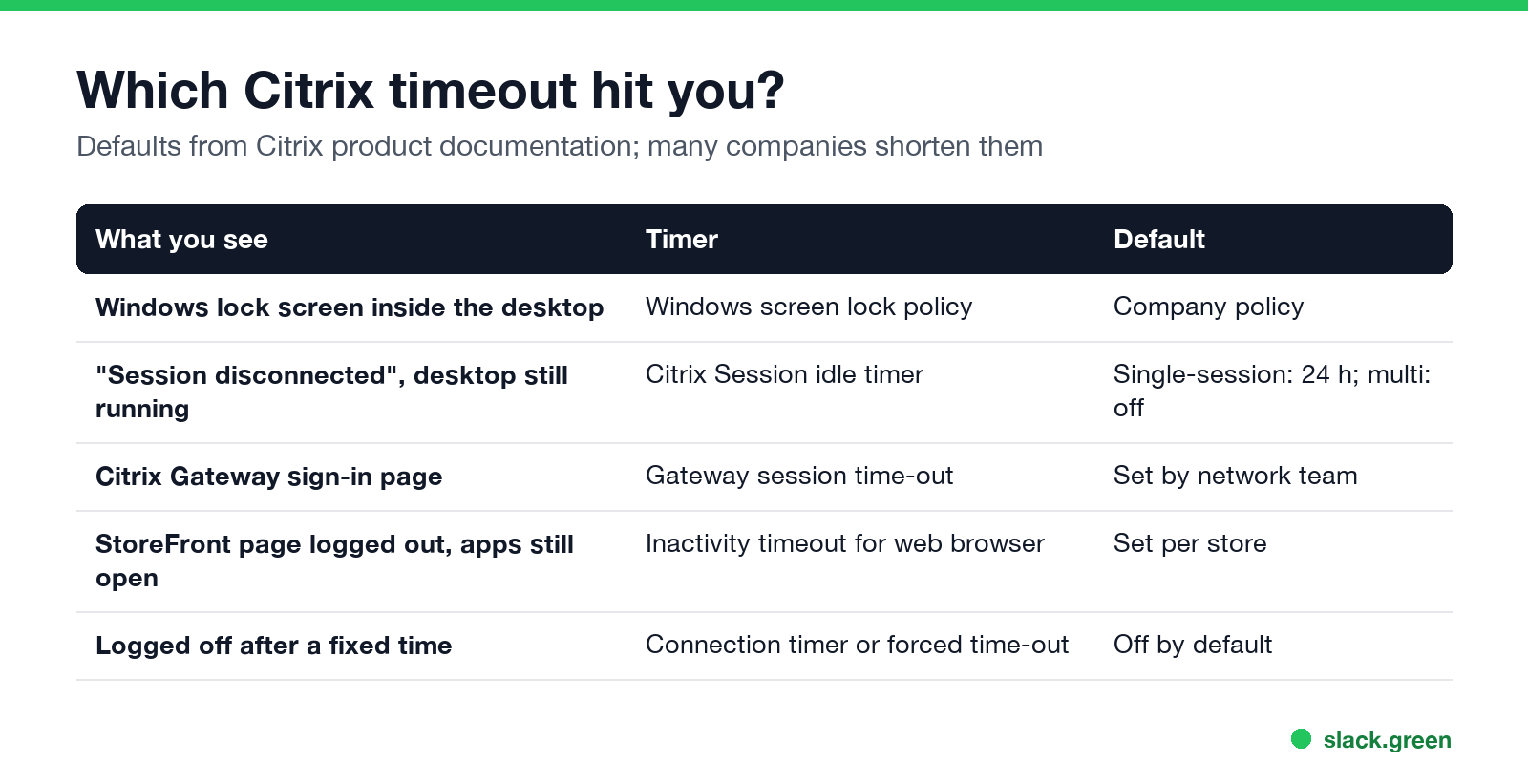
| What you see when you come back | Timer | Default | Who sets it |
|---|---|---|---|
| The Windows lock screen inside the Citrix desktop | Windows screen lock (Group Policy in the virtual desktop) | Company policy, often 10 to 15 minutes | Windows admin |
| "Session disconnected", the window closed, the desktop is still running when you reconnect | Citrix Session idle timer | Single-session desktops: on, 1,440 minutes (24 hours). Multi-session: off | Citrix admin |
| You are sent to the Citrix Gateway sign-in page | Citrix Gateway session time-out | Set by the network team | Gateway admin |
| The StoreFront web page says you were logged out, but open apps keep running | StoreFront "Inactivity timeout for web browser" | Set per store | StoreFront admin |
| You are logged off after a fixed time, active or not | Session connection timer or Gateway forced time-out | Off by default | Citrix or Gateway admin |
The defaults in the table come from Citrix's product documentation. Many companies shorten them, which is why one employer's Citrix drops you after 15 minutes and another's never does.
The StoreFront timeout catches many people. Citrix's docs say it applies only to the store page in a browser, and that the installed Citrix Workspace app "does not apply an inactivity timeout when connected to a StoreFront store." So if you launch from a browser, the store tab can log out while your desktop keeps running.
What counts as activity in a Citrix session
Citrix describes its idle timer in terms of input from the user: it tracks how long a connection is kept "when there is no input from the user." In practice that means keyboard and mouse input from your own device, sent into the Citrix window.
- • Typing or moving the mouse inside the Citrix window counts.
- • Moving the mouse over the Citrix window without clicking counts, because the pointer position is sent to the session.
- • Work in local apps outside the Citrix window does not count. Citrix never sees it.
- • Watching a video or a long report render inside the session does not count.
This is also why a local keep-awake tool is not enough. It keeps your own laptop awake, which matters, because a sleeping laptop drops the connection. But it sends no input to the session.
How to keep a Citrix session from timing out
Never appear "away" on Slack again
Cloud-based. No downloads. Works 24/7 even when your laptop is off.
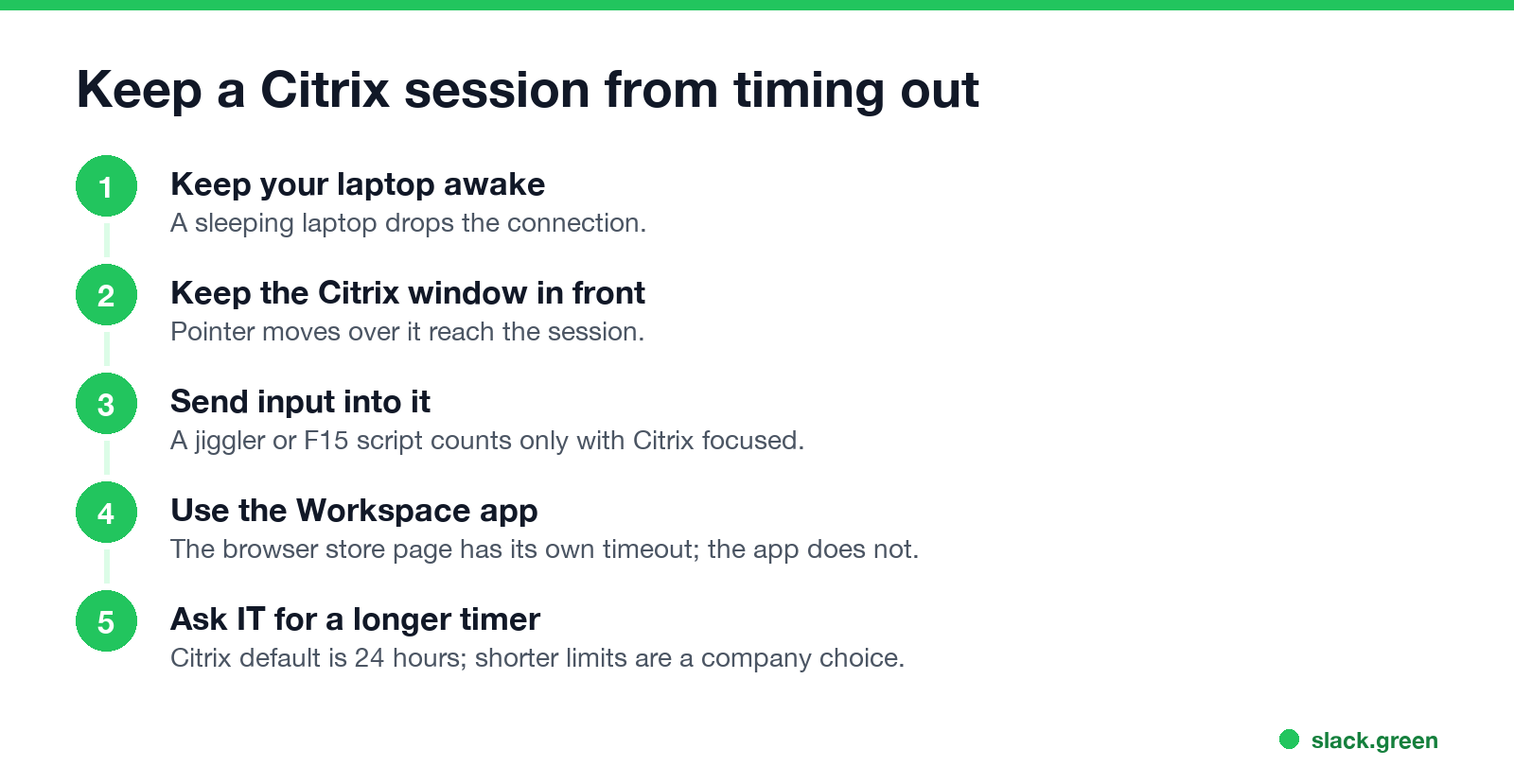
Some people run a jiggler inside the virtual desktop instead. That usually needs install rights you do not have, and it may not reset Citrix's idle timer, which is documented around input from the user device. Company policy may also forbid either kind; see are mouse jigglers safe before you try one on a work laptop.
Citrix keep alive does not stop idle timeouts
"Citrix keep alive" is a policy setting, not a way to stay logged in. The ICA keep-alive messages setting makes the server send a small message every 60 seconds by default to check whether the connection still works. Citrix's docs say it "prevents broken connections from being disconnected", and that it does not work with Session Reliability turned on. It does not count as user input, so the Session idle timer still runs.
In other words, keep-alive helps with a flaky network. It does nothing for a timer that ends sessions when you stop typing.
For Citrix admins: where the timers live
Set-STFWebReceiverService -SessionStateTimeout.A longer idle timer keeps an unattended desktop open. Pair it with a Windows screen lock inside the session so an idle desktop is not an open door.
Citrix and your chat status
Never appear "away" on Slack again
Cloud-based. No downloads. Works 24/7 even when your laptop is off.
Teams and Slack inside a Citrix desktop follow their own rules. Teams counts input anywhere in the virtual desktop, so input that keeps Citrix alive also keeps Teams Available. Slack counts only input inside the Slack window, so it goes grey after 10 minutes even while you type in another app in the same session. Slack Green keeps your Slack status active on your schedule from our servers, with nothing running in the Citrix desktop.
Citrix session questions
How long before Citrix times out? It depends on your company. Citrix's default idle timer for single-session desktops is 24 hours, but admins often set 15 to 60 minutes, and a browser store page or the Gateway can end sooner.
Why does Citrix disconnect me when I am working? You are working in a local app, not in the Citrix window, so Citrix sees no input. Or the Gateway or a forced time-out ended the session regardless of activity.
Does a mouse jiggler work with Citrix? On your own computer, only while the pointer is over the Citrix window, since the moves reach the session only then.
Does Citrix keep alive stop timeouts? No. ICA keep-alive checks the connection; it is not user input.
Stop Jiggling Your Mouse.
Join hundreds of remote workers who never worry about their Slack status. Set it up once, stay green forever.
Related Articles
KeepingYouAwake vs Amphetamine: Which Mac Keep-Awake App to Use
KeepingYouAwake is a free, open-source menu bar switch that runs Apple's caffeinate for you. Amphetamine is a free App Store app with triggers, schedules and a closed-lid mode. Pick KeepingYouAwake for one click and Homebrew, Amphetamine for automation. Neither keeps Slack or Teams active.
Computer Locks After 15 Minutes? How to Tell If Group Policy Set It
A work laptop that locks after exactly 15 minutes, with screen settings greyed out, is almost always following a policy from IT: the Windows machine inactivity limit, a forced screen saver, or an Intune device lock. Security baselines and PCI DSS ask for 15 minutes. How to see which policy it is, and what you can and cannot change.
How Long Before Google Chat Shows Away? Idle at 5 Minutes, Away at 10
Google Chat shows you Idle after 5 minutes without activity in Gmail or Chat on a computer, and Away once you have been idle for more than 10 minutes. Losing your connection or a sleeping computer shows Away at once. Neither timer can be changed, by you or by a Workspace admin.