
How to Mention a User in a Slack Webhook: <@ID>, @here and Groups
To mention someone in a Slack incoming webhook, put their member ID in angle brackets: <@U0123ABCD>. A plain @name stays text. @here is <!here>, @channel is <!channel>, and a user group is <!subteam^S0123ABCD>. Where to find the IDs, a lookup-by-email script, and what we measured.
To mention a user in a Slack webhook, put their member ID inside angle brackets with an @: <@U0123ABCD>. Slack turns it into a real mention and notifies the person. A plain @jane in the webhook text stays plain text. For @here use <!here>, for @channel use <!channel>, and for a user group use <!subteam^S0123ABCD> with the group's ID.
We checked each form on 28 September by sending test messages with Slack's chat.postMessage API to a direct message in our own workspace, then deleting them. Incoming webhooks read the same mrkdwn text.
Slack webhook mention syntax
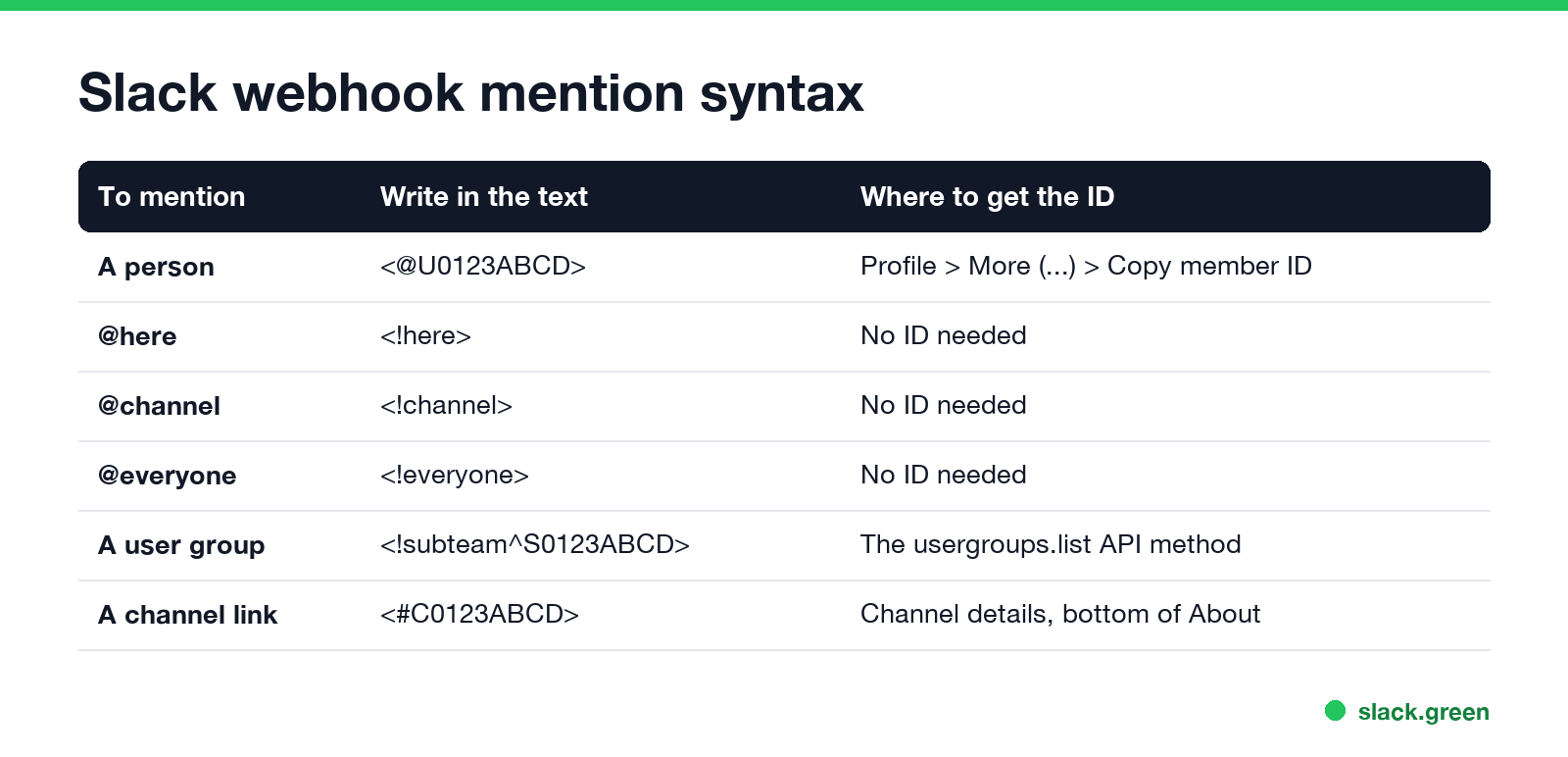
| To mention | Write in the webhook text | Where to get the ID |
|---|---|---|
| A person | <@U0123ABCD> | Their profile: More (the three dots), then Copy member ID |
| @here | <!here> | No ID needed |
| @channel | <!channel> | No ID needed |
| @everyone | <!everyone> | No ID needed |
| A user group | <!subteam^S0123ABCD> | The usergroups.list API method |
| A channel (link) | <#C0123ABCD> | Channel details, at the bottom of the About tab |
A full webhook call with a mention looks like this:
curl -X POST -H "Content-Type: application/json" \
  -d '{"text": "<@U0123ABCD> the deploy finished. <!here> please test staging."}' \
  "$SLACK_WEBHOOK_URL"
Slack answers ok with HTTP 200. More payload shapes, and the error codes a webhook returns, are in our Slack webhook curl example.
What we sent and what Slack did
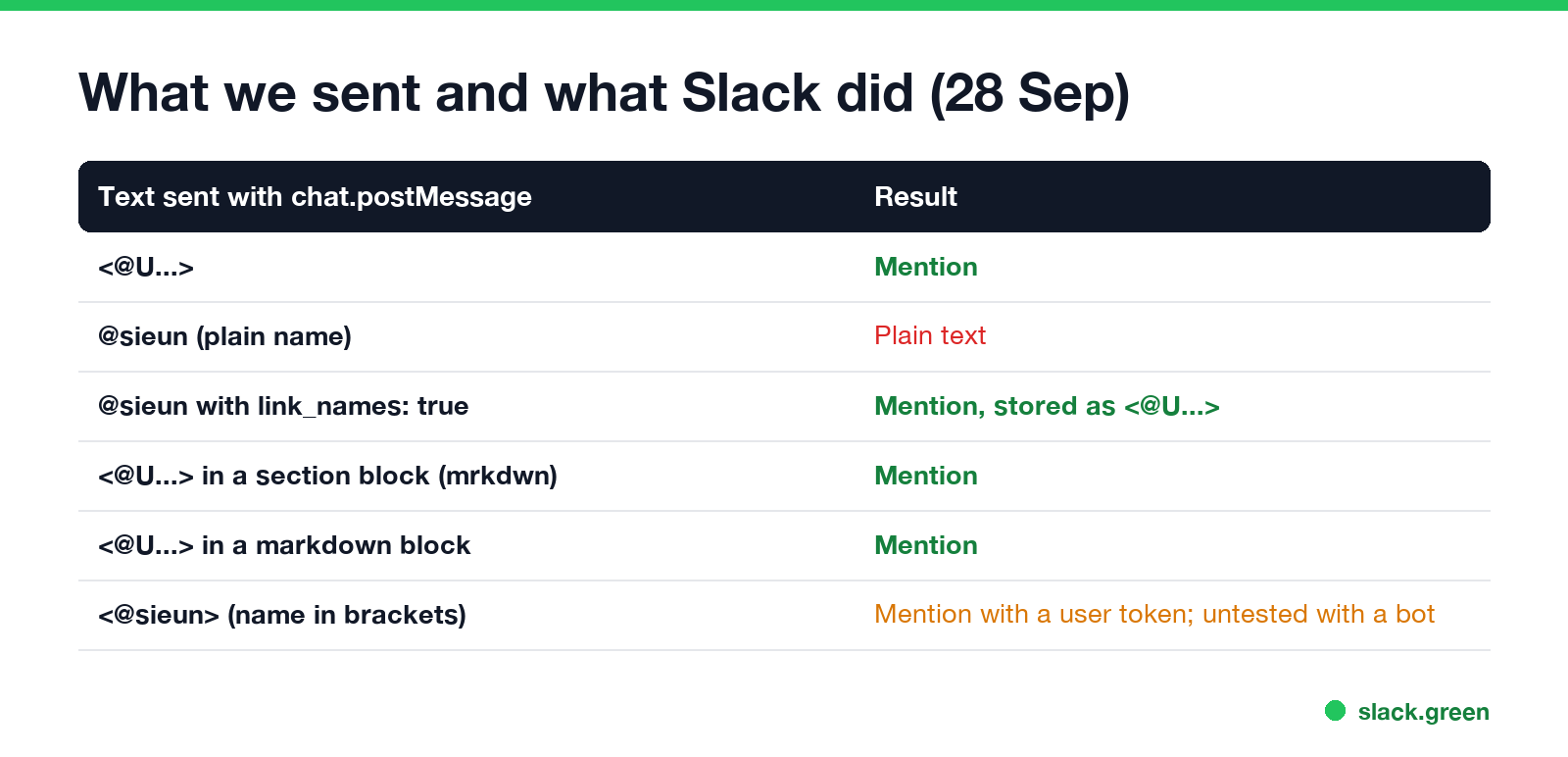
We posted six messages and read them back with conversations.history to see what Slack stored:
- •
<@U...>became a mention, stored as auserelement. - •
@sieunas plain text stayed plain text. - •
@sieunwith"link_names": truebecame a mention, and Slack stored it as<@U...>. - •
<@U...>inside a Block Kit section withmrkdwntext became a mention. - •
<@U...>inside a Block Kit markdown block became a mention. - •
<@sieun>, a name in the brackets, also became a mention. Slack's docs say to use IDs, and we sent this one with a user token, not a bot or a webhook, so do not rely on it. - Click the person's name or photo in Slack and open their full profile.
- Click More (the three dots).
- Click Copy member ID. It starts with
U(orWon Enterprise Grid).
This is how the six messages looked in Slack:
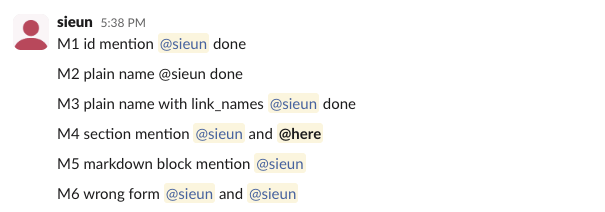
link_names is a chat.postMessage argument. We did not test it on an incoming webhook, so for webhooks, send IDs.
How to find a Slack member ID
For many people, look IDs up by email with the Web API. users.lookupByEmail needs a bot token with the users:read.email scope. This script finds the ID and posts the mention through a webhook:
import json
import os
import urllib.parse
import urllib.request

BOT_TOKEN = os.environ["SLACK_BOT_TOKEN"]      # xoxb-..., needs users:read.email
WEBHOOK_URL = os.environ["SLACK_WEBHOOK_URL"]  # https://hooks.slack.com/services/...


def user_id_for(email: str) -> str:
    """Look up a Slack member ID from an email address."""
    url = "https://slack.com/api/users.lookupByEmail?" + urllib.parse.urlencode({"email": email})
    req = urllib.request.Request(url, headers={"Authorization": f"Bearer {BOT_TOKEN}"})
    with urllib.request.urlopen(req, timeout=10) as resp:
        data = json.load(resp)
    if not data.get("ok"):
        raise RuntimeError(f"users.lookupByEmail failed: {data.get('error')}")
    return data["user"]["id"]


def post(text: str) -> None:
    body = json.dumps({"text": text}).encode()
    req = urllib.request.Request(WEBHOOK_URL, data=body, headers={"Content-Type": "application/json"})
    with urllib.request.urlopen(req, timeout=10) as resp:
        print(resp.status, resp.read().decode())  # 200 ok


if __name__ == "__main__":
    uid = user_id_for("jane@example.com")
    post(f"<@{uid}> the nightly build failed. Log: <https://ci.example.com/run/42|run 42>")
With a wrong token, users.lookupByEmail returns invalid_auth, and a wrong webhook URL returns HTTP 404 with the body no_team. We checked both of those responses from Slack on 28 September. Store the ID once you have it; member IDs do not change when someone renames themselves.
Never appear "away" on Slack again
Cloud-based. No downloads. Works 24/7 even when your laptop is off.
Mention @here, @channel and user groups from a webhook
<!here>.<!channel>. Use it rarely; see @here vs @everyone vs @channel.<!subteam^S0123ABCD>. Find it with usergroups.list. Setting up groups is in Slack user groups.Slack's formatting docs add one rule: a user mentioned by an app is notified only if they are already in the channel. If a mention shows as a name but nobody gets a notification, check that the person is a member of the webhook's channel.
Slack webhook mention not working
@name. Replace it with <@MemberID>.plain_text or has "mrkdwn": false. Mentions only parse in mrkdwn text.< with < in the whole message, it breaks the mention too. Escape only the user text you insert, not your own <@...> tokens.U0123ABCD, not jane.doe.To check a message before you send it, paste the text into the Slack message formatter. If your source text is standard markdown, run it through the markdown to Slack converter first; in mrkdwn, **bold** and [text](url) stay literal, so the converter rewrites them as *bold* and <url|text>.
Mentions in Block Kit, Workflow Builder, n8n and GitHub Actions
<@U0123ABCD> in a mrkdwn text object, or in a markdown block. Both worked in our test. The rest of the syntax is in Slack Block Kit markdown.<@{{ $json.slackId }}> in n8n. The tool only sends the string; Slack does the parsing.<@ID>. The workflow is in how to send a Slack message from GitHub Actions.FAQ
How do I tag someone in a Slack webhook message?
Use their member ID in angle brackets: <@U0123ABCD>. Copy the ID from their profile under More, Copy member ID.
How do I send @here with a Slack webhook?
Put <!here> in the text. <!channel> sends @channel.
Can a Slack webhook mention a user by name?
Not reliably. Plain @name stays text. Look up the ID by email with users.lookupByEmail and send <@ID>.
How do I mention a user group in a Slack webhook?
<!subteam^S0123ABCD>, with the group's ID from usergroups.list.
Stop Jiggling Your Mouse.
Join hundreds of remote workers who never worry about their Slack status. Set it up once, stay green forever.
Related Articles
How to Make an Emoji From a Video (Slack and Discord)
To make an emoji from a video, cut 1 to 2 seconds, crop it to a square, scale it to 128 x 128 and save it as a GIF under 128 KB for Slack or 256 KB for Discord. One tested ffmpeg command, the frame rate and color settings that decide the file size, and a free browser tool that shrinks the GIF for you.
How to Use Slack Block Kit Builder: Templates, Preview, Payload
Slack's Block Kit Builder at app.slack.com/block-kit-builder lets you pick a template, add blocks, preview the message on Desktop or Mobile, and copy the JSON payload for a webhook or chat.postMessage. A walk through the current builder, a working deploy message, and the steps to send it.
Can Slack Messages Be Subpoenaed? Yes, Here Is How It Works
Yes. Slack messages, including DMs, can be requested in a lawsuit or an investigation. Most requests go to the company that owns the workspace, which exports them. Slack itself gives out message content only with a search warrant and tells the company first. Slack's own policy, its disclosure numbers, legal holds, and what deleted messages mean.