
Slack User Groups: How to Create, Mention and Manage Them
A Slack user group is a named list of people with one @handle, like @designers, that notifies all of them and can add them to up to 100 default channels. How to create one, who can, how to mention it, and how it differs from a channel.
A Slack user group is a named list of people with its own handle, such as @designers or @oncall. Mention the handle in any channel and everyone in the group gets a notification, without tagging each person. A user group can also add its members to up to 100 default channels. To create one, go to Directories, then User Groups, then Create user group. User groups are available on paid plans only, and by default only Workspace Owners and Admins can create and edit them.
The details below come from Slack's help article "Create and edit user groups". We build Slack Green, a Slack presence tool, and our guides cover the Slack features our users ask about.
How to create a user group in Slack
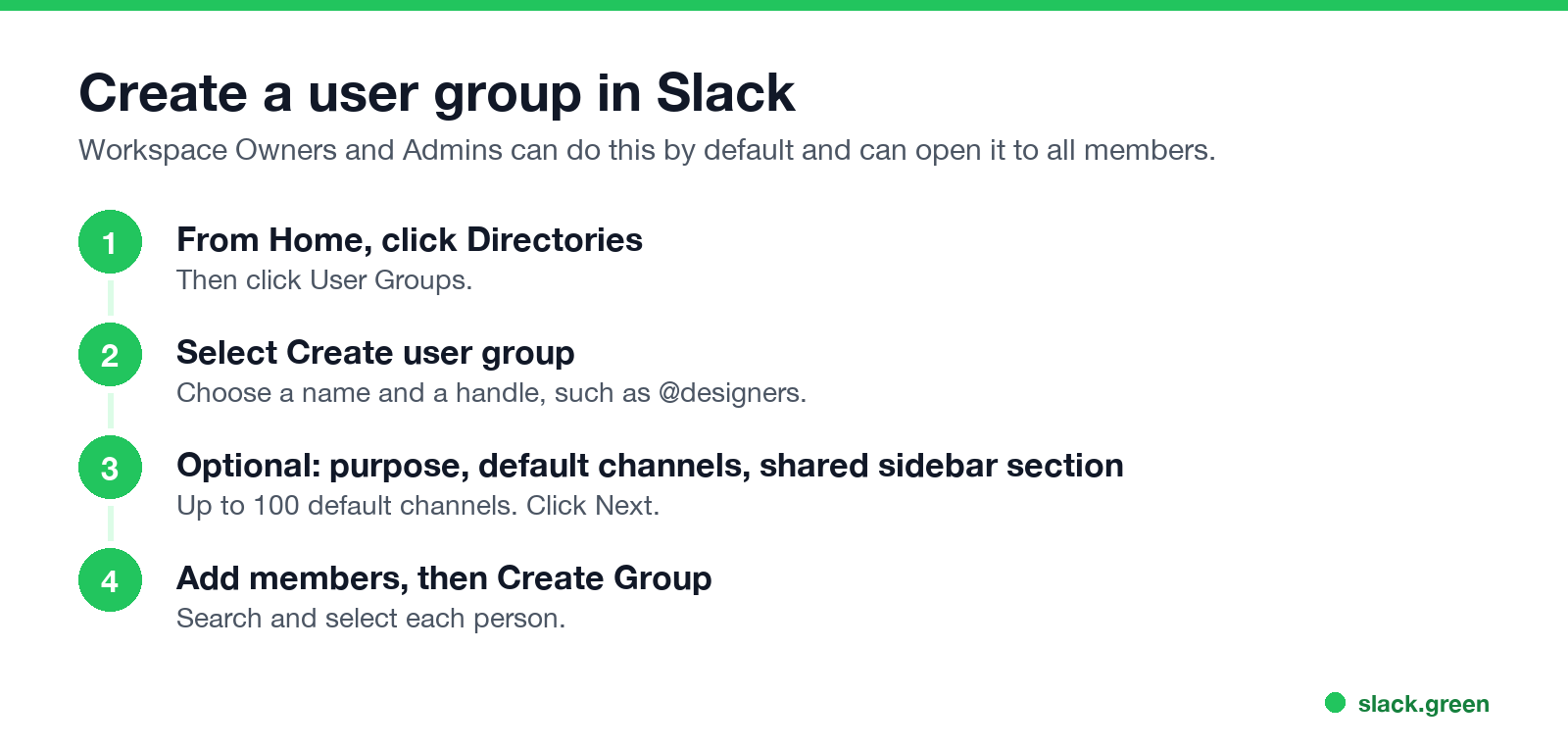
- From the Home tab, click Directories.
- Click User Groups, then Create user group.
- Choose a name and a handle.
- Optionally, set a purpose, pick default channels for members to join, or create a shared sidebar section. Click Next.
- Under Add members, search for and select people.
- Click Create Group.
- • Workspace Owners and Admins can create and edit workspace user groups by default.
- • They can open this to all members in the admin settings.
- • Org Owners and Admins on Enterprise create org-level groups.
- • Guests and people in Slack Connect channels and DMs cannot be added to your user groups and cannot mention them. See Slack Connect vs guest accounts.
If you do not see Create user group, an admin has restricted it. Ask a Workspace Owner or Admin. On Business+ you can also create workspace-level user groups through SCIM provisioning from your identity provider. On Enterprise, Org Owners and Admins create org-level groups from Organization settings, People, Groups, and those can span several workspaces.
Who can create and edit user groups
The difference between the Owner and Admin roles is in Slack workspace Owner vs Admin.
How to mention a user group
Never appear "away" on Slack again
Cloud-based. No downloads. Works 24/7 even when your laptop is off.
Type @ and the group's handle, for example @designers, then send. Members of the group who are in that channel get a mention notification. If some members are not in the channel, Slack may offer to invite them; a mention on its own does not add anyone.
Apps and scripts mention a user group with its ID in this format:
{
  "channel": "C0123456789",
  "text": "<!subteam^S0123456789> the release is ready for review"
}
Send that body to chat.postMessage. A plain @designers in API text does not notify anyone; the <!subteam^ID> form does. You can list your workspace's group IDs with the usergroups.list method.
Edit, add members, or deactivate a user group
User groups vs channels vs @here
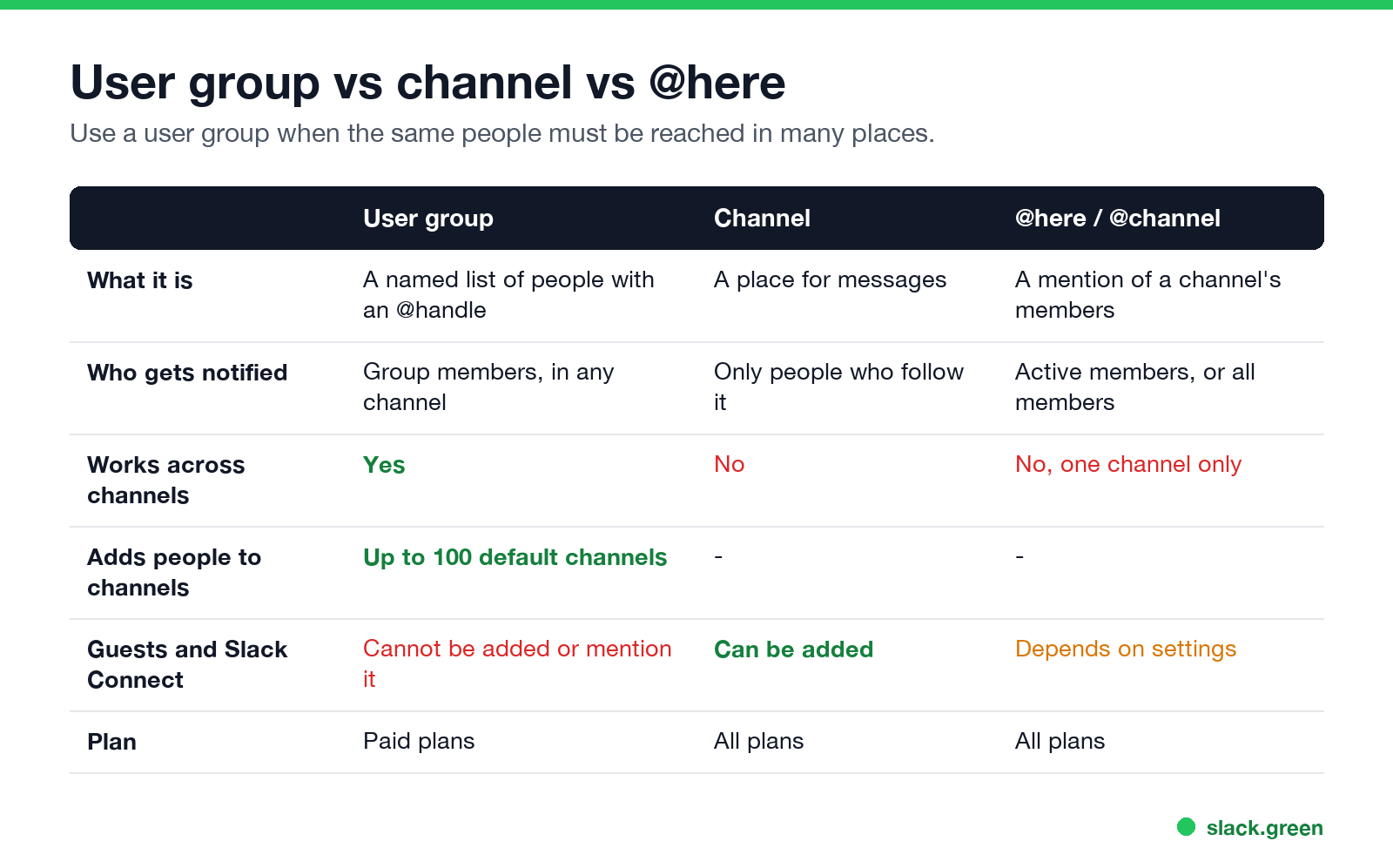
| User group | Channel | @here / @channel | |
|---|---|---|---|
| What it is | A named list of people with an @handle | A place for messages | A mention of one channel's members |
| Who gets notified | Group members, in any channel | Only people who follow it | Active members (@here) or all members (@channel) |
| Works across channels | Yes | No | No |
| Adds people to channels | Up to 100 default channels | No | No |
| Plan | Paid plans | All plans | All plans |
Use a user group when the same people need to be reached in many channels, such as an on-call rotation or a team that supports other teams. Use @here or @channel for one channel, and keep them rare; the etiquette is in Slack @everyone, @channel and @here.
Can you use user groups on the Slack free plan?
Never appear "away" on Slack again
Cloud-based. No downloads. Works 24/7 even when your laptop is off.
No. User groups are a paid-plan feature. On the Free plan, the options are to mention people one by one, use @here or @channel in a channel, or create a channel for the group.
When a user group mention does not notify you
A group mention follows your normal notification settings. If you paused notifications, the mention waits until your Do Not Disturb ends. The z on your dot tells others that, as in the green dot with a z. If mentions never arrive, see Slack notifications not working.
FAQ
What is a user group in Slack?
A named list of people with one @handle. Mentioning it notifies everyone in the group.
How do I create a user group in Slack?
Directories, User Groups, Create user group. Choose a name and handle, add members, then Create Group.
Who can create user groups in Slack?
Workspace Owners and Admins by default. They can allow all members to do it.
Are Slack user groups free?
No. User groups are available on paid plans only.
Can guests be in a Slack user group?
No. Guests and people from other companies in Slack Connect cannot be added to user groups or mention them.
Does mentioning a user group add people to the channel?
No. A mention does not add anyone to the channel. Default channels are a separate setting of the group.
Stop Jiggling Your Mouse.
Join hundreds of remote workers who never worry about their Slack status. Set it up once, stay green forever.
Related Articles
Slack Lists Tutorial: Create, Organize and Share a List
Slack lists are tables of tasks inside Slack, with fields, assignees, due dates, a board view and a comment thread on every item. How to create a list from scratch or a template, set up fields, turn it into a kanban board, add messages to it, share it, and what the plan limits are.
Slack Jira Integration: Setup, /jira Commands and Notifications
Install the Jira Cloud for Slack app, type /jira connect in a channel to send a Jira space's updates there, /jira notify for personal notifications as DMs, and create work items from any message with More actions. Every /jira command, Jira automation to Slack, and fixes when previews or notifications stop.
How to Create a Slack Workspace, on Desktop or Phone
Go to slack.com/get-started, enter your email, type the confirmation code, and click Create a Workspace. It is free to start, you become the Primary Owner, and it takes about five minutes. Steps for desktop, iPhone and Android, and what to set up next.