
Slack User Groups: How to Create, Mention and Manage Them
A Slack user group is one @handle that notifies a set of people. How to create, edit and mention one on a paid plan, and what a Free workspace shows instead (tested).
A Slack user group is a named list of people with its own handle, such as @designers or @oncall. Mention the handle in any channel and everyone in the group gets a notification, without tagging each person. To create one on a paid plan, open Directories, then User groups, then Create user group. On the Free plan the User groups tab is not there at all, and by default only Workspace Owners and Admins can create groups on paid plans.
If you are looking for the button and cannot find it, the two usual reasons are the plan and an admin setting. We checked the Free-plan case in our own test workspace on October 4, 2026; the results are below.
If you meant a group chat, not a user group
Many people who search "create a group in Slack" want a group chat, which works on every plan, Free included:
- • A group DM: click New message (the pencil icon next to the workspace name), then add several people in the To: field. The first message starts a private conversation for just those people.
- • A channel: click the + (Create new) at the bottom of the left rail, then Channel, which Slack describes as "Start a group conversation by topic". Its name must be lowercase, with no spaces or periods, up to 80 characters; Slack channel name rules shows what the app fixes for you and what it refuses. Use a channel when the group will grow or when its history should be easy to find.
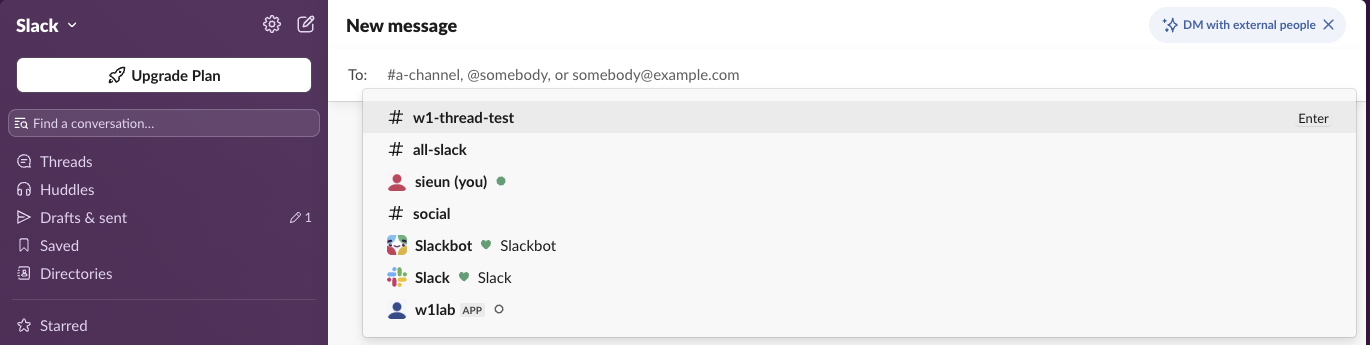
A user group is different: it is only an @handle that notifies a list of people, and on Free you cannot make one.
What a Free Slack workspace shows
We opened our test workspace (Free plan, signed in as the Primary Owner) in the Slack web app and looked for user groups in three places.
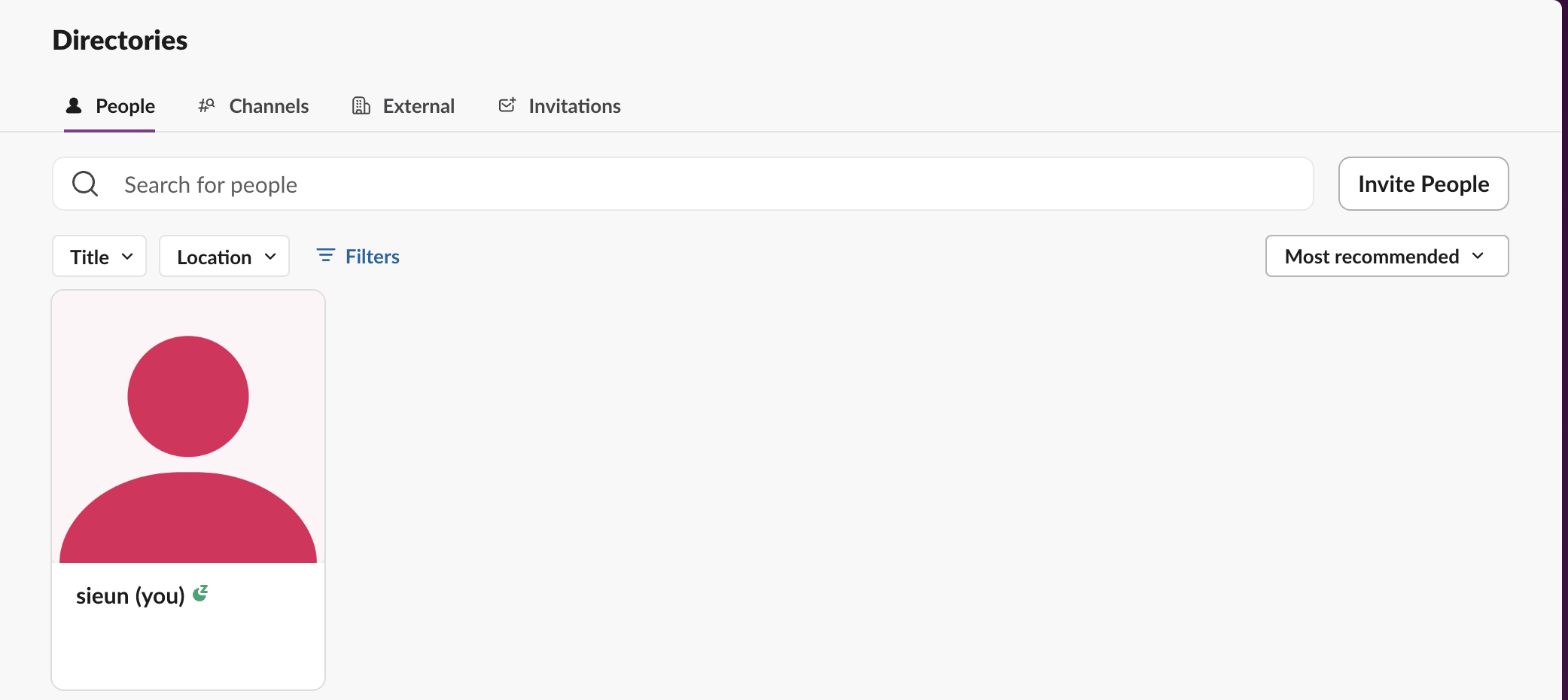
Directories. The page has four tabs: People, Channels, External and Invitations. There is no User groups tab, so there is no Create user group button to click.
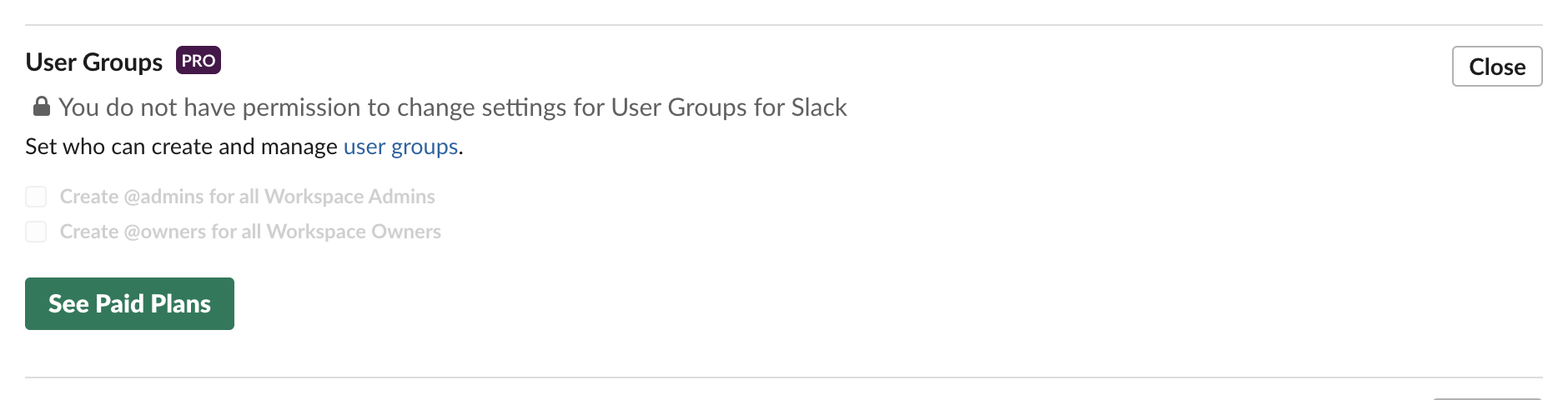
Admin settings. Under Settings & permissions, then Permissions, the User Groups row carries a PRO badge and the line "You do not have permission to change settings for User Groups", even for the Primary Owner. Expanding it shows two greyed boxes, "Create @admins for all Workspace Admins" and "Create @owners for all Workspace Owners", and a See Paid Plans button.
The API. usergroups.list returns an empty list, and usergroups.create fails with a plan error:
usergroups.list   -> {"ok": true, "usergroups": []}
usergroups.create -> An API error occurred: paid_teams_only
So on Free there is no way around it, from the app or from a script. The options are to mention people one by one, use @here or @channel inside one channel, or make a channel for the group.
How to create a user group on a paid plan
These are the steps in Slack's help article "Create and edit user groups". We could not click through them ourselves, because our test workspace is on Free.
On Business+ you can also create workspace user groups through SCIM provisioning from your identity provider. On Enterprise, Org Owners and Admins create org-level groups from Organization settings, People, Groups, and those can span several workspaces.
Why you do not see Create user group
slack_usergroup resource in Terraform's Slack provider, need a paid workspace too.Never appear "away" on Slack again
Cloud-based. No downloads. Works 24/7 even when your laptop is off.
Edit a user group, add members, or turn one off
How to mention a user group
Type @ and the group's handle, for example @designers, then send. Members of the group who are in that channel get a mention notification. If some members are not in the channel, Slack may offer to invite them; the mention on its own adds nobody.
Apps and scripts mention a user group by its ID, which usergroups.list returns on a paid plan:
{
  "channel": "C0123456789",
  "text": "<!subteam^S0123456789> the release is ready for review"
}
Send that body to chat.postMessage. A plain @designers in API text is not turned into a mention unless the call also sets link_names, which Slack's reference says still links user groups; our link_names test shows what that argument linked for users and channels on a Free workspace.
User groups, channels and @here compared
| User group | Channel | @here / @channel | |
|---|---|---|---|
| What it is | A named list of people with an @handle | A place for messages | A mention of one channel's members |
| Who gets notified | Group members, in any channel | Only people who follow it | Active members (@here) or all members (@channel) |
| Works across channels | Yes | No | No |
| Adds people to channels | Up to 100 default channels | No | No |
| Plan | Paid plans | All plans | All plans |
Use a user group when the same people need to be reached in many channels, such as an on-call rotation. Use @here or @channel for one channel, and keep them rare; when each one is allowed is in Slack @everyone, @channel and @here. A group mention follows each member's own notification settings, so someone with paused notifications gets it when their pause ends, as described in Slack notifications not working.
FAQ
Can I name a group DM instead of making a user group?
No. A group DM has no name of its own; it shows the members' names. If you want a named place for the same people, create a private channel.
What are @admins and @owners in Slack?
They are user groups Slack can create for you, holding every Workspace Admin or every Workspace Owner. The option sits in the User Groups permission and is greyed out on Free.
Does deactivating a user group remove its members from channels?
No. Deactivating only stops the handle from being mentioned. Members stay in every channel they joined.
Can a user group include people from another workspace?
Only org-level groups on Enterprise can span workspaces. A workspace user group covers members of that one workspace.
Stop Jiggling Your Mouse.
Join hundreds of remote workers who never worry about their Slack status. Set it up once, stay green forever.
Related Articles
How to Make a Slack Channel Private, and Why It Can Fail for Members
Open the channel, click its name, go to Settings and choose Change to a private channel. We tried it as a regular member on a free workspace: Slack showed the option and then failed with Something went wrong.
Slack After Hours Status: Working Hours, Messages and Examples
To show you are off after hours in Slack, set your working hours in Preferences so Slack pauses notifications outside them, tick the after-hours option under Automatic statuses, and add a status that says when you are back. Examples, what coworkers see, and a script for a daily status.
How to Find Inactive Users in Slack (and What They Cost)
To find inactive users in Slack, a workspace owner or admin opens Admin, Workspace analytics, the Members tab, adds the Last active column and sorts oldest first. It needs a paid plan. Slack's Fair Billing Policy stops billing members after 28 days without use. How to check, export, and deactivate.