
Out of Office Message When Leaving a Company: 14 Templates
An out of office message when you leave a company says you have left, since when, and who handles your work now: 'I left Acme on 30 September. For billing, please contact Dana Kim.' 14 templates for the auto-reply, your last-day Slack or Teams status and the farewell post, and how to set each one.
An out of office message when you leave a company needs three things: that you have left, since when, and who handles your work now. For example: "I left Acme on 30 September and no longer read this inbox. For billing questions, please contact Dana Kim at dana@acme.com." Set it on your last day with no end date, and ask IT to keep it on the mailbox after your account closes.
Below are 14 templates: email auto-replies before and after you go, a last-day Slack or Teams status, and a farewell post, then the steps for Outlook and Gmail.
We build Slack Green, a Slack presence tool, and our free Slack status generator has more status wording.
Which message, when
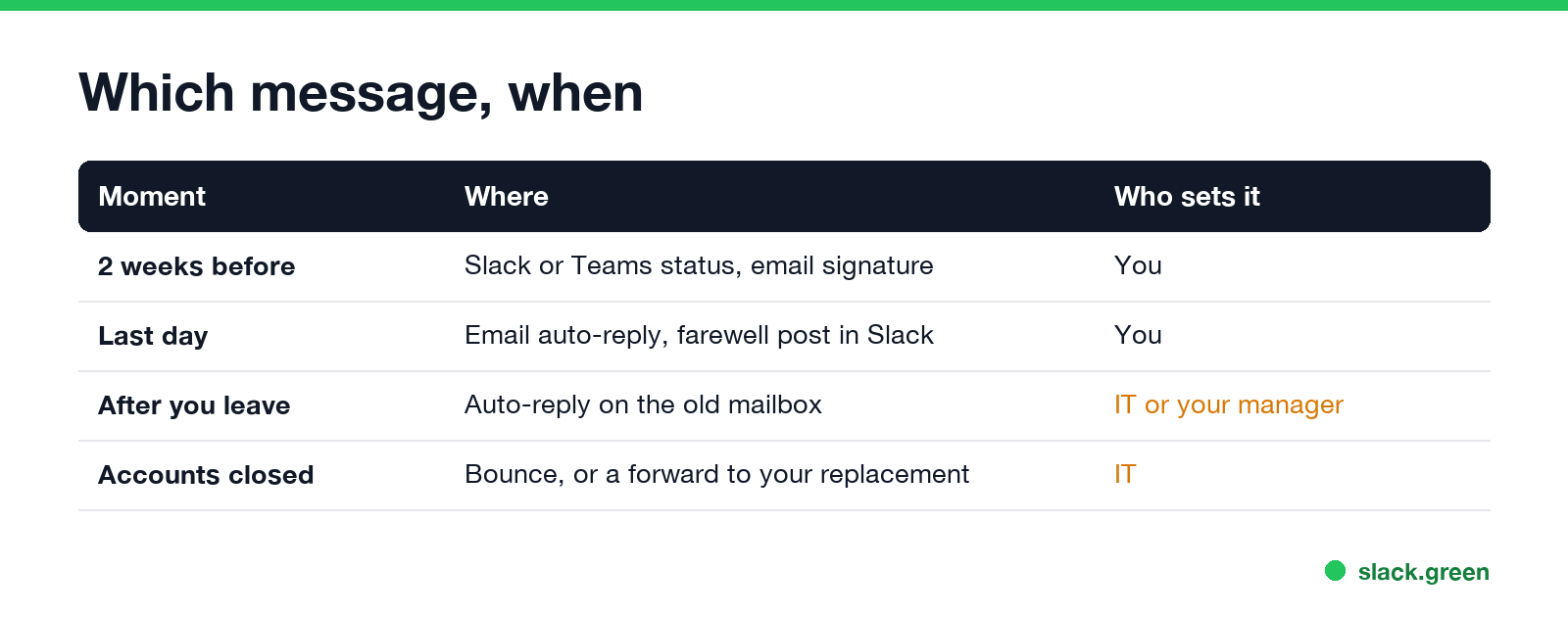
| Moment | Message | Who sets it |
|---|---|---|
| Two weeks before | Status and email signature: "Leaving on [date]" | You |
| Last day | Email auto-reply and a farewell post | You |
| After you leave | Auto-reply stays on the old mailbox | IT or your manager |
| Accounts closed | Mail bounces or forwards to your replacement | IT |
Many companies close accounts on the last day. If yours does, the auto-reply only keeps working if IT keeps the mailbox, often by converting it to a shared mailbox. Ask before your last day.
Auto-reply templates for after you leave
Replace the brackets. Keep it short; most people read the first line only.
I left [Company] on [date] and no longer read this inbox. For [area], please contact [Name] at [email].Thank you for your email. I am no longer with [Company]. [Name] ([email]) now handles my accounts and will reply.[Your name] has left [Company]. Your message has not been forwarded. Please resend it to [team@company.com].I have left [Company] as of [date]. For support, write to [support@company.com]. For anything about [project], contact [Name], [email].Hello, I no longer work at [Company]. Your email has been forwarded to [Name], who will reply within [two working days].The third one is the version IT usually sets after you are gone. The last one only works if a forward is set up; do not promise a forward that does not exist.
Before you leave: the handover period
Never appear "away" on Slack again
Cloud-based. No downloads. Works 24/7 even when your laptop is off.
I am leaving [Company] on [date]. Until then I will reply as usual. After that, please contact [Name] at [email].Out of office until [date], my last day at [Company]. For [area], please contact [Name].I am in my last week at [Company] and handing over my work. [Name] is taking over [project] from [date].Last-day Slack and Teams status
Statuses in Slack hold 100 characters, and Teams status messages 280.
👋 Last day at [Company] today. Thank you all.
📦 Handing over to [Name] this week. Last day [date].
🎒 Last day. [Name] owns [project] from tomorrow.
👋 Leaving on [date]. For [area], ask [Name].
🙏 Last day here. It has been great working with you.
In Slack, set Remove status after to Today on your last day so it is gone before the account closes. In Teams, turn on Show when people message me so people see it in chats. The steps are in Slack out of office message and how to set an away message in Teams.
Farewell post for Slack or Teams
Today is my last day at [Company]. Thank you for [X years] of great work together, especially [team or project]. [Name] is taking over [area], so please send those questions their way from tomorrow. If you want to stay in touch: [LinkedIn or personal email]. 👋Post it in your team channel, not in #general, unless your company does that. Check with your manager before you share a personal email in a work channel.
What to put in, and what to leave out
Never appear "away" on Slack again
Cloud-based. No downloads. Works 24/7 even when your laptop is off.
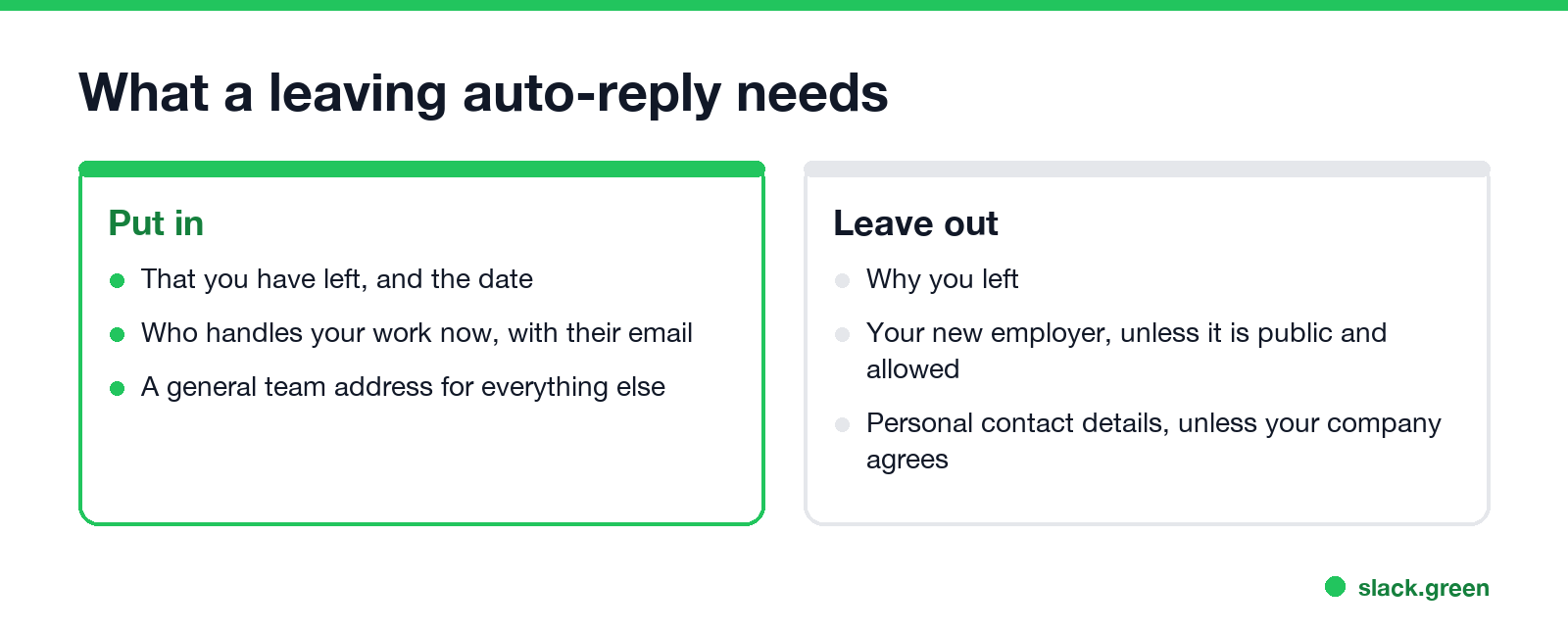
- • Name a person and a team address. A person helps this month; a team address still works after that person leaves too.
- • Skip the reason. "I have left" is complete.
- • Leave out your new employer in an auto-reply that goes to customers. Many contracts restrict it, and it can read as poaching.
- • Personal contact details only with permission. An auto-reply answers everyone who writes, including spam.
How to set the auto-reply on your last day
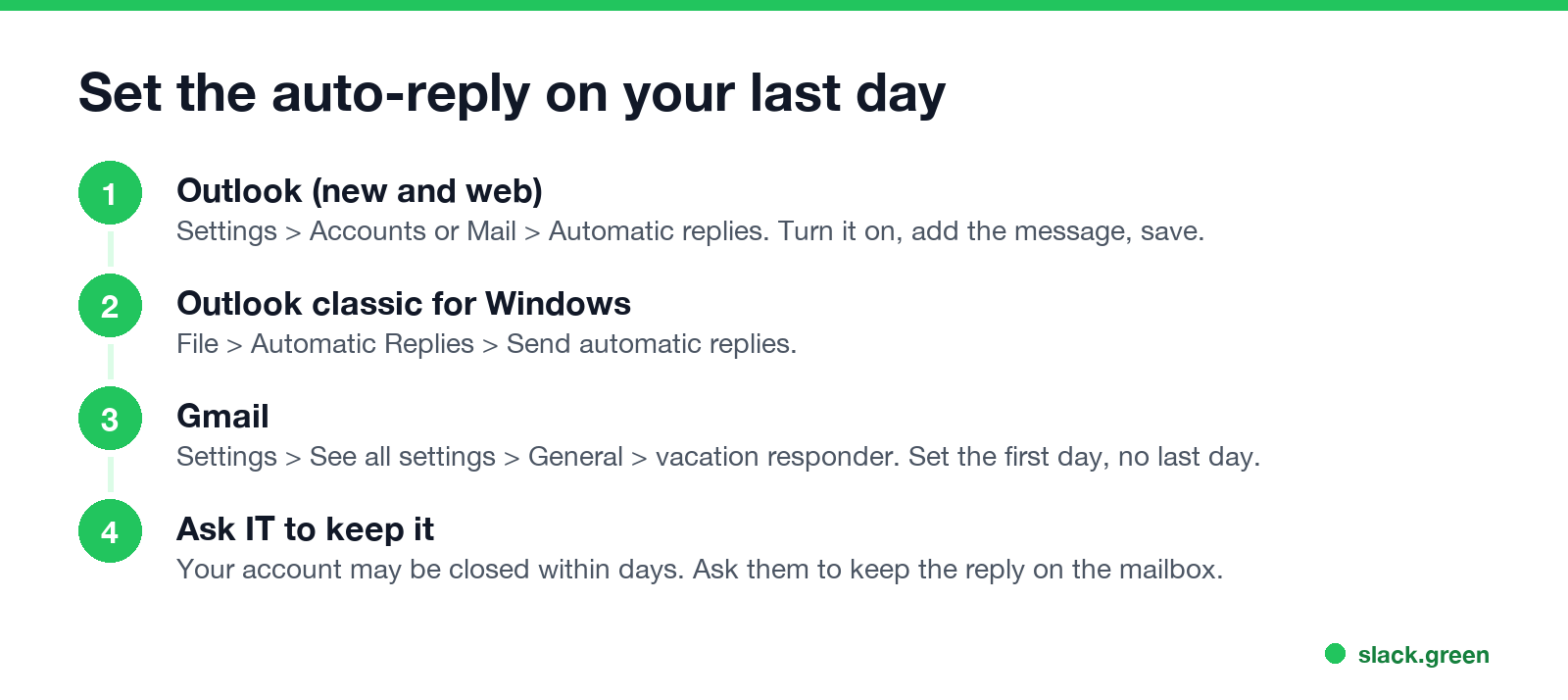
Outlook, new app and web. Open Settings, then Accounts (new Outlook) or Mail (web), then Automatic replies. Turn them on, paste the message for people inside and outside your organization, and save. Leave the end date empty.
Outlook classic for Windows. File, Automatic Replies, Send automatic replies. Fill in both the Inside My Organization and Outside My Organization tabs.
Gmail and Google Workspace. Click the gear, See all settings, then the General tab. Near the bottom, turn on the vacation responder, set the first day to your last day, leave the end date empty, add a subject such as "No longer at [Company]", and click Save Changes.
Then ask IT or your manager to keep the reply on the mailbox for a few months after your account closes.
After you leave: Slack and Teams accounts
When your Slack account is deactivated, people see it as deactivated and can no longer message you there, and your status is gone. There is no Slack auto-reply for a deactivated account, so the farewell post is the one message people will find. Anything you want to keep, save before your last day; see how to export Slack messages without admin.
FAQ
Never appear "away" on Slack again
Cloud-based. No downloads. Works 24/7 even when your laptop is off.
What should an out of office message say when you leave a company? That you have left, the date, and who to contact now, with their email.
Should I put my personal email in my leaving auto-reply? Only if your company agrees. A personal email goes to everyone who writes, including spam.
Who sets the auto-reply after I leave? You set it on your last day. After your account closes, only IT or your manager can keep it running.
What should my Slack status be on my last day? Something like "👋 Last day at [Company] today. Thank you all.", set to clear Today.
How long should the leaving auto-reply stay on? Usually one to three months, until regular contacts have learned the new address.
Stop Jiggling Your Mouse.
Join hundreds of remote workers who never worry about their Slack status. Set it up once, stay green forever.
Related Articles
Slack Emoji for OOO, PTO and Days Off
The usual Slack emoji for OOO is 🌴 :palm_tree:, with ✈️ :airplane: for travel and 🗓️ :spiral_calendar_pad: for planned PTO. Enterprise's built-in Out of office status uses ⛔. Codes for vacation, upcoming PTO, sick days, holidays and outages, custom :ooo: and :pto: emoji, and statuses to copy.
Slack Status for Bereavement: Short Statuses to Copy
A Slack status for bereavement only needs to say you are away, until when, and who to contact: 'Out on family leave until Monday. Urgent: Dana.' You do not have to give the reason. 20 short statuses for bereavement leave, a funeral, a family or medical emergency, and coming back.
Teams Status Message for Training: 24 Examples to Copy
A Teams status message for training says you are in training, until when, and how fast you will reply: 'In training until 4 PM, checking Teams at breaks.' 24 examples for training days, courses, exams, conferences and onboarding, plus which presence to pick.