
Lock Icon Next to a Slack Channel? What the Lock and Grey Text Mean
A padlock next to a Slack channel means it is private. Grey text with a crossed-out bell means you muted it. We made a private, muted, archived and unread channel and screenshot each one in the sidebar.
A lock icon next to a Slack channel means the channel is private: only people who were added can see it or read it, and it does not show up when others browse channels. The lock does not mean the channel is frozen, read-only or broken, and you can post in it like any other channel. A channel name in grey text with a crossed-out bell is a channel you muted, and a bold name has unread messages. On 3 November 2026 we made one channel of each kind in a test workspace on the Free plan, signed in as a regular member in Slack's web app, and screenshot the sidebar after each change.
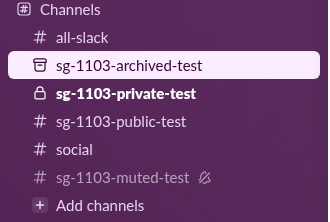
What each icon and style in the sidebar means
The screenshot above holds every state we could make as a member. Each row came from one action, listed in the table, and the last column says how to get back to a plain channel.
| What you see | What it means | What we did to get it | How to undo it |
|---|---|---|---|
| Padlock instead of # | Private channel | Created it with Make private on | An owner or admin converts it to public |
| Bold name | Unread messages | A new message we had not opened | Open the channel |
| Grey name, crossed-out bell | Muted channel | Chose Mute and hide | Unmute it from the channel menu |
| Box icon, only while open | Archived channel | Archived it from channel settings | Unarchive it from channel details |
| Plain # | Public channel you joined | Created it | Nothing to undo |
The lock is the only icon that says something about who can see the channel. The other three describe your own view: bold and grey are about your notifications, and the box icon shows that the channel was archived.
The lock icon: a private channel
Slack draws the padlock in place of the hash for every private channel you belong to. In our sidebar, sg-1103-private-test had the padlock from the moment we created it with Make private turned on, and its header showed the same padlock before the name. A regular member on the Free plan could create a private channel without an admin's help.
If you see a lock next to a channel you are not in, for example in a message that links to it, Slack's help page on actions says people without access see "a lock icon followed by Private Channel" in place of the name. That means the channel exists but you were never added. Ask someone inside it to add you, because a private channel cannot be joined from the channel browser.
To get rid of the lock, the channel has to become public, which by default only owners, admins and Channel Managers can do; the steps are in how to make a private Slack channel public. The reverse change, and why it failed for our regular member, is in how to make a Slack channel private.
Grey text: a muted channel
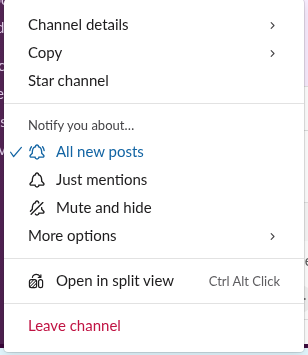
A greyed-out channel is one you muted. Slack's channel menu now calls the action Mute and hide, and the name is honest: as soon as we muted sg-1103-muted-test, it disappeared from our sidebar.
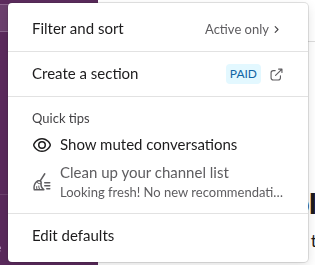
It came back only after we turned on Show muted conversations, which sits in the sidebar's settings menu under the gear icon at the top of the sidebar. With that on, the muted channel sat at the bottom of the channel list in grey text with a crossed-out bell after its name.
A muted channel stays grey even when it has news. We posted a message in the muted channel and marked it unread, and after a reload the private channel with the same kind of unread message turned bold while the muted one stayed grey. So a grey channel can hold messages you have not read. If a channel seems to have vanished rather than turned grey, check muting first, then the other causes in why Slack channels disappear from the sidebar. The full list of mute options is in how to mute a Slack channel.
Never appear "away" on Slack again
Cloud-based. No downloads. Works 24/7 even when your laptop is off.
The box icon: an archived channel
An archived channel leaves the sidebar. We archived sg-1103-archived-test as the member who created it, and its row was gone after a reload. When we opened it again by its link, it came back in the sidebar for as long as it was open, with a small box icon in place of the hash and "(archived)" after its name in the header. Slack put this line under the last message:

The message box is gone in an archived channel, so nobody can post there until someone unarchives it. That is the one state that really works like a lock, but Slack shows it with the box icon, not the padlock. The messages and files stay readable and, as Slack's own note says, searchable.
Bold text and the other dots
A bold channel name only means unread messages, and it goes back to normal once you open the channel. Bold and the lock can appear together, as on our private channel in the first screenshot. Small icons next to people's names in the Direct messages section are about presence, not channels, and our guide to Slack status icons lists each one.
FAQ
Can other people see that I muted a channel?
Muting is one of your own notification settings. When we muted our test channel, Slack posted nothing in it, unlike archiving, which added a line to the channel for everyone.
Does a lock icon mean the channel is encrypted?
No. The lock in the sidebar marks a private channel, which is about who can see it. Owners and admins of the workspace can still export or review private channels on plans that allow it.
Why is my whole Slack window grey?
That is not a channel icon. After each reload in our test, the sidebar and the message area were empty colored blocks for several seconds while Slack loaded. If the window stays that way, follow our fix for a blank Slack screen.
Stop Jiggling Your Mouse.
Join hundreds of remote workers who never worry about their Slack status. Set it up once, stay green forever.
Related Articles
How to Resolve or Close a Slack Thread (and Who Can Lock One)
Slack has no Resolve or Close button for threads. We checked every thread menu as a member, found the admin-only lock in Slack's code, and tested the workarounds that do work: a checkmark, a to-do you mark complete, and muting replies.
How to Search for Images in Slack, Including Text Inside Them
To find an image in Slack, search, switch the results from Messages to Files and set File type to Images, or type type:images. We tested 6 images: Slack also found words written inside PNGs, but not inside JPGs.
Download Slack for Mac Without the App Store: DMG, PKG or App Store?
Click Download, not Download on the Mac App Store, on slack.com/downloads/mac and you get the universal DMG. We downloaded all four direct installers for 4.53.276, measured them, checked their signatures and read the code paths that differ in the App Store build.