
How to Move a Slack Message to Another Channel (Slack Can Only Copy It)
Slack has no Move option for messages. We forwarded a message, a thread and a file to a new channel, deleted the original, and checked what the copy kept.
You cannot move a message in Slack. There is no Move item in the message menu, and the API has no move call. The closest thing is two steps: forward the message to the other channel, then delete the original. The forwarded copy keeps the author's name, the original time, the channel it came from and any attached file. It does not bring the thread replies. We tested this on 9 October 2026 in Slack web on the Free plan, from a test channel #w1-thread-test to a new channel #w1-move-dest.
There is no Move option
This is the full menu of one of our own messages in a channel. It has Edit, Mark unread, Add to saved, Add a reminder, Turn off notifications for replies, Copy link, Copy message, Pin to channel, Connect to apps and Delete message. Nothing moves the message:
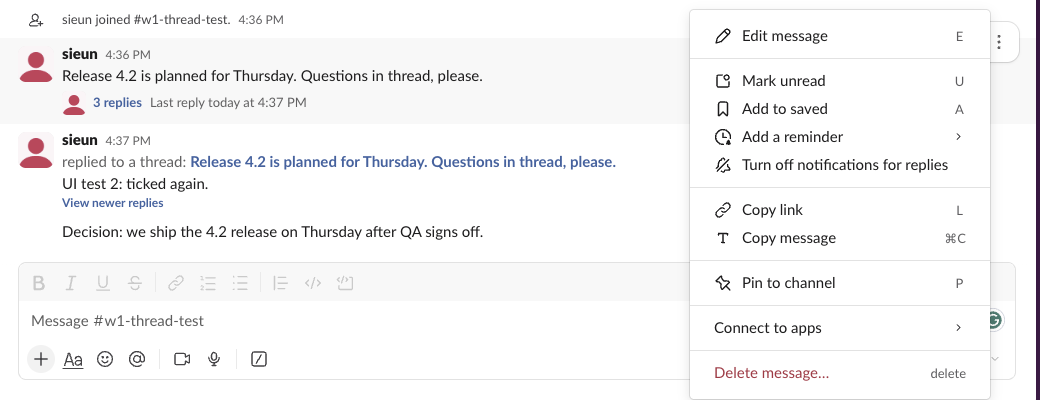
The hover toolbar has no move button either. Forwarding is the arrow icon in the hover toolbar, next to the reply button.
Forward the message, then delete the original
- Hover the message and click the Forward message arrow.
- Type the channel or person in "Search for channel or person" and pick it.
- Add a note if you want, such as "Moving this here".
- Click Forward.
- Go back to the original and choose Delete message from its menu, if you want it gone from the old channel.
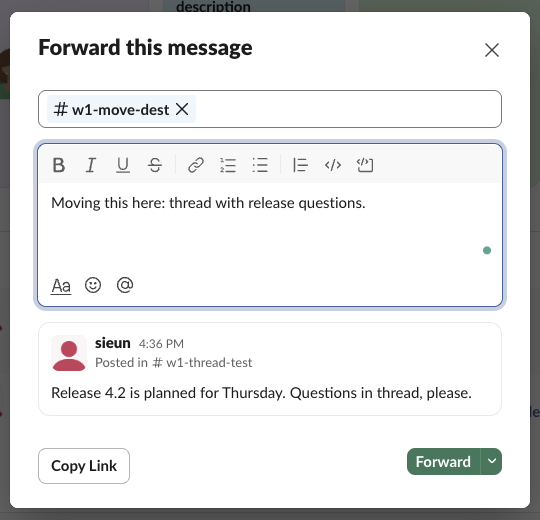
The dialog also has a Copy Link button. A pasted link to a message unfurls into the same kind of preview card, so for one message the two are close. Forwarding lets you add the note in the same step.
Never appear "away" on Slack again
Cloud-based. No downloads. Works 24/7 even when your laptop is off.
What the forwarded copy keeps
We forwarded three things to #w1-move-dest: a thread parent with three replies, a message with a PNG file, and a plain message. Then we read the copies with conversations.history:
| What we forwarded | In the new channel | Kept | Not kept |
|---|---|---|---|
| Thread parent with 3 replies | A card under our note | Author, original time, "Thread in #w1-thread-test" footer, link back | The 3 replies |
| Message with a PNG | A card with the file | Author, time, the file itself (files inside the card) | |
| Plain message | A card | Author, time, source channel |
In the API the copy is a new message from the person who forwarded it. The original sits inside it as an attachment with is_share: true, is_msg_unfurl: true, the original ts, author_id, channel_id and a from_url back to the source. A thread parent also has is_thread_root_unfurl: true. The replies are not in the attachment, and a reader has to follow the link to see them.
Then we deleted the original "Decision" message in #w1-thread-test. The forwarded copy in #w1-move-dest still showed its full text after a reload:
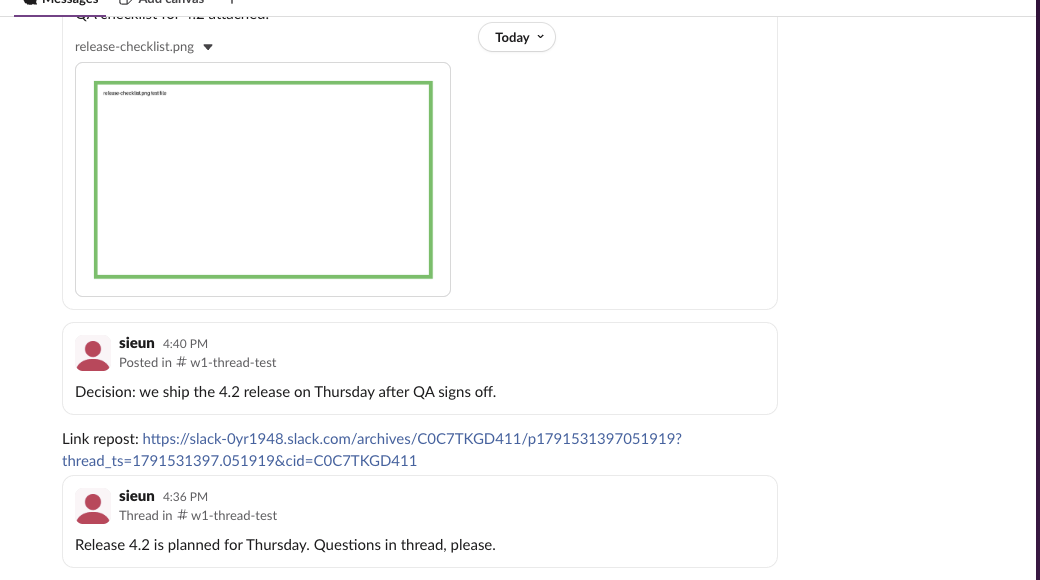
So forward plus delete works as a move for the text and files, and the thread replies stay behind. To send several messages in one go, see our page on forwarding multiple messages.
Moving a whole thread or many messages
For a thread, forward the parent with a note, then post the important replies again in the new thread, or link to the old thread. Forwarding a parent does not copy any reply. Do not delete the old thread if people need its replies.
For many messages, Slack has no bulk move. You can export the channel's messages and post a summary in the new channel, or forward the few that matter.
If the whole channel should live under a new name, rename it instead of copying it; a rename does not touch the messages. A DM cannot become a channel, so forward the key DM messages into the channel.
Stop Jiggling Your Mouse.
Join hundreds of remote workers who never worry about their Slack status. Set it up once, stay green forever.
Related Articles
Does Slack Compress Images? We Uploaded a PNG, JPEG, HEIC and MP4 to Check
We uploaded four files to Slack and downloaded them again. The PNG and MP4 came back byte for byte, the JPEG came back re-encoded without its EXIF, and the chat only ever shows a 1024 px preview.
Can You Have a GIF Profile Picture on Slack? We Uploaded One
We set a 12-frame animated GIF as a Slack profile photo and downloaded every size Slack made. All of them were still images, frame 1 only.
How to Clear Slack Search History (Recent Searches)
Slack keeps your recent searches on its servers, so they follow you to every device. We found where to delete them, and the one way the delete button worked for us.