
Slack oauth.v2.access: The Install Flow and Every Error We Got
We ran Slack's Add to Slack flow against a 34-line Python callback on localhost, then broke each step: a reused code, a typo, a wrong secret, a wrong redirect_uri, a cancelled consent screen and a code we held for 11 minutes.
oauth.v2.access is the Slack API method that turns the temporary code Slack sends to your redirect URL into tokens: a bot token (xoxb-) for the app, and a user token (xoxp-) when you also asked for user scopes. You call it from your server with the app's client_id, client_secret, the code, and the same redirect_uri you used in the authorize link. On 2 October 2026 we ran the whole Add to Slack flow in our own test workspace with a small Python callback on localhost, then broke each step on purpose. Every response below is one we got.
The flow in three steps
- Send the person to
https://slack.com/oauth/v2/authorizewithclient_id,scope(bot scopes),user_scope(user scopes, if any) andredirect_uri. - They pick a workspace and click Allow. Slack redirects the browser to your
redirect_uriwith?code=.... - Your server posts that code to
oauth.v2.accessand stores the tokens from the response.
This is the consent screen our authorize link opened, for an app with 10 bot scopes and 2 user scopes:
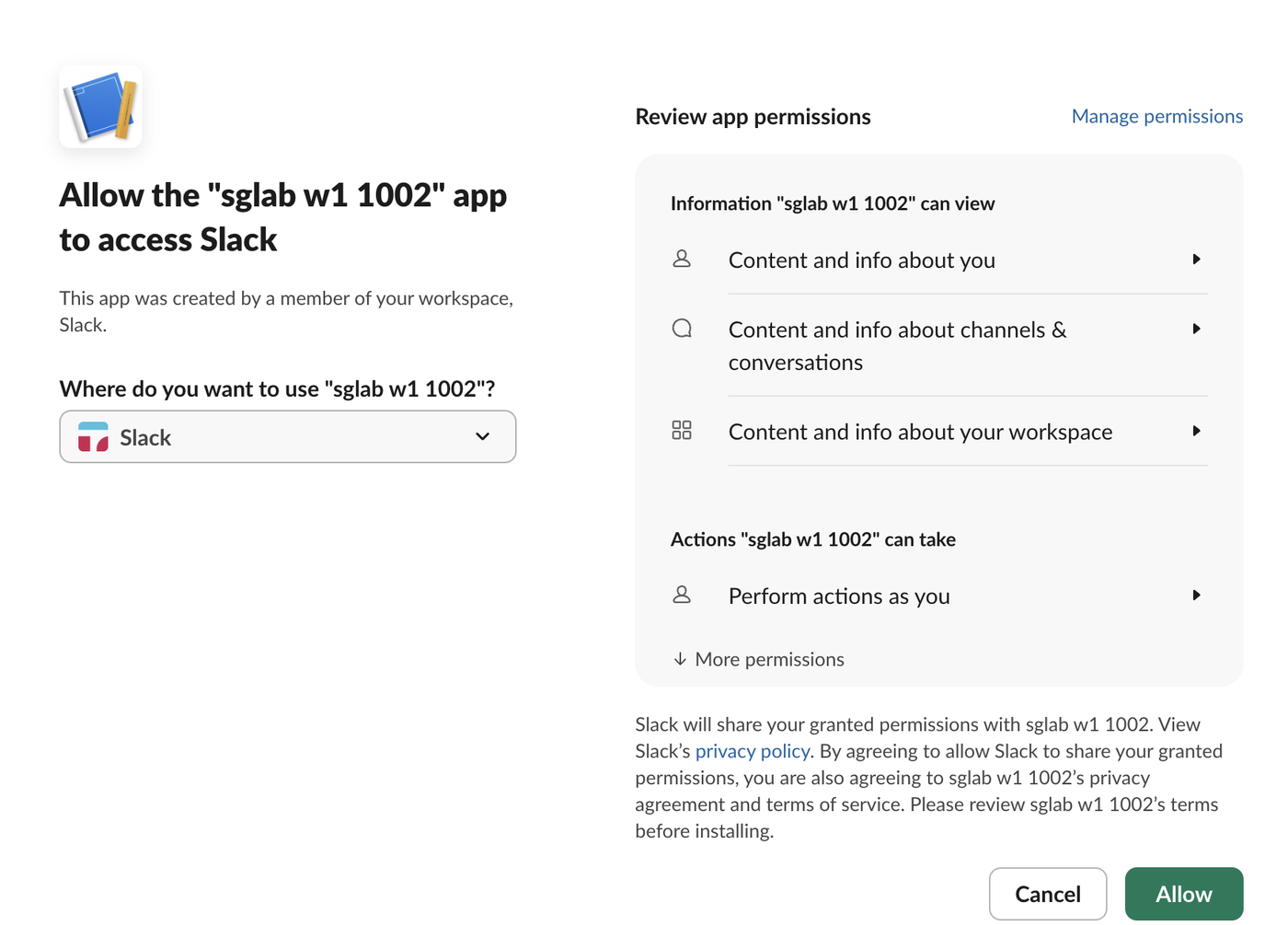
The redirect URL has to be listed under OAuth & Permissions > Redirect URLs. What Slack accepts there, including http://localhost, is on our redirect URL page.
A callback that exchanges the code
This is the server we ran on localhost:8853. It uses slack_sdk 3.45.0 and logs each response to a file. The HOLD_FILE lines let us keep a code without exchanging it, for the expiry test below:
import json, os, sys, time, urllib.parse
from http.server import BaseHTTPRequestHandler, HTTPServer
from slack_sdk import WebClient
from slack_sdk.errors import SlackApiError

CLIENT_ID = os.environ["SLACK_CLIENT_ID"]
CLIENT_SECRET = os.environ["SLACK_CLIENT_SECRET"]
REDIRECT_URI = "http://localhost:8853/callback"
HOLD = os.environ.get("HOLD_FILE", "")      # lab only: keep the code, do not exchange it
OUT = os.environ.get("CB_LOG", "callback.jsonl")

class Callback(BaseHTTPRequestHandler):
    def do_GET(self):
        url = urllib.parse.urlparse(self.path)
        q = dict(urllib.parse.parse_qsl(url.query))
        rec = {"at": time.time(), "path": url.path, "query_keys": sorted(q), "code": q.get("code"), "error": q.get("error")}
        if "code" in q and not (HOLD and os.path.exists(HOLD)):
            try:
                resp = WebClient().oauth_v2_access(client_id=CLIENT_ID, client_secret=CLIENT_SECRET,
                                                   code=q["code"], redirect_uri=REDIRECT_URI)
                rec["response"] = resp.data
            except SlackApiError as e:
                rec["response"] = e.response.data
        with open(OUT, "a") as f:
            f.write(json.dumps(rec) + "\n")
        self.send_response(200)
        self.send_header("Content-Type", "text/plain")
        self.end_headers()
        ok = rec.get("response", {}).get("ok")
        self.wfile.write(f"callback received; exchange ok={ok}".encode())
    def log_message(self, *a): pass

HTTPServer(("127.0.0.1", 8853), Callback).serve_forever()
After we clicked Allow, the callback received the code and Slack answered the exchange with this (tokens shortened here; a real response has the full strings):
{
  "ok": true,
  "app_id": "A0C605Y7BQD",
  "authed_user": {
    "id": "U0B7L4YK420",
    "scope": "users:read,chat:write",
    "access_token": "xoxp-…redacted",
    "token_type": "user"
  },
  "scope": "chat:write,commands,channels:manage,groups:write,channels:join,users:read,channels:read,groups:read,channels:history,groups:history",
  "token_type": "bot",
  "access_token": "xoxb-…redacted",
  "bot_user_id": "U0C695L6YVA",
  "team": {
    "id": "T0B7JBCDKC1",
    "name": "Slack"
  },
  "enterprise": null,
  "is_enterprise_install": false
}
access_token at the top level is the bot token. The user token sits in authed_user.access_token, and it is only there when the authorize link asked for user_scope. bot_user_id is the bot's user ID; our bot token page covers what each token type can do.
We ran the flow ten more times with the same app. The three later exchanges we compared in full returned the same two token strings as the first one, and the first tokens still passed auth.test at the end. Two of those runs added scopes; they kept both strings and only changed the scope lists.
Never appear "away" on Slack again
Cloud-based. No downloads. Works 24/7 even when your laptop is off.
Errors we reproduced
| What we changed | oauth.v2.access response |
|---|---|
| Sent a code we had already exchanged | {"ok": false, "error": "invalid_code"} |
| Exchanged a fresh code twice in a row | first ok, second invalid_code |
| Changed the last character of the code | invalid_code |
Wrong client_secret | bad_client_secret |
No client_secret at all | bad_client_secret |
Wrong client_id | invalid_client_id |
redirect_uri different from the authorize link | bad_redirect_uri |
The same code again with the right redirect_uri | invalid_code |
No redirect_uri in the exchange | ok |
| A code held 9 min 41 s | ok |
| A code held 10 min 15 s, and two held 11 min | internal_error |
Things to take from the table:
invalid_code, not code_already_used. We never saw code_already_used, even when we sent the same code twice within a second. If your logs show invalid_code right after a successful install, look for a second request: a page refresh on the callback URL or a retry in your HTTP client.bad_redirect_uri uses up the code. After it failed, the correct call with the same code returned invalid_code, so you need a new authorization to try again.internal_error at 10 min 15 s and at 11 minutes, which fits the 10 minutes in Slack's docs. Retrying the same code returned internal_error again. A fresh code exchanged a minute later worked, so it was not an outage. Exchange the code as soon as the callback receives it.redirect_uri worked in our test, where the app has one redirect URL. Sending it anyway is safer: when it is sent, it must match.Errors before the exchange
Some failures never reach oauth.v2.access. When we clicked Cancel on the consent screen, Slack redirected to our callback with no code:
/callback?error=access_denied&state=&error_description=The+user+has+denied+access+to+the+scope%28s%29+requested+by+the+client+application.Handle error in the callback, or a person who clicks Cancel lands on a crash. And when the authorize link asked for a scope that does not exist (channels:write.bogus), Slack showed this page instead of the consent screen:
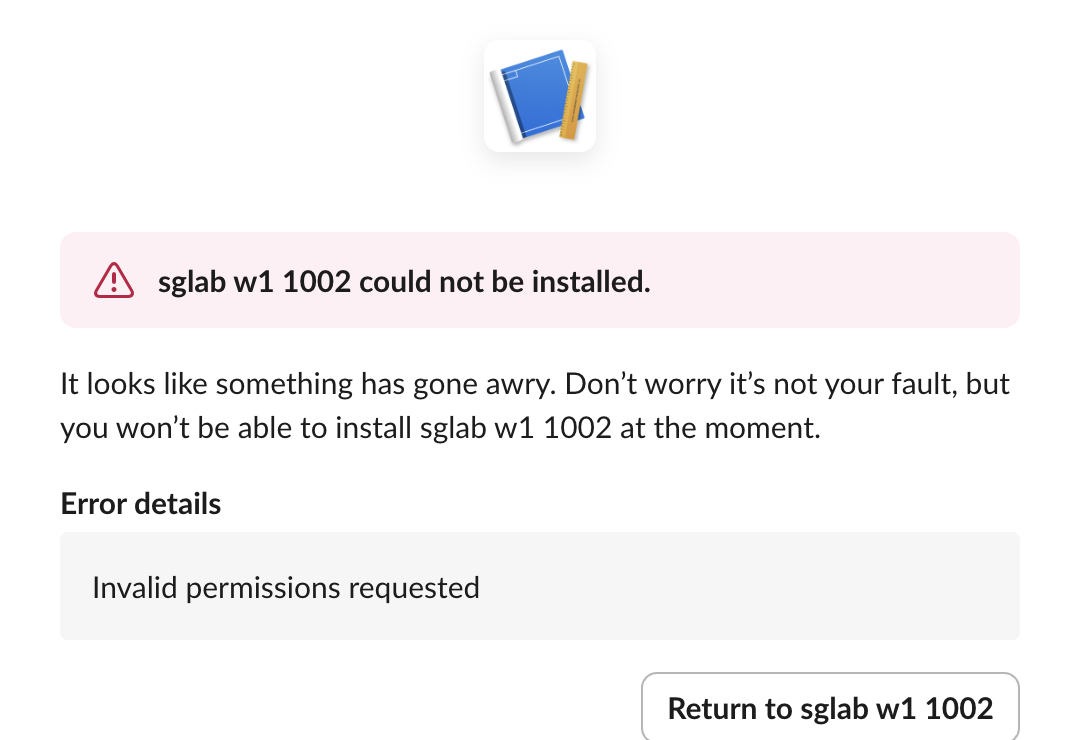
The page does not name the bad scope. Compare the scope and user_scope values in your link with the scope list in the app's settings, and check that you did not put a user scope in scope. After the install, a call that needs a scope you did not request fails with missing_scope.
FAQ
Do Slack OAuth tokens expire?
The tokens from this flow did not expire during our test: the first bot and user tokens still worked after ten more authorizations. Slack's docs say they expire only when the app turns on token rotation, which adds refresh_token and expires_in to this response.
Do I need oauth.v2.access for an app in my own workspace?
No. For an internal app, Install to Workspace on the app's settings page shows the bot token, so you can skip the flow. You need it when other workspaces, or other people in yours, install the app.
Stop Jiggling Your Mouse.
Join hundreds of remote workers who never worry about their Slack status. Set it up once, stay green forever.
Related Articles
Slack API Pagination: next_cursor, the Last Page and invalid_cursor, Tested
Slack paginates list methods with a cursor: pass response_metadata.next_cursor back as cursor until it is empty. We paged 27 real messages on 2 October 2026 and broke the cursor five ways to see which ones fail.
Slack RTM API Deprecated: What rtm.connect Returns for a New App, and the Socket Mode Fix
A Slack app created today cannot use the RTM API. We called rtm.connect and rtm.start with every token a new app gets on 2 October 2026, tried to request the rtm:stream scope, and ran the same bot over Socket Mode.
Slack Bot Icon and Name Per Message: icon_emoji, icon_url and username, Tested
icon_emoji, icon_url and username only work with the chat:write.customize scope, and Slack ignores them silently without it. We tested every case on 2 October 2026, plus webhooks and the app icon upload limits.