
Slack RTM API Deprecated: What rtm.connect Returns for a New App, and the Socket Mode Fix
A Slack app created today cannot use the RTM API. We called rtm.connect and rtm.start with every token a new app gets on 2 October 2026, tried to request the rtm:stream scope, and ran the same bot over Socket Mode.
A Slack app created today cannot use the RTM API. With its bot token, rtm.connect and rtm.start return not_allowed_token_type. With its user token they return missing_scope for rtm:stream, a scope a new app is not allowed to request. RTM only works with tokens from classic apps, and Slack stopped letting anyone create classic apps on 4 June 2024. The replacement is Socket Mode: the same kind of WebSocket connection, opened with an app-level xapp- token.
We checked all of this on 2 October 2026 with throwaway apps in a test workspace. Every error below is a response we got.
rtm.connect and rtm.start with each token
curl -s -X POST https://slack.com/api/rtm.connect -H "Authorization: Bearer $TOKEN"| Token | rtm.connect | rtm.start |
|---|---|---|
Bot token, xoxb- | not_allowed_token_type | not_allowed_token_type |
User token, xoxp- | missing_scope, needed rtm:stream | missing_scope, needed rtm:stream |
App-level token, xapp- | not_allowed_token_type | not_allowed_token_type |
| No token | not_authed | not tried |
The user token response in full:
{
  "ok": false,
  "error": "missing_scope",
  "needed": "rtm:stream",
  "provided": "identify,channels:read,groups:read,chat:write"
}
The bot token one has no hint at all:
{"ok": false, "error": "not_allowed_token_type"}not_allowed_token_type on an rtm.* call means the token comes from a modern app. No scope fixes it.
A new app cannot request rtm:stream
The missing_scope error suggests adding rtm:stream, so we tried. Adding it as a user scope through apps.manifest.update was refused:
{
  "ok": false,
  "error": "invalid_manifest",
  "errors": [
    {
      "code": "illegal_user_scopes",
      "message": "Illegal user scopes found `rtm:stream`",
      "pointer": "/oauth_config/scopes/user"
    }
  ]
}
As a bot scope it failed with illegal_bot_scopes, "Illegal bot scopes found rtm:stream". The old umbrella scope bot, which is what gave classic bots RTM access, failed the same way: "Illegal bot scopes found bot".
We also tried the old v1 install URL, https://slack.com/oauth/authorize?scope=bot&client_id=..., with a new app's client ID. Slack still showed a consent screen. After we clicked Allow, exchanging the code with the old oauth.access method returned {"ok": false, "error": "internal_error"}, and a fresh code exchanged with oauth.v2.access returned {"ok": false, "error": "oauth_authorization_url_mismatch"}. That path gives no token at all.
Never appear "away" on Slack again
Cloud-based. No downloads. Works 24/7 even when your laptop is off.
Classic apps can no longer be created
The old creation link, https://api.slack.com/apps?new_classic_app=1, now opens this dialog. Create App is greyed out:
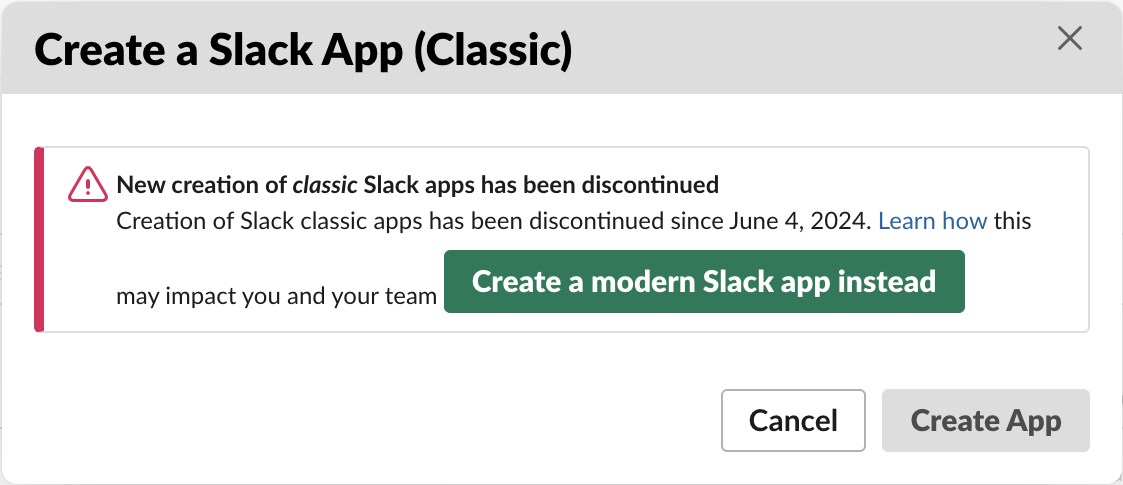
If you still run an RTM bot, it is a classic app with a classic token. This dialog means you cannot create another one, for a new workspace, a staging copy or a fork. Plan the move before you need one.
The replacement: Socket Mode
Socket Mode keeps the part people liked about RTM: no public URL, events over a WebSocket. Turn it on under Settings, Socket Mode (or "socket_mode_enabled": true in the manifest), subscribe to the events you want, and create an app-level token with the connections:write scope on Basic Information. That xapp- token opens the connection:
{"ok": true, "url": "wss://wss-primary.slack.com/link/?ticket=<cut>"}That is apps.connections.open. With the bot token instead, it returned not_allowed_token_type, the mirror of the RTM error. You almost never call it yourself; Bolt does. This is the "reply to hello" bot an RTM tutorial would build, as a Bolt app:
import os, json, logging
from slack_bolt import App
from slack_bolt.adapter.socket_mode import SocketModeHandler

logging.basicConfig(level=logging.INFO, format="%(asctime)s %(name)s %(message)s")
app = App(token=os.environ["SLACK_BOT_TOKEN"])

@app.middleware
def log_payload(body, next):
    with open("events.jsonl", "a") as f:
        f.write(json.dumps(body) + "\n")
    next()

@app.message("hello")
def reply_hello(message, say):
    say(f"Hi <@{message['user']}>, this reply came over Socket Mode.")

@app.event("app_mention")
def on_mention(event, logger):
    logger.info("app_mention from %s in %s", event["user"], event["channel"])

@app.event("message")
def other_messages(logger):
    pass

if __name__ == "__main__":
    SocketModeHandler(app, os.environ["SLACK_APP_TOKEN"]).start()
Our app had the bot scopes chat:write, channels:history and app_mentions:read, the bot events message.channels and app_mention, and the bot was a member of the channel. The log from our run:
2026-10-02 10:23:34,521 slack_bolt.App A new session has been established (session id: 47c23c75-f6a0-470a-84aa-60c8b512d609)
2026-10-02 10:23:34,521 slack_bolt.App ⚡️ Bolt app is running!
2026-10-02 10:23:34,568 slack_bolt.App Starting to receive messages from a new connection (session id: 47c23c75-f6a0-470a-84aa-60c8b512d609)
2026-10-02 10:23:45,204 socket_bot.py:on_mention app_mention from U0B7L4YK420 in C0C6ZRH1Z8Q
We typed hello in a test channel. The reply's timestamp was 0.61 seconds after ours:

The bot did not answer its own reply, so there was no loop. Bolt skips events from the app's own bot user by default.
RTM vs Socket Mode
| RTM | Socket Mode | |
|---|---|---|
| Token that opens the socket | classic token with rtm:stream | xapp- with connections:write |
| Method | rtm.connect (rtm.start is the older one) | apps.connections.open |
| What arrives | the RTM event stream | only the events you subscribe to in app settings |
| Can a new app use it | no: not_allowed_token_type, and rtm:stream is an illegal scope | yes |
For the full setup with the token errors you can hit along the way, see Slack Socket Mode in Python. Token prefixes are explained in Slack bot tokens.
Stop Jiggling Your Mouse.
Join hundreds of remote workers who never worry about their Slack status. Set it up once, stay green forever.
Related Articles
Slack API Pagination: next_cursor, the Last Page and invalid_cursor, Tested
Slack paginates list methods with a cursor: pass response_metadata.next_cursor back as cursor until it is empty. We paged 27 real messages on 2 October 2026 and broke the cursor five ways to see which ones fail.
Slack Bot Icon and Name Per Message: icon_emoji, icon_url and username, Tested
icon_emoji, icon_url and username only work with the chat:write.customize scope, and Slack ignores them silently without it. We tested every case on 2 October 2026, plus webhooks and the app icon upload limits.
Slack as_user: What It Does Now, Tested With Bot and User Tokens
We sent chat.postMessage with as_user=true, as_user=false and no as_user, with a bot token and a user token. as_user=true changed nothing, as_user=false was rejected, and only the user token posted under the person's name.