
Where to Find Your Slack Workspace URL (5 Places, Tested)
Click your workspace name at the top left of Slack and the menu shows your workspace URL. We checked five places it appears, the Find your team flow, and what a wrong URL shows.
To find your Slack workspace URL, click the workspace name at the top of the sidebar. The menu that opens shows the URL in small grey text under the name, in the form name.slack.com. On October 26, 2026 we checked every place the URL shows up in our Free test workspace, whose URL is slack-0yr1948.slack.com, and tried the sign-in pages for people who do not know theirs.
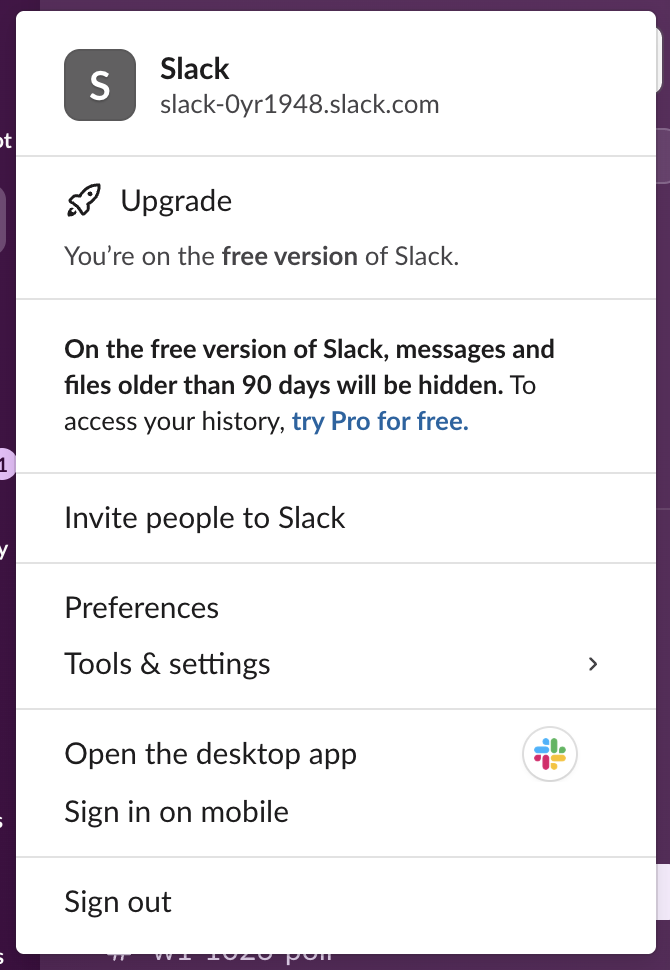
The same menu works in the desktop app and in a browser. On a phone, the workspace switcher lists your workspaces by name, so the computer is the easier place to look.
Four other places the URL shows up
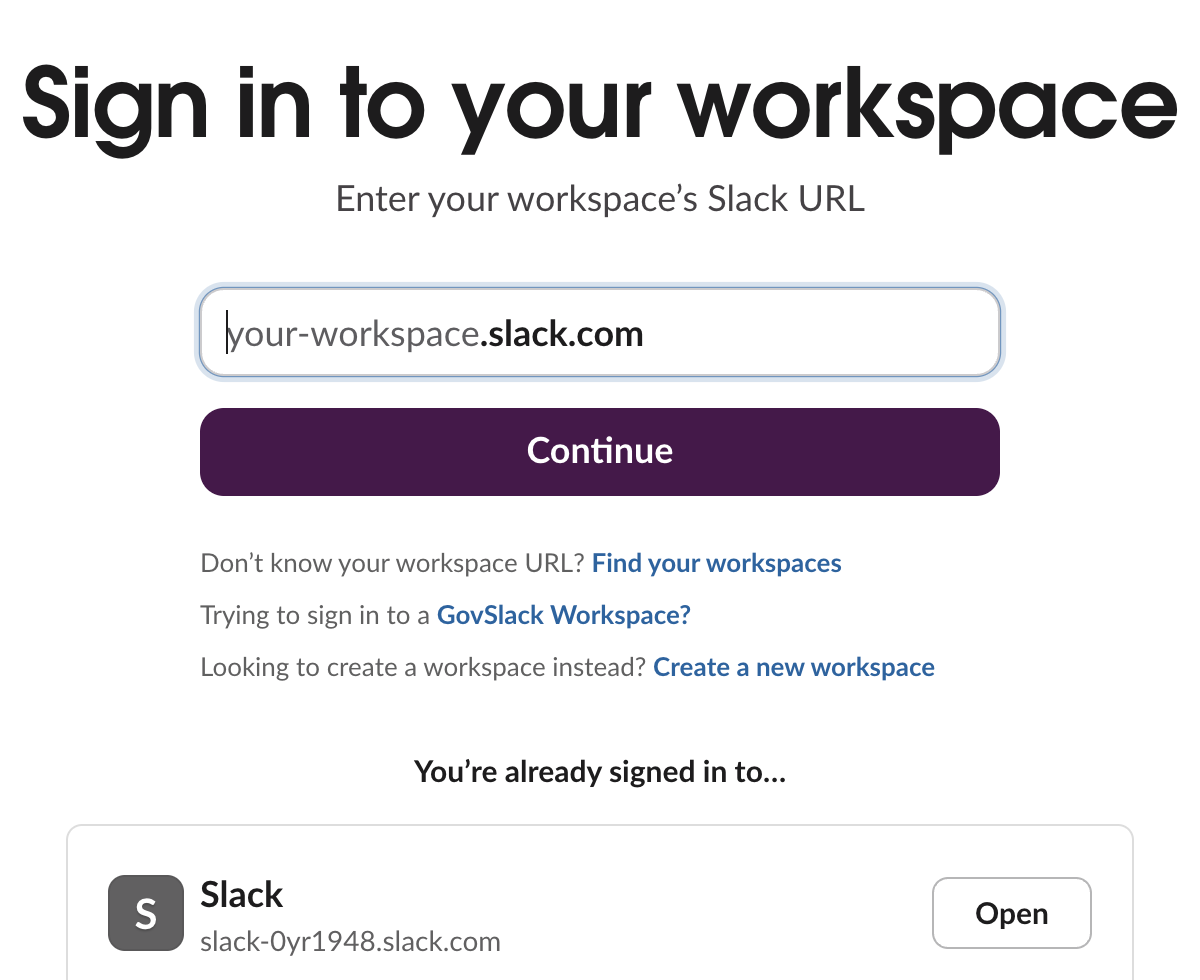
The sign-in page. Open slack.com/workspace-signin in a browser where you are already signed in. Under You're already signed in to... Slack lists every workspace with its URL:
A message link. Every message link carries the workspace URL. In our workspace a copied link looked like https://slack-0yr1948.slack.com/archives/C0C6S6R94BW/p1791163009567969. The part before /archives is the URL. Slack message permalinks explains the rest of the link.
The admin page. Owners and admins see the line "Your workspace name is ... and your URL is ..." under Admin > Edit workspace > Name and URL. The same form changes the URL, as our test of changing a Slack workspace name shows.
The API. If you have a token, team.info and auth.test both return it. This is what our test app got back:
curl -s -H "Authorization: Bearer $SLACK_BOT_TOKEN" https://slack.com/api/team.info{"ok": true, "team": {"id": "T0B7JBCDKC1", "name": "Slack", "domain": "slack-0yr1948", "url": "https://slack-0yr1948.slack.com/"}}domain is the part you type on the sign-in page, and url is the full address.
One place it does not show is the browser address bar. When we opened slack-0yr1948.slack.com in a signed-in browser, Slack redirected to app.slack.com/client/T0B7JBCDKC1/C0CBY34A0JH. That address holds the workspace ID (the part that starts with T) and a channel ID, not the URL.
If you do not know your workspace URL
Click Find your workspaces on the sign-in page. It opens Let's find your team, which asks for your email address or a Google or Apple sign-in:
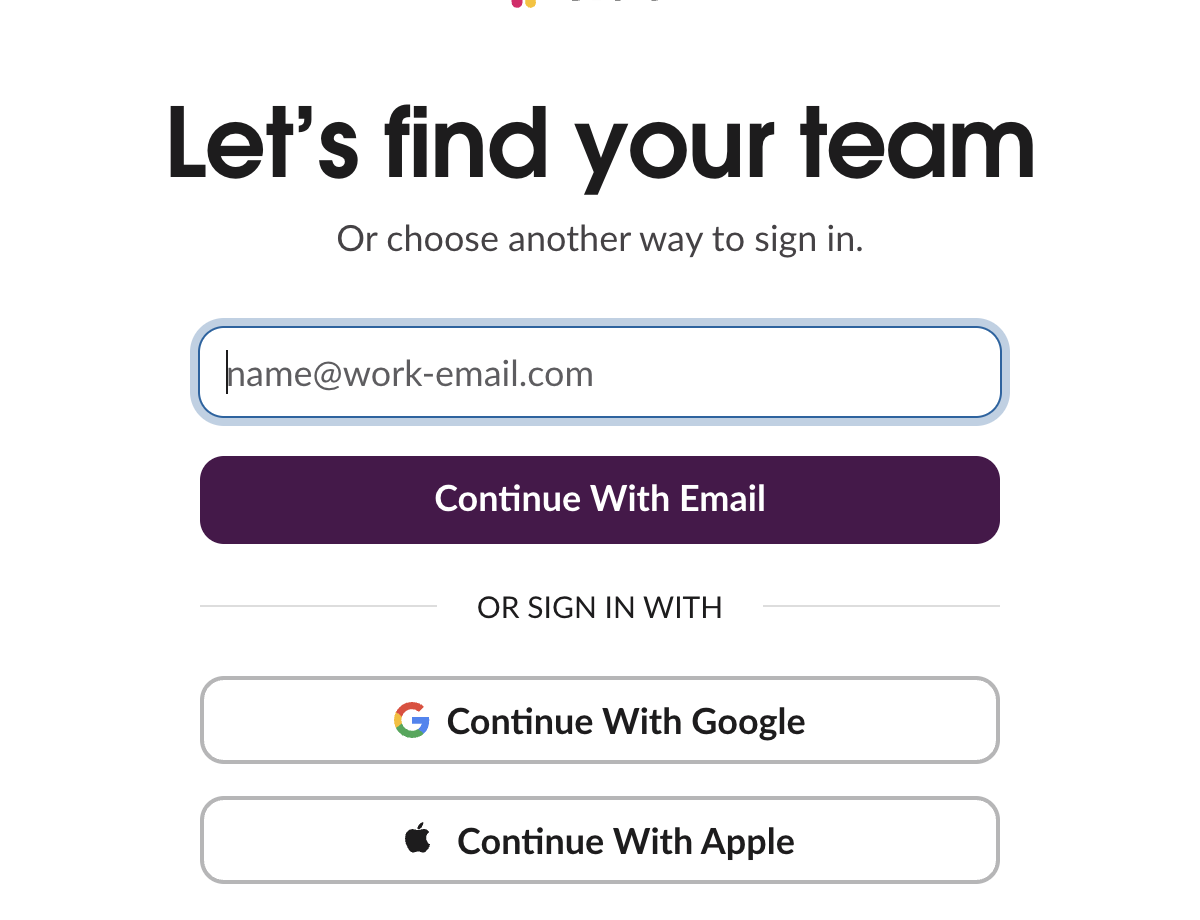
When we entered the test account's address and clicked Continue With Email, a reCAPTCHA "I'm not a robot" box appeared. We stopped there, so we did not see the step after it. If you can reach a teammate, asking for any message link is faster: the URL is the first part of it.
Never appear "away" on Slack again
Cloud-based. No downloads. Works 24/7 even when your laptop is off.
What a wrong URL shows
A workspace URL uses only lowercase letters, numbers and dashes. If you mistype it, Slack does not say "workspace not found". When we opened slack-0yr1948-nope-zz.slack.com, we got this page, and a plain request to the same address returned HTTP 404:

If you see "There's been a glitch" after typing a workspace URL, check the spelling first, then use Find your workspace in the top bar of that page.
Workspace URL vs workspace ID
| Workspace URL | Workspace ID | |
|---|---|---|
| Example from our test | slack-0yr1948.slack.com | T0B7JBCDKC1 |
| Where you see it | Workspace menu, sign-in page, message links | app.slack.com address bar, API responses |
| Can it change? | Yes, owners and admins can change it | No |
| What it is for | Signing in and sharing links | Apps, the API and support requests |
Channels and people have IDs of their own. How to find a Slack channel ID and Slack member ID show where those are. If you belong to several workspaces, each has its own URL, and Slack with multiple workspaces covers switching between them.
FAQ
What does a Slack workspace URL look like?
It is a subdomain of slack.com, such as acme.slack.com. Ours, slack-0yr1948.slack.com, is the workspace name followed by random characters.
Is the workspace URL the same as the workspace name?
No. They are two separate settings. When we renamed our test workspace, team.info still returned the same domain, so the URL stayed as it was.
Stop Jiggling Your Mouse.
Join hundreds of remote workers who never worry about their Slack status. Set it up once, stay green forever.
Related Articles
How to Mark a Message Urgent in Slack (There Is No Flag)
Slack has no urgent or priority flag on messages. On October 27, 2026 we checked every menu in the Free plan's message box and message menu and found none. What works instead: a DM, @here or @channel, a reminder on the message, and the reader's VIP and keyword settings.
How to Delete a Thread in Slack (Parent and Replies)
Slack has no delete-thread button. Deleting the first message leaves 'This message was deleted.' with the replies still attached; the thread only disappears once every reply is deleted too. We tested both in the app and through the API on October 27, 2026.
How to Delete Files in Slack (Deleting the Message Is Not Enough)
Delete a Slack file from Files or from the file's own menu with Delete file. In our October 27, 2026 test, Delete message on a file post removed the post but left the file on Slack's servers. We also deleted files in bulk with a short script.