
Can CrowdStrike Detect a Mouse Jiggler? What Falcon Records
CrowdStrike Falcon does not measure idle time, so it has no jiggler alarm. It does record every process, so a jiggler app or script is in its history, and with Device Control it logs USB jigglers as connected devices with vendor and product IDs. A mechanical jiggler leaves nothing. What each jiggler type leaves behind, and who actually looks.
CrowdStrike Falcon has no mouse-jiggler alert, because it is security software and does not track idle time or how your mouse moves. It can still show a jiggler to anyone who looks. The Falcon sensor records every process that starts, so a jiggler app or script is in its history by name, path and hash. With the Device Control module turned on, it also logs USB devices as they connect, so a jiggler dongle shows up as a new device with its vendor and product ID. A mechanical jiggler that moves a real mouse leaves nothing Falcon can see.
Whether anyone looks is a company decision. Security teams hunt for threats, not for idle staff, but the data is there if HR asks. If the goal is only to keep Slack green, Slack Green does it from the cloud during the hours you set, with nothing on the work laptop for an endpoint agent to find.
What CrowdStrike can see, by jiggler type
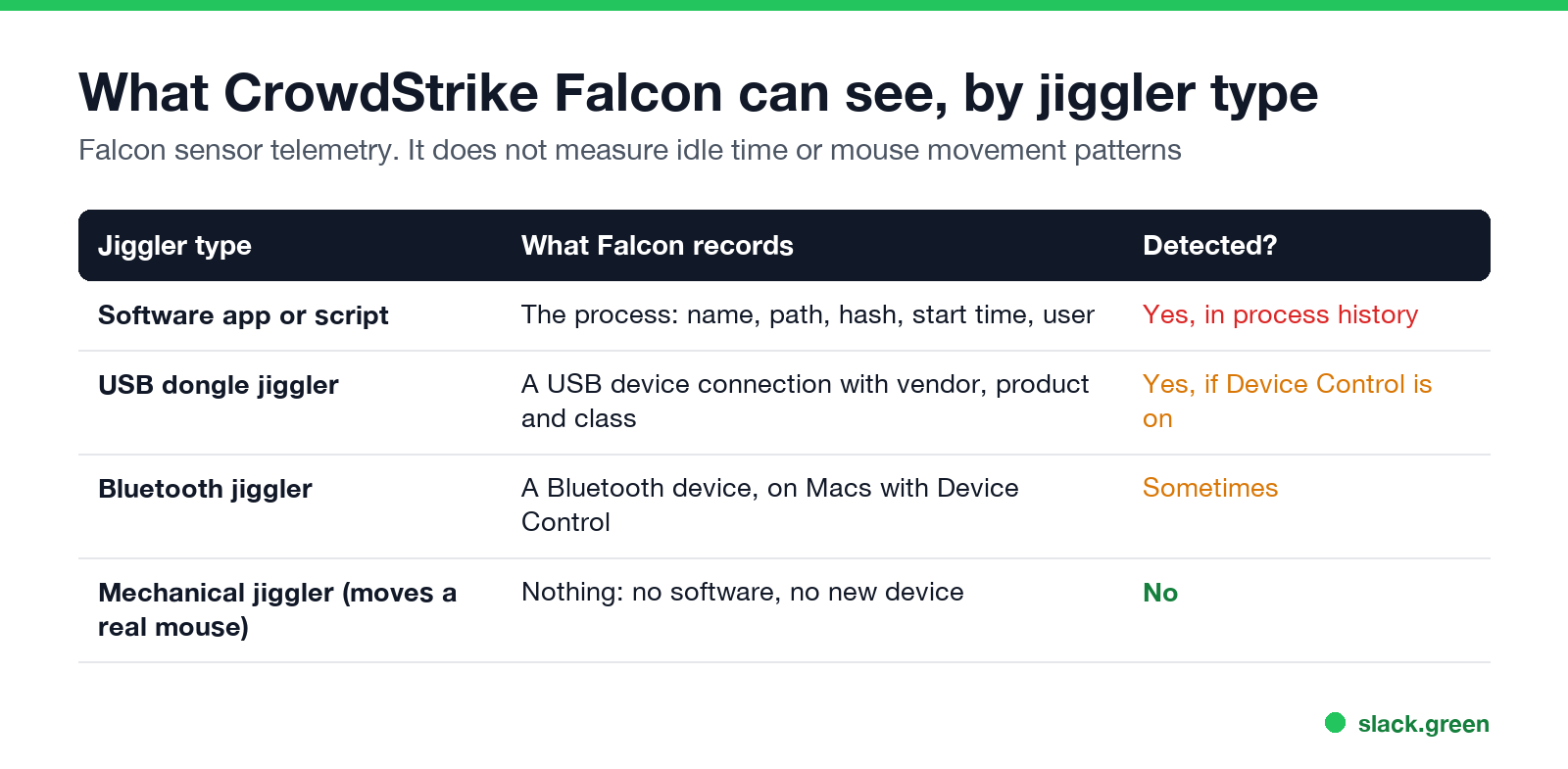
| Jiggler type | What Falcon records | Visible to the security team? |
|---|---|---|
| Software app or script (Mouse Jiggler, Move Mouse, AutoHotkey, PowerShell) | The process: name, path, file hash, start time, user | Yes, in process history |
| USB dongle jiggler | A USB device connection with vendor, product and device class | Yes, if Device Control is on |
| Bluetooth jiggler | A Bluetooth device connection, on Macs with Device Control | Sometimes |
| Mechanical jiggler that moves your real mouse | Nothing: no new software and no new device | No |
Falcon does not see the movement itself. It has no view of "the cursor moved one pixel every 30 seconds for eight hours". Productivity tools such as ActivTrak, Hubstaff and Insightful look at activity patterns; Falcon looks at processes, files, network connections and devices.
Software jigglers: in the process history
Falcon's sensor sends an event for every process that starts on the laptop, with the file name, full path, SHA256 hash, command line, parent process and user. A security analyst can search that history for known jiggler names in seconds. AutoHotkey or PowerShell scripts show up too, as AutoHotkey.exe or powershell.exe with the script path on the command line.
Falcon does not block these tools by default, because they are not malware. A company can add a hash or a name to a block list if it wants them gone. Our tests of what each app does, and how visible it is, are in can a mouse jiggler be detected.
USB jigglers: in the Device Control log
Never appear "away" on Slack again
Cloud-based. No downloads. Works 24/7 even when your laptop is off.
Falcon Device Control is a separate module for USB and Bluetooth devices. CrowdStrike's FAQ says admins "can create rules by class and exceptions by vendor ID, product ID or serial number", and its sensors log connections as DcUsbDeviceConnected events that analysts search in the Falcon console. A USB jiggler presents itself to the computer as a mouse or keyboard, so it appears as an extra human interface device with its own vendor and product ID.
An analyst looking for unknown input devices might run a search like this in Falcon's event search:
event_simpleName=DcUsbDeviceConnected
| table ComputerName UserName DevicePropertyClassName DeviceInstanceId
On Windows, the DeviceInstanceId contains the VID_ and PID_ values. A laptop with its own trackpad, the company mouse and a third input device from an unknown vendor stands out. Cheap dongles sold as "undetectable" copy the vendor ID of a common mouse brand, which hides the name but not the fact that a new device was plugged in. The same check without CrowdStrike is in how to detect a mouse jiggler.
Device Control policies are mainly used to block USB storage. Blocking all mice and keyboards by class would lock out real ones, so most companies log input devices rather than block them.
Mechanical jigglers: nothing to record
A mechanical jiggler is a small turntable or arm that moves the mouse you already use. The computer sees the same mouse, moving. No software is installed and no new device connects, so there is nothing in Falcon's data. The limits of that approach, and what a camera or a pattern check still catches, are in what is a mouse jiggler.
Who actually looks
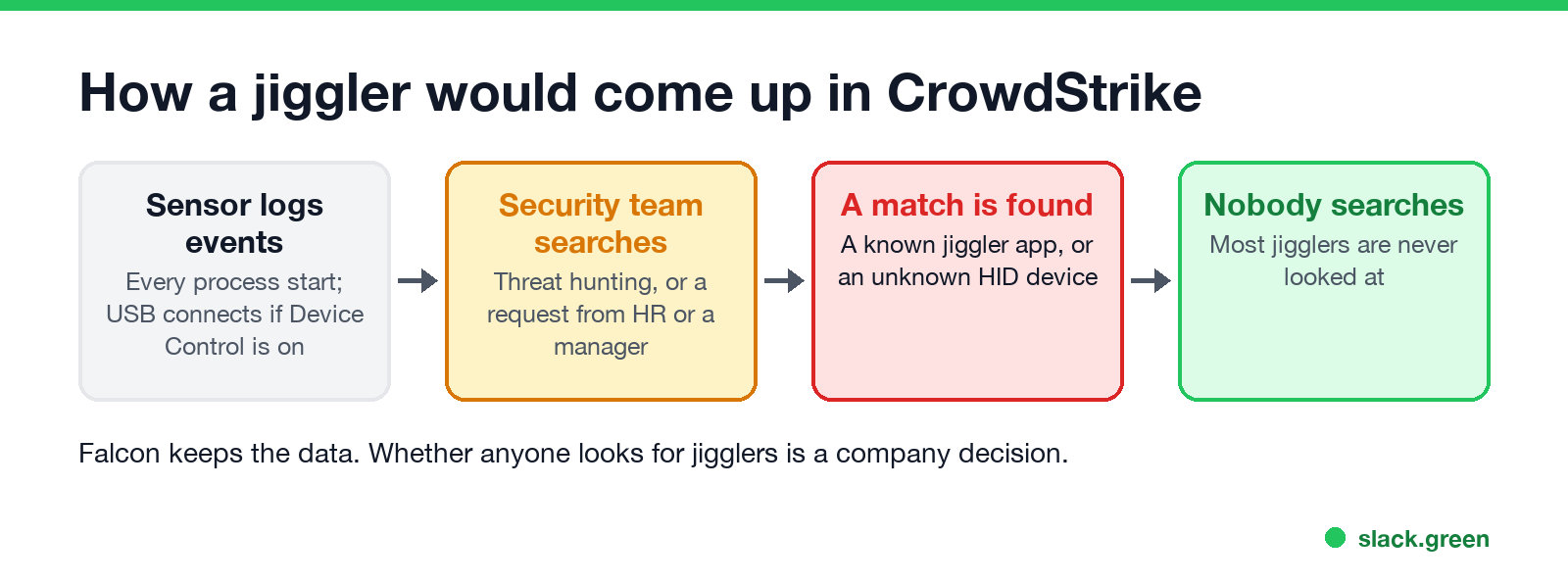
CrowdStrike data is read by the security team, not by your manager. Jiggler checks usually happen in two situations:
- • An investigation. HR or a manager raises a concern about someone's work, and security is asked what ran on that laptop. Falcon keeps event history for a period set by the company's subscription, so the search can go back in time.
- • A hygiene sweep. Some security teams list unapproved software or unknown USB devices across all laptops. A jiggler turns up with the rest.
If your company also runs a productivity tool, that tool is more likely to raise the question. Each one works differently: can ActivTrak detect a mouse jiggler, can Hubstaff detect a mouse jiggler and can Insightful detect a mouse jiggler.
FAQ
Never appear "away" on Slack again
Cloud-based. No downloads. Works 24/7 even when your laptop is off.
Does CrowdStrike detect mouse jigglers? It has no jiggler detection. It records jiggler apps as processes and, with Device Control, USB jigglers as connected devices, which the security team can search.
Does CrowdStrike detect USB devices? With Falcon Device Control, yes. It logs connections with vendor ID, product ID and device class, and can block devices by class or ID.
Can CrowdStrike see mouse movement? No. Falcon does not record cursor movement or idle time.
Can CrowdStrike detect a mechanical mouse jiggler? No. It adds no software and no device, so there is nothing to log.
Will CrowdStrike block my mouse jiggler app? Not by default. A security team can add it to a block list by hash or name.
Stop Jiggling Your Mouse.
Join hundreds of remote workers who never worry about their Slack status. Set it up once, stay green forever.
Related Articles
Quiet Vacationing: What It Means and Why Workers Do It
Quiet vacationing, also called a hushed vacation, means taking time off without telling your manager while you keep looking online. In a Harris Poll of 1,170 US workers, 37% of millennials said they had done it and 38% had moved their mouse to look active. What it looks like, why people do it, how it gets noticed, and the working-vacation alternative.
Can Time Doctor Detect a Mouse Jiggler? Yes, With One Report
Yes, if your company has Time Doctor's Unusual Activity Report. It checks keyboard and mouse activity in 30-minute blocks and flags mouse movement without clicks and input that is unusually regular, which is what app and USB jigglers produce. It does not look at app names. What the report flags, who sees it, and what else Time Doctor records.
What Can a Google Workspace Admin See? Email, Drive, Chrome
A Google Workspace admin can see activity logs for Gmail, Drive, Chat, Meet, Calendar and sign-ins, and on editions with Google Vault can search and export your work email and chat messages. They cannot see your screen or keystrokes, and they do not get your full browsing history unless your Chrome browser or profile is managed and reporting. What is visible, app by app.