
Chat SDK for Slack: A Streaming Thread Bot, Tested
Vercel's Chat SDK (chat 4.45.0 with @chat-adapter/slack) ran a Slack thread bot for us on 17 November 2026 with no Vercel deploy: a plain Node server, a quick tunnel, streamed replies, thread subscriptions and markdown conversion. Here is the code, what Slack showed and what it does that raw Bolt does not.
Chat SDK is Vercel's TypeScript library for chat bots, and its Slack adapter (@chat-adapter/slack) turns Slack webhooks into handlers such as onNewMention and onSubscribedMessage, with replies posted through thread.post(), including streamed text. It does not need Vercel. On 17 November 2026 we ran chat 4.45.0, @chat-adapter/slack 4.45.0 and @chat-adapter/state-memory 4.45.0 on Node 22.23.5 behind a plain Node HTTP server and a Cloudflare quick tunnel, with a throwaway app in a test workspace. Below are the code, what Slack showed, and the parts that differ from raw Bolt.
Setup
npm install chat @chat-adapter/slack @chat-adapter/state-memoryThe adapter reads SLACK_BOT_TOKEN and SLACK_SIGNING_SECRET from the environment. Our app's bot scopes included app_mentions:read, channels:history, chat:write, reactions:write and users:read, and it subscribed to the bot events app_mention and message.channels. The README's sample manifest lists the full set for DMs and private channels too. Event Subscriptions, Interactivity and the slash command all pointed at one URL.
The bot
The docs show Next.js route handlers. Any server works if you turn the request into a Web Request and hand it to bot.webhooks.slack:
import http from "node:http";
import { Chat } from "chat";
import { createSlackAdapter } from "@chat-adapter/slack";
import { createMemoryState } from "@chat-adapter/state-memory";

const bot = new Chat({
  userName: "sg1117lab",
  adapters: { slack: createSlackAdapter() },
  state: createMemoryState(),
  logger: "debug",
});

const sleep = (ms) => new Promise((r) => setTimeout(r, ms));

bot.onNewMention(async (thread, message) => {
  const started = Date.now();
  await thread.subscribe();
  const words = "Chat SDK streams this reply into the thread one word at a time".split(" ");
  const stream = (async function* () {
    for (const w of words) {
      await sleep(250);
      yield w + " ";
    }
  })();
  await thread.post(stream);
  console.log(JSON.stringify({ mention: message.text, thread: thread.id, ms: Date.now() - started }));
});

bot.onSubscribedMessage(async (thread, message) => {
  const parts = ["**Still listening.** ", "You said: ", "_" + message.text + "_", "\n\n", "- one\n", "- two\n", "- `three`"];
  const stream = (async function* () {
    for (const p of parts) {
      await sleep(600);
      yield p;
    }
  })();
  await thread.post(stream);
});

bot.onSlashCommand("/sg1117", async (event) => {
  await event.channel.post("Slash command via Chat SDK: " + event.text);
});

// Plain Node server: turn the request into a Web Request for bot.webhooks.slack
http
  .createServer(async (req, res) => {
    if (req.url !== "/slack/events") {
      res.writeHead(200).end("ok");
      return;
    }
    const chunks = [];
    for await (const c of req) chunks.push(c);
    const request = new Request("http://localhost" + req.url, {
      method: req.method,
      headers: req.headers,
      body: Buffer.concat(chunks),
    });
    const response = await bot.webhooks.slack(request, {
      waitUntil: (task) => task.catch((e) => console.error("task failed", e)),
    });
    res.writeHead(response.status, Object.fromEntries(response.headers));
    res.end(Buffer.from(await response.arrayBuffer()));
  })
  .listen(3000, () => console.log("chat sdk bot on :3000"));
A signed url_verification request got 200 with {"challenge":"..."}, and an unsigned POST got 401. We used a small async generator instead of a model so the timing is plain to see; an AI SDK fullStream or textStream goes into thread.post() the same way.
What Slack showed
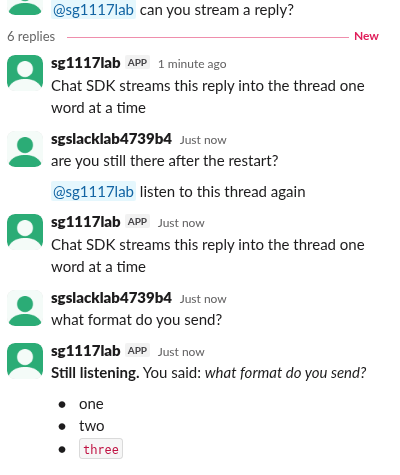
| Test | Result |
|---|---|
@sg1117lab can you stream a reply? | Reply in a thread under the mention. The handler took 3,546 ms for 13 words at 250 ms each |
Same message arrived as app_mention and as message.channels | The SDK logged Skipping duplicate message and replied once |
Plain reply in the thread after thread.subscribe() | onSubscribedMessage ran |
| Plain reply after we restarted the process | Log: isSubscribed: false and No handlers matched message; no reply |
| New mention in the same thread | Subscribed again, replied |
Markdown **Still listening.**, _..._, - one, ` three | Posted as Still listening., italics, • bullets and inline code |
| /sg1117 status | event.channel.post()` posted a normal message in the channel |
The restart row is the one to plan for. The memory state adapter keeps subscriptions, locks and the duplicate list in the process, so a redeploy or a cold start forgets every thread the bot was following. The README points to Redis, ioredis and PostgreSQL state adapters for production.
Never appear "away" on Slack again
Cloud-based. No downloads. Works 24/7 even when your laptop is off.
Streaming: short replies arrive in one piece
The adapter streams through chatStream in @slack/web-api (7.19.0 in our install). That helper keeps a 256-character buffer (buffer_size defaults to 256 in chat-stream.js) and calls Slack only when the buffer fills or the stream ends. Our 64-character reply therefore appeared all at once, about 4 seconds after the mention, even though it was produced word by word.
A longer reply does stream. We sent 10 lines of 110 characters, one every 700 ms. The message appeared 2.5 seconds after the question, once the first 256 characters were ready, and kept growing until it was done 7.5 seconds after the first line started:
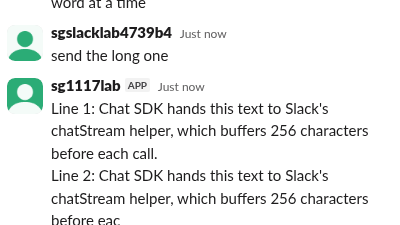
If you want short answers to look live, show a status first (a reaction or a "thinking" message) rather than expecting the stream to animate a two-line answer.
What Chat SDK does that raw Bolt does not
| Chat SDK | Bolt for JavaScript | |
|---|---|---|
| A mention that also matches a message listener | Deduplicated by message id | Both listeners run if you register both |
| "Keep talking in this thread" | thread.subscribe() plus onSubscribedMessage, stored in the state adapter | Your own storage and checks on thread_ts |
| Concurrent messages in one thread | A per-thread lock (logged as Lock acquired) | Your own locking |
| Markdown in replies | Converted to Slack formatting | You write mrkdwn or blocks |
| Streaming | Any async iterable in thread.post() | Call client.chatStream() from @slack/web-api yourself |
| Other platforms | Same handlers for Teams, Discord, Google Chat and more | Slack only |
| Slack-only features (modals, App Home, Workflow steps) | Partly covered (the docs have pages on modals and actions) | Full coverage |
For a Slack-only app with modals, shortcuts and App Home, Bolt is still the more complete toolkit; our Bolt with Express test covers the HTTP side. For an AI assistant that lives in threads, Chat SDK saves the subscription, lock and dedup code. If you would rather call the API from an AI agent than run a bot, see our Slack MCP server notes.
FAQ
Do I need to deploy to Vercel?
No. We ran it on a plain Node 22 HTTP server. The waitUntil option takes any function that keeps the process alive until the handler's promise ends.
Does it support Socket Mode?
Yes. The README documents mode: "socket" with an xapp- app token, plus a forwarding setup for serverless hosts. We tested the webhook mode only.
Why did my bot stop answering in a thread? With the memory state adapter, a restart clears subscriptions. Mention the bot again or use a persistent state adapter.
Stop Jiggling Your Mouse.
Join hundreds of remote workers who never worry about their Slack status. Set it up once, stay green forever.
Related Articles
Slack Bolt with Express: ExpressReceiver and customRoutes, Tested
Two ways to serve your own HTTP routes next to a Bolt JS app: ExpressReceiver with receiver.router, or customRoutes on the built-in receiver. We ran both with Bolt 5.1.0 and Express 5.3.0 on 17 November 2026, plus the body-parser mistake that makes every slash command fail.
Slack App Configuration Token: Generate, Rotate and Revoke
An app configuration token lets a script create Slack apps from manifests. We generated one, rotated it five times and tested it again 28 hours later.
Slack App Collaborators: Add, Remove and Transfer Ownership
Collaborators are the people who can edit a Slack app. We added and removed one on 20 November 2026 as a regular member of a test workspace, recorded who can be added and what Slack asks you to do after a removal, and wrote down the hand-over path Slack documents.