
Does Teams Show Last Seen to External Users?
By default, yes. Microsoft says anyone in any organization using Teams can see your presence, and Last seen is part of the Away status. Your admin decides who outside the company sees it: all organizations, only some, or none with privacy mode. What guests, federated contacts and personal Teams accounts see, and how to check your company's setting.
By default, yes. Microsoft's own admin documentation says that "anyone in any organization using Teams can see (in nearly real time) if other users are available online", and it lists the Last seen time as part of the Away status. So a contact at another company who chats with you through Teams external access can see that you are Away and, where their Teams shows it, since when. Whether that happens is your admin's choice, not yours: external access can share presence with all organizations, only some, or none, and a tenant-wide privacy mode stops your presence from leaving the company at all. Guests in your own teams see your status like coworkers do.
Slack has no Last seen line for anyone, inside or outside your workspace. It shows a green or grey dot, and the dot turns grey after 10 minutes without input in the Slack window. Slack Green keeps that dot green from a server during the hours you set.
Who outside your company can see your Teams status
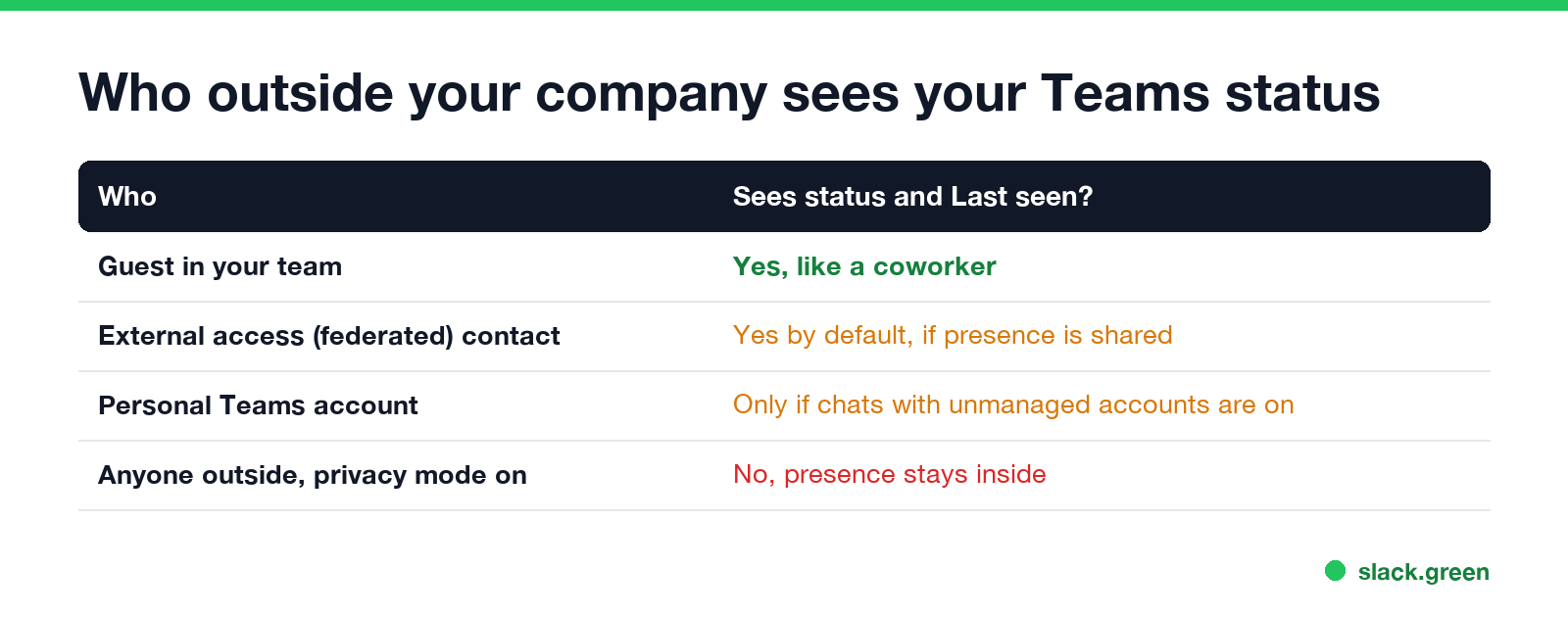
| Who | How they reach you | Sees your status and Last seen? |
|---|---|---|
| Guest in your team | Added to your organization as a guest | Yes, like a coworker, in the teams and chats they share with you |
| External access (federated) contact | Chats from their own company's Teams | Yes by default, if your admin shares presence with their organization |
| Personal Teams account (Teams free) | Chats from a personal Microsoft account | Only if your admin allows chats with unmanaged accounts |
| Anyone outside, with privacy mode on | Any of the above except guests | No. Presence is never shared outside the organization |
Guests are the case people forget. A client added as a guest to a shared channel or team counts as a member of your organization for presence, so they see your status, your Last seen time and your status message.
What Last seen shows to anyone who can see your presence
Last seen is the most recent time any of your devices was active. People see it next to your status when you are Away or Offline, such as "Away, Last seen 25m ago", in a chat header and on your profile card. It disappears when you turn Available. What does Last seen mean on Teams has the details, and does Teams show your location covers the other profile fields people ask about.
Microsoft does not document a separate Last seen rule for external contacts. Its presence page treats Last seen as part of the Away state, so plan on this: anyone who can see your presence can see your Last seen time.
How admins control presence for external users
Never appear "away" on Slack again
Cloud-based. No downloads. Works 24/7 even when your laptop is off.
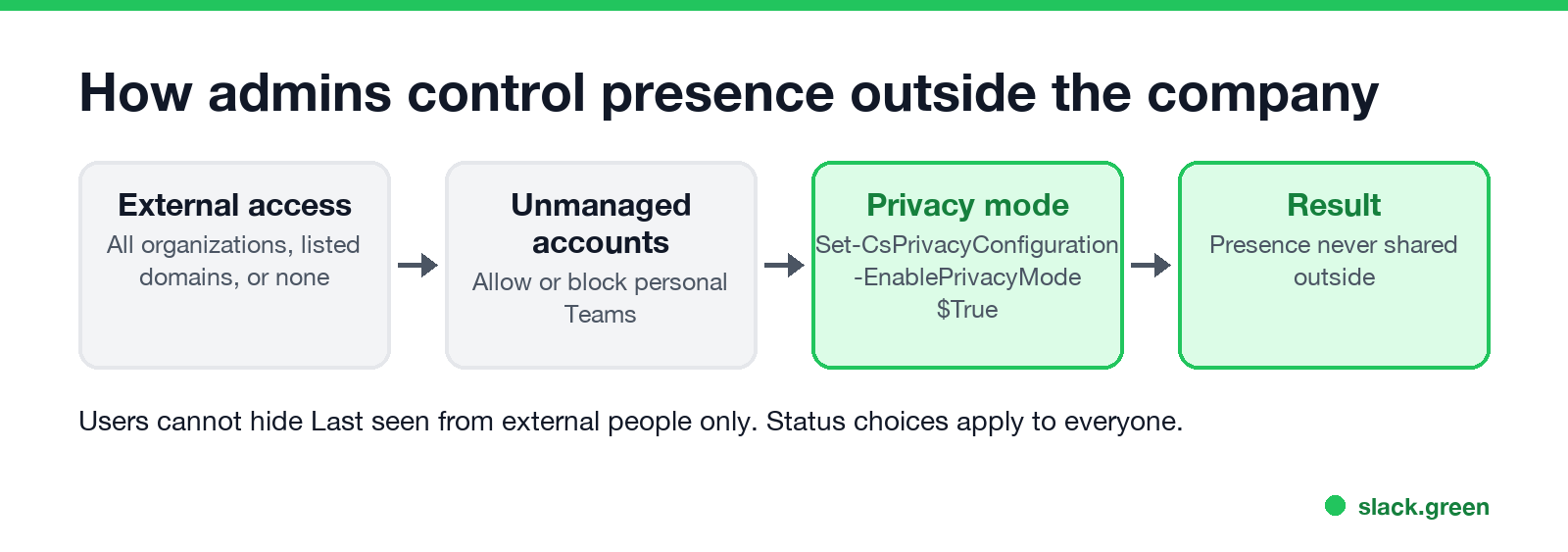
Two settings decide it, both admin-only:
- External access in the Teams admin center (Users > External access). It allows chat and presence with all external organizations, only listed domains, or none. It also has a switch for chats with people using personal Teams accounts.
- Privacy mode, set in the Teams PowerShell module. With it on, presence is never shared outside the organization, whatever external access says:
# hide all presence from people outside the organization
Set-CsPrivacyConfiguration -Identity global -EnablePrivacyMode $True

# check the current value
Get-CsPrivacyConfiguration -Identity global | Select-Object EnablePrivacyMode
Microsoft notes that privacy mode changes can take several hours to reach everyone. Nothing in the Teams app lets a user hide Last seen from outside people only. Your status choices apply to everyone at once.
What you can do as a user
If the concern is how your hours look to a client, remember what drives the status: Teams on a computer goes Away after a few minutes without input or when you lock it, and on a phone whenever Teams is in the background. Many people who look this up also want to know how Last seen compares with Offline and whether Teams shows when you are typing.
FAQ
Can people outside my company see my Teams status? By default, yes, if they use Teams and your admin shares presence through external access. With privacy mode on, no one outside sees it.
Can guests see my Last seen time on Teams? Yes. Guests are treated like members of your organization in the teams and chats they share with you.
Can I hide my Teams status from external users only? Not from the app. Only your admin can, with external access settings or privacy mode.
Stop Jiggling Your Mouse.
Join hundreds of remote workers who never worry about their Slack status. Set it up once, stay green forever.
Related Articles
Best Chrome Extensions for Remote Workers, by the Job They Do
14 Chrome extensions for remote work, grouped by the job: async video, meetings, focus, writing, passwords, tabs, screenshots, time tracking and keeping the screen on. Each checked on the Chrome Web Store, with user counts, cost, and the extensions to avoid on a work laptop.
Can My Employer See My Zoom Chats? Meeting Chat vs Team Chat
It depends which Zoom chat. In a meeting, the host cannot read private messages between two other people, even in a saved chat. Zoom Team Chat on a work account is different: the company owns it, and admins can archive and search it. What hosts, admins and your manager can each see, and what stays private.
Slack: Get Notified When Someone Comes Online (No Built-In Alert)
Slack has no alert for when a coworker becomes active. No preference, Workflow Builder trigger or profile button does it. You can watch their green dot, send a message they will see when they return, or run a short script that checks users.getPresence every minute and DMs you.