
Does Slack Notify When You View Someone's Profile? No
No. Opening someone's Slack profile, hovering over their name or checking their status sends them nothing, and Slack has no list of who viewed your profile. Admins cannot see profile views either. What does get noticed: typing in a DM, messages, reactions, mentions and huddles. What a profile shows, and what Slack admins can see instead.
No, Slack does not notify anyone when you view their profile. Opening a profile, hovering over a name or photo, or checking someone's status, local time or green dot sends them nothing, and Slack has no "who viewed your profile" list like LinkedIn's. Workspace admins cannot see which profiles you open either. What the other person can notice is anything that creates activity toward them: typing in a DM with them shows "is typing", and a message, reaction, mention or huddle sends a notification.
Slack is generally quiet about viewing. It also has no read receipts in DMs, as covered in does Slack have read receipts.
Presence is what we work on. We build Slack Green, which keeps your Slack status green during the hours you set. Your green or grey dot is the one thing on your profile that changes by itself, and it is explained below.
What the other person sees when you look them up
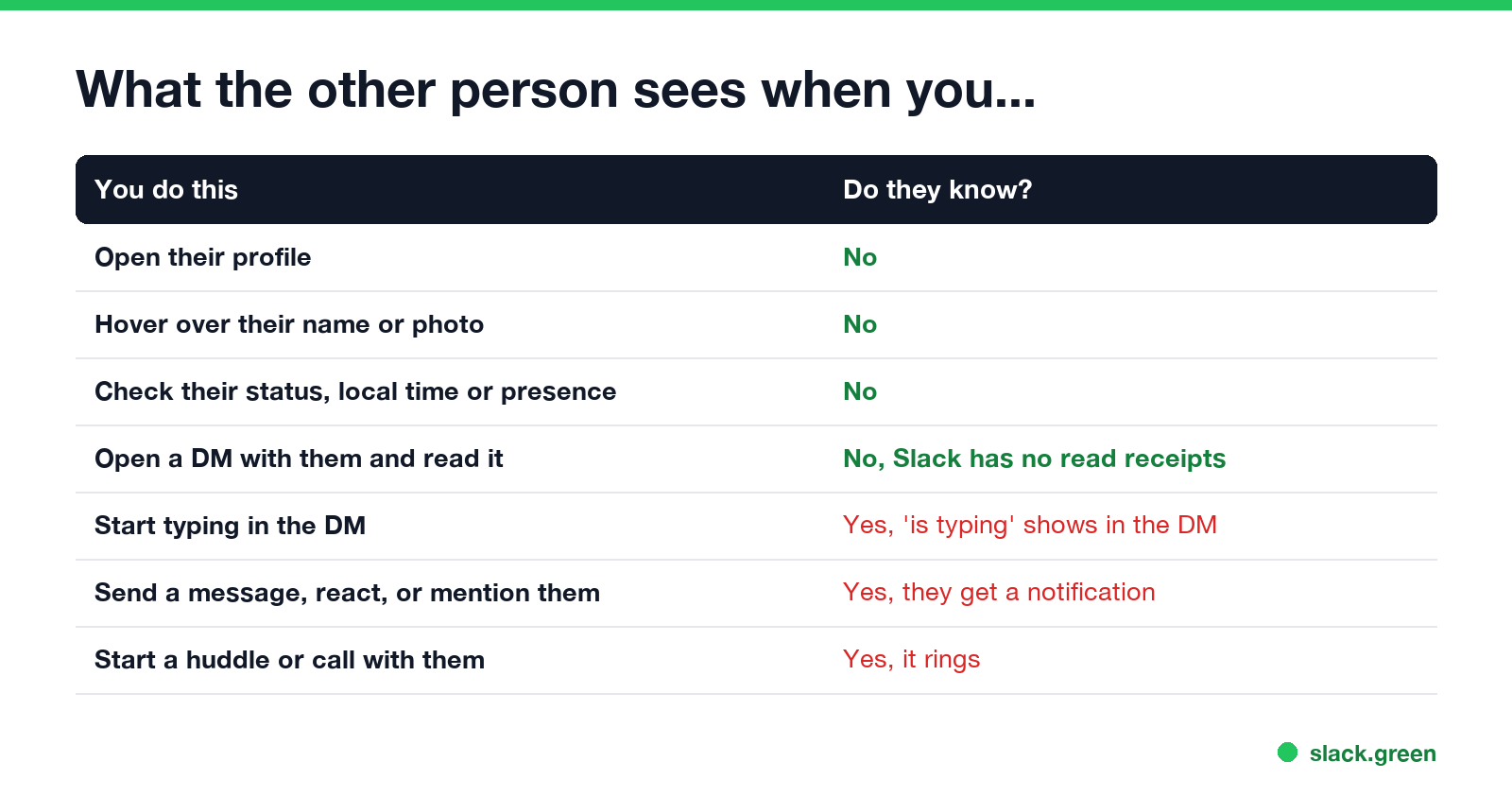
| You do this | Do they know? |
|---|---|
| Open their full profile | No |
| Hover over their name or photo | No |
| Check their status, local time or presence dot | No |
| Open a DM with them and read it | No. Slack has no read receipts |
| Start typing in the DM | Yes. "is typing" shows at the bottom of the DM while you type |
| Send a message, react to their message, or mention them | Yes. They get a notification by default |
| Start a huddle or call with them | Yes. It rings |
| Save or forward their message | No |
The one surprise is typing. If you open a DM and start writing, then delete it, the other person may already have seen "is typing" appear and vanish.
What a Slack profile shows
Anyone in your workspace can open your profile and see:
- • your name, display name, pronouns and title, as you or your admin filled them in;
- • your status emoji and text, and when it clears;
- • your presence dot: green when active, hollow when away;
- • your local time, from your time zone setting;
- • contact fields your company added, such as phone number, team or manager.
People outside your company, in a shared Slack Connect channel, see a shorter version. The presence dot updates from your activity in Slack; how it decides is in how Slack decides when you are away.
What Slack admins can see instead
Never appear "away" on Slack again
Cloud-based. No downloads. Works 24/7 even when your laptop is off.
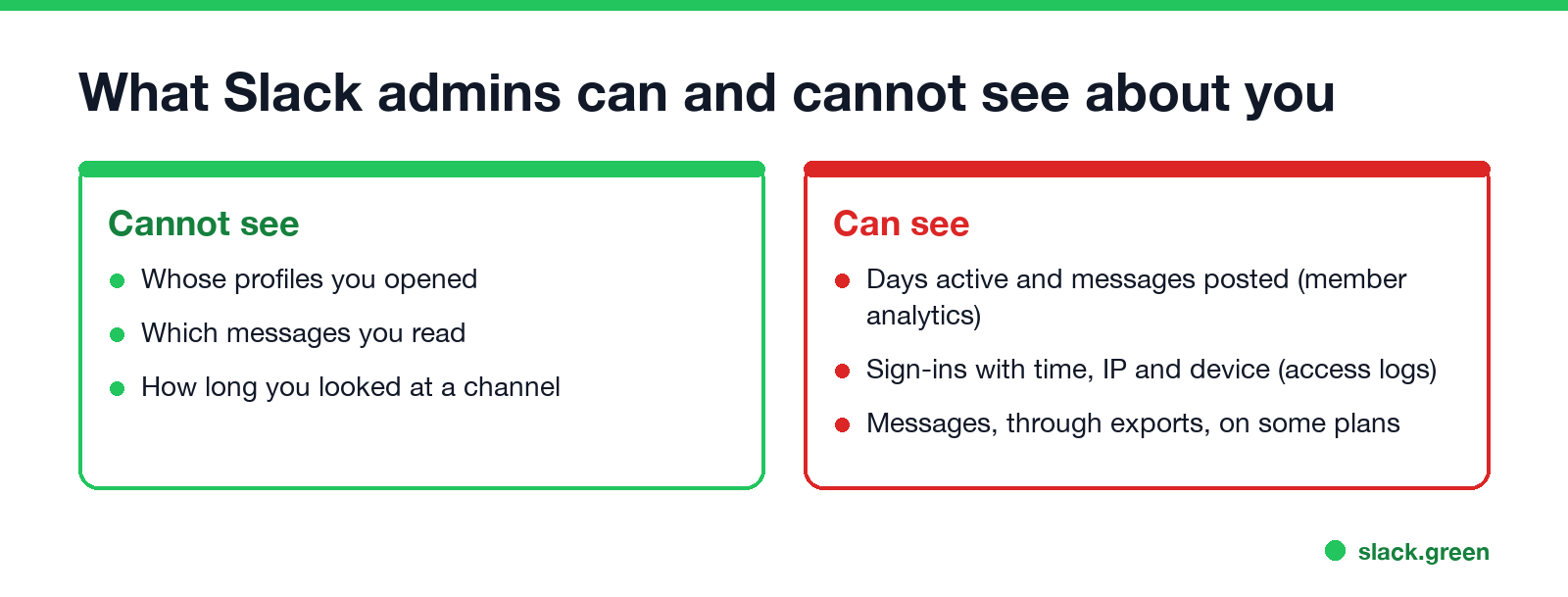
Slack admins do not get a log of profile views or of which messages you read. What owners and admins can see, depending on the plan:
The details are in can Slack admins see your DMs and how employers monitor remote workers.
Can you see who viewed your Slack profile?
No. There is no setting, plan or app in Slack's own features that shows profile viewers. Slack does not record profile views as something you can look up.
If you want to know when a particular person is around, the tools that exist are the presence dot and, for a notice when they become active, the approaches in Slack notify when someone comes online.
Slack vs LinkedIn, Teams and Google Chat
| Slack | Microsoft Teams | Google Chat | ||
|---|---|---|---|---|
| Notifies when you view a profile | No | Yes, in Who viewed your profile, unless you browse in private mode | No | No |
| Read receipts in direct messages | No | Yes | Yes, "Seen" | Yes, avatar at last read message |
| Shows "last seen" | No | Active status only | Yes, on the profile card | No |
The LinkedIn side is in LinkedIn active status, and Google Chat's in does Google Chat have read receipts.
FAQ
Never appear "away" on Slack again
Cloud-based. No downloads. Works 24/7 even when your laptop is off.
Can someone see if you looked at their Slack profile? No. Slack sends no notification and keeps no viewer list.
Does Slack tell someone if you click on their name? No. Clicking a name opens their profile, and that is private to you.
Does Slack show when you are typing? Yes, in DMs and channels, "is typing" appears while you type a message.
Can Slack admins see what profiles I look at? No. Admin tools cover sign-ins, activity counts and, on some plans, message exports, not profile views.
Stop Jiggling Your Mouse.
Join hundreds of remote workers who never worry about their Slack status. Set it up once, stay green forever.
Related Articles
Can My Employer See My iMessages on a Work Mac?
Not through device management or the network: Jamf or Intune cannot read Messages, and iMessage is end-to-end encrypted. But if you sign in to Messages on a work Mac, your texts are stored on that Mac, where monitoring screenshots, backups and admin access can reach them. How to check, and how to take iMessage off the Mac without deleting it from your iPhone.
Can My Boss See My Private Outlook Calendar Events?
Usually not the details. When you mark an Outlook event Private, someone who can read your calendar sees only Private appointment, the time and a lock. The exceptions are delegates you gave Can view private items, the people invited to the event, anyone with full access to your mailbox in new Outlook or the web, and compliance admins. How to check who has which access, and what Private does not hide.
Productivity Theater: Meaning, Numbers and How It Starts
Productivity theater is work done to look busy rather than to get results: extra messages, status updates, meetings to show progress, and keeping a green dot on. Slack's 2023 survey of 18,000 desk workers put it at 32% of the working week. Microsoft ties it to productivity paranoia, where 85% of leaders doubt remote staff are productive.