
Does Slack Have Read Receipts? No, but Admins Can Count Views
No. Slack never shows who read a DM or a channel message. On Business+ and Enterprise plans, admins can see how many people viewed a message in channels with 50 or more members, never who.
No, Slack does not have read receipts. A DM, a group DM, or a channel message never shows "seen", a read tick, or a list of readers. The person who sent the message cannot tell whether you opened it, and you cannot tell whether they opened yours.
There is one feature close to it. On Business+ and Enterprise plans, admins can open message activity for a message in a channel with 50 or more members. It shows how many people viewed the message, not who. This page covers what Slack shows, what admins can see, and four ways teams confirm that a message was read.
We build Slack Green, which keeps your Slack status green from our servers. People often ask us what their coworkers can see, so we check Slack's help center for every claim here.
Can you tell if someone read your Slack message?
Not from Slack. These are the only signals, and none of them is a read receipt:
- • An emoji reaction or a reply. The only proof that someone read a message is that they reacted to it or answered it.
- • The typing line. "is typing" under the message box means they are in the conversation right now.
- • The green dot. It means the person used Slack in the last few minutes. It does not mean they opened your DM. See how Slack active status works.
It works the other way too. You can open a DM, read it, and close it, and the sender sees nothing. Unread badges exist only on your own screen, and Mark unread changes only your own view.
What Slack shows, and what admins see
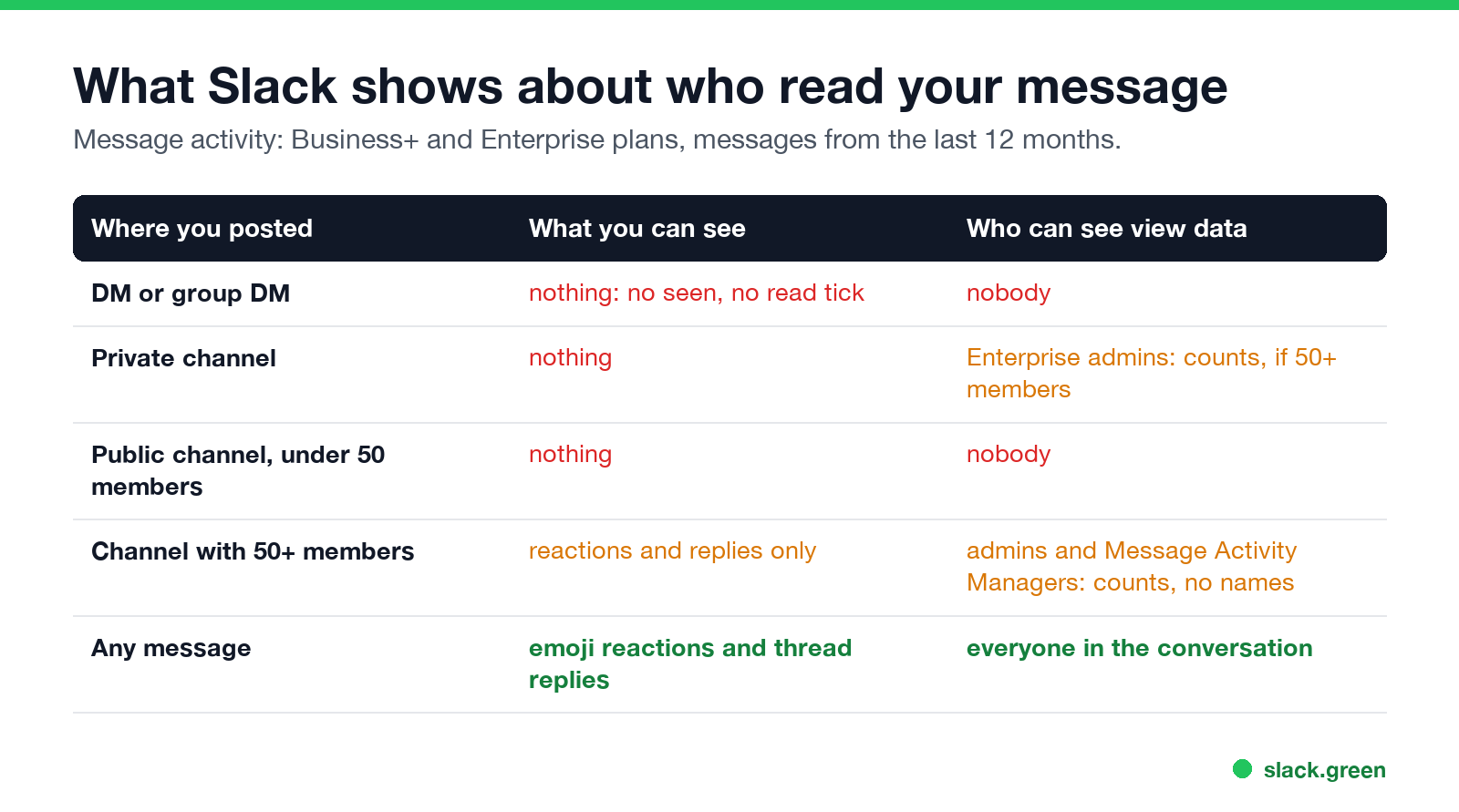
| Where you posted | What you can see | Who can see view data |
|---|---|---|
| DM or group DM | Nothing | Nobody |
| Private channel | Nothing | Enterprise admins, as counts, if the channel has 50+ members |
| Public channel, under 50 members | Nothing | Nobody |
| Public channel, 50+ members | Reactions and replies | Admins and Message Activity Managers, as counts |
| Any message | Emoji reactions and thread replies | Everyone in the conversation |
Slack's help page on message activity lists what it shows: "the number of members who have viewed, reacted to, or clicked a message", a graph of views over time, the share of first views on browser, desktop, and mobile, and views by department if the company syncs departments. It works for messages from the last 12 months in channels with at least 50 members. Owners and admins can use it by default, and they can give the Message Activity Manager role to other members. On Business+ it does not cover private channels.
Message activity is for measuring company announcements. It never lists names, and it does not exist for DMs.
Why Slack does not have read receipts
Never appear "away" on Slack again
Cloud-based. No downloads. Works 24/7 even when your laptop is off.
Slack's help center does not give a reason. The one view feature it did build points one way: message activity is limited to channels with 50 or more members and shows counts only. That keeps it useful for "did the announcement land" without showing that one person read a DM and did not answer. Teams use Slack at their own pace. A missing read receipt means you can read a message in a meeting and answer an hour later without anyone watching the gap.
Other tools choose differently. Microsoft Teams shows a "Seen" icon in chats. WhatsApp shows blue ticks. If you move between them, Slack's silence can feel like a missing feature.
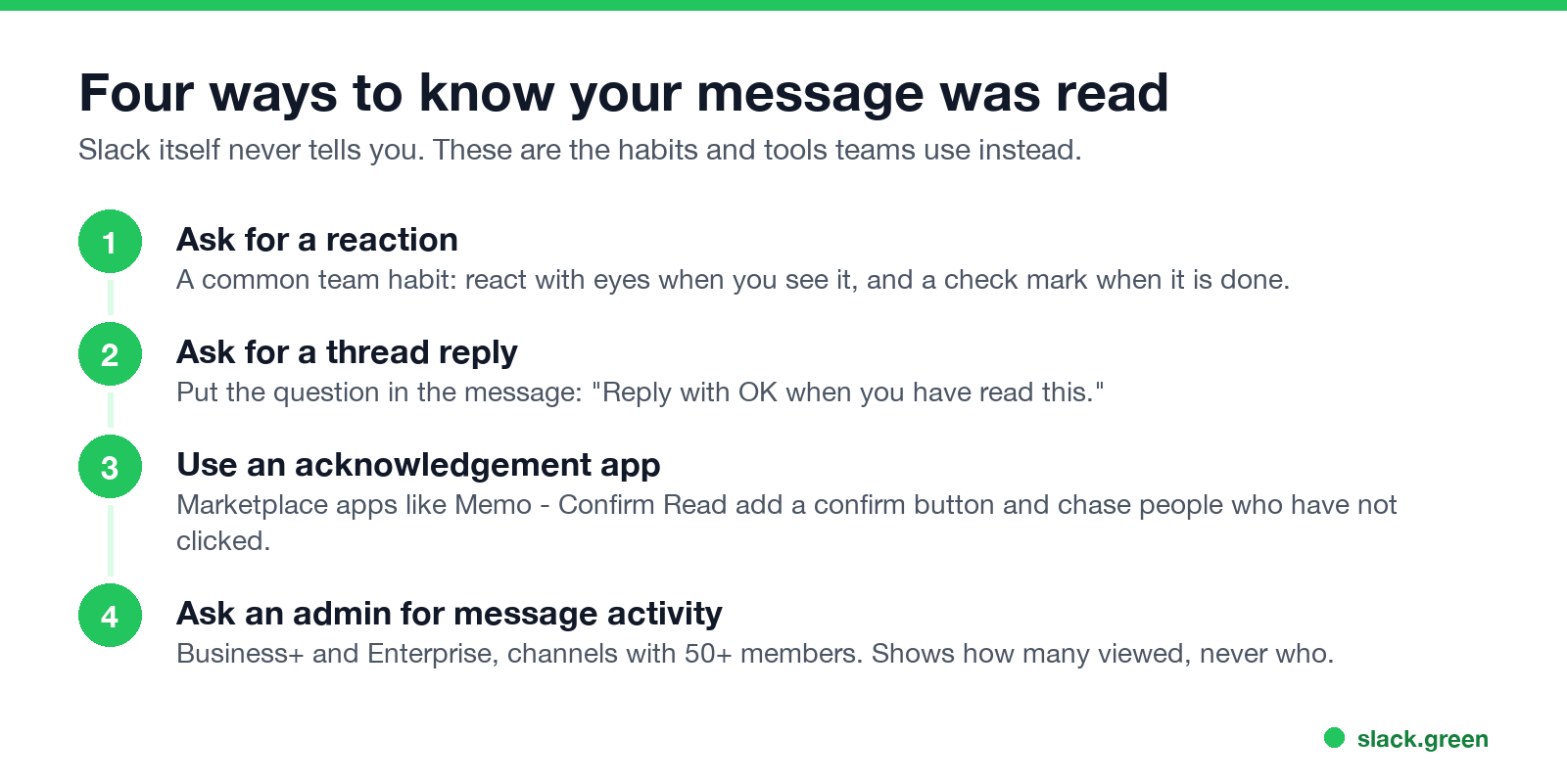
Four ways to know your message was read
What people can see about you
If you are on the other side of this question, here is what a coworker can see about you:
Admins can see more, including message exports on some plans. The rules are in can Slack admins see your DMs. If you want the dot to show you as available during work hours without watching Slack, Slack Green keeps it green on a schedule; how to keep Slack active compares the options.
FAQ
Never appear "away" on Slack again
Cloud-based. No downloads. Works 24/7 even when your laptop is off.
Does Slack show read receipts in DMs?
No. DMs and group DMs show nothing about whether the other person opened the message.
Can people see if you viewed their Slack message?
No. Opening a message sends nothing to the sender. In channels with 50 or more members on Business+ or Enterprise, you are counted in the admin view total, without your name.
Is there a Slack read receipts app?
Yes, several acknowledgement apps in the Slack Marketplace, such as Memo - Confirm Read. The reader has to click a button, so they record a confirmation, not a silent read.
Can my boss see if I read a message?
Not by name. An admin can see view counts for messages in channels with 50 or more members on Business+ and Enterprise plans. Nobody can see whether you read a DM.
Does the eyes emoji mean someone read my message?
On many teams, yes. It is a team habit, not a Slack feature. Someone reacts with the eyes emoji to say "I have seen this".
Stop Jiggling Your Mouse.
Join hundreds of remote workers who never worry about their Slack status. Set it up once, stay green forever.
Related Articles
Can a Deactivated Slack Account Be Reactivated? Yes, by an Admin
Yes. A workspace Owner or Admin can reactivate a deactivated Slack account at any time from Admin, Workspace settings, People: click the three dots and Activate account. The member can sign in at once and sees messages they sent before, but is not added back to channels. Steps, Enterprise, and why an account gets deactivated.
Slack Message Retention: How Long Slack Keeps Messages, by Plan
On the free Slack plan you can only see and search the last 90 days of messages and files, and data older than one year is deleted. Paid plans keep everything for the life of the workspace by default. Retention options by plan, file retention, DMs, and who can change them.
How to Delete a Slack Emoji (and Replace a Custom One)
To delete a custom Slack emoji, click your workspace name, choose Customize [workspace], open the Emoji tab, find the emoji and click the delete icon. Members can delete only emoji they added; owners and admins can delete any. How to replace one, remove packs, and what happens to old messages.