
Does Slack Have Read Receipts? No, but Admins Can Count Views
Slack has no read receipts. We checked a real message: its menu has no seen option, the API message has no reader field, and last_read is only your own. Admins on Business+ and Enterprise can count views in channels with 50 or more members.
No, Slack does not have read receipts. A DM, a group DM or a channel message never shows "seen", a read tick or a list of readers, so people on Slack cannot see when you read their message. The sender cannot tell whether you opened it, and you cannot tell whether they opened yours. The only read state Slack keeps is your own unread marker, and you set how it moves under Preferences > Mark as read.
The one feature close to it is message activity on Business+ and Enterprise plans. For a message in a channel with 50 or more members, admins can see how many people viewed it, not who.
What Slack shows on a message
We posted a message in our own Slack workspace (Free plan) on October 1, 2026, and opened its menu. These are all the actions Slack offers: Edit message, Mark unread, Remind me, Turn off notifications for replies, Copy link, Copy message, Pin to channel, Connect to apps and Delete message. None of them is "seen by" or "viewed by".
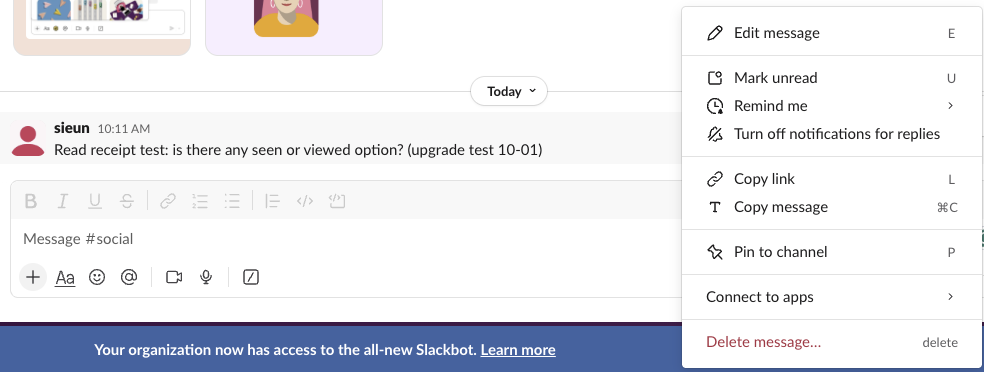
The API tells the same story. The message object conversations.history returned for that post has six fields: user, type, ts, text, team and blocks. There is no field for readers.
The only read data Slack stores is your own. conversations.info returns a last_read value, the point up to which you have read the channel. When we clicked Mark unread, our last_read went from the message's time stamp to 0000000000.000000. The shortcut for it, and what clears the marker again in channels, DMs and threads, are in Slack mark as unread. That changed our own unread badge and nothing anyone else can see.
We also watched what the web client sends when you read. On October 5, 2026 we kept a DM open in Slack for web, logged every request the tab made, and posted a new message into it. The client made one API call, conversations.mark, and last_read moved from 1791184278.961439 to the new message's 1791184512.111009 within 6 seconds. That method sets the read cursor of the person who calls it. No call went to the sender, and no message object changed.
The Mark as read setting
This is the setting people sometimes mistake for read receipts, and we tested each of its options on 30 unread messages in Slack mark as read settings. Open Preferences > Mark as read. It decides only when your own unread markers clear:
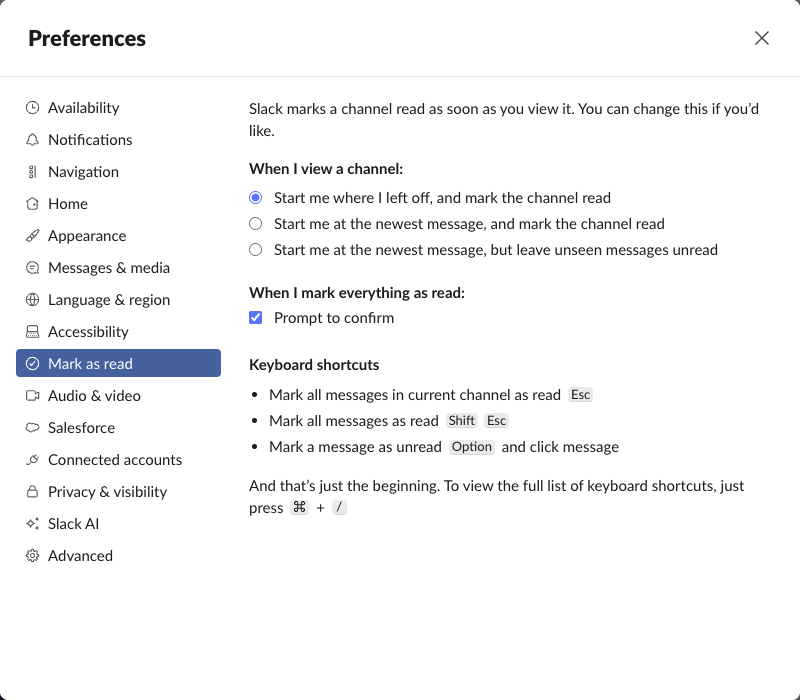
- • Start me where I left off, and mark the channel read is the default. Opening a channel clears its unread badge.
- • Start me at the newest message, and mark the channel read jumps to the bottom and clears the badge.
- • Start me at the newest message, but leave unseen messages unread keeps older messages bold until you scroll to them.
- • An emoji reaction or a reply. The only proof that someone read a message is that they reacted or answered.
- • The typing line. "is typing" under the message box means they are in the conversation right now.
- • The green dot. It means the person used Slack in the last few minutes. It does not mean they opened your DM. See how Slack active status works.
In our workspace the API stores the default as mark_msgs_read_immediately: true and start_scroll_at_oldest: true. None of the three options shows anything to the sender. Esc marks the current channel read, Shift+Esc marks everything read, and Option-click (Alt-click on Windows) on a message marks it unread again.
Can you tell if someone read your Slack message?
Not from Slack. These are the only signals, and none of them is a read receipt:
It works the other way too. You can open a DM, read it and close it, and the sender sees nothing.
Never appear "away" on Slack again
Cloud-based. No downloads. Works 24/7 even when your laptop is off.
What admins can see: message activity
| Where you posted | What you can see | Who can see view data |
|---|---|---|
| DM or group DM | Nothing | Nobody |
| Private channel | Nothing | Enterprise admins, as counts, if the channel has 50+ members |
| Public channel, under 50 members | Nothing | Nobody |
| Public channel, 50+ members | Reactions and replies | Admins and Message Activity Managers, as counts |
Slack's help page on message activity lists what it shows: "the number of members who have viewed, reacted to, or clicked a message", a graph of views over time, the share of first views on browser, desktop and mobile, and views by department if the company syncs departments. It covers messages from the last 12 months in channels with at least 50 members. Owners and admins can use it by default and can give the Message Activity Manager role to others. On Business+ it does not cover private channels. Our Free workspace has no such option, as the menu above shows.
Message activity is built to measure company announcements. It never lists names, and it does not exist for DMs. Other apps chose differently: Microsoft Teams shows "Seen" in chats, and Google Chat puts the reader's avatar at the last message they read; see does Google Chat have read receipts.
Four ways to know your message was read
What coworkers can see about you
Admins can see more, including message exports on some plans. The rules are in can Slack admins see your DMs.
FAQ
Can my boss see if I read a message?
Not by name. An admin can see view counts for messages in channels with 50 or more members on Business+ and Enterprise. Nobody can see whether you read a DM.
Is there a Slack read receipts app?
Yes, acknowledgement apps in the Slack Marketplace, such as Memo - Confirm Read. The reader has to click a button, so they record a confirmation, not a silent read.
Does Slack notify someone when I view their profile?
No. Opening a profile is private, and Slack keeps no list of profile viewers; see does Slack notify when you view a profile.
Why doesn't Slack have read receipts?
We found no reason published by Slack. When people ask, its support account points them elsewhere: "While Slack doesn't have read receipts, you can use emoji reactions or threads to acknowledge messages" (@SlackHQ on X, 25 February 2025). Message activity counts on Business+ and Enterprise are as close as Slack has come.
Stop Jiggling Your Mouse.
Join hundreds of remote workers who never worry about their Slack status. Set it up once, stay green forever.
Related Articles
How to Hide Your Email on Slack, and What Apps Still See
Only a workspace owner or admin can hide email addresses in Slack. We switched Email Display to No one, viewed a profile as a coworker, and read the same profile through the API.
Slack Message Retention: How Long Slack Keeps Messages, Tested on Free
Paid plans keep messages for the life of the workspace. On Free, a busy channel showed messages back to exactly 90 days and nothing older. Real settings and options below.
Can Slack See Deleted Messages? What Your Company Can Recover
A deleted Slack message disappears for everyone, admins included. We checked as a workspace Owner: the Free plan does not track deletions, the Standard Export leaves out deletion logs, and only paid-plan retention or a legal hold keeps a copy.