
Does Google Chat Have Read Receipts? Yes, in DMs Only
Yes. In Google Chat direct messages, the reader's small avatar appears next to the last message they read. It works in one-to-one DMs and group DMs of up to 20 people, not in spaces, and there is no setting to turn it off for users or admins. Where it shows, what it proves, and how it compares with Slack, Teams and WhatsApp.
Yes, Google Chat has read receipts in direct messages. When someone reads your message, their small profile picture (avatar) appears next to the last message they read. Google Chat Help puts it this way: "When one or more people read your message, their avatar displays next to their last read message." It works in one-to-one DMs and in group DMs of 20 people or fewer. It does not work in spaces, where you get a view count instead. And you cannot turn it off: Google's announcement says "there is no end user setting for this feature and it cannot be toggled ON or OFF", and there is no admin control either.
The receipt shows that someone read up to a message. It does not show when they read it.
Presence and "seen" signals are what we work on. We build Slack Green, which keeps your Slack status green during the hours you set. Slack takes the opposite approach and has no read receipts; see does Slack have read receipts.
Where Google Chat shows read receipts
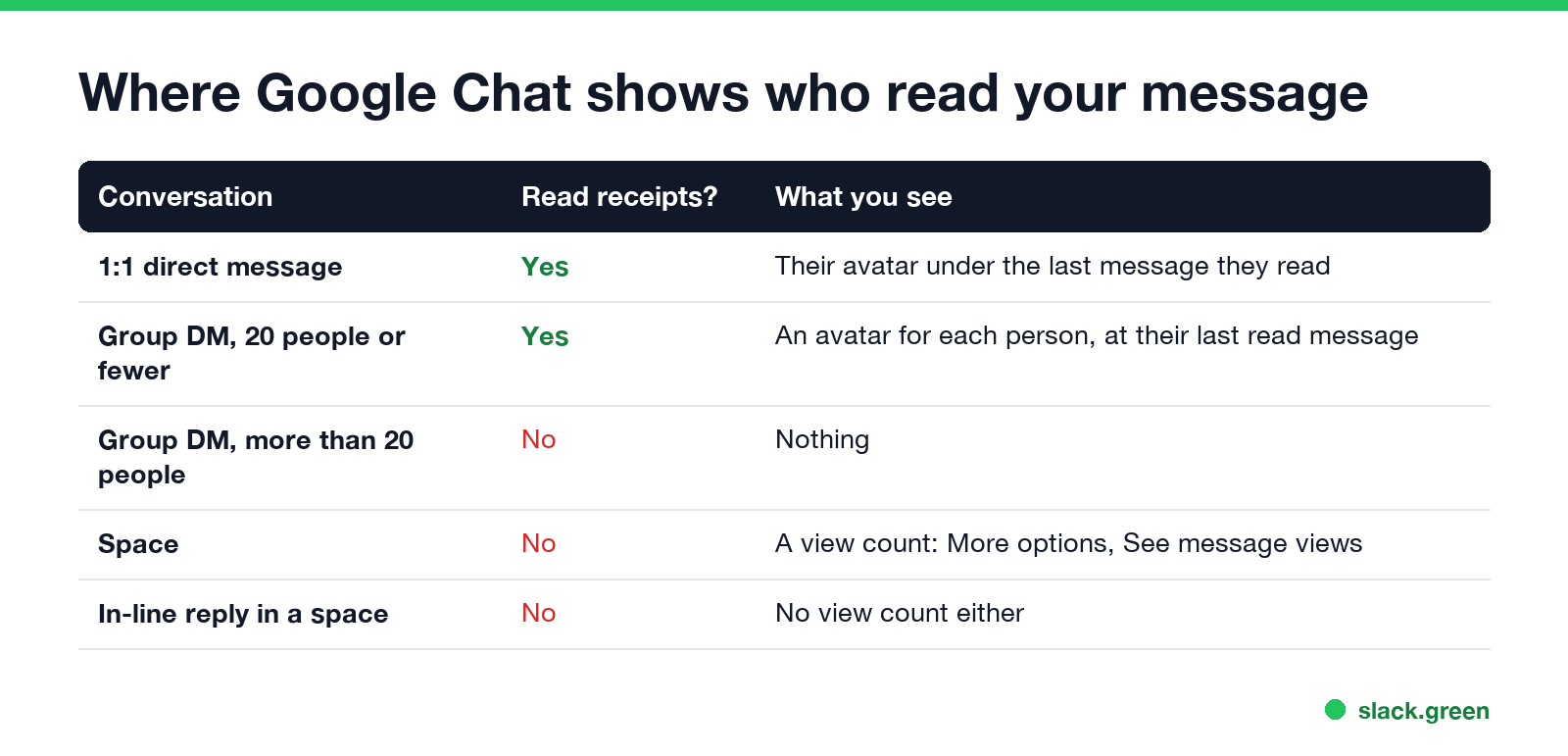
| Conversation | Read receipts? | What you see |
|---|---|---|
| One-to-one direct message | Yes | The other person's avatar under the last message they read |
| Group DM with 20 people or fewer | Yes | One avatar per person, each at the last message that person read |
| Group DM with more than 20 people | No | Nothing |
| Space | No | A view count under More options > See message views |
| In-line reply in a space | No | No view count either |
The limits come from the Google Workspace Updates post "See read receipts for messages in Google Chat group direct messages" (29 June 2023): "Read receipts will only be shown in Chats of 20 people or less, and will not be shown in spaces." The feature is on for Google Workspace accounts and personal Google accounts alike.
How to tell if someone read your Google Chat message
- Open the direct message in Google Chat, in Gmail, or in the Chat app on your phone.
- Look just below your messages on the right side of the conversation.
- Find the other person's small avatar.
- • The avatar is next to your newest message: they have read everything you sent.
- • The avatar is next to an older message: they read up to there and have not opened the conversation since.
- • No avatar under your messages: they have not opened the conversation since you wrote.
In a group DM, each person's avatar moves on its own, so you can see who has caught up and who has not.
In a space, hover over your message, click More options, then See message views. You get the number of people who viewed it. Google notes that view counts are not available for in-line replies.
What a read receipt proves, and what it does not
Never appear "away" on Slack again
Cloud-based. No downloads. Works 24/7 even when your laptop is off.
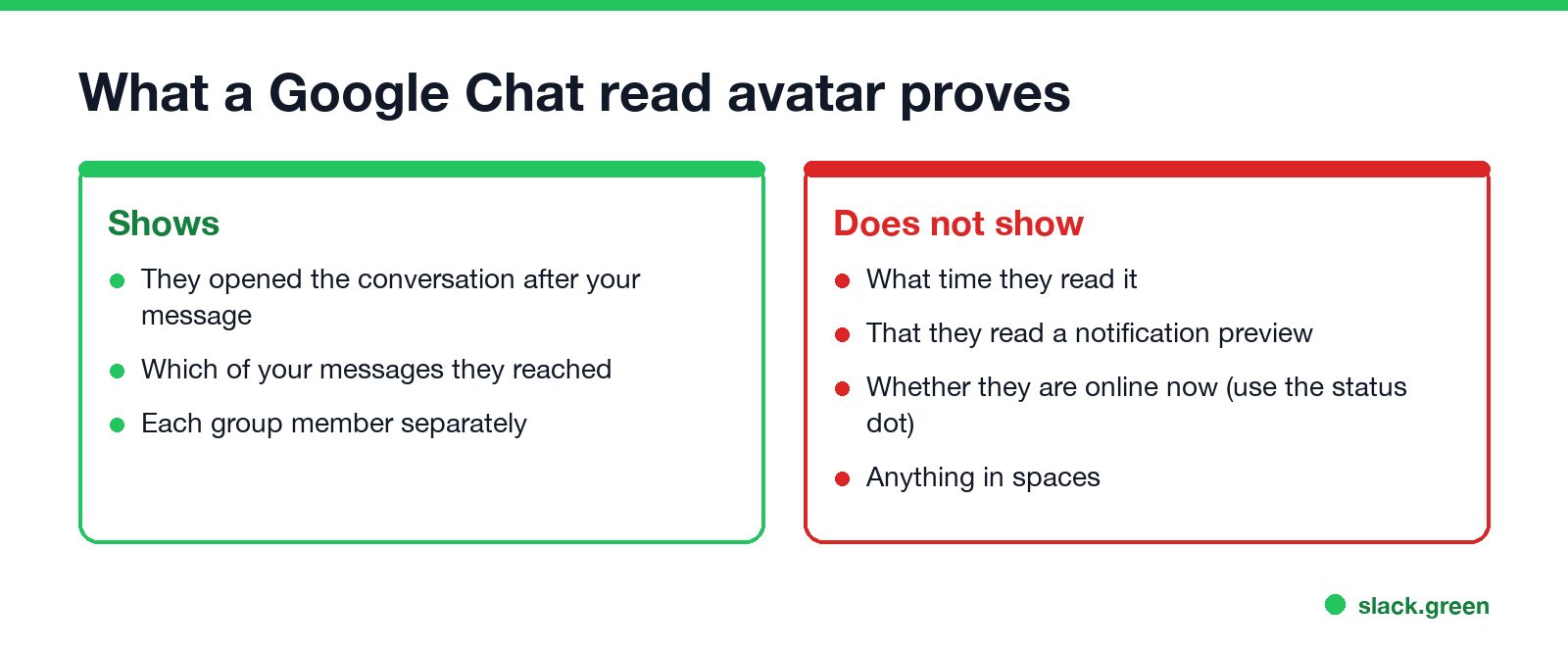
A read avatar tells you that the person opened the conversation after your message arrived. It does not give a time. Google Chat shows no "seen at 3:42 PM" and no "last seen" time anywhere; the full picture is in Google Chat last seen.
Some other gaps:
Can you turn off read receipts in Google Chat?
No. There is no setting in Google Chat, Gmail or the mobile apps, and Google Workspace admins have no switch in the Admin console. Videos and posts that promise a way to disable it describe notification settings, which change what you hear, not what others see.
What you can do:
Google Chat vs Slack, Teams and WhatsApp
| Google Chat | Slack | Microsoft Teams | ||
|---|---|---|---|---|
| Read receipts in direct messages | Yes, avatar at last read message | No | Yes, "Seen" eye icon | Yes, blue ticks |
| In group chats | Up to 20 people | No | Up to 20 people | Yes |
| Users can turn them off | No | Not applicable | Yes, in Privacy settings, if the admin allows it | Yes, except in groups |
| Admins can turn them off | No | Not applicable | Yes | Not applicable |
FAQ
Never appear "away" on Slack again
Cloud-based. No downloads. Works 24/7 even when your laptop is off.
Does Google Chat show "seen"? Not as a word. It shows the reader's avatar next to the last message they read.
Can someone see if I read their message in Google Chat? Yes, in DMs and group DMs of up to 20 people. Your avatar moves to the last message you read.
Why is there no read receipt on my Google Chat message? The other person has not opened the conversation since you sent it, the conversation is a space, or the group has more than 20 people.
Does Google Chat tell you when someone reads your message in a space? No. You can see how many people viewed a message, but not who.
Stop Jiggling Your Mouse.
Join hundreds of remote workers who never worry about their Slack status. Set it up once, stay green forever.
Related Articles
Can My Employer See My iMessages on a Work Mac?
Not through device management or the network: Jamf or Intune cannot read Messages, and iMessage is end-to-end encrypted. But if you sign in to Messages on a work Mac, your texts are stored on that Mac, where monitoring screenshots, backups and admin access can reach them. How to check, and how to take iMessage off the Mac without deleting it from your iPhone.
Can My Boss See My Private Outlook Calendar Events?
Usually not the details. When you mark an Outlook event Private, someone who can read your calendar sees only Private appointment, the time and a lock. The exceptions are delegates you gave Can view private items, the people invited to the event, anyone with full access to your mailbox in new Outlook or the web, and compliance admins. How to check who has which access, and what Private does not hide.
Productivity Theater: Meaning, Numbers and How It Starts
Productivity theater is work done to look busy rather than to get results: extra messages, status updates, meetings to show progress, and keeping a green dot on. Slack's 2023 survey of 18,000 desk workers put it at 32% of the working week. Microsoft ties it to productivity paranoia, where 85% of leaders doubt remote staff are productive.