
Slack Saved for Later: Where the Later Tab Is and How It Works
Saved messages in Slack live in the Later tab, which replaced stars and Saved items in 2023. Hover a message and click Save for later, or press A. Add a reminder, mark items complete, and find them with is:saved. Where Later is on desktop and mobile, and what changed.
Saved messages in Slack are in the Later tab. On desktop, click Later in the sidebar or navigation bar; on mobile, tap Later at the top of Home. To save a message, hover over it and click the bookmark icon (Save for later), or press A with the message in focus. Later replaced stars and the old Saved items list in 2023, according to Slack's developer changelog, and it keeps reminders in the same place. From Later you can add a reminder, mark an item complete, or remove it. To search inside saved items, add is:saved to a search.
Saving a message is a note to yourself; nobody else sees it. What others do see is your presence dot, which goes grey 10 minutes after your last input in Slack. Slack Green keeps it active during the working hours you set, from the cloud.
Save it for later: the actions
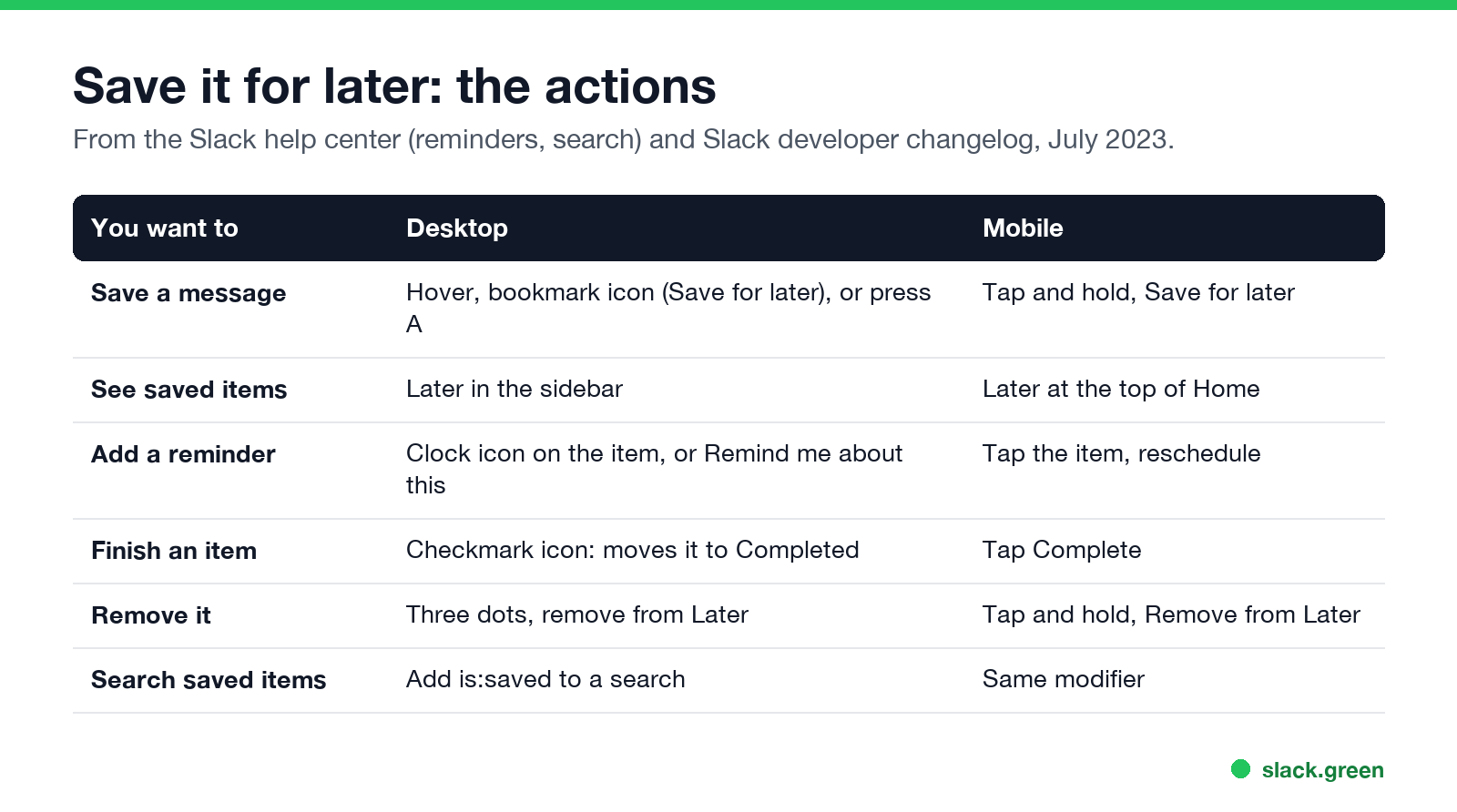
| You want to | Desktop | Mobile |
|---|---|---|
| Save a message | Hover, bookmark icon, or press A | Tap and hold, Save for later |
| See saved items | Later in the sidebar | Later at the top of Home |
| Add a reminder | Clock icon, or Remind me about this | Tap the item and reschedule |
| Finish an item | Checkmark icon | Complete |
| Remove it | Three dots, remove | Tap and hold, Remove from Later |
| Search saved items | Add is:saved | Same |
Where is Saved for later in Slack?
In Later. If you do not see it in the sidebar, it may be under More; you can add it back in Preferences, Navigation. Items with due reminders show a badge on Later and Activity, as Slack's reminders help page describes. Reminders are covered in Slack /remind command examples.
Later vs the old stars and saved items
Never appear "away" on Slack again
Cloud-based. No downloads. Works 24/7 even when your laptop is off.
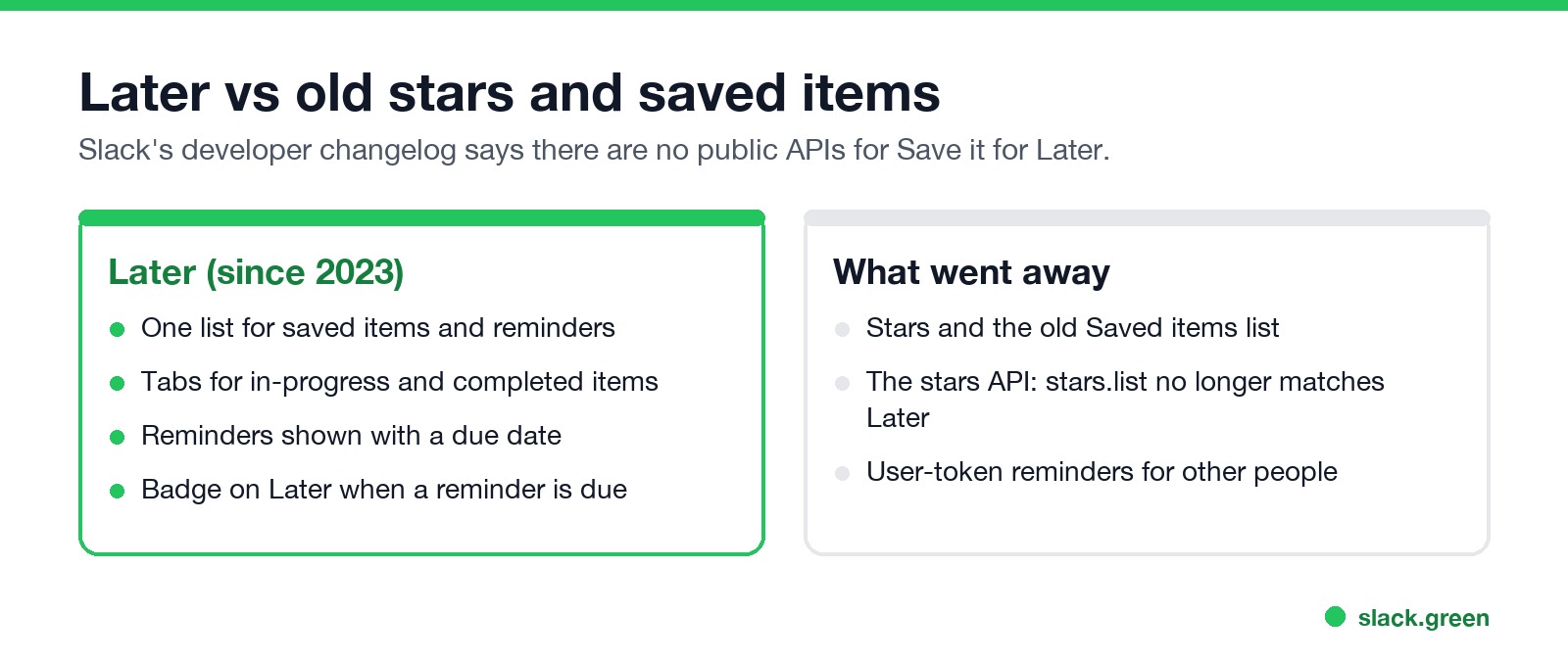
Slack's developer changelog from July 2023 says Save it for Later replaced Saved Items, also known as stars, and Reminders, and that there are no public APIs for it. stars.list no longer reflects what users see in Later, and user-token reminders for other people were retired. If an old script or integration saved items for you, it stopped showing up.
How to find saved messages in Slack
- • Open Later and browse the in-progress items.
- • Search with
is:saved, for exampleinvoice is:saved. Every search modifier is in Slack search operators.
How to clear all Saved for later items
Slack has no single button for this in its help pages. Mark items complete with the checkmark, or remove them one by one. Completed items move out of your in-progress list, which is usually what people want.
Saved for later vs pins and reminders
Never appear "away" on Slack again
Cloud-based. No downloads. Works 24/7 even when your laptop is off.
For a message you want to send at a set time, use scheduled send instead; see how to schedule a recurring message.
FAQ
Where did my saved items go in Slack?
Into the Later tab, which replaced Saved items and stars.
What is the shortcut to save a message in Slack?
Press A with the message in focus. More in the Slack keyboard shortcuts cheat sheet.
Can others see my saved messages?
No. Later is private.
Does saving a message keep a copy if it is deleted?
No. If the sender deletes it, it is gone from Later too.
Is there an API for Slack Later?
Slack's developer changelog says no, and the old stars API no longer matches Later.
Stop Jiggling Your Mouse.
Join hundreds of remote workers who never worry about their Slack status. Set it up once, stay green forever.
Related Articles
Slack Workflow Builder Examples: 12 Workflows to Copy, With Triggers and Steps
Twelve Slack Workflow Builder examples with the exact trigger and steps for each: daily standups, channel welcomes, time-off approvals, help desk requests, emoji escalations, keyword routing, incidents, list updates and webhooks from other tools. Plus where Workflow Builder lives, what it costs and how branches work.
Slack Timer: How to Set a Countdown, Pomodoro or Focus Timer in Slack
Slack has no built-in timer, but four built-in tools act like one: /remind me to ... in 25 minutes, a status that clears itself, /dnd for a focus block, and Workflow Builder for dated countdowns. For a live countdown in a channel, use a Marketplace app or a 15-line bot script.
Slack Red Dot Won't Go Away? What It Counts and How to Clear It
A red dot on the Slack icon means unread activity somewhere; a red number means DMs, mentions, keywords or followed thread replies. Press Shift+Esc to mark all read, check Threads, Activity, Later and other workspaces, then clear the cache or reset the OS badge.