
Slack Save for Later: Where Saved Messages Went, and Who Can See Them
Slack moved saved messages from Later to Saved in the sidebar in October 2026, and reminders to To-dos. We tested who can see a save, what a reminder does, and what happens when a saved message is deleted.
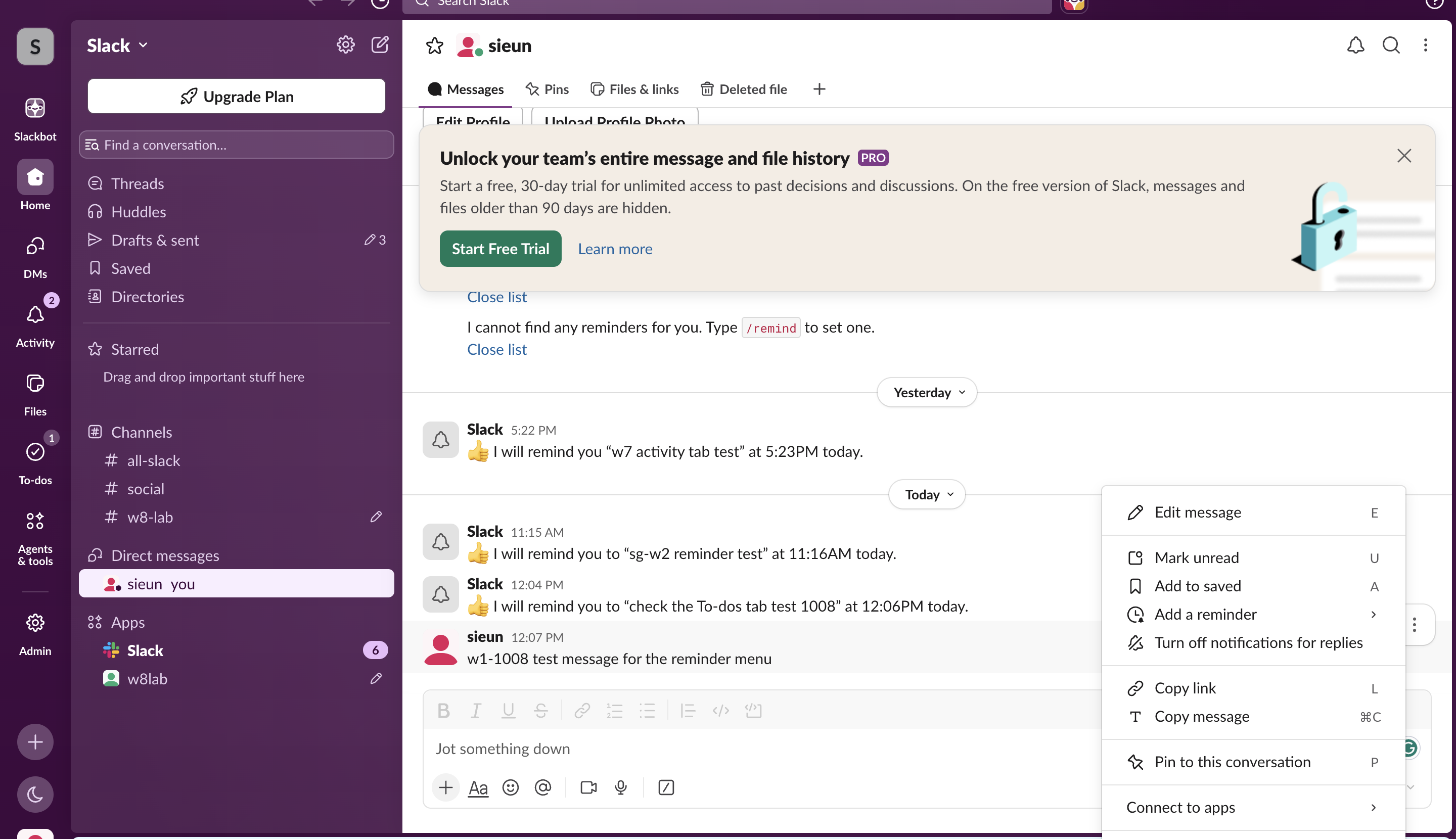
Slack's Save for later is now called Add to saved, and saved messages are under Saved in the sidebar. In October 2026 Slack split the old Later tab in two: messages you save go to Saved, and anything with a due time goes to the To-dos tab in the left rail. To save a message, hover over it, click the three dots and choose Add to saved, or press A with the message in focus. Saving is private: when we saved a test message in a channel and read the same channel as a second member, nothing about the save showed up.
On a brand-new account the Saved entry is not in the sidebar at all: it appeared only after our test member saved its first message, on 3 November 2026. We checked the new names in our test workspace on 8 October 2026. The deeper tests below (privacy, reminders, deleted messages, search) ran on 4 October, when everything still sat in Later; the menu names in those parts are the ones Slack used then.
Where is Saved for later in Slack?
On desktop and web, Saved is in the sidebar, between Drafts & sent and Directories. The To-dos tab in the left rail, where the bookmark-shaped Later icon used to be, holds reminders and to-dos. On 8 October 2026 the To-dos tab opened with this note:
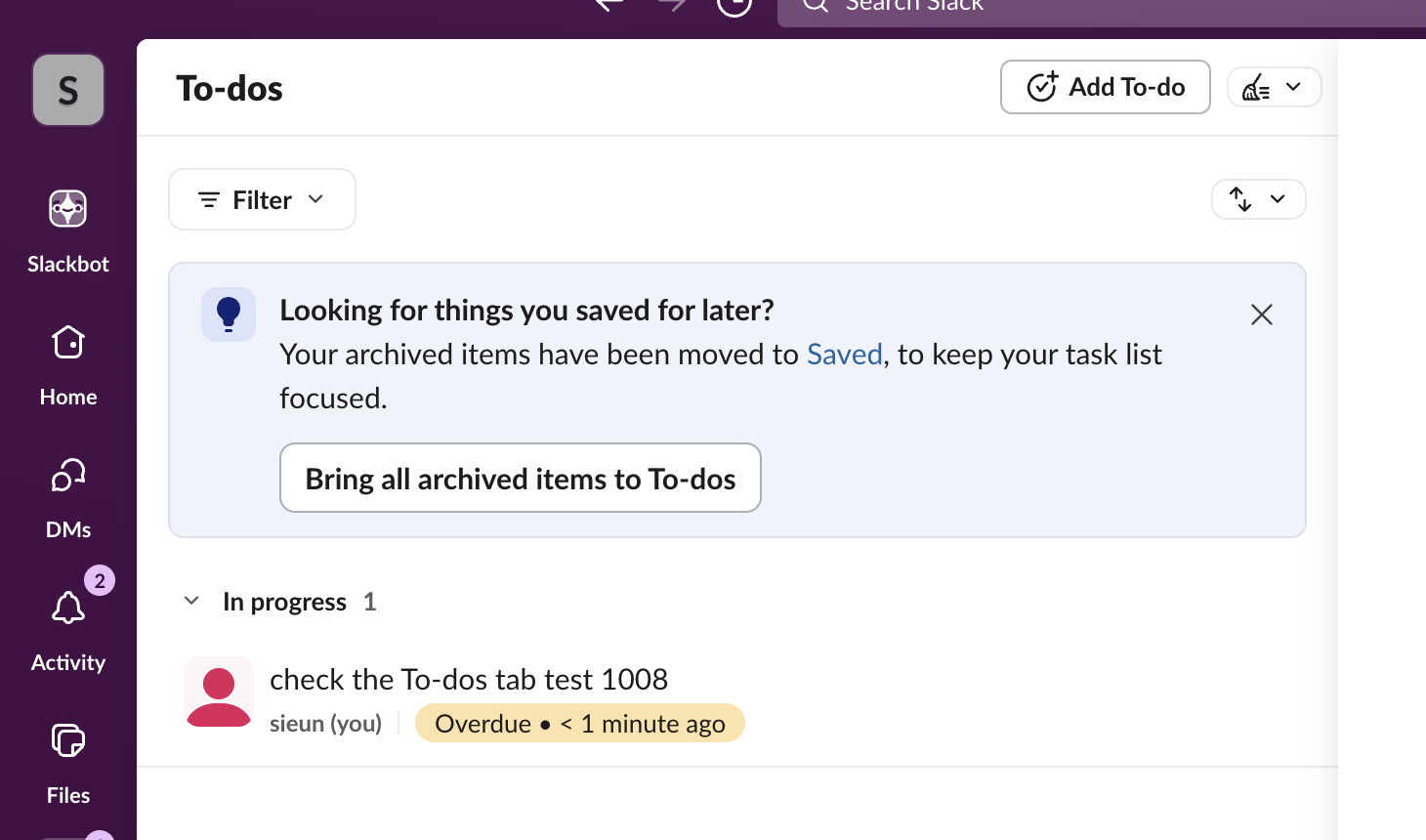
So items you had archived in Later are in Saved now. The Bring all archived items to To-dos button moves them back into the task list. Items with a reminder stay under In progress in To-dos until you mark them complete.
Saved appears after your first save
On 3 November 2026 we repeated the test with a second, new member of our test workspace. Before the first save, its sidebar listed Huddles, Drafts & sent and Directories, with no Saved, and the left rail had no To-dos tab. We saved one message in its own DM and reloaded: Saved now sat between Drafts & sent and Directories, To-dos appeared in the left rail, and the message carried a Saved for later · View Saved label.
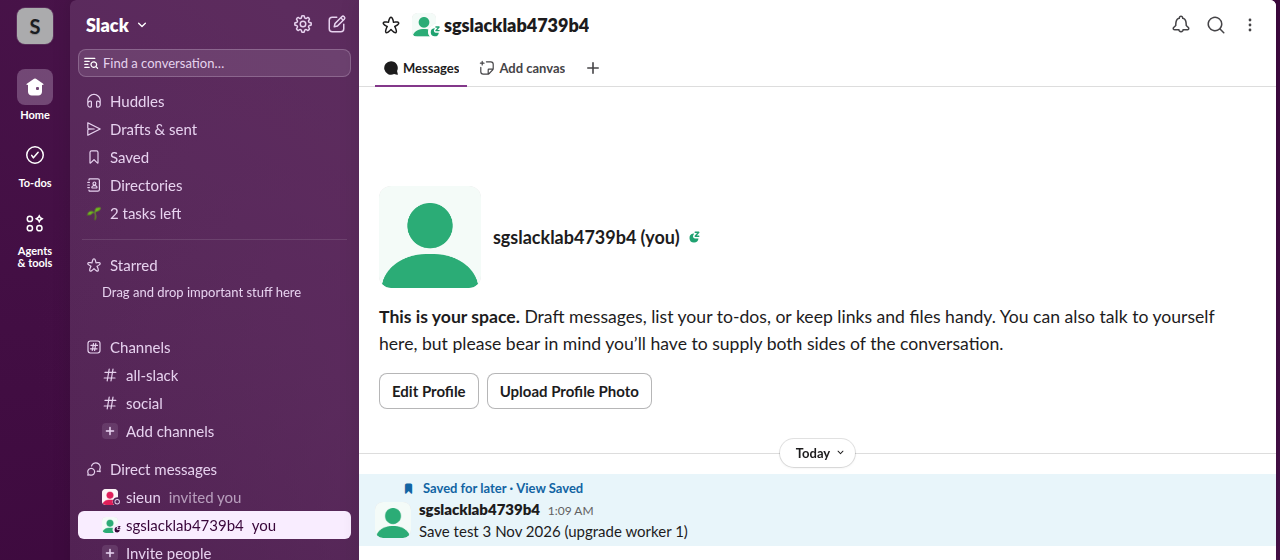
The web app does this through Slack's internal saved.* methods, which we called with that member's own session:
| Call (3 November 2026) | What Slack returned |
|---|---|
saved.add on the message | todo_state: saved, date_due: 0; counts saved_no_due_date_count: 1, todo_count: 0 |
saved.update with a due time 1 hour out | todo_state: to_do; counts saved_no_due_date_count: 0, todo_count: 1 |
saved.update with date_due: 0 | todo_state: saved again |
saved.delete | ok; total_count: 0 |
So Saved and To-dos are one list with two filters: a due time moves an item to To-dos, and removing it moves the item back to Saved.
Before the split, Later had three tabs: In progress, Archived and Completed. We have not checked the phone app since the change; on 4 October, Later sat at the top of Home on mobile.
Can others see what I save for later?
No. We saved a message in a public test channel, then read that channel twice with Slack's conversations.history method:
| Who read the channel | What the message looked like |
|---|---|
| The person who saved it | The message plus a saved block: state: in_progress, todo_state: saved |
| A second member of the channel (a bot user) | The same message with no saved block, no reaction, no pin, no reply count |
The save is stored against your account, not on the message. The sender gets no notification, and nothing changes in the channel. Pins are the shared version: everyone in the channel sees them in its Pins tab; our pin tests are in Slack pinned messages.
How to save a message and what each action does
| You want to | Desktop and web (8 October 2026) |
|---|---|
| Save a message | Three dots, Add to saved, or press A |
| See saved items | Saved in the sidebar |
| Save it with a due time | Three dots, Add a reminder; it shows in To-dos |
| Finish a to-do | Hover it in To-dos, checkmark (Mark complete) |
| Search saved items | Add is:saved to a search |
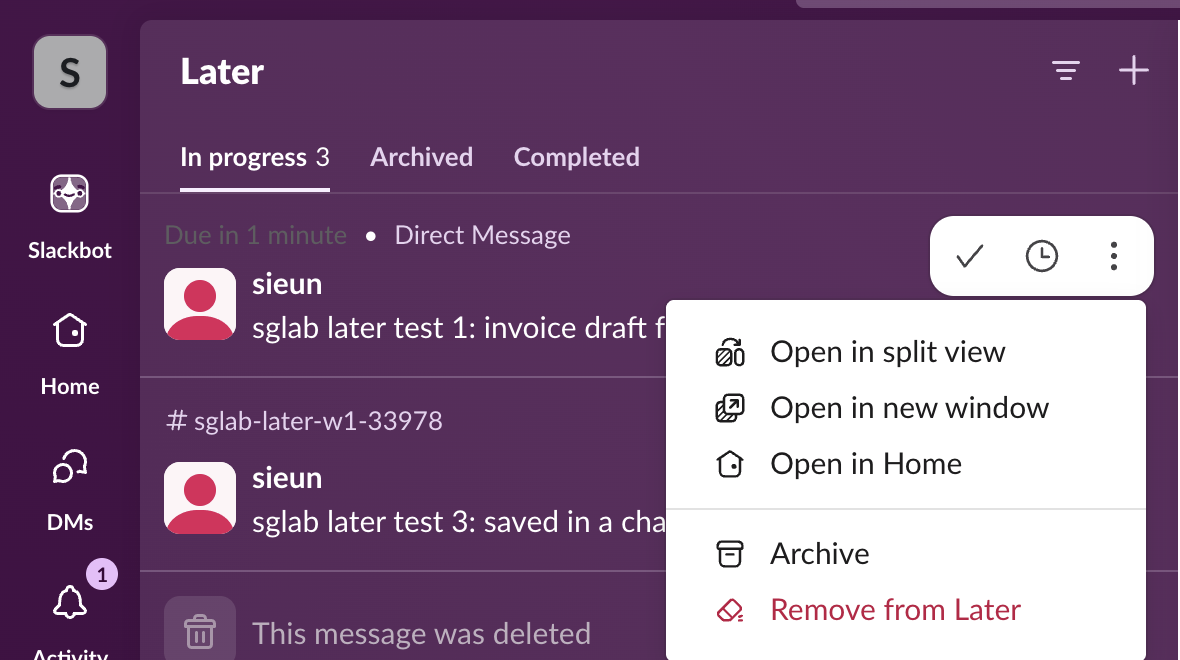
In our 4 October test, the hover menu on a saved item in Later also had Archive and Remove from Later:
What a reminder on a saved message does
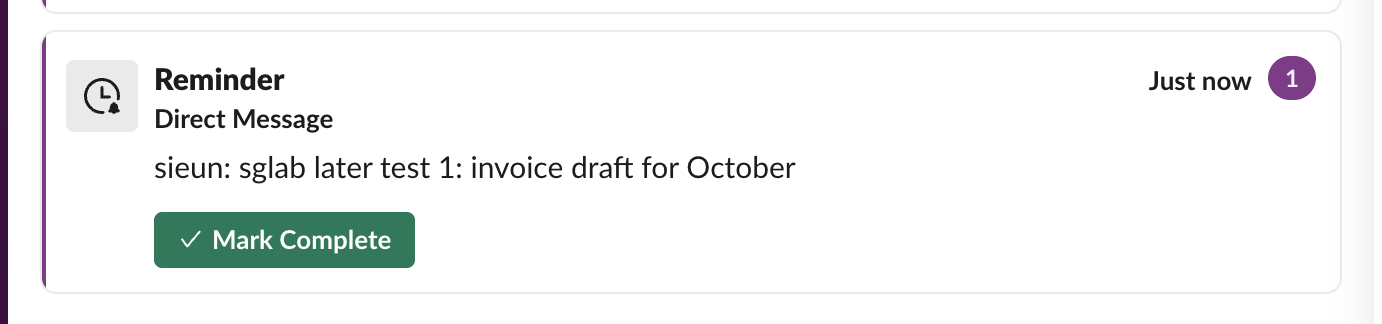
We set a reminder 2 minutes out on a saved message on 4 October. The item showed Due in 2 minutes, then Due in < 1 minute. When it came due, a Reminder card appeared in Activity with the message text and a Mark Complete button. No Slackbot DM arrived. Clicking Mark Complete on that card moved the item from In progress to Completed. On 8 October the same kind of reminder sat in To-dos, labelled "Due in 30 minutes"; see Slack remind me about this message.
For reminders that are not tied to a message, see Slack /remind command examples.
Never appear "away" on Slack again
Cloud-based. No downloads. Works 24/7 even when your laptop is off.
What happens to a saved message after it is deleted?
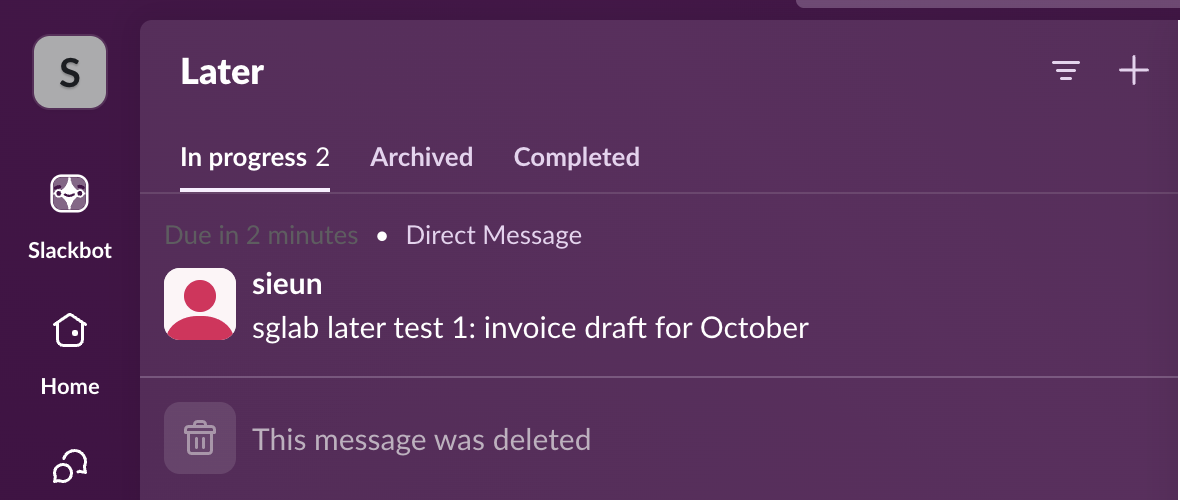
In our 4 October test it stayed in the list as a grey row that said This message was deleted, and it still counted toward the In progress number. The text is gone; Slack keeps no copy for you. The row stayed until we removed it with Remove from Later. The deleted message also dropped out of is:saved search results.
How to find saved messages in Slack
- • Open Saved in the sidebar, and To-dos in the left rail for anything with a due time.
- • Search with
is:saved, for exampleinvoice is:saved. In our 4 October test the search returned completed and archived items too, so a finished item is still searchable. Every search modifier is in Slack search operators. - • Saved and To-dos are private to you.
- • Pins are visible to everyone in the channel, up to 100 per channel.
- • Bookmarks are links shared with the whole channel, kept at the top of it; see Slack bookmarks. They sit in a folder tab under the channel name, which you can rename or move, as our Slack channel tabs test shows.
- • Lists track shared tasks with owners and due dates; see Slack canvas vs lists.
How to clear all saved items
We found no bulk button on 4 October. Each item had its own Mark complete, Archive and Remove from Later. Completing or archiving cleared the In progress list; only Remove from Later took the item out of the list and out of is:saved search. In To-dos on 8 October, a clear button sat next to Add To-do; clearing our two test to-dos showed "2 to-dos cleared" with an Undo link.
Saved vs stars, pins, bookmarks and lists
Slack's developer changelog from July 2023 says Save it for Later replaced Saved Items, also known as stars, and Reminders, and that there are no public APIs for it. stars.list no longer reflects what users see. If an old script saved items for you, they stopped showing up.
For a message you want to send at a set time, use scheduled send instead; see how to schedule a recurring message. For a private note that is not tied to anyone's message, use your own DM; how to message yourself on Slack shows that notes and files there raised no badge, and only a /remind showed up in Activity.
FAQ
What is the shortcut to save a message in Slack?
Press A with the message in focus. The message menu showed it next to Add to saved on 8 October 2026. More in the Slack keyboard shortcuts cheat sheet.
Where did the Later tab go?
Slack renamed it To-dos and moved saved and archived items to Saved in the sidebar. We saw the change between 4 and 8 October 2026.
Is there an API for saved items?
No public one. Slack's changelog says so, and the old stars API no longer matches. The web app uses internal saved.* methods (saved.add, saved.update, saved.list, saved.delete). They worked with a signed-in member's session on 3 November 2026, but saved.list with a bot token returned not_allowed_token_type.
Does Slack tell someone when you save their message?
No. In our test the message looked the same to other members after the save, and no notification is sent.
Stop Jiggling Your Mouse.
Join hundreds of remote workers who never worry about their Slack status. Set it up once, stay green forever.
Related Articles
How to Edit a Slack Reminder (and Why Some Only Let You Delete)
One-time Slack reminders can only be moved to a new time from the To-dos tab, called Later until October 2026. Recurring and channel reminders cannot be edited at all: delete them from /remind list and set them again.
Slack Timer: How to Set a Countdown, Pomodoro or Focus Timer in Slack
Slack has no timer button. Use /remind in 25 minutes, a status that clears itself, or a date-token message that shows "in 23 minutes" to your channel.
Slack /remind Command Examples, Each One Tested
Copyable /remind commands for channels and yourself, with what Slack set up for each in our test, the month-end phrasings it gets wrong, and how to list and delete reminders.