
How to Copy a Slack Profile Link (and What Others See)
Open the profile, click the three-dot button and choose Copy link to profile. Slack copies a link in the form https://yourworkspace.slack.com/team/U0123ABCDEF. We tested what that link does for a member, for someone signed out, and inside a message.
To copy a link to a Slack profile, open the person's profile, click the three-dot button under their name, and choose Copy link to profile. Slack copies a link in the form https://yourworkspace.slack.com/team/U0123ABCDEF, which is your workspace URL, then /team/, then the person's member ID. It works the same for your own profile. On 4 November 2026 we copied both kinds of link in a Free plan workspace and opened them as a member, signed out and inside a message.
Copy the link to someone else's profile
- Click the person's name or photo in a message, a DM or the member list.
- Click View full profile if Slack shows the small profile card first.
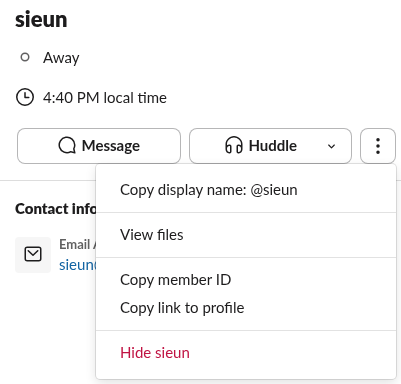
- Click the three-dot button next to Message and Huddle.
- Choose Copy link to profile.
The same menu has Copy member ID, which copies only the ID, such as U0123ABCDEF, and Copy display name. When we intercepted the copy in the browser, the profile link was exactly the workspace URL plus /team/ plus the member ID, with nothing after it.
Copy the link to your own profile
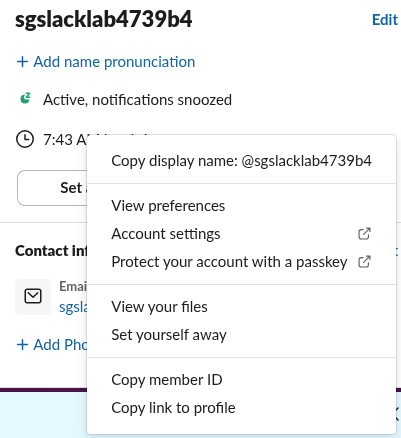
Click your photo in the bottom left of Slack, choose Profile, then click the three-dot button next to Set a status and View as. Your own menu is longer: it adds View preferences, Account settings and Set yourself away, and Copy link to profile sits at the bottom.
The URL forms of a Slack profile
| Form | Example | Where you get it |
|---|---|---|
| Profile link | https://yourworkspace.slack.com/team/U0123ABCDEF | Copy link to profile |
| Member ID | U0123ABCDEF | Copy member ID |
| Web app address | https://app.slack.com/client/T0123ABCD/C0123ABCD/user_profile/U0123ABCDEF | The address bar while a profile is open in a browser |
| Mention in a message | <@U0123ABCDEF> | Typing @name, or the API |
The member ID is the part that matters, and you can build a profile link yourself from any member ID and the workspace URL. Our guide to the Slack member ID shows the other places to find it. The web app address also worked when we pasted it into a signed-in browser: it opened the channel with the profile panel on the right.
Never appear "away" on Slack again
Cloud-based. No downloads. Works 24/7 even when your laptop is off.
What the link opens
We opened the copied link in three ways.
Signed in to the workspace in a browser, the link did not go straight to the profile. It opened a Launching Slack page that tries to hand the link to the desktop app, with a fallback link, open this link in your browser.
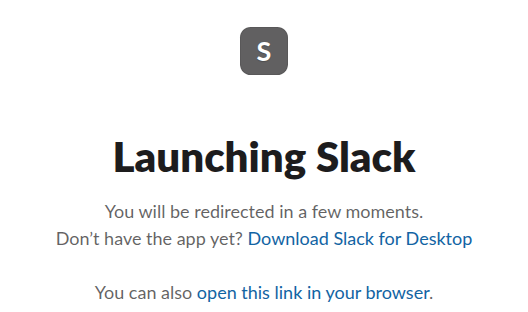
When we clicked open this link in your browser, Slack opened the workspace's first channel, #all-slack in our case, with the person's profile open in the right-hand panel. If the link keeps opening a browser tab when you want the app, see Slack keeps opening in the browser.
Signed out, in a fresh browser with no Slack cookies, the same link went to the workspace's sign-in page with the banner "You need to sign in to see this page." So a profile link shows nothing to people outside the workspace: no name, no photo and no title.
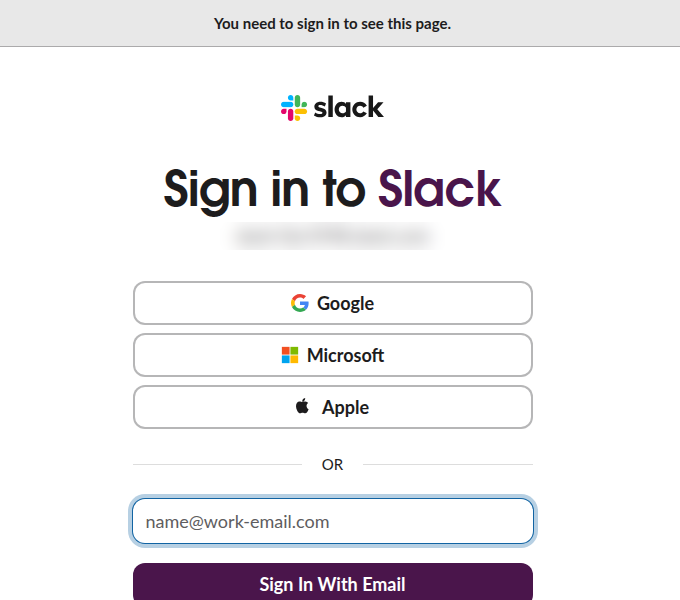
That makes a Slack profile link useful inside the workspace only. To share who you are with people outside it, give them your email or the workspace URL and ask them to sign in.
Paste a profile link into a message
When we posted our profile link in a channel, Slack added a small card under it with the person's name, the word Profile and Slack. A mention does a different job: <@U0123ABCDEF>, or typing @ and picking the name, shows a highlighted @name that opens the profile when clicked and notifies the person.
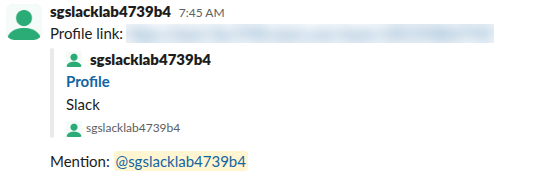
Use the link when you want to point to a person without pinging them, and the mention when you want them to see the message.
FAQ
Does the person know I copied or opened their profile link?
No notification is sent when you copy the link or open a profile. Our test of whether Slack notifies someone when you view their profile covers this in detail.
Can I link to a Slack user from outside Slack, like an email?
Yes, but the reader must be a member of the workspace and sign in. Anyone else lands on the sign-in page, as in our signed-out test.
Is there a link to a channel or a message too?
Yes. The channel menu has Copy link, and every message has Copy link in its menu. Our guide to the Slack message permalink shows the message link format, and finding a channel ID covers channels.
Stop Jiggling Your Mouse.
Join hundreds of remote workers who never worry about their Slack status. Set it up once, stay green forever.
Related Articles
Slack SDK for Rust: slack-morphism Tested (Post, History, Socket Mode)
Slack has no official Rust SDK. The community crate that works today is slack-morphism: on 5 November 2026 we used version 2.31.1 to post a message, page through history with a cursor and answer a mention over Socket Mode. Code and output below.
Slack Deep Links: Every slack:// Command in the Current App
A Slack deep link is a slack:// URL such as slack://channel?team=T123&id=C123 that opens the desktop or mobile app on a channel, person, file or setting. We read the handler in Slack's current code, listed the commands it accepts, and tested the https fallbacks.
How to Show Unread Channels on Top in Slack (What Works Now)
Slack has no sort that lifts unread channels to the top. The closest is Filter and sort > Unreads, which hides every read channel. We tried each sort and filter in the sidebar with one unread channel and screenshot the order.