
Slack Keeps Opening in the Browser? How to Open the App Instead
Slack keeps opening in the browser when you once chose to use Slack in the browser, when the browser does not remember to open the app, or when the slack:// link handler is missing. How to open links in the desktop app, fix the sign-in loop, and set which browser Slack links use.
Slack keeps opening in the browser for three reasons. You once chose to use Slack in the browser and it remembers. Your browser does not have permission to open the Slack app. Or the Slack app is not registered to handle slack:// links, which is how the browser hands off to the app. To fix it, open Slack in the browser, click your workspace name in the top left, and choose Open in Slack app. When the browser asks whether to open Slack, tick Always allow and click Open. If nothing happens, reinstall the desktop app, which registers the link handler again.
Whichever one you use, the app or a tab, your presence follows the same rule: you go away 10 minutes after your last input in Slack. Slack Green keeps your dot green during the working hours you set, from the cloud, whether Slack is open in a tab, in the app, or closed.
Why Slack opens in the browser instead of the app
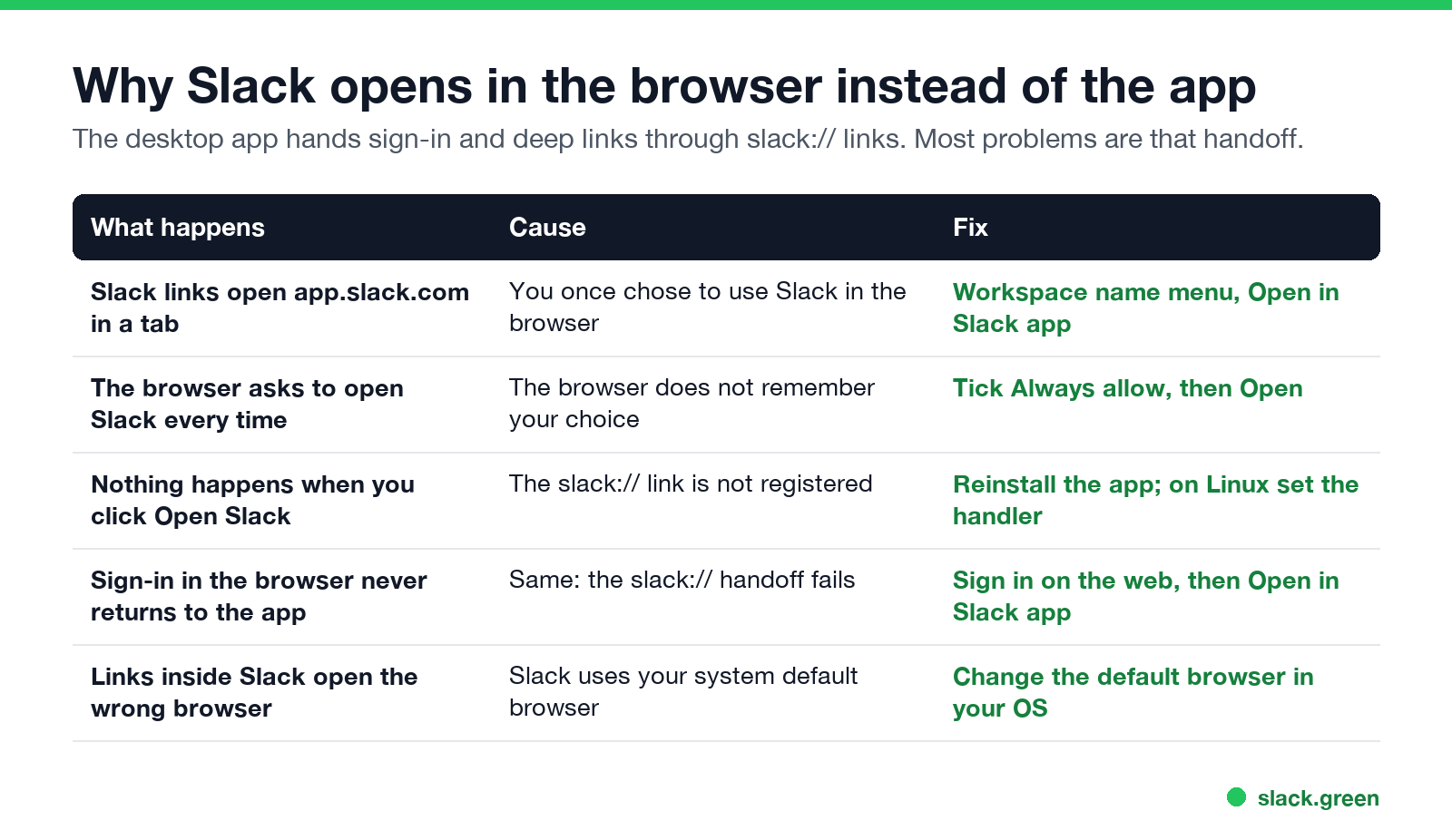
| What happens | Cause | Fix |
|---|---|---|
| Slack links open app.slack.com in a tab | You chose to use Slack in the browser | Workspace name menu, Open in Slack app |
| The browser asks every time | It does not remember your choice | Tick Always allow, then Open |
| Clicking Open Slack does nothing | slack:// is not registered | Reinstall the app; on Linux, set the handler |
| Browser sign-in never returns to the app | The same handoff fails | Sign in on the web, then open the app |
| Links in Slack open the wrong browser | Slack uses your system default browser | Change the default browser |
How to open Slack in the app instead of the browser
- Make sure the desktop app is installed and signed in to the workspace.
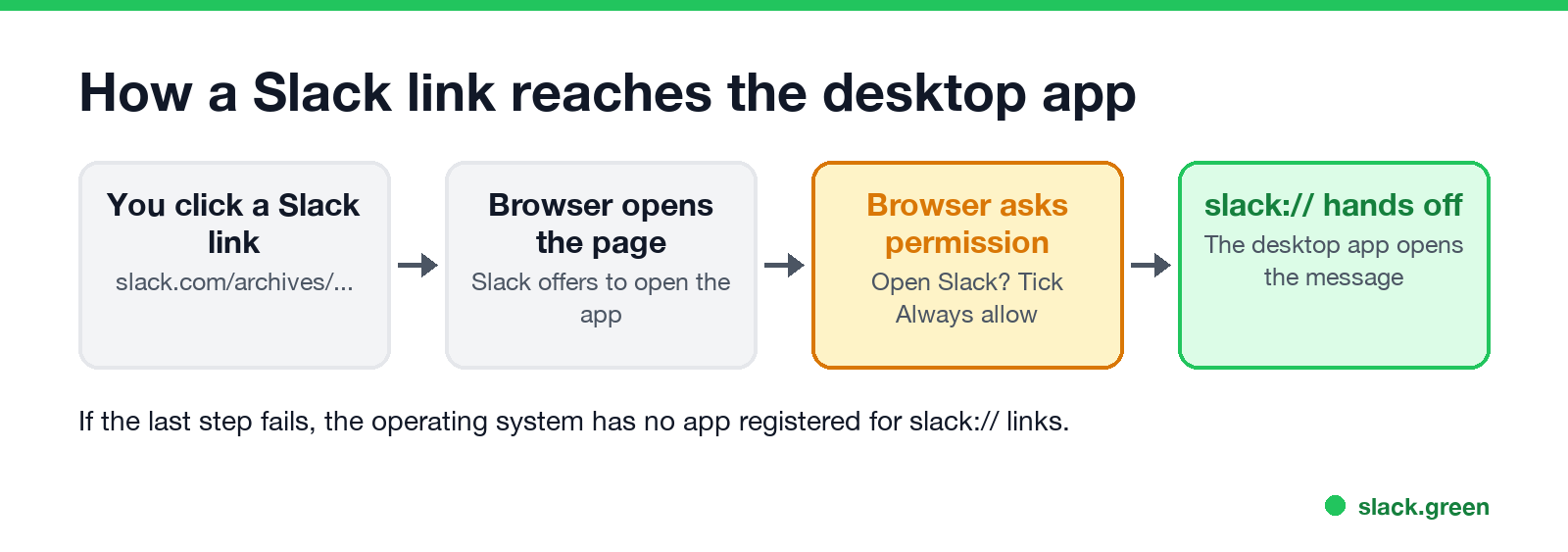
- Open the Slack link in your browser.
- Click the workspace name in the top left and choose Open in Slack app (the exact label varies by version). Users on r/Slack and Super User report this as the fix that sticks.
- When the browser asks to open Slack, tick the Always allow box and click Open.
- • Chrome and Edge: open site settings for
app.slack.comand click Reset permissions, then click a Slack link again to get the prompt back. - • Firefox: in Settings, General, Applications, find slack and set it to use the Slack app.
From then on, Slack links in that browser go to the app.
If the browser remembered "don't open"
Slack sign-in in the browser does not open the app
Never appear "away" on Slack again
Cloud-based. No downloads. Works 24/7 even when your laptop is off.
The desktop app sends you to the browser to sign in, then the browser hands you back with a slack:// link. If you end up signed in on the web and the app still shows the sign-in screen:
Fix the slack:// link on each system
xdg-mime default slack.desktop x-scheme-handler/slackOn Linux the Snap version can also lose its session between restarts; see Slack keeps logging me out.
Slack keeps opening links in Safari or the wrong browser
Links inside Slack messages open in your system's default browser. To change it:
App or browser: which is better?
Never appear "away" on Slack again
Cloud-based. No downloads. Works 24/7 even when your laptop is off.
The app gives you desktop notifications without a browser tab open and keeps its session separate from browser cookies. A tab uses less extra memory if your browser is already open; see why Slack uses so much memory. For presence there is no difference: both mark you away 10 minutes after your last input in Slack, and a background tab counts the same as a minimized app. Staying green in a tab has its own guide: keep Slack active in the browser. The full comparison is in Slack desktop app vs browser.
FAQ
How do I get Slack to open in the app instead of the browser?
In the browser, click your workspace name and choose Open in Slack app, then tick Always allow when the browser asks.
Why isn't Slack opening in the desktop app?
The browser has no permission, or the app is not registered for slack:// links. Reinstalling the app registers it again.
How do I stop Slack from automatically opening?
To stop it opening at login, turn off the launch-at-login option in Slack's preferences on Windows, or remove Slack from Login Items in System Settings on a Mac. Full steps are in how to stop Slack from opening on startup.
Why does Slack keep opening links in Safari?
Safari is your default browser. Change the default in your system settings.
Stop Jiggling Your Mouse.
Join hundreds of remote workers who never worry about their Slack status. Set it up once, stay green forever.
Related Articles
Slack Red Dot Won't Go Away? What It Counts and How to Clear It
A red dot on the Slack icon means unread activity somewhere; a red number means DMs, mentions, keywords or followed thread replies. Press Shift+Esc to mark all read, check Threads, Activity, Later and other workspaces, then clear the cache or reset the OS badge.
How to Keep Your Outlook Status Green (It Comes From Teams)
Your Outlook status shows your Microsoft Teams presence, so to keep Outlook green you keep Teams Available: Teams signed in and running, input on the computer, no lock or sleep, and no leftover status. What sets you Away, and what you can change.
Does Microsoft Teams Track Your Activity? What Admins Can See
Teams admins can see activity counts per person: messages in channels and chats, meetings, 1:1 calls, audio, video and screen share time, and your last activity date. Your status follows keyboard and mouse activity on the whole computer. Teams does not log keystrokes, your screen, or other apps.