
Does Slack Notify When You View Someone's Profile? No
No. Opening someone's Slack profile, hovering over their name or checking their status sends them nothing, and Slack has no list of who viewed your profile. Admins cannot see profile views either. What does get noticed: typing in a DM, messages, reactions, mentions and huddles. What a profile shows, and what Slack admins can see instead.
No, Slack does not notify anyone when you view their profile. Opening a profile, hovering over a name or photo, or checking someone's status, local time or green dot sends them nothing, and Slack has no "who viewed your profile" list like LinkedIn's. Workspace admins cannot see which profiles you open either. What the other person can notice is anything that creates activity toward them: typing in a DM with them shows "is typing", and a message, reaction, mention or huddle sends a notification.
We checked this on 4 October in a Slack workspace by logging what the Slack web app sends when you open a profile, and by reading Slack's full list of audit-log events. Results are below. Slack also has no read receipts in DMs, as covered in does Slack have read receipts.
What the other person sees when you look them up
| You do this | Do they know? |
|---|---|
| Open their full profile | No |
| Hover over their name or photo (what the default photo colors mean) | No |
| Check their status, local time or presence dot | No |
| Open a DM with them and read it | No. Slack has no read receipts |
| Start typing in the DM | Yes. "is typing" shows at the bottom of the DM while you type |
| Send a message, react to their message, or mention them | Yes. They get a notification by default |
| Start a huddle or call with them | Yes. It rings |
| Save or forward their message | No. Saved items are private; we tested it in Slack saved for later |
The one surprise is typing. If you open a DM and start writing, then delete it, the other person may already have seen "is typing" appear and vanish.
What Slack sends when you open a profile
We hooked the Slack web app's network calls and its real-time connection, then opened a member's full profile. The app sent four requests, all of them reads:
POST /api/users.profile.getSections
POST /api/users.profile.get
POST /api/team.profile.get
POST /api/users.profile.getExtras
Nothing went over the real-time connection, which is where "is typing" signals travel; how that signal works is in Slack typing indicator. None of the four calls records a view.
Opening a direct message is different. It also sent visits.record, which feeds your own recent-conversations list. When the DM was with an app, it sent apps.home.dispatchOpenEvent, which tells that app you opened it (an app_home_opened event). So an app can know you opened its DM; a person cannot know you opened their profile. We watched only the client's requests and cannot see inside Slack's servers, so the audit log below is the check on the admin side.
Can Slack admins see what profiles I look at?
No. On 4 October we downloaded Slack's list of audit-log actions from api.slack.com/audit/v1/actions. It has 795 action types, and none of them is a profile view. The profile events are user_profile_updated and user_profile_deleted (changes to a profile) and a group of user_profile_flag* events for reported profiles. The closest thing to a read is mcp_slack_read_user_profile_tool_called, logged when an AI tool connected through Slack's MCP server reads a profile. Audit logs are an Enterprise feature; smaller plans have less, not more.
See your profile the way others see it
Your own profile has a View as button with two choices: A coworker at your workspace, or A contact from other organizations. It is the only way to see what other people see, since Slack will not tell you who looked. To send someone straight to a profile, copy its link from the profile's three-dot menu; our guide to copying a Slack profile link shows what that link opens for members and for people who are signed out.
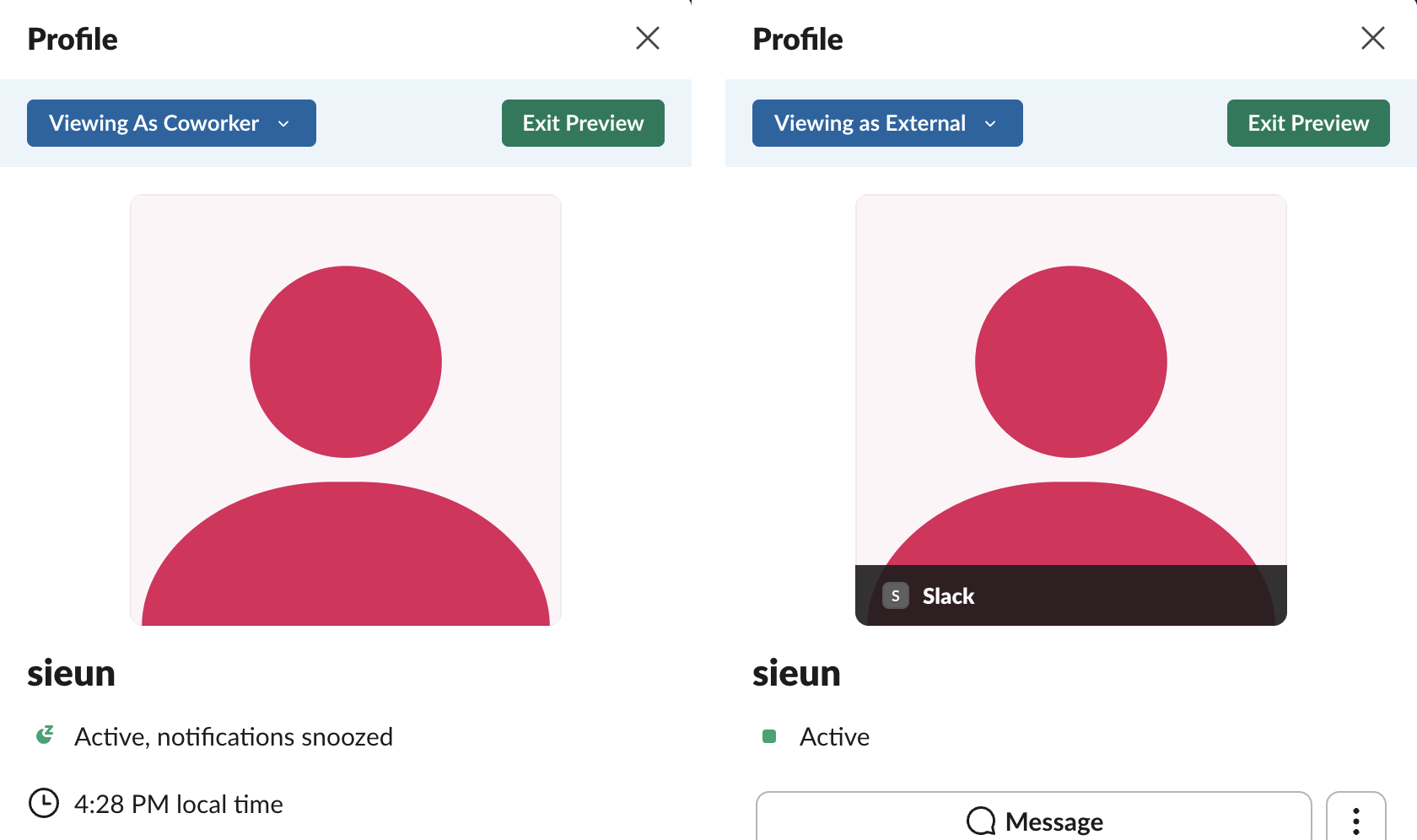
In our preview, a coworker saw the presence line with "notifications snoozed" and the local time. An external contact saw only "Active", the organization name and a Message button, with no local time.
What a Slack profile shows
Anyone in your workspace can open your profile and see:
- • your name, display name, pronouns (shown only when an admin turns on Pronouns Display) and title, as you or your admin filled them in;
- • your status emoji and text, and when it clears;
- • your presence dot: green when active, hollow when away;
- • your local time, from your time zone setting;
- • contact fields your company added, such as phone number, team or manager.
- • Member analytics: days active, messages posted and similar counts per member.
- • Access logs: each sign-in with the time, IP address and device.
- • Exports: message history, including DMs on some plans and under the company's data policy.
People outside your company, in a shared Slack Connect channel, see a shorter version. Your email address shows on your profile too, unless an owner or admin hides it; our hide your email on Slack test found that an app could still read it after that. The presence dot updates from your activity in Slack; how it decides is in how Slack decides when you are away.
What Slack admins can see instead of profile views
Slack admins do not get a log of profile views or of which messages you read. What owners and admins can see, depending on the plan:
The details are in can Slack admins see your DMs and how employers monitor remote workers.
Can you see who viewed your Slack profile?
No. There is no setting, plan or app in Slack's own features that shows profile viewers. Slack does not record profile views as something you can look up.
If you want to know when a particular person is around, the tools that exist are the presence dot and, for a notice when they become active, the approaches in Slack notify when someone comes online.
Slack vs LinkedIn, Teams and Google Chat
| Slack | Microsoft Teams | Google Chat | ||
|---|---|---|---|---|
| Notifies when you view a profile | No | Yes, in Who viewed your profile, unless you browse in private mode | No | No |
| Read receipts in direct messages | No | Yes | Yes, "Seen" | Yes, avatar at last read message |
| Shows "last seen" | No | Active status only | Yes, on the profile card | No |
The LinkedIn side is in LinkedIn active status, and Google Chat's in does Google Chat have read receipts.
FAQ
Can someone see if you looked at their Slack profile? No. Slack sends no notification and keeps no viewer list.
Does Slack tell someone if you click on their name? No. Clicking a name opens their profile, and that is private to you.
Does Slack show when you are typing? Yes, in DMs and channels, "is typing" appears while you type a message.
Stop Jiggling Your Mouse.
Join hundreds of remote workers who never worry about their Slack status. Set it up once, stay green forever.
Related Articles
Fake Slack Active Status: What Works and What Gets Noticed
Seven ways people fake an active Slack status, which ones hold up, and the thing that gives most people away. It isn't the dot.
How to Keep Slack Active All Day, Hour by Hour
A normal workday has about five moments where Slack flips you to away. Here's each one, in order, and the cheapest fix for it.
Slack Yellow Dot: Slack Has No Yellow Status
Slack only has two availability states, and neither one is yellow. If you see a yellow dot, it's a theme, an emoji, or a different app.